An endorsement automation tool reads mid-term change requests wherever they arrive, prepares each change for the policy administration system with its evidence, checks it against the carrier's rules and the representative's authority, and, once a person has issued it, reads the issued endorsement back and compares it with the request. To do that it needs to connect to five things a carrier already has: the service inbox and broker portal, the policy system, the rating engine, the forms library and, for new drivers, motor vehicle records. It does not need to replace any of them, and a tool that asks to is selling a different project. Botminds' Policy Endorsement Processing is built this way: it reads from the policy system and leaves keying and issuing to a person, and its value is measured in the gap between the request and the issued endorsement.
Where this page shows screens and settings, they come from a fictional sample carrier, Bracken Hill Mutual, serving commercial lines in Ohio and Indiana. The regulatory standards cited are real and linked.
Where Policy Endorsement Processing sits: around the policy system, not inside it
1
Requests in
- Service inbox and attachments
- Broker portal change forms
- Call notes
- Scanned mail
2
Agents
- Read and split
- Locate the page
- Check rules and authority
- Rate
- Draft endorsement and keying sheet
3
Systems you keep
- Policy administration system: lookup
- Rating engine: filed rates
- Forms library: filed editions
- Motor vehicle records: on licence number
4
After a person issues
- Issued endorsement read back from the policy system
- Every field compared with the request
- Mismatch returned to whoever keyed it
A person accepts and issues in the policy system, within the authority matrix. The tool drafts; it never keys into the policy system on its own and never sends anything to a broker or insured.
What does an endorsement automation tool need to connect to?
The channels requests arrive through, the systems that decide what a change is and costs, and the policy system it reads back from. In the sample deployment those are four request channels (service email with attachments, broker portal change forms, call notes, scanned mail) and four systems: policy lookup and read-back, the rating engine, the forms library with filed editions by state, and motor vehicle records ordered once a licence number arrives. Each connection has a different direction and a different risk, which is the subject of the table further down.
What is missing from that list is as important. There is no connection that writes a change into the policy system on the tool's own authority, and none that sends a document out. The representative keys the change from the keying sheet and issues it in the policy system; the tool reads what was issued. That design keeps the policy system, its audit trail and its users' entitlements exactly as they were.
Why replacing the policy administration system is a different project
Because the problem the tool solves sits in front of the policy system, not inside it. The slow, error-prone part of a mid-term change is turning an email, a scan or a call into correct changes, checking them and confirming that what was issued matches; the policy system's job, holding the contract and issuing documents, is usually done well enough. A new policy system changes the screens a representative keys into, but the email still arrives with four jobs in it and a missing date of birth.
The two projects also differ in what they put at risk. A policy system replacement moves every in-force policy, rate and form; a reading-and-checking tool can be switched off and the desk keeps working. A buyer who wants both should sequence them: a tool that reads requests and reads back issued endorsements is portable from the old policy system to the new one, because it touches each only through lookup and read-back. The conversion itself, and the notices it can owe, is a project of its own.
Read-only by default: what the tool reads, calls and never writes
A well-built endorsement tool reads the policy system, calls the rating engine, reads the forms library and writes only its own drafts. The table sets out each connection, what the tool does with it and the question to ask a vendor. "Calls" means the tool asks the system for an answer, such as a rate, without changing anything in it.
Each connection an endorsement tool makes, and the question to ask about it
| Connection | What the tool does | Never | Ask the vendor |
|---|---|---|---|
| Service inbox, portal, call notes, scanned mail | Reads each message and attachment; splits it into changes, quoting the source sentence. | Sends mail on its own. | Which mailboxes and folders, read with what permissions, and is anything deleted or moved? |
| Policy administration system | Looks up the policy, schedules and forms; after issue, reads the issued endorsement back. | Edits or issues a policy. | Read-only account? How does it read issued documents: screens, an API or a document store? |
| Rating engine | Calls it with the change; prorates by days to expiry, flat charges as filed. | Overrides a rate or waives a minimum. | Does every premium come from your engine, with the working shown? |
| Forms library | Picks the form and edition the state has on file for the change. | Uses an edition not filed in that state. | Can it show which edition it chose and why, state by state? |
| Motor vehicle records | Orders a driver’s record once the licence number and state arrive. | Orders without the data, or for a purpose the law does not permit. | Who is the ordering party, under which permitted purpose? |
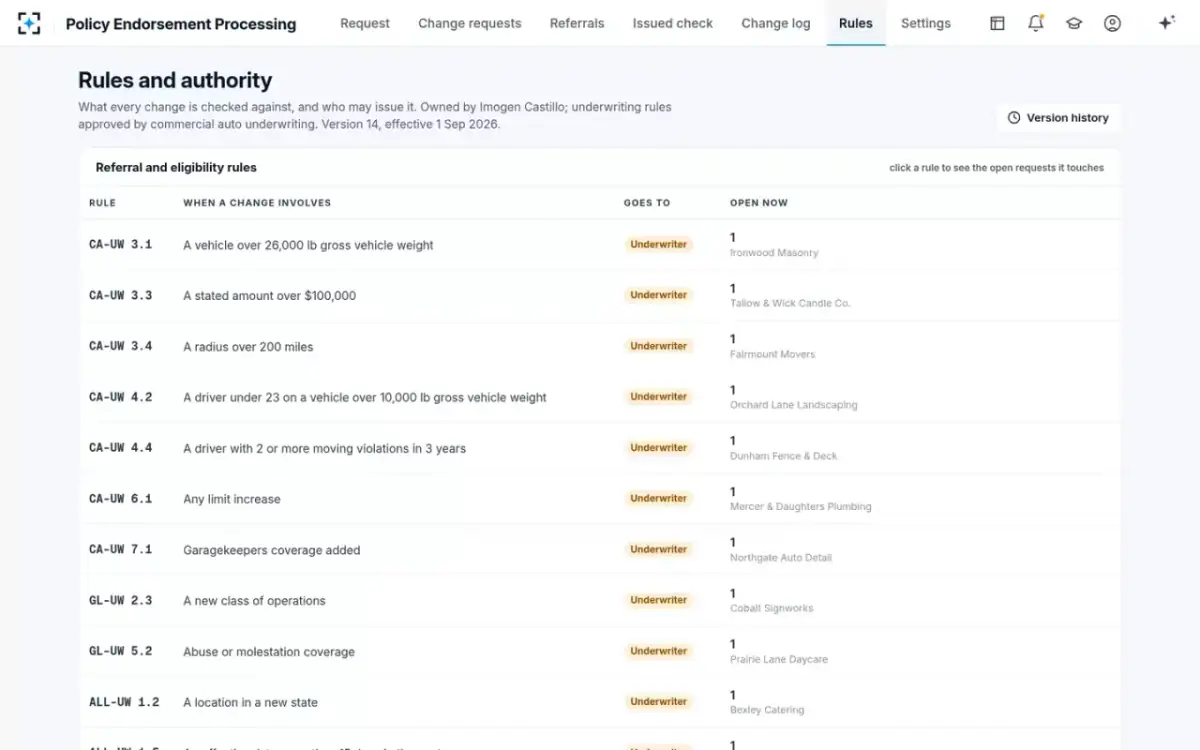
| Rules and authority matrix | Applies your referral rules and each role’s authority, versioned. | Approves a referral. | Can your team lead change a rule without a software release, and see who changed it? |
Policy Endorsement Processing settings a service team lead owns: channels, promises and drafting
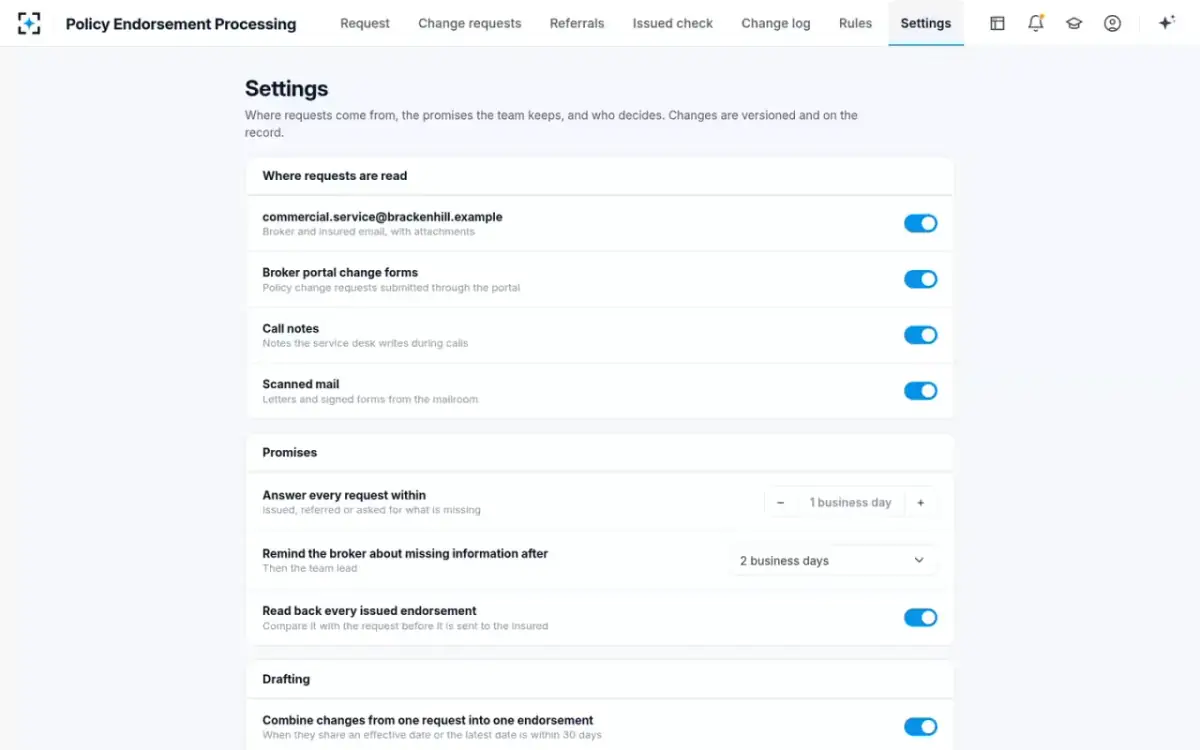
The rating engine stays the source of the premium
A tool that calculates premium itself has, in effect, built a second rating plan nobody filed. Examiners test that every premium charged follows the filed rates or the company's own rating plan (NAIC examination standards, 2024; the difference between a rate and the premium it produces is traced in rate increase vs premium increase). The safe design is for the tool to call the carrier's rating engine for the annual premium of the changed risk and do only the proration and the arithmetic it can show: the annual difference, the days left in the term, the flat charges that the filing allows, the minimum premium rules in the carrier's manual.
The rating manual is where those rules live. The Casualty Actuarial Society's ratemaking text notes that a carrier's manual rules "may also outline various premium determination considerations (e.g., minimum premium, down payments, refunds in the event of cancellation)." In the sample deployment the premium rater calls the rating engine for the truck's $2,318 annual premium, prorates it for 137 of 365 days to $870, adds the $50 flat charge for the additional insured and shows each line. It never overrides a rate or waives a minimum. The full calculation is in how to calculate additional premium for endorsements.
The forms library: filed editions, state by state
An endorsement is only as right as the form it attaches, and the form must be one the state has on file. The NAIC standard expects every form, endorsement forms and certificates included, to be on file with the insurance department where filing is required (NAIC examination standards, 2024; what an endorsement is, as a document, is set out in mid-term endorsement meaning). The examiners' review procedure in the 2017 edition of the handbook is a single instruction: "Determine if the forms and endorsements have been filed."
That makes "use the latest edition" a dangerous default for software. A newer edition of a standard form can be published before a carrier files it in a given state, and the tool that attaches it has created an unfiled form on an issued policy. In the sample settings the forms editions are set to "Filed editions, Ohio and Indiana," with "Latest ISO editions" as the alternative a team lead would have to choose deliberately. Ask any vendor to show, for one change in each of your states, which edition it attached and the filing it relied on.
Does an endorsement tool need driver's licence numbers? Data security and vendor oversight
Yes, if it handles driver additions, and that puts the tool inside a carrier's data security programme. The NAIC's Insurance Data Security Model Law counts a consumer's name combined with a driver's licence number as nonpublic information and, where a state has adopted it, requires a licensee to choose such vendors with due diligence and to require them to protect the systems and information they can reach (NAIC Model #668). A vendor counts as a third-party service provider when its services give it access to nonpublic information, which describes any tool reading a service inbox; the oversight that follows is set out in insurance back office outsourcing companies.
Motor vehicle records carry their own rule. Federal law lets state motor vehicle departments release a driver's personal information only for listed purposes, one of which covers insurers' rating and underwriting (18 U.S.C. §2721(b)(6)). The tool should order a record only when the change needs one, for the permitted purpose, and keep the order on the change's history. In the sample, the record for the new driver was ordered at 10:53, a minute after the broker supplied his licence number, and not before.
Vendor oversight does not end at contract signature. Market conduct examiners also check that a carrier actually watches whatever work it has contracted out (NAIC examination standards, 2024). A tool whose every field cites its source and whose every issued endorsement is read back gives the carrier the evidence to do that monitoring, for the tool and for any outsourced team keying through it.
Can endorsement automation run with ServiceNow or Azure?
Usually alongside them rather than inside them. Workflow platforms route tickets, assign work and track service levels; cloud platforms host services and data. An endorsement tool reads the content of a request and decides what changes it contains, which is a different job. The practical questions are whether the tool can take requests from the queue your workflow platform already manages, write its status back, and run in an environment your security team approves. Ask for those three things on your own platform; Policy Endorsement Processing's sample deployment reads directly from a service mailbox and a broker portal, and any other connection should be demonstrated, not assumed.
Rules and authority as settings: version 14, each rule with the requests it touches
Going live without replacing anything: a pilot on your own past requests
Run the tool on a quarter of past change requests whose outcomes you already know, compare its splits, referrals, premiums and drafts with what your desk actually issued, and only then switch on live channels one at a time. Past requests are the fairest test because they include the messy ones and because the right answer is in your policy system already. A seeded-error test on issued endorsements, described in insurance endorsement errors and a test that counts them, measures the read-back separately.
A go-live that leaves the policy system untouched
A person decides
Connect read-onlyIT grants read access to the service mailbox, portal forms and policy lookup, and call access to the rating engine.
A person decides
Write down the rulesThe team lead and underwriting set the referral rules, the authority matrix by role and the answer promise.
A person decides
Load the filed formsForms and editions as filed in each state, with the date each took effect.
Agent
Replay past requestsThe agents split, check, rate and draft a quarter of past requests; results are compared with what was issued.
Never: issuing or changing anything in the policy system during the replay.
A person decides
Review the differencesEach difference is either the tool’s error, a rule nobody wrote down, or an error the desk made at the time.
Agent
Read back live issuesThe issued-endorsement checker reads back every new endorsement, including outsourced work.
Never: closing a mismatch on its own.
A person decides
Switch on channelsOne channel at a time, starting with the one carrying the most multi-change requests.
The replay usually surfaces three kinds of difference, and only one is the tool's fault. Some are errors in the tool's reading or rules, which are fixed before go-live. Some are rules that exist only in practice, such as an underwriter who always refers a certain class, which have to be written down or accepted as changed. And some are errors the desk made at the time and nobody caught, which are the strongest argument for the read-back.
Integration questions to put to any endorsement automation tool
- Show the account it uses in our policy system, and what that account can do
Read-only for lookup and read-back is the answer to look for.
- Show a premium it calculated, and the rating engine call behind it
Every number should trace to a filed rate and a shown proration.
- Show the form edition it chose for one change in each of our states
With the filing it relied on.
- Show what it does with a driver’s licence number
Where it is stored, who can see it, when a motor vehicle record is ordered and why.
- Show a rule change made by our team lead
Versioned, dated, with the open requests it affects.
- Show the read-back on an endorsement keyed by an outsourced team
And how a mismatch reaches the person who keyed it.
- Show it switched off
The desk should be able to work exactly as before.
Questions people ask
What are insurance policy administration systems?
They are the core systems that hold a carrier's policies, rate them, produce the documents and process transactions such as endorsements, renewals and cancellations. An endorsement automation tool works in front of one, reading requests and preparing changes, and behind one, reading back what it issued. Why so many carriers still run old ones is the subject of legacy policy administration systems.
How does insurance policy software integration usually work for endorsements?
Through reads and calls rather than writes: lookups of the policy and its schedules, calls to the rating engine for premiums, and reads of the issued endorsement after a person issues it. Writing directly into the policy system without a person is the integration to avoid, because it moves issuing authority into software.
What is the difference between an endorsement automation tool and an insurance policy processing automation tool?
Mostly scope. Policy processing tools may cover new business, renewals and cancellations as well as mid-term changes; an endorsement tool concentrates on the mid-term change and its read-back. The test is the same for both: trace one real request through it, as in this 52-second trace.
Is AI used for insurance endorsements safe to put in front of brokers?
Only behind a person. In the sample deployment the agents draft the broker letter and the endorsement, and a representative reads, edits if needed and sends; nothing is issued or sent by an agent. That keeps what reaches a broker or insured within a licensed person's authority.
Can policy servicing automation run on Azure?
Where a carrier's security team approves the hosting, the question is less the platform than the data: driver's licence numbers and policy details are nonpublic information under the NAIC model law, and the carrier must exercise due diligence on any service provider with access to them. Ask for the hosting, access and retention terms in writing.