Insurance pricing software covers four different jobs: building the models that indicate rates, running the rating engine that calculates each premium, managing rate filings and competitors' filings, and measuring what a proposed change does to the existing book before it is filed. The first three are mature software markets. The fourth, the impact or dislocation analysis, is in most pricing teams still a workbook rebuilt for each state and scenario. The honest buying question for that step is not which vendor, but whether software beats the workbook on cost and risk over three years. Botminds' Rate Dislocation Analysis is software for that fourth job only: it re-rates every in-force policy under a proposed plan, explains the tail, designs and checks a cap, counts notices and drafts exhibits from one run. It does not build models, rate new business or file.
The figures on this page are of three kinds and labelled as such: public data (the Bureau of Labor Statistics, state law), an estimate by Botminds of working days, and results from the solution running on a fictional sample carrier's Texas homeowners program. Where a cost depends on a vendor's quote, the page leaves a blank for yours.
What the impact step costs, in time and in errors
14 → 4days
working days for one state program's dislocation work, by hand and with the solution (Botminds estimate)
$130,000
median annual pay of an actuary in 2025, before benefits (BLS)
1,674
renewal notices a sample workbook missed for one scenario, found when tied to a full re-rate
What is insurance pricing software? Four kinds of tool
Insurance pricing software is any system used to set, calculate or file the price of insurance, and buyers who search the term are usually looking for one of four distinct things. Mixing them up is the commonest way to buy the wrong tool: a superb modelling platform does not count a single renewal notice, and a rating engine does not tell you who is in the tail.
Insurance pricing software sorts into four jobs
| Kind of tool | What it does | What it does not do | Who uses it |
|---|---|---|---|
| Modelling and analytics | Fits GLMs and other models to experience; produces indicated relativities | Re-rate today's book under the selected manual; count notices | Pricing actuaries, data scientists |
| Rating engine | Calculates the premium for each quote and renewal from the filed manual, inside policy administration | Compare scenarios before filing; explain a book-wide change | Policy administration, IT |
| Filing and market tools | Assemble and track filings; read competitors' public filings | Measure the impact on your own renewals | Rate filing analysts, product managers |
| Impact and dislocation analysis | Re-rates the in-force book under a proposed plan; distribution, tail, cap, notices, exhibits | Build the model; rate new business; file | Pricing actuaries, product managers, compliance |
The fourth row is where spreadsheets persist, and for a reason: it sits between the other three, reads from all of them, and changes with every filing. The model's relativities, the rating engine's order of calculation, the policy system's in-force extract and each state's notice rules all meet in one workbook, which is why it is rebuilt every time. Filing assembly and competitor monitoring are covered by Botminds' Rate and Form Filing Automation (product filing automation software) and Competitor Rate Filing Analysis (rate filing monitoring); this page is about the fourth row.
A three-year cost for the impact step, workbook against software
The three-year cost of the impact step is people's time, plus any licence and implementation, plus the cost of the errors each option lets through. Only the first is usually counted. The figure below prices people's time for one illustrative carrier, from stated inputs; the licence and implementation lines are left for a vendor's quote, and the error line is discussed in the next section.
People's time over three years: 252 actuarial days by workbook, 72 with software
Three things move this arithmetic more than the day rate. The number of scenarios: the 14-day estimate assumes a team compares two or three, because each costs a day by hand; a team that wants to test eight pays more by workbook and almost nothing more by software. The number of reviewers: a dislocation analysis is checked by a second actuary, a product manager and a filing analyst, and each check of a workbook starts with working out which version it is. And the number of states: notice rules, capping rules and exhibit formats differ by state, so each new state is a new workbook but a new setting in software.
The three-year cost of the impact step
People
programs × reviews a year × days per review × day rate × 3
Count every person who builds, checks or reconciles the analysis, not only the actuary.
Head of pricing
Licence and implementation
annual licence × 3 + set-up
Set-up includes loading rate plans, state rules and the extract; ask for it in days, not only dollars.
Procurement
Errors that reach a filing or a policyholder
expected errors × cost of each
A notice not sent, an exhibit that does not tie, a cap that breaks a state standard.
Compliance
Better decisions
scenarios you could not afford to test
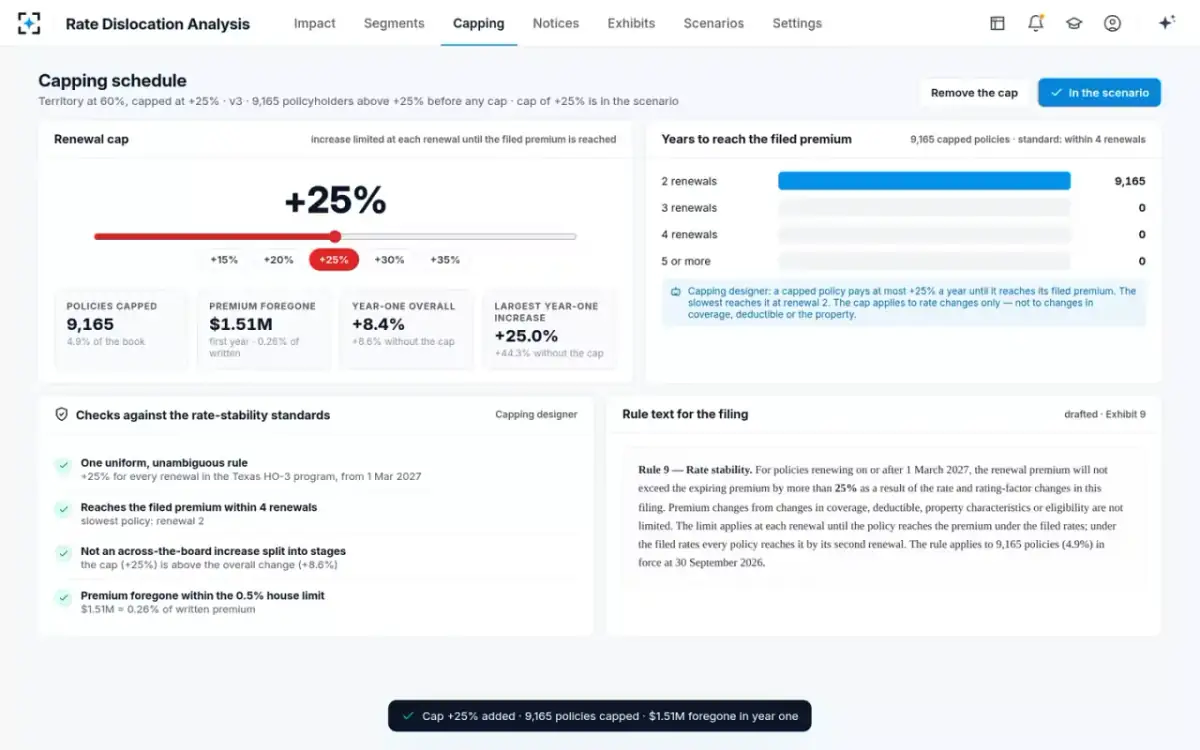
Harder to price; on the sample, territory at 60% instead of 100% cut the +25% tail from 23,802 to 9,165.
Head of the line
What an error costs: the line most comparisons leave out
The workbook's largest cost is the error it lets through, because the impact step feeds legal obligations. Texas requires an insurer to notify a residential property policyholder of a rate increase at renewal that raises the premium by at least 10% over the lesser of the premium paid in the prior 12 months or the prior policy period, and to send it at least 30 days before the increase takes effect (Tex. Ins. Code §2251.005). An undercount means policyholders who were owed a notice did not get one.
On the sample review, that is exactly what happened. A workbook for the scenario "territory at 60%" counted 71,233 Texas notices. A full re-rate of the same scenario counted 72,907. The 1,674 policies in between had a mid-term endorsement after the 31 August extract the workbook used, so it rated them on the old premium, below the 10% line. Nobody made an arithmetic mistake; the workbook read an older file.
Capping errors carry their own risk. In Washington, a rate stability rule that breaks the state's standards is treated as unfairly discriminatory in rate review, and the standards include a three-year limit and a ban on using a cap to stage an across-the-board increase (WAC 284-24-130). California, from 2026, prohibits insurers from modifying the formulas in its prior approval rate templates and exhibits, so an exhibit has to land in the regulator's template as the regulator built it (California Bulletin 2026-2). None of these costs is easy to put a number on in advance; all of them are cheaper to prevent than to explain.
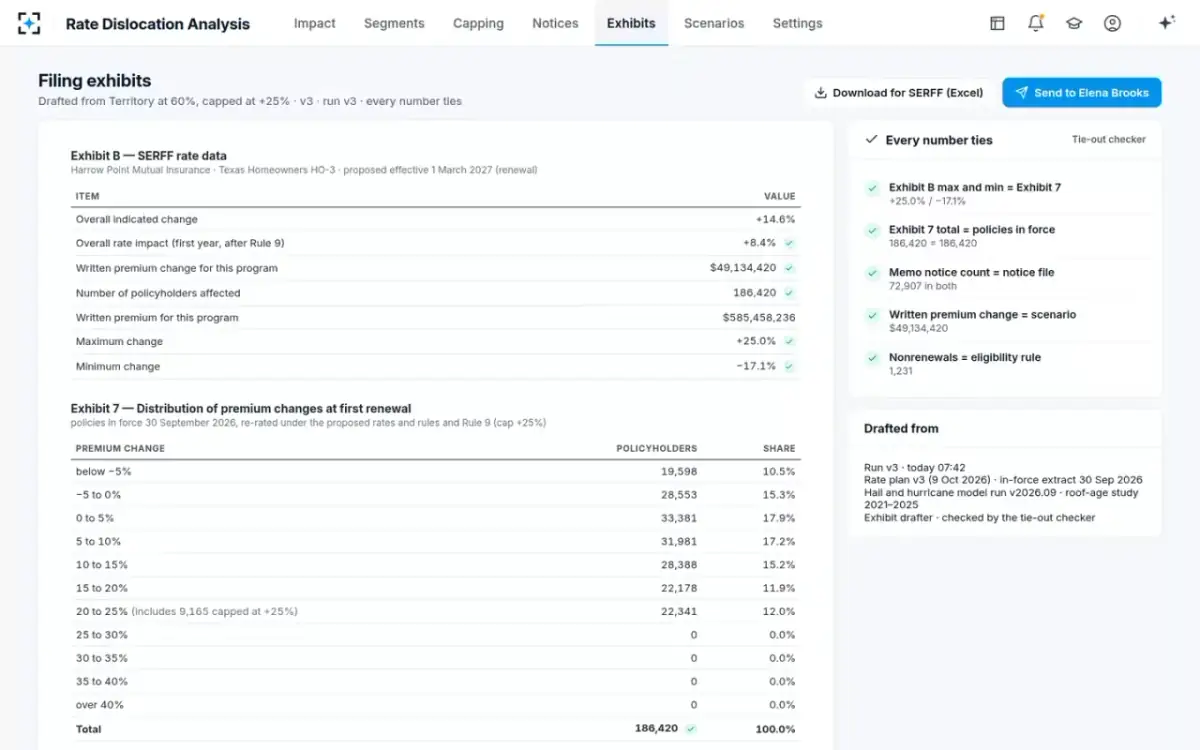
Exhibits drafted from the run, each number checked to tie
Workbook or impact software: how the two compare
A well-built workbook is not the enemy; an unrepeatable one is. The comparison below assumes a competent actuarial team on both sides and asks what each method makes easy and hard.
The impact step by workbook and by software, row by row
Workbook rebuilt per state and scenario: A day or more: copy, re-link, re-rate, re-check.
Impact software on one saved run: Seconds to re-rate; the time goes to deciding.
Workbook rebuilt per state and scenario: Whichever extract the builder last used; endorsements after it are missed.
Impact software on one saved run: A dated extract recorded with the run; endorsed premiums applied.
Workbook rebuilt per state and scenario: A filter on a column, then manual investigation.
Impact software on one saved run: Each policy's change split by rating factor, ranked.
Workbook rebuilt per state and scenario: Designed after the rate, often in a second workbook.
Impact software on one saved run: Proposed, priced and checked against your standards in the same run.
Workbook rebuilt per state and scenario: Counted from a separate query, which may not match the exhibit.
Impact software on one saved run: Counted by state rule and renewal month from the same run.
Workbook rebuilt per state and scenario: Depends on the file still existing and someone remembering how it worked.
Impact software on one saved run: Plan version, extract date and model versions saved with each run.
Workbook rebuilt per state and scenario: No licence; high in people and in error risk.
Impact software on one saved run: A licence and set-up; low per scenario.
What to look for in insurance pricing software for impact analysis
Ask a vendor to re-rate your book under last year's filed change and reproduce the exhibit you filed. Everything else on a demonstration is secondary to that test, which is set out in full in the rate change impact analysis template guide. Beyond it, these are the capabilities that separate impact software from a faster spreadsheet.
Ten things to check before buying software for dislocation analysis
- It re-rates every policy, not segments
Extension of exposures on the full in-force book; averages by cell are not a dislocation analysis.
- It uses the endorsed premium
Policies changed after the extract are rated on what they now pay and cover.
- Attribution reconciles to the dollar
Each policy's change split by factor, in your order of calculation, summing to the proposed premium.
- A scenario takes seconds
Or the team will still test only two or three.
- Caps are priced and checked
Policies capped, premium foregone, renewals to reach the filed premium, and your states' rules.
- State notice rules are versioned settings
Each rule with its citation, effective date and approver; a change is a new version.
- Exhibits are drafted from the run
And blocked from sending if any count disagrees.
- Every run is reproducible
Plan, extract and model versions saved; a regulator's question next year can be answered.
- It cannot change a filed rate or a policy
Read access to policy data; no write access to the rating engine.
- People approve and sign
The head of the line approves the scenario and the actuary signs; the software records who did what, when.
What auditors and model risk will ask of the software itself
Software that produces filing numbers becomes part of the filing's evidence, and internal audit, model risk and examiners will ask of it what they ask of a model. Can a premium in the exhibit be reproduced? The NAIC white paper's element C.7.g asks for "a means to calculate the rate charged a consumer", and Missouri's guidance on rate stability rules asks insurers to keep enough information that the department "may accurately reproduce premiums charged to policyholders" (Missouri Bulletin 20-01). A tool that cannot say which rate plan, extract and rule versions produced a number fails that test, however fast it is.
Three more questions follow. Who can change a state rule or a house standard, and is the change versioned with its approver? What can the software write to? Impact software should read the policy system and the rate plan and write nothing back to either. And where is the human decision recorded? On the sample program the activity trail lists who added the cap, who replaced the workbook's notice count with the run's, who requested approval, who approved and who signed, each with the time. A buyer should ask to see that trail on the vendor's own demonstration data before trusting it on theirs.
These questions cost little to ask and a great deal to answer after a market conduct examiner has asked them first. They belong in the evaluation alongside speed and price.
Where Rate Dislocation Analysis fits, and where it does not
Rate Dislocation Analysis fits a personal lines pricing team that already has a model and a rating manual, files in several states, and spends its review cycles rebuilding the impact workbook. Six agents do the mechanical part on one saved run: the book rerater, a factor attributor, a capping designer, a notice and nonrenewal counter, an exhibit drafter and a tie-out checker. They never change a filed rate or a policy record, never send a notice and never file.
It does not fit every need, and a buyer should know the limits before a demonstration:
It does not build or fit models. It reads the relativities your modelling produces and lets you move each factor between the current and the indicated value. It does not rate new business or replace your rating engine. It reproduces the manual to re-rate renewals; the rating engine stays the system of record for premiums charged. It does not file. Exhibits are downloaded in Excel for SERFF, and the rate filing analyst files. It needs your data. The in-force extract with rating characteristics and endorsements, and the rate plan in a machine-readable form, are the inputs; if those cannot be produced, no impact software will work, and the parallelogram method is what remains. Each state is a setting to configure and approve. State notice and capping rules are kept as versioned settings, and a state you file in must be set up before its counts can be trusted.
A cap proposed, priced and checked against the standards
Build, buy or keep the workbook: a decision by volume
The workbook remains the right answer for some carriers. A single-state program with a simple rating plan and one review a year can keep a disciplined workbook, provided it is built on a full re-rate rather than cell averages and tied to the notice file before filing. The case for software grows with three numbers: the states you file in, the scenarios you want to test, and the number of rating variables that move in a typical filing.
The CAS ratemaking text gives the underlying reason. A change to the base rate alone moves every policy by nearly the same amount; a change to the relativities can move different insureds very differently (CAS, Basic Ratemaking). A carrier whose filings are mostly base-rate changes needs little dislocation analysis. A carrier refitting territory, roof and deductible relativities every year needs it on every filing, in every state.
Building in-house is a fourth option. It suits a carrier with an engineering team close to pricing and a rating engine that can be called in batch. Its three-year cost is the build plus the upkeep of every state rule, and the test of the result is the same as for a bought tool: does it reproduce last year's filed exhibit. For carriers in the second group, Botminds offers to run Rate Dislocation Analysis on your own in-force book and a proposed rate plan before any decision.
Questions people ask
What is actuarial pricing software?
Software used by pricing actuaries to set rates: modelling tools that fit GLMs and other models, rating tools that reproduce the manual, and tools that measure the impact of a proposed change on the in-force book. The NAIC's predictive-model white paper asks reviewers to obtain a rate disruption or dislocation analysis made by re-rating the current book, which is the impact tool's output. No single product covers all three jobs well.
What are the main insurance pricing tools a P&C carrier uses?
A modelling platform for indications, a rating engine inside policy administration for premiums charged, SERFF and filing tools for submissions, and spreadsheets or impact software for scenario testing and dislocation. Competitors' filings, which are public in states such as Texas, are read with market tools. The impact step is the one most often left to spreadsheets.
Do insurance pricing software vendors handle state notice rules?
Some do and many do not, because notice rules sit outside pricing. Texas requires notice of a residential rate increase of 10% or more at least 30 days before it takes effect; Washington will require automatic notices of 10% renewal increases from 1 January 2029. Ask any vendor how a state's rule is stored, cited, dated and approved.
How long does it take to implement pricing software for impact analysis?
The work is in the data, not the installation: an in-force extract with rating characteristics and endorsements, and the rate plan in machine-readable form. A pilot that re-runs last year's filed change on your own book shows within weeks whether the tool reproduces your exhibit. If it cannot, it is not ready for a live filing.
Can a spreadsheet still be used for rate filing exhibits?
Yes, and some states require their own: California's prior approval application is built on the department's own template and exhibits, and since Bulletin 2026-2 insurers may not modify the department's formulas in them. Software that drafts exhibits should export into the state's format rather than replace it. The question is whether the numbers in the spreadsheet came from a full, reproducible re-rate.