Product filing automation software, for an insurer, is software that prepares, checks, submits and tracks rate, rule and form filings with each state's insurance department and helps answer the objection letters that come back. The useful kind does more than fill forms: it builds each state's package from the program's actuarial memorandum, exhibits, forms and the state's current checklist; it checks every number, model version and edition date across the package before anyone outside sees it; and it drafts answers to objections that cite the exhibit and page, for the actuary to sign. Botminds' Rate & Form Filing Automation is built that way, with six agents and a person at every decision. Going live means one thing: the first real state package assembled from your own documents, checked, and submitted in SERFF by your analyst.
What product filing automation software reads, produces, and must never do
Reads
- The actuarial memorandum and rate exhibits
- Prior filings and approvals by state
- Each department's filing instructions and checklists
- Policy forms and endorsements
- Objection letters and past responses
Produces
- A filing package per state, with SERFF fields filled
- A pre-submission gap and consistency report
- Drafted objection responses, each sentence cited
- A status timeline across states
Never
- Invents or edits an actuarial number
- Submits a filing or sends a response
- Waives a requirement
- Offers a concession, rate change or withdrawal
- Requests an extension without a person
What does product filing automation software do?
It does the reading, copying and comparing that sit between the pricing actuary's exhibits and the department's reviewer. In a manual process, the rate filing analyst cuts the program memorandum and exhibits for each state, types the overall change, written premium and policyholder counts into SERFF's schedules, attaches forms and manual pages, ticks the state's checklist and checks every exhibit against the memorandum by eye. Software takes those steps and does them the same way every time, for every state.
The NAIC's Product Filing Review Handbook describes what the regulators built on their side: SERFF is "a web-based application designed to provide an efficient process for rate, rule, and form filing and review," and it "facilitates communication, management, analysis, and electronic storage of documents and supporting information" (NAIC, 2024). Filing automation is the insurer's side of the same exchange: what goes into SERFF, checked before it goes.
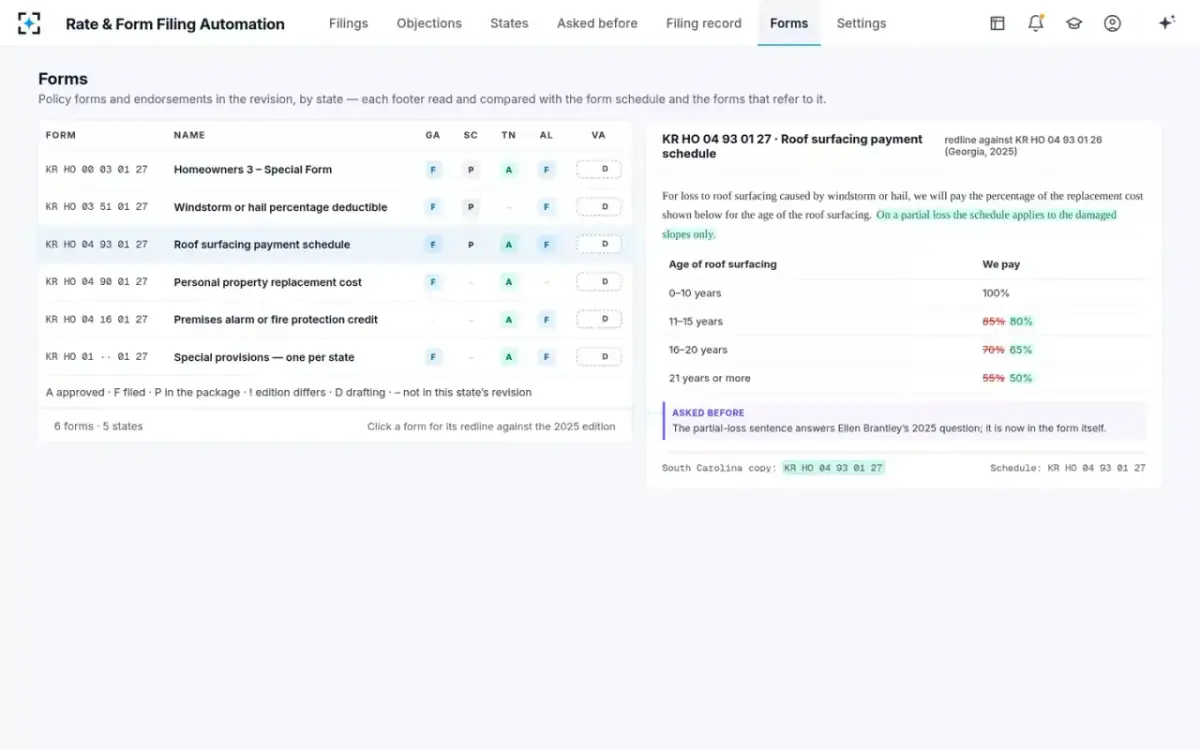
In Rate & Form Filing Automation, six agents divide the work. The package assembler builds each state's package and fills the SERFF fields. The state requirements checker reads each department's instructions and marks every checklist item present or missing. The consistency checker ties every number, model version and edition across memorandum, exhibits, manual pages, SERFF fields and forms. The reviewer history reader finds the questions a department asks again. The objection responder drafts cited answers. The deadline watcher tracks every state's clock.
Insurance product filing requirements the software has to know
Insurance product filing requirements live in three layers, and software has to read all three. The national layer is the NAIC's uniform tools: the Property and Casualty Transmittal Document, whose fields are built into every SERFF filing, and the Uniform Product Coding Matrix, whose updates "are effective Jan. 1 of each year" (NAIC, 2024). The state layer is each department's review standards checklists and filing instructions. The line layer is the exhibit set a state asks for in a rate filing, such as New York's 36-exhibit Rate Filing Sequence Checklist or California's templates.
State rules reach into file formats. California requires several exhibits "in both working Excel (with formulas intact) and PDF (with searchable text) format," and forbids changing or switching off any formula, macro or protected cell in its templates (CDI instructions, October 2026 edition; the rule is read in full in California's prior approval rate filing instructions). New York rejects a filing whose data and attachments are not on the right schedule: "If the data and attachments are not included in the appropriate schedule your filing will be rejected" (NY DFS filing instructions).
The layers change. California's change log for its prior approval package records seven updates in 2026 before the end of October, five of them to the filing instructions (CDI change log). Software that reads a saved copy of a checklist will, sooner or later, check a package against the wrong rules. Rate & Form Filing Automation reads each department's checklist from its current instructions and checks monthly for changes; the interval is a setting.
What to look for in product filing automation software
Look for evidence, not speed. Any tool can fill a form quickly; the question is whether it can show that the form agrees with the memorandum, that every required item is present, and that nothing it touched changed a number the actuary signed. The checklist below is what we would ask of any vendor, including ourselves.
Ten questions to put to any product filing automation tool
- Does it read each state's current checklist, and tell you when one changes?
A saved checklist is a stale checklist; ask how changes are detected and how often.
- Does it tie numbers across documents, not only fill fields?
Ask to see it find a SERFF field that disagrees with the memorandum, with both values and both pages.
- Can it change an actuarial figure?
The right answer is no. Exhibits and signatures belong to the actuary.
- Does every drafted answer cite the exhibit and page?
An uncited answer moves the searching from the analyst to the actuary.
- Who can approve a concession, rate change or withdrawal?
It should be a named person, set once, with the setting on the audit trail.
- Does it leave state templates untouched?
California forbids modifying its formulas; a tool must fill, not rebuild, a regulator's template.
- Does it work with SERFF as it changes?
SERFF is moving to a new platform state by state; ask how the tool follows.
- Can it block submission while an item differs or is missing?
And can a person override with a reason and a second signature, on the record?
- Can it be tested on a filing you already submitted?
Replay a past filing and compare its findings with the objections the department actually sent.
- What does it never do?
Ask for the list in writing. A tool without limits will eventually act without a person.
Where it fits next to SERFF, as SERFF itself changes
Filing automation sits in front of SERFF, not in place of it. SERFF is the regulators' system of record: nearly every jurisdiction accepts filings through it, New York's Regulation 195 requires it for most filers, and California received 100% of its 2025 rate filing bureau submissions through it. The software prepares and checks what goes into SERFF; a person submits.
SERFF is also in the middle of a rebuild, which matters for any tool that fills its fields. The NAIC's Speed to Market Working Group heard in October 2025 that the modernization project had launched in March, that it would move states in waves starting with "a group of 10 early adopter states," and that it "represents a new platform with updated terminology, design, and workflows," with legacy and new systems running side by side for a period (NAIC Speed to Market (D) Working Group, October 2025). A buyer should ask how a tool handles a state on the new platform and a state on the old one in the same program.
The useful division of labour is plain. SERFF holds the submission, the correspondence and the state's requirements. Filing automation holds the comparison of your own documents with each other and with those requirements, and drafts the words people will sign. Neither replaces the analyst's decision to submit.
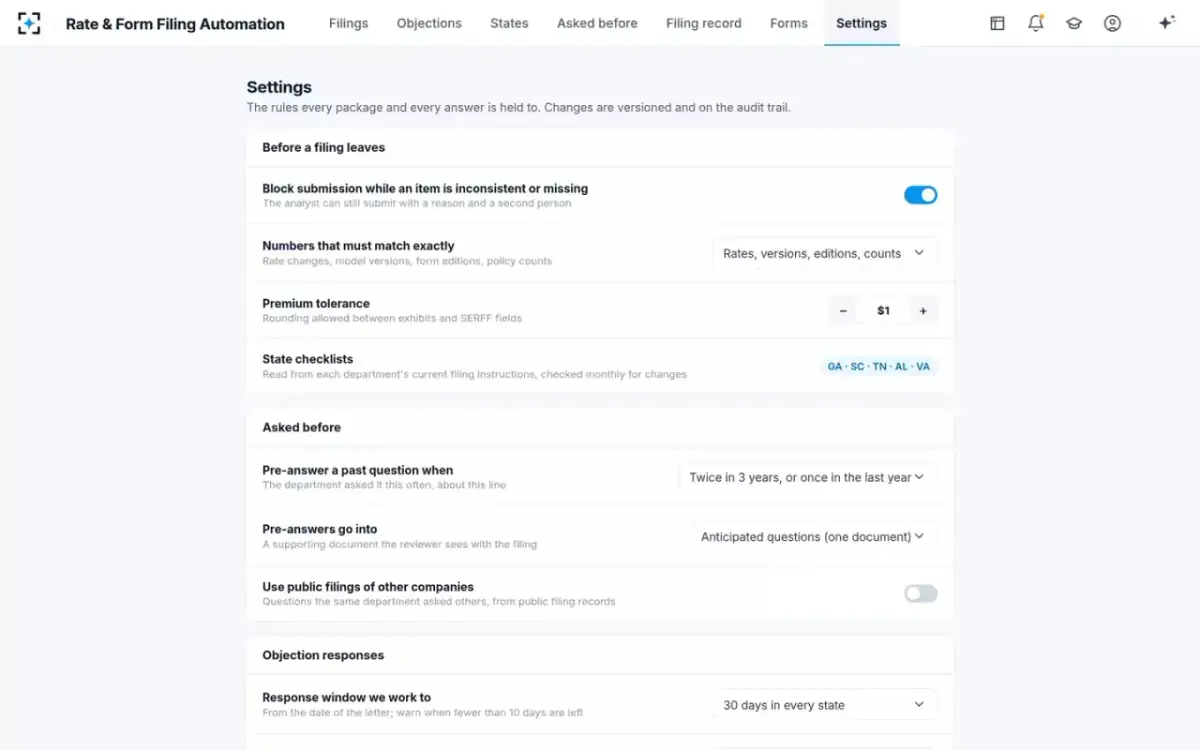
The rules every package is held to, set by you
Is insurance statutory filing software the same thing?
No. Statutory filing software prepares an insurer's statutory financial statements, the NAIC annual and quarterly statements; rate and form filing software prepares filings for approval of rates, rules and policy forms. The two meet in the data: California's reconciliation checklist asks filers to compare the premiums in a rate filing with "Statutory Page 14 Direct Earned Premium (Annual Statement Exhibit of Premiums and Losses)" (CDI reconciliation checklist). A rate filing tool should be able to tie to the statutory figures; it is not a substitute for the software that produces them.
"Insurance regulation filing system" and "SERFF filing software" are searched for the same reason: people want the system that accepts filings. That system is SERFF, run by the NAIC for the states. A product filing automation tool is the insurer-side software that prepares what goes into it.
The go-live plan: weeks to the first live package
Plan backwards from a real filing date. Pick the next program revision with a state submission date eight to ten weeks out, and make that state's package the go-live: assembled by the software from your own documents, checked, routed, fixed by the owners and submitted by your analyst. Everything before it is preparation; everything after it is scale.
A ten-week plan from signed order to the first live state package
- Gather checklists, memo, exhibits, forms, past letterswk 1–2
- Replay one past filingwk 3–4
- Set rules and signerswk 5–6
- Live package, in parallelwk 7–9
- Submitwk 10
- Analyst and compliance choose the state and filinganalyst
- Actuary checks findings against real objectionsactuary
- Product manager and chief actuary set approvalsowners
- Each owner fixes their itemsowners
- Analyst submitsanalyst
Weeks three and four carry the most information. Run the software on a filing you already submitted and that drew a letter, and compare its findings with what the department actually asked. That replay is the honest test of fit: it shows which objections a pre-submission check would have prevented, which it would not, and how many of its findings your team agrees with. It is also the offer we make to every filing team: we will run Rate & Form Filing Automation on one of your own past filings and its objection letters.
Weeks five and six turn your filing rules into settings: which numbers must match exactly, the premium tolerance between exhibits and SERFF fields, who signs actuarial answers, who approves a rate or form change, and whether submission blocks while an item differs. Weeks seven to nine run the live package alongside the manual process, so every finding can be checked by a person who would otherwise have done the work by hand.
Who owns what in the weeks before the first live filing
Go-live is a filing team project with an IT role, not the other way round. Each seat has one thing to decide and one thing to verify, and the plan stalls if any seat is missing.
Who owns what in the weeks to the first live package
Today
Assembles and checks each state package by hand.
With agents
Chooses the go-live filing, reviews each finding and routes fixes; submits the live package.
Still theirs: the decision to submit
Today
Finds the page behind each figure when signing answers.
With agents
Checks the replay's findings against real objections and corrects their own exhibits.
Still theirs: every exhibit and signature
Today
Hears about form mismatches from reviewers.
With agents
Sets who may approve a rate or form change; supplies the right form copies.
Still theirs: selected rates, forms and concessions
Today
Keep checklists current and documents where filers can find them.
With agents
Confirm which checklists and document stores the software reads, and who can change its settings.
Still theirs: access, audit and change control
Forms by state, each footer compared with the schedule
Where automation stops, and should
The limits are the product. Rate & Form Filing Automation's agents never invent or edit an actuarial number, never submit a filing, never send a response, never waive a requirement, never offer a concession, rate change or withdrawal, and never request an extension or withdraw without a person. An exhibit or a signature changes only with the actuary; a form only with the product manager. Submission blocks while an item differs or is missing, and the override needs a reason and the chief actuary's second signature.
It also does not do the actuarial work. It will not build an indication, select a trend or choose a catastrophe model; it checks that the numbers the actuary produced appear the same way everywhere. For the analysis that comes before a filing, Botminds has separate solutions: Rate Dislocation Analysis for the policy-level effect of a rate change (see dislocation analysis), and Competitor Rate Filing Analysis for reading rivals' public filings (see how to read insurance rate filings).
Where it fits best is a team with several states in flight at once, where most of the effort goes into keeping one decision consistent across many packages. The guide to regulatory filing automation for insurance companies traces that consistency problem one number at a time, and the NY DFS rate filing checklist shows the difference between complete and consistent on one state's form. To see the agents on the sample program, start from Rate & Form Filing Automation.
Questions people ask
What is a product filing automation tool?
It is software that assembles, checks and tracks an insurer's rate, rule and form filings with state departments and helps answer their objection letters. The difference between tools is whether they only fill SERFF fields or also prove the package agrees with itself before submission.
Can you automate rate filings end to end?
The assembly, checking, tracking and drafting can be automated; the decisions cannot, and should not. Actuarial numbers and signatures, selected rates, concessions and the act of submitting stay with named people; in Rate & Form Filing Automation those limits are built in.
What are SERFF filing software requirements?
SERFF itself is web-based and licensed by the NAIC to filers; it needs no separate software to submit. Tools that prepare filings for SERFF must produce documents in the formats states require, such as California's Excel templates with formulas intact and searchable PDFs, and place each attachment on the right schedule.
How long does it take to go live with filing automation?
Plan around a real filing: the plan we suggest is about ten weeks from start to the first live state package for one program, including a replay of a past filing and a live package run in parallel. The schedule is set by the filing date you choose, not by the software.
Does filing automation replace the rate filing analyst?
No. It removes the copying and checking from the analyst's week and leaves the decisions: what to fix, whom to send it to, and when to submit. The analyst still submits every filing and sends every response.