Loss run automation means software that reads prior carriers' loss runs as they arrive with a commercial submission, maps every carrier's layout to one set of fields and produces a loss summary for the underwriter, instead of an assistant re-keying each run. Getting it live is less a technology project than a reading-rules project: which carriers' formats the desk receives, what each column means, how expense, stale runs and duplicate claims are treated, and how the desk will know the summaries can be relied on. A plan of about six weeks covers that for a desk with a known set of prior carriers, ending with a two-week parallel run on closed accounts. Botminds' Loss Run Analysis Automation is built to be set up this way: the desk's rules are versioned settings, each new carrier layout is confirmed once by a named person, and every figure opens its source row, which is what makes a parallel run quick to check.
The six weeks below are an illustrative plan, not a promise: integrations, the number of carrier layouts and the size of the test sample move it. Examples come from a fictional sample desk, Marrowstone Casualty's commercial transportation team, and every person, company and carrier named is invented.
Loss run automation in six weeks, by workstream
- Inventory runsWk 1
- Confirm column maps, top carriers firstWk 2–3
- New layouts confirmed as they arriveWk 4–6
- WaitingWk 1
- Draft from guidelinesWk 2
- Manager signs version 1Wk 3
- Frozen during the test and go-liveWk 4–6
- Broker mailbox and submissionsWk 1–2
- File templateWk 3
- In use for the testWk 4–6
- Waiting for maps and settingsWk 1–2
- Pick the sampleWk 3
- Read both ways and compareWk 4–5
- Results reviewedWk 6
- PreparingWk 1–5
- Live, fully reviewedWk 6
How long does loss run automation take to implement?
For one commercial desk with a stable set of prior carriers and light integration, about six weeks to first live accounts is a reasonable plan; more lines, more desks or deep integration with a submission system add time. The long pole is rarely the software. It is agreeing in writing how runs are to be read and testing that the tool reads them that way.
Three things shorten it. A desk that already has written guidelines on loss runs, such as a look-back, a large-loss threshold and a rule on stale runs, skips most of week 2. A desk whose prior carriers are mostly ones the tool already reads confirms fewer layouts; the sample desk has 37 learned. And a desk that keeps its past submissions with the runs attached can pick a parallel-run sample in a day.
What do you need to start automating loss runs?
Three inputs and three people. The inputs are the desk's underwriting guidelines on loss runs, its file template for the loss summary or narrative, and a sample of recent and past submissions with their runs. The people are an underwriting assistant who will confirm carrier layouts, an underwriting manager who owns the reading rules, and an underwriter who will judge whether the summaries are right.
Before week 1: what to gather
- Three months of incoming runs
Every run that arrived with a submission or renewal, with carrier, line and format, to size the layout work.
- Thirty or more closed accounts
Quoted or bound in the past year, with the runs as received and the summary the underwriter priced on.
- The written guidelines on loss runs
Look-back, large-loss threshold, valuation window, expense treatment, referral rules. Where none exist, the manager’s current practice, written down.
- The file template
Where the loss summary and narrative go, and in what form.
- The prior-carrier list on the application
So missing years can be found against what the insured declared.
- Named owners
Who confirms layouts, who signs the settings, who accepts the parallel-run results.
Week 1: inventory the carrier formats you actually receive
Start from what arrives, not from a list of carriers. Count every run received over a recent quarter by carrier, line and format: spreadsheet export, text PDF, scan, claim-detail report, third-party administrator report. The count usually follows a steep curve, with a handful of carriers sending most of the runs and a long tail sending one each.
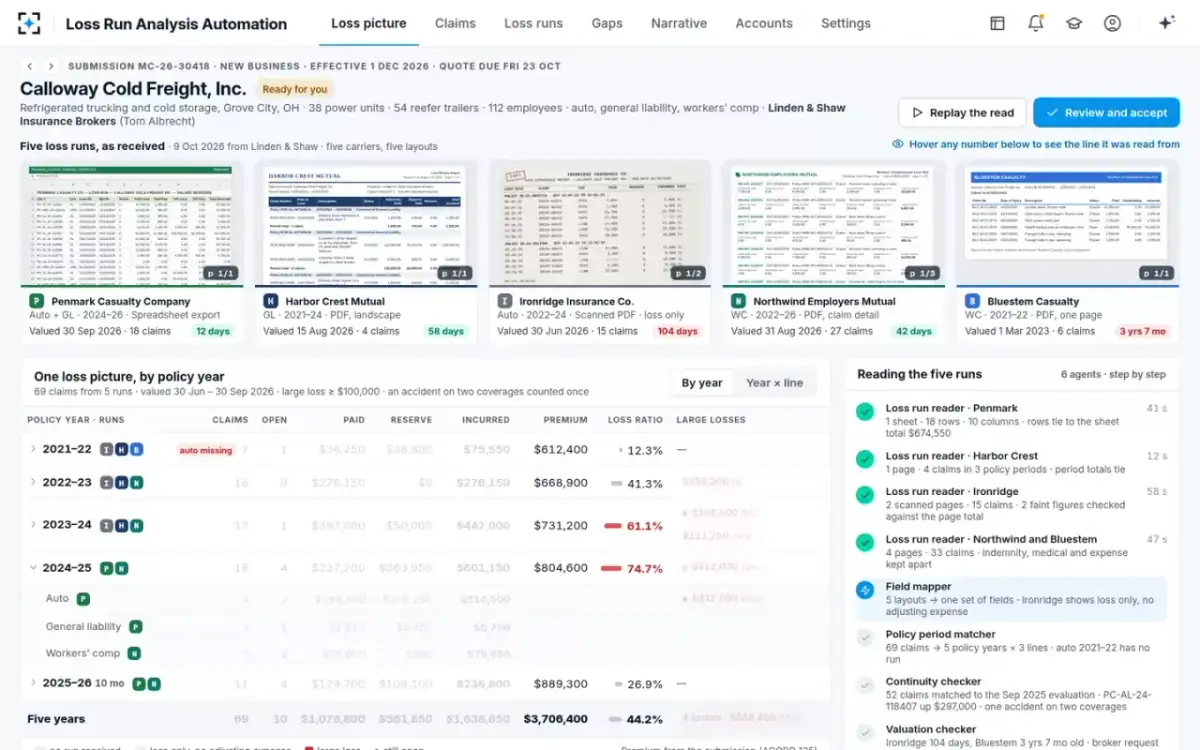
The inventory sets the mapping order and the test sample. On the sample desk, five layouts arrived on a single trucking account: a ten-column spreadsheet, a landscape PDF grouped by policy period, a two-page scan marked loss only, a workers' comp claim-detail report and a one-page PDF. A desk that sees those five on one account will see dozens over a quarter, and the first two weeks of mapping should cover the carriers behind most of its runs.
Weeks 2–3: who signs off a loss run field mapping?
The person who knows the carrier's runs best, normally the underwriting assistant who has keyed them, confirms each layout's column map; the underwriting manager owns the rules the maps must follow. In the solution a new layout is read on first sight and kept once someone confirms its column map, and the confirmation is recorded with the person's name. On the sample desk the assistant Dana Whitfield confirmed the spreadsheet carrier's seven columns.
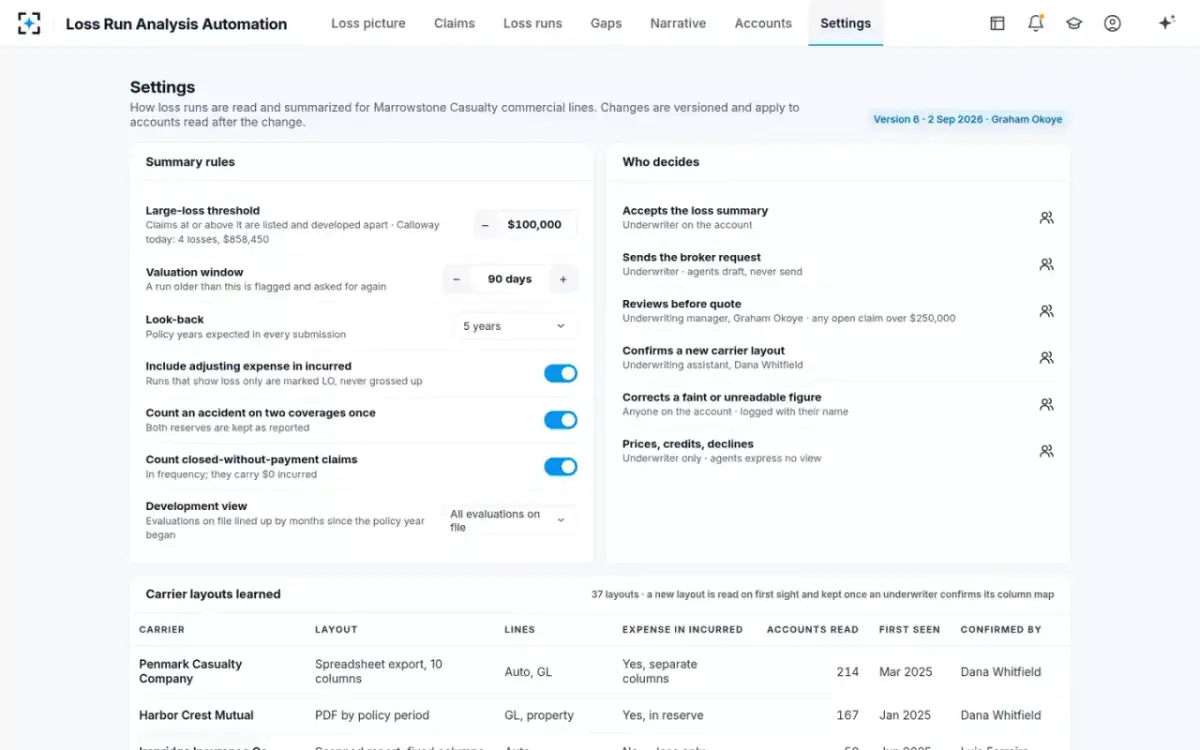
The rules come first, because the maps depend on them. Does incurred include adjusting expense for this desk? How are loss-only runs treated? Is an accident reserved under two coverages one claim or two? Do claims closed without payment count? These are written as settings and signed by the manager as version 1. Changing them later is normal; on the sample desk the settings were at version 6, and changes apply only to accounts read afterwards, so a summary never changes under a quote.
The reading rules a desk writes down before testing
| Setting | Sample desk | Range | Why it matters |
|---|---|---|---|
| Large-loss threshold | $100,000 | $50,000 to $500,000, in $25,000 steps | Which claims are listed and developed apart |
| Valuation window | 90 days | 30 to 180 days | Which runs are flagged as stale and re-requested |
| Look-back | 5 years | 3, 5 or 7 | Which missing years count as gaps |
| Adjusting expense in incurred | On | On or off | Loss-only runs are marked, never grossed up |
| One accident on two coverages | Counted once | On or off | Frequency, and reserves kept as reported |
| Closed without payment | Counted in frequency | On or off | Claim counts on accounts with many small reports |
| Development view | All evaluations on file | All, or last two | How much reserve history the underwriter sees |
| Review before quote | Underwriting manager | Any open claim over $250,000 | Which accounts go up the line |
The reading rules and who decides, as versioned settings
Weeks 4–5: should you run old and new loss reviews in parallel?
Yes, on closed accounts, for about two weeks, before any live quote depends on the tool. A parallel run reads a sample of past submissions with the tool and compares its summaries with what the underwriter priced on, field by field. Closed accounts are the right sample because the answer is known and no quote is at risk.
Regulators describe the same idea for AI generally. The NAIC's model bulletin on insurers' use of AI expects validation and testing, and says validation can compare a model's results on data held back during development with its results after go-live, or measure it against expert review (NAIC Model Bulletin on the Use of AI Systems by Insurers, 2023, section 3.4; quoted in the driving risk score guide). A parallel run against the underwriters' own summaries is measuring performance against expert review, in plain terms.
How do you test loss run automation? Acceptance criteria that can fail
Write the pass marks before the test, so the result cannot be argued afterwards. Each criterion should be measurable on the closed sample and able to fail.
Parallel-run acceptance criteria
- Every run ties to its printed totals
Or the mismatch is shown; none silently accepted.
- Money fields match the person’s reading
Paid, reserve and incurred per claim, counting flagged-faint figures separately from errors.
- Expense treatment right on every carrier
No loss-only run added in as if it included expense.
- Policy years and lines right
Claims placed by date of loss and policy, gaps found against the application.
- Every figure opens its source
Spot-check twenty figures per account; all should open the right cell.
- Gaps at least as complete as the desk’s
Missing years and stale runs the underwriters found, and any they missed.
- Differences explained
Where the tool and the underwriter disagree, which was right, and why.
Expect the last criterion to be uncomfortable. A parallel run on closed accounts compares the tool with summaries people typed under time pressure, and some differences will be the people's errors: a loss-only run added to runs that included expense, an accident counted twice, a stale run priced as current. Those findings are part of the business case, and they belong in the go-live review. What the reader agent does on each page, and why it can be checked so quickly, is in loss runs AI.
Replay the read: what each agent checked on an account
Week 6: going live, and who does what from the first live account
Go live on new submissions with full review: the underwriter reads every summary against the runs for the first weeks, as during the test, and the desk tracks the exceptions. Referral rules apply from the first account; on the sample desk any account with an open claim over $250,000 goes to the underwriting manager before quote.
Who does what once the desk is live
Today
Keyed runs, mapped columns, built the gaps list by hand.
With agents
Confirms new carrier layouts, corrects flagged figures, keeps the broker request moving.
Still theirs: the layout sign-off
Today
Waited for a typed summary and re-checked the large claims.
With agents
Reads a cited summary, accepts it, and sends the drafted broker request.
Still theirs: price, credits, declinations
Today
Set reading rules informally and asked for reserve histories after the fact.
With agents
Owns the versioned settings and reviews referred accounts with the claim history attached.
Still theirs: the rules and the referral decision
Today
Had no measure of how runs were read.
With agents
Tracks exceptions, new layouts and time from received runs to accepted summary.
Still theirs: the decision to widen use
What are the risks of automating loss runs?
The main risk is a confident error: a summary that is precise, looks complete and is wrong in a way nobody checks. Four kinds are worth naming, with the control for each.
Expense treated wrongly, where a loss-only run is summed with runs that include defence costs; the control is a confirmed column map per carrier that states expense treatment, and loss-only years marked in every total. Stale runs priced as current; the control is a valuation window applied to every run, with the age shown beside it. Gaps filled rather than reported, where a missing year is quietly treated as clean; the control is matching runs to the application's prior carriers, with gaps listed, never filled. And over-reliance, where underwriters stop reading the runs behind large claims; the control is a referral rule and figures that open their source, so checking a large claim takes a hover rather than a search.
There is also a vendor risk: dependence on a tool for an input the underwriting file must be able to defend. Settings, mappings and summaries should be exportable, and every correction and acceptance logged with a name. How the reserve on an open claim can mislead even when it is read correctly is worked through in how to read a loss run report.
When can underwriters rely on automated loss summaries?
When the parallel run has met its criteria, and then on each account only after the underwriter accepts the summary. Reliance is earned in two steps: the tool shows on closed accounts that it reads the desk's runs the way the desk reads them, and each live summary is accepted by a named underwriter with every figure traceable.
In Loss Run Analysis Automation the agents never accept anything. They read, map, match and draft; the underwriter accepts every summary and sends every broker request, and the narrative carries its data limits in plain words. On the sample account that meant a summary accepted with a missing auto year, two stale runs and a loss-only scan stated rather than hidden, and the account referred because one open claim exceeded the manager's threshold. The cost side of the decision, worked per account, is in loss run software or a spreadsheet.
Questions people ask
How many carrier formats do we need to map before go-live?
Enough to cover most of the runs the desk receives, which the week 1 inventory shows. A few carriers usually send most runs; map those first and confirm the long tail as each arrives. In the solution a new layout is read on first sight and only needs a person's confirmation.
How large should the parallel-run sample be?
Large enough to include every common layout, at least one scan, at least one workers' comp claim-detail report and several accounts with open large claims; thirty or more closed accounts is a practical floor for one desk. The mix matters more than the count.
Can we change the reading rules after go-live?
Yes. In the solution the settings are versioned, show who changed them and when, and apply to accounts read after the change, so a summary already accepted does not move under an issued quote. The sample desk was on version 6.
Do brokers need to change how they send loss runs?
No. The point of reading any layout is that brokers keep sending what carriers give them. What changes is the reply: one request per account listing every missing or stale item with its reason, drafted by the agents and sent by a person.
What happens if a run arrives in a layout the tool has never seen?
It is read on first sight, its proposed column map is shown, and a person confirms it once; after that, the layout is kept for every later account from that carrier.
Does loss run automation need IT to build integrations?
Some. Connecting the broker mailbox and the submission system, and placing the narrative in the file template, are the usual pieces; the reading rules and mappings are the underwriting desk's work, not IT's.