The best FMLA tracking software is the tool that, given 50 of your own closed leaves, reaches the same answers the law requires on every one: who was eligible, how much leave each person had left under your chosen 12-month method, how many hours each intermittent absence used, when each notice was due, and what each week paid when short-term disability and a state program ran alongside. Feature lists cannot tell you that; a replay of past leaves can, in four weeks, before you sign. FMLA tracking is hard because the entitlement is counted in the employee's own hours, the year can roll, and many leaves also involve a paid program with its own rules. Botminds' Integrated Disability & Absence Management is built for carriers and administrators who run FMLA together with disability and state leave, and the pilot below is how to test it, or anything else, on your own files.
The sample screens are from the solution's fictional book of business at Calder Point Group Benefits. The rules are quoted from the Department of Labor's FMLA regulations; the survey figures come from the Department's 2018 surveys of employees and worksites.
Twelve pass marks for any FMLA tracking software, each tied to the rule it tests
- Eligibility, with the values shown
12 months of service, 1,250 hours in the 12 months before the leave, 50 employees within 75 miles; every one of the 50 leaves right (29 CFR 825.110).
- Your 12-month method, applied as written
Calendar, fixed, forward or rolling backward; a rolling year recalculated at every request (825.200(b)–(c)).
- Entitlement in the employee’s own hours
Leave counted against the actual workweek, pro rata for part-time and variable schedules; zero hours of difference (825.205(b)).
- The increment rule
No larger than the smallest increment used for any other leave, and never more than one hour (825.205(a)(1)).
- Required overtime counted, voluntary overtime not
Hours of mandatory overtime missed count against the entitlement (825.205(c)).
- Eligibility and rights notice on time
Within five business days of the request or of the employer’s knowledge, on every leave (825.300(b)–(c)).
- Designation notice on time, with the amount
Within five business days of enough information, stating the hours, days or weeks counted where known (825.300(d)).
- Certification and cure clocks
15 calendar days to return; seven to cure an incomplete form; both dated from the right event (825.305).
- Disability weeks counted, PTO not forced
STD or workers’ compensation weeks designated as FMLA where they qualify; no PTO substituted into a paid week (825.207(d)–(e)).
- Spouses at one employer
Combined 12 weeks for birth, bonding and parental care where both work for the same employer (825.120(a)(3)).
- Holiday and shutdown weeks
A holiday in a full week of leave counts; in a partial week it does not unless the employee was scheduled (825.200(h)).
- Pay that never exceeds 100%
State benefit, STD after offset and employer pay together within pre-leave pay, week by week.
What is the best FMLA tracking software?
There is no best tool in the abstract, only the one that is right on your leaves, under your policies, in your states. A tool that is excellent for a single-site employer counting hours against 12 weeks may be the wrong choice for a carrier that runs leave and short-term disability for 200 employers in nine states. So the first question is what the software has to do, and for many buyers the answer is more than tracking: it must date notices, coordinate pay, and leave a trail a regulator or a court can follow.
The FMLA's remedies explain why accuracy is the only feature that matters in the end. An employee may sue "within two years after the last action which the employee contends was in violation of the Act, or three years if the violation was willful," and recover lost wages and benefits plus an equal amount "as liquidated damages unless such amount is reduced by the court because the violation was in good faith" (29 CFR 825.400). A tracking tool that miscounts an intermittent entitlement creates exactly the kind of record that case is built on.
How do you compare FMLA tracking tools?
Compare them on the same set of your own closed leaves, scored against an answer key your team builds from the regulations, not against each other's demos. A demo uses a leave the vendor chose. A pilot on closed leaves uses the ones that went wrong, the ones that were hard, and the ones a regulator or a lawyer might one day read. The difference between the two is the difference between learning what a tool can do and learning what it will do.
The Department of Labor's survey of worksites shows where to aim the test. Employers covered by the FMLA find some kinds of leave much harder than others, and a sample of 50 should be loaded towards them.
Long and unplanned leaves are the ones employers find hardest to manage
Can FMLA software track intermittent leave?
It must, and it is the hardest thing it does. Intermittent leave is common: in the Department's employee survey, "about a third (31 percent) took multiple occasions of leave for the same reason, termed “intermittent leave”—a rate higher than in 2012 (24 percent)" (DOL 2018 surveys). Each occasion has to be counted in the right increment, against the right workweek, inside the right 12-month window.
The regulation sets the increment from the employer's own practice: the employer "must account for the leave using an increment no greater than the shortest period of time that the employer uses to account for use of other forms of leave provided that it is not greater than one hour" (29 CFR 825.205(a)(1)). If sick leave is counted in half-hours, FMLA leave must be too. The entitlement is counted against the employee's real schedule: someone who normally works 40 hours and takes eight off uses a fifth of a week; someone whose schedule varies too much to know uses "a weekly average of the hours scheduled over the 12 months prior to the beginning of the leave period."
Then there is the year. An employer may choose a calendar year, a fixed year, a year measured forward from the first leave, or "A “rolling” 12-month period measured backward from the date an employee uses any FMLA leave" (29 CFR 825.200(b)), and the regulation warns that under the rolling method employers "may need to calculate whether the employee is entitled to take FMLA leave each time that leave is requested." A tool that stores a single balance and subtracts from it is not tracking a rolling year. Test it with an employee who took four weeks three times, ten months apart.
Does FMLA software send notices?
Most can generate the Department of Labor's notice forms; the test is whether they date them correctly and fill them with the right content for the leave. The eligibility notice, with the rights and responsibilities notice, is due within five business days of the request; the designation notice within five business days of having enough information; and the designation notice must state the amount counted where it is known, or give it on request "no more often than once in a 30-day period" for unforeseeable intermittent leave (29 CFR 825.300(d)(6)).
Two traps catch most generated notices. The first is the substitution paragraph: if the employer will require paid leave to run with FMLA leave, the designation notice must say so, but a week paid by a disability plan cannot have PTO forced into it. The second is the start of the clock: five business days run from when the employer knew the leave might qualify, not from when the form was finished. What each notice must contain, and who sends it when a carrier runs the leave, is set out in FMLA designation notice requirements.
How to run the pilot on closed leaves
A pilot on closed leaves takes four weeks and needs one person from your leave team, one from payroll, and access to the files. It answers one question: on leaves where you already know what should have happened, how often does the tool agree with the law?
A four-week pilot on 50 closed leaves, your team and the tool side by side
- Choose 50 leaves, build the answer keywk 1 · answer key
- Hand over files, answer questionswk 2 · support
- Score each leave against the keywk 3 · score
- Review every mismatch, decidewk 4 · decide
- Load policies, states and settingswk 1 · set up
- Replay all 50 leaveswk 2 · replay
- Explain each answer with its rulewk 3 · explain
- Re-run after any settings fixwk 4 · re-run
Week 1: choose and key. Pick 50 leaves closed in the last 12 months and build an answer key for each: eligibility with the three values, the entitlement left under your 12-month method, every notice date due, the hours each intermittent absence used, and, where a disability plan or state program paid, what each week should have paid. Building the key is half the value of the pilot; teams often find their own errors here.
Week 2: replay. The tool gets the leave requests, the payroll and hours data the leave team had at the time, your policies and your state settings, and nothing else. It should produce every answer on the key without being told the answer.
Weeks 3 and 4: score and explain. Score each leave against the key, then ask the tool to explain every mismatch. A mismatch the tool can explain with a rule, where your key was wrong, is a point in its favour. One it cannot explain is a finding.
How to stratify 50 closed leaves so the pilot finds the hard cases
| Kind of leave | In the sample | What it tests |
|---|---|---|
| Own serious health condition with STD | 10 | Concurrency with a disability plan, PTO not forced into paid weeks, return-to-work coding |
| Pregnancy and bonding with a state program | 10 | Disability weeks, then bonding; state family leave; employer parental pay; offsets |
| Intermittent, unplanned | 10 | Increments, hours against the actual workweek, rolling-year balance at each absence |
| Reduced schedule or variable hours | 5 | Pro rata counting and the 12-month average for variable schedules |
| Care of a family member | 5 | Family definitions, certification for the family member |
| Several reasons in one 12-month period | 5 | One eligibility notice per reason, a shared entitlement |
| Edge cases | 5 | Spouses at one employer, holiday weeks, required overtime, a leave that crossed a year end |
Pass marks for each rule
Pass marks should be set by what the law requires, not by what is achievable. Eligibility, notice dates and entitlement balances are not matters of degree: every leave should be right, and any miss should be explained by a fact the tool did not have. Pay coordination is held to the cent, because a week overpaid is a recovery letter. Anything below that is not a failed pilot; it is a list of the settings and data the tool needs before you trust it.
Three measures summarise the result for a decision-maker: the share of the 50 leaves with no finding at all; the number of findings that would have reached an employee as a wrong notice or a wrong paycheck; and the share of the tool's answers that showed the rule and the values behind them. The third matters as much as the first two. An answer you cannot check is an answer you cannot defend.
What should FMLA tracking software cost?
No government or research source publishes prices for leave software, and published price lists say little about the cost of a wrong answer. The pilot gives a better basis. Count the findings that would have reached an employee, price each one at what it would have cost to fix (a recovery, a corrected notice, a reinstated week of entitlement), and compare that annual figure, scaled to your volume, with the price. The FMLA's remedies set the ceiling on the downside: lost wages and benefits, an equal amount in liquidated damages, attorney's fees, within two years, or three if willful.
The other half of the sum is staff time. A tool that dates notices and keeps balances but leaves the pay coordination on a spreadsheet saves less than it appears to. For a book where most leaves also involve a disability plan or a state program, the largest cost is usually in the weeks where several programs pay at once, which is where overpayment recovery begins.
Where Botminds' solution fits, and where it does not
Integrated Disability & Absence Management fits a leave operation that runs the FMLA together with short-term disability, state paid leave and employer pay, for one employer or for many: a group carrier's absence team, a third-party administrator, or a large employer with its own leave desk. It takes the intake once, applies each program's test with the rule cited, works out every week's pay with the offset, dates every notice from the plan, and reads each employer's payroll file before the cut-off. A named case manager agrees every decision and signs every plan.
Every open leave on one time axis, with the next dated obligation and its flag
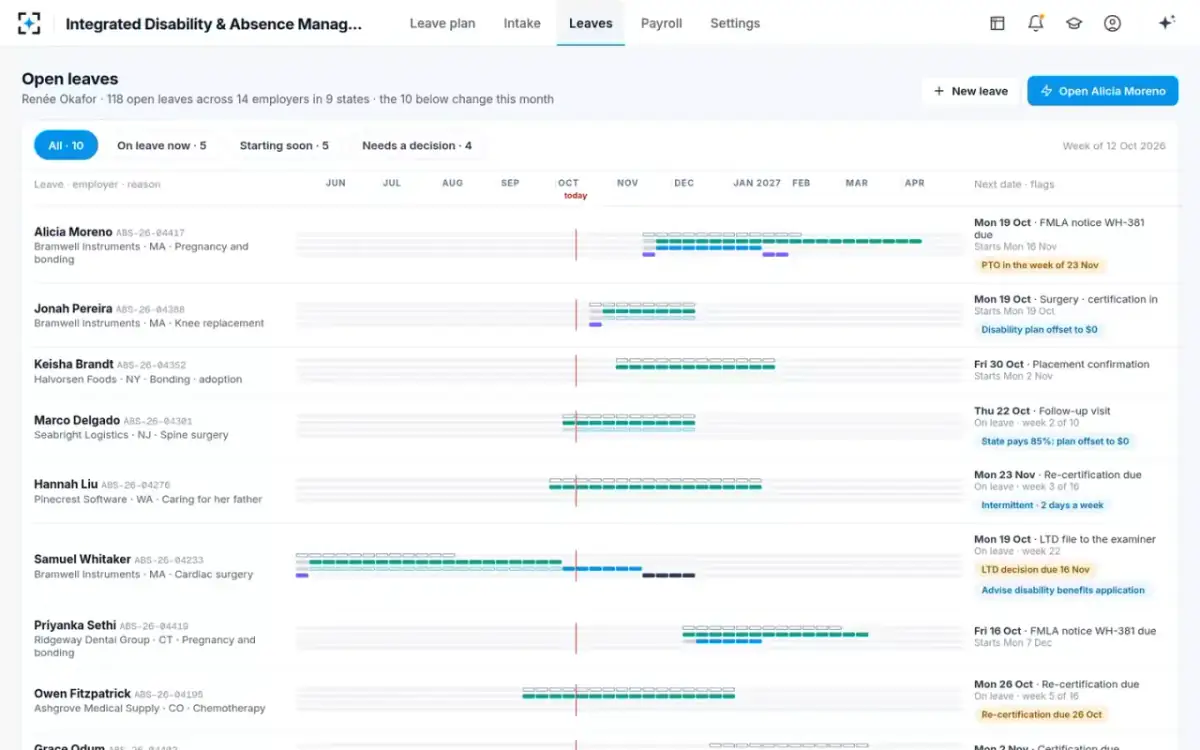
It does not fit everywhere. It is not a time-and-attendance system, so an employer whose need is only to count FMLA hours from a timeclock is buying more than it needs. Nor is it the place to research what each state's law allows across a dozen states; that rule layer, and what to load into a tracker on day one, is covered in leave of absence tracking software. It does not edit payroll or pay benefits: it drafts instructions for the employer's payroll manager, and payment stays with the carrier. It works from the employer's payroll and enrolment feed for hours, service, headcount and pay, so an employer that cannot supply one has to supply those facts another way. And it does not decide: no agent approves, denies, pays, recovers or sends.
The rules the agents apply, as settings you can change and version
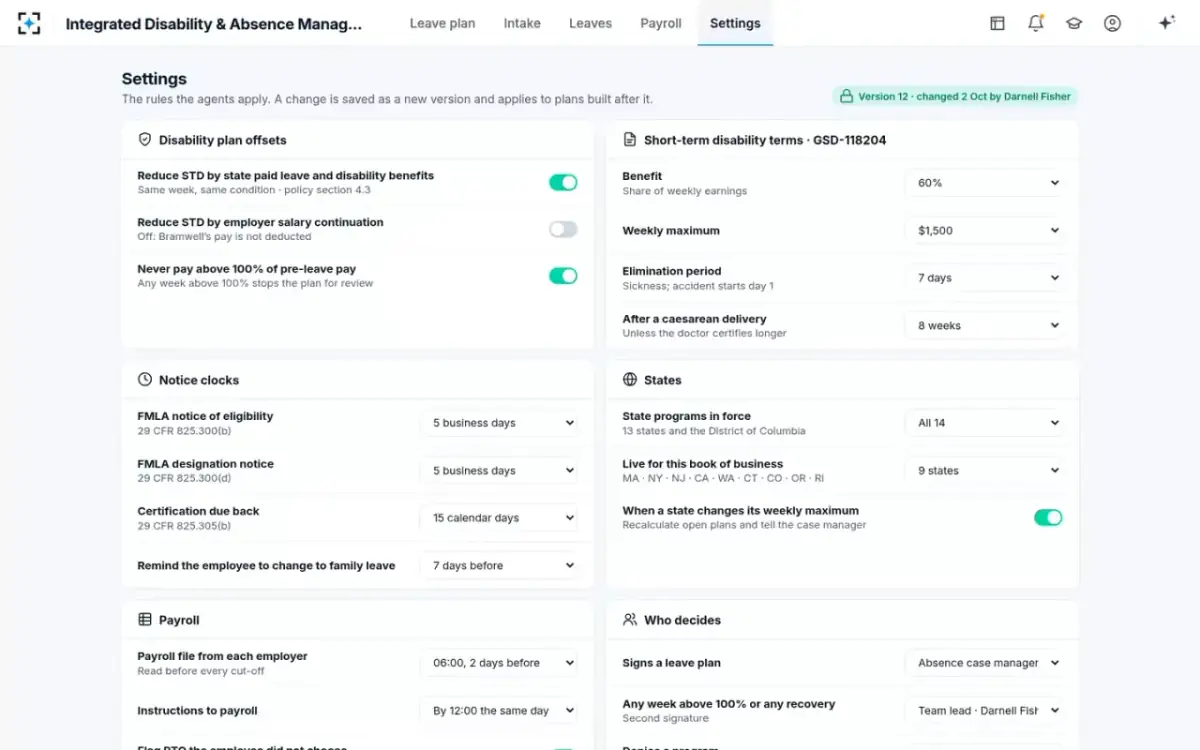
The pilot works the same way here as for any other tool: load your settings, replay 50 closed leaves, score against your key. The disability side of the same replay, offset by offset, is described in STD state disability offset, and the product itself is at Integrated Disability & Absence Management.
Questions people ask
Is there free FMLA tracking software?
Spreadsheets and free templates can count weeks, but they rarely handle a rolling 12-month year, hours-based counting for variable schedules, or notice dates, and none coordinates pay with disability or state programs. A free tool can be tested with the same pilot: replay your closed leaves and count the findings before relying on it.
How do you track intermittent FMLA leave in hours?
Convert the 12 workweeks into the employee's own hours, then deduct each absence in the employer's smallest leave increment, no larger than an hour. A 40-hour employee has 480 hours; one who works 30 hours has 360. If the schedule varies too much to know, the regulation uses the weekly average of hours scheduled over the previous 12 months (29 CFR 825.205(b)(3)).
Can an employer change its FMLA 12-month method?
Yes, with at least 60 days' notice to all employees, and the transition must leave employees "the full benefit of 12 weeks of leave under whichever method affords the greatest benefit to the employee" (29 CFR 825.200(d)(1)). An employer that never chose a method must use the one most beneficial to the employee until it gives that notice.
What records does FMLA software need to keep?
At least three years of the records 29 CFR 825.500 lists: pay and hours, dates of FMLA leave, hours for leave taken in less than full days, copies of notices, benefit premium payments and any designation dispute. Certifications and medical histories must be kept as confidential medical records, separate from personnel files.
What should I ask an FMLA software vendor before a pilot?
Ask which 12-month methods it supports and how it recalculates a rolling year; how it counts hours for variable schedules; whether every answer shows its rule and the employee's values; how it handles disability and state programs in the same weeks; and whether it will replay 50 of your closed leaves and let you score the result against your own answer key.