Study director software is not one product. Search the phrase and you will be shown four different jobs — collecting the study's data, converting it to submission standards, storing the documents, and writing the report — and most toxicology groups already own something for the first three. The fourth is the one that is still done by hand, and the questions that separate good from bad there are not about features. They are: does raw data stay read-only; does every number in the draft carry the cell it came from; what does the system do with an empty cell; and what validation evidence comes with it. Botminds' Preclinical Study Report Automation sits in that fourth box: it drafts each section of a study report from the signed plan and the raw data export, leaves a blank where the data has none, and hands the signed draft to the quality assurance unit with the number-to-source trail attached.
The regulatory material below is quoted from the US electronic records rule, the OECD GLP principles, the European and UK regulators. The product details and the screens come from a working demonstration on an invented study, VLT-TOX-028, with invented people; no figure here is a customer's measured result.
What a pilot asks of you, before anyone signs anything
3studies
closed, signed and still holding their data packages — one study type
1template
the house report template for that study type, as it is actually used
1
written statement of house style: number format, significance markers, pathology terms
0
live studies at risk, because every pilot study is already signed
What software does a study director use?
On a normal day, more of it than anyone designed. The collection system that holds the in-life data; the laboratory system behind clinical pathology; the pathology system the slides are read in; a spreadsheet or two; the document system the report is stored in; email for every question that does not fit the above; and a word processor, which is where the report is actually assembled. The study director's own work — reading the plan, checking the package, reviewing the draft, deciding adversity, signing — happens across all of them.
That is why the phrase is slippery. A supplier selling a collection system and a supplier selling a drafting system will both answer "yes" to "is this study director software", and both will be telling the truth about a different hour of the day. The first question to put to any demonstration is which of the four jobs it is doing, and which of the others it assumes you already have.
Four tools, four jobs: collection, standards, documents, drafting
The four jobs sold under one phrase
| The job | What it covers | What it does not | Does it write a sentence? |
|---|---|---|---|
| Collecting the data | In-life and laboratory capture: body weights, food consumption, clinical observations, clinical pathology, organ weights, pathology findings, with attribution and time stamps. | It does not summarise by group for a report, and it holds no view of the study plan’s reporting requirements. | No |
| Converting to standards | Mapping the study’s recorded values into standard tabulation datasets, checking them against conformance rules, and describing them in a data definition file. | It produces datasets for a reviewer, not tables for a report, and it is required only for some study types. | No |
| Storing the documents | Version control, controlled copies, electronic signature, retention and retrieval of the plan, the amendments, the contributing reports and the final report. | It stores whatever it is given. It has no opinion about whether a number in the document matches the data behind it. | No |
| Writing the report | Reading the signed plan and the data package, building every table cell from its source, drafting each section in house style, listing what is missing, and re-checking every number before signature. | It does not collect data, generate submission datasets, or replace the archive. | Yes — and that is exactly why its limits matter |
The practical consequence is that a drafting tool is an addition, not a migration. If a proposal involves moving the data out of the collection system, or re-keying it into a new one, the cost has been moved rather than removed.
The difference between a LIMS and a reporting tool
A laboratory information management system is a system of record: it is where a value is first written, attributed to a person and a time, and protected from being changed without a trace. A reporting tool is a system of reference: it does not own any value, and its job is to carry values into a document without altering them, and to say so when it cannot.
Confusing the two produces the worst outcome in a GLP setting — a second place where a value lives. The UK medicines regulator makes the design preference plain, listing among the enablers of data integrity the "use of external devices or system interfacing methods that eliminate manual data entries and human interaction with the computerised system". The same logic applies one layer up: a report whose numbers are references into the export, rather than characters typed from it, eliminates a manual transcription step that nobody should be performing in the first place.
What to ask a vendor about raw data
These are the questions that separate the fourth box from the brochure. Each is phrased so that a vague answer is visible as a vague answer.
Twelve questions to ask before you buy, and the answers that should worry you
- What write access does the system have to our raw data?
Worrying answer: "it can update the source if needed." Raw data should be read-only to a drafting tool, full stop.
- Where does a number in the draft come from?
Worrying answer: "the model reads the export and writes the report." Ask to point at a figure and see the file, sheet and cell behind it.
- What happens when a source cell is empty?
Worrying answer: anything other than "a blank that names the cell, and will not pass to signature." Carry-forward, group means and estimates are all wrong answers.
- How is a derived figure shown?
Worrying answer: just the result. You want the inputs and the arithmetic, so the only remaining question is whether the formula is right.
- What does it do when the export is replaced?
Worrying answer: "you re-run it." You want only the dependent sections redrafted, the new numbers re-checked, and the previous version kept.
- Can anyone turn off the checking?
Worrying answer: "it is configurable." Re-checking every number before signature should not be a setting.
- Who decides adversity and the dose levels?
Worrying answer: the system proposes and the study director confirms with one click. Proposals should be marked as proposals, with what they rest on.
- What is in the audit trail, and who can change it?
Worrying answer: "there is a log." Ask whether a user or an administrator can amend or switch it off, and what record that leaves.
- What validation evidence do we receive?
Worrying answer: "we are validated." Validation is of your use, in your environment; ask what you have to do and what they hand you.
- How do we archive the evidence?
Worrying answer: "it is in the portal." Validation documentation for computerised systems is an archive item under the GLP principles.
- What happens to our template and house style?
Worrying answer: "we have our own template." Your template is a controlled document; the tool should write into it.
- What leaves our environment?
Worrying answer: a shrug. Ask what is read, what is retained, where it is processed, and for how long.
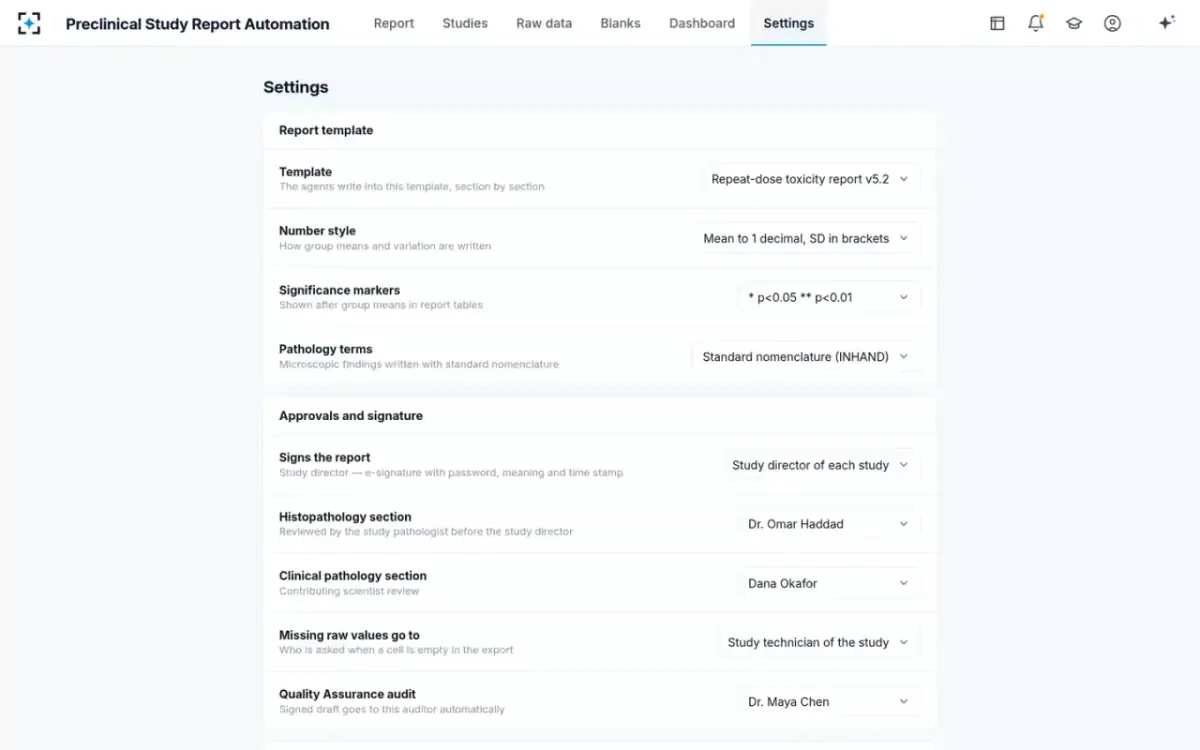
Which rules are yours to set, and which two are not
How do you validate software used in a GLP study?
Validation is of a use, not of a product, which is why "we are validated" is never an answer. The duty sits with the laboratory: under the OECD principles the study director must "ensure that computerised systems used in the study have been validated", and the validation documentation is among the records retained in the archives. The US electronic records rule states the object of the exercise — "validation of systems to ensure accuracy, reliability, consistent intended performance, and the ability to discern invalid or altered records".
The European regulator adds the governance layer for anything with a model in it: "SOPs implementing GxP principles on data and algorithm governance should be extended to include all data, models and algorithms used for AI/ML in cases of high regulatory impact or high patient risk", documented and regularly reviewed. FDA's draft AI guidance frames the same proportionality differently, asking that the effort spent establishing credibility "be commensurate with the AI model risk and tailored to the specific COU", where model risk combines the consequence of a wrong decision with how much influence the model has over it.
That last pairing is the useful one for a drafting tool, because it is how you argue the risk down honestly. The consequence of a wrong number in a study report is high. The influence of the system over that number is low by design if every figure is a reference to a cell and every figure is re-read against its source before a person signs. Write that argument down; it is the backbone of the validation plan.
The validation evidence map: what the rules ask, and what the supplier should hand you
Validation of the system
The electronic records rule
21 CFR 11.10(a): "Validation of systems to ensure accuracy, reliability, consistent intended performance, and the ability to discern invalid or altered records."
GLP expectation
OECD 1.2.2(g): the study director must "ensure that computerised systems used in the study have been validated".
What to ask for
A validation package you can read and extend: intended use, requirements, the tests run against them, the results, and what is left as a known limitation.
Retention of that evidence
The electronic records rule
—
GLP expectation
OECD 10.1(e): "Validation documentation for computerised systems" is among the items retained in the archives.
What to ask for
Documents in a form you can archive for the retention period, not a portal you lose access to when the contract ends.
The audit trail
The electronic records rule
21 CFR 11.10(e): "Use of secure, computer-generated, time-stamped audit trails … Record changes shall not obscure previously recorded information."
GLP expectation
OECD section 8: "Computerised system design should always provide for the retention of full audit trails to show all changes to the data without obscuring the original data."
What to ask for
A demonstration on your own test study: make a change, then show the previous value, who made it, when, and why.
Electronic signatures
The electronic records rule
21 CFR 11.50(b): the signer’s name, the date and time and the meaning "shall be included as part of any human readable form of the electronic record".
GLP expectation
OECD 9.1: the final report is signed and dated by the study director to accept responsibility for the validity of the data.
What to ask for
An exported PDF that carries the signature block, not a status that only exists inside the application.
Access and authority
The electronic records rule
21 CFR 11.10(d) and (g): system access limited to authorised individuals, with authority checks on who may sign or alter a record.
GLP expectation
The quality system’s own procedures, extended to the tool.
What to ask for
A role model you can map to your own seats, and evidence that an unauthorised attempt is refused and recorded.
Change control after go-live
The electronic records rule
21 CFR 11.10(k): controls over systems documentation, with "revision and change control procedures to maintain an audit trail".
GLP expectation
EMA: for higher-risk uses, "all non-trivial changes in the software and hardware stack supporting the model … require a re-evaluation of system performance".
What to ask for
A release process you are told about in advance, and a way to re-run your acceptance cases against a new version.
What 21 CFR Part 11 requires of a GLP system
Part 11 is short and specific about closed systems, and three of its controls decide whether a drafting tool is usable. First, validation, as above. Second, audit trails: "use of secure, computer-generated, time-stamped audit trails to independently record the date and time of operator entries and actions that create, modify, or delete electronic records. Record changes shall not obscure previously recorded information." The OECD principles say the same thing from the study's side, requiring design that retains "full audit trails to show all changes to the data without obscuring the original data".
Third, signature manifestations. A signed electronic record has to carry the signer's printed name, the date and time, and the meaning of the signature — and those three items "shall be included as part of any human readable form of the electronic record (such as electronic display or printout)". That rules out a design where the signature is a status inside an application and the exported PDF says nothing. In the demonstration, the signature screen states what is being signed — the exact version, the number of traced figures, and a warning if sections remain unreviewed — and the signer chooses the meaning before entering a password.
What each signature means, and who may apply which one, is the subject of a sibling guide: who signs a study report, and for what.
How to pilot report-drafting software on your own closed studies
A pilot on live studies is a bad idea and an unnecessary one. Everything worth knowing can be learned from work you have already signed, where the right answer is known and nothing is at risk.
A five-step pilot on closed studies, and what a good result looks like
| Step | What you do | What a good result looks like |
|---|---|---|
| 1 · Choose | Three signed reports of one study type whose data packages you still hold, including at least one that had a missing value or a late contributing report. | The awkward study is in the set. A pilot made only of clean studies proves nothing about the interesting cases. |
| 2 · Configure | Load the house template for that study type and write down your number style, significance markers and pathology terminology. | Configuration takes hours, not weeks, and every rule you set is visible on one screen. |
| 3 · Draft | Run each package through, without correcting anything first. | A complete draft of every section, plus a list of blanks and gaps — including the ones your team found at the time, and ideally one or two it did not. |
| 4 · Compare | Put the draft beside the signed report and compare number by number, not impression by impression. Where they differ, decide which is right. | Differences are few, each is explainable, and each is traceable to a cell you can open. A difference the tool cannot explain is the finding of the pilot. |
| 5 · Decide | Score three things: figures that differ, gaps found against gaps missed, and the time the whole run took against your own baseline. | Numbers you could show a quality assurance auditor, on your own studies, in your own template. |
Then break it on purpose, which is the half most pilots skip. Delete a week of values from one group and confirm a blank appears naming the cell. Hand it an unsigned amendment and confirm it is flagged. Replace one cell after the draft exists and confirm the dependent sections are redrafted and re-checked. Remove a contributing report and confirm the gap is classed as blocking. Four tests, an afternoon, and they tell you more than a month of demonstrations.
What you have to bring: templates, house style, signed reports
The inputs are the things a laboratory already has, which is the point. The report template for each study type, as it is actually used rather than as it was last approved. A written statement of house style: how numbers are formatted and rounded, how significance is marked, whether pathology terms follow standard nomenclature or the pathologist's recorded wording. A sample of past study plans, data packages and signed reports, so the drafting can be compared with work you already accepted. And the list of who signs, who reviews which section, and who audits.
What it reads on a live study is the same short list: the signed study plan and its amendments, the raw data export, and the contributing scientists' signed reports. What it produces is the report in your template, exportable as a document or a PDF, with the number-to-source trail as a spreadsheet, handed to the quality assurance unit when the study director signs.
Integration, not replacement: what stays where it is
What a drafting tool replaces, and what it must leave alone
Changes: Nothing. The export is read, never written.
Stays exactly where it is: The collection and laboratory systems remain the systems of record, with their own attribution and audit trails.
Changes: Built cell by cell from the source under your precision rules, instead of typed or pasted.
Stays exactly where it is: The table layouts are your template’s, not the supplier’s.
Changes: Nothing. A drafting tool neither produces nor validates standard tabulation datasets.
Stays exactly where it is: Whatever you use for conversion and conformance checking.
Changes: Nothing, except that what arrives is already traced.
Stays exactly where it is: Your archive, its retention schedule and its controls — including the validation documentation.
Changes: Nothing. Adversity, dose levels and the signature stay with the study director.
Stays exactly where it is: The study director as the single point of study control, and the contributing scientists’ releases.
Changes: It starts from a number-to-source trail rather than from a blank spreadsheet.
Stays exactly where it is: An independent unit, its own schedule, its own records and its own signed statement.
Going live on one study type first
Start where the volume is and the template is stable — usually repeat-dose, sometimes genetic toxicology, where reports are short and mostly tables. One study type means one template, one house style and one set of reviewers, and it lets the first month's findings be fixed before the second type is added. The demonstration covers repeat-dose, genetic toxicology, safety pharmacology, reproductive toxicology, toxicokinetic and acute studies, each written to its own template; a laboratory adds them one at a time, not all at once.
Two things are worth agreeing before the first live study rather than after. What the acceptance criteria are — written as the pilot's three scores, with the thresholds you will accept — and what happens at a new release: EMA's point about re-evaluating performance after non-trivial changes to the stack applies to your acceptance cases too, so keep them runnable.
The study list a head of nonclinical actually watches
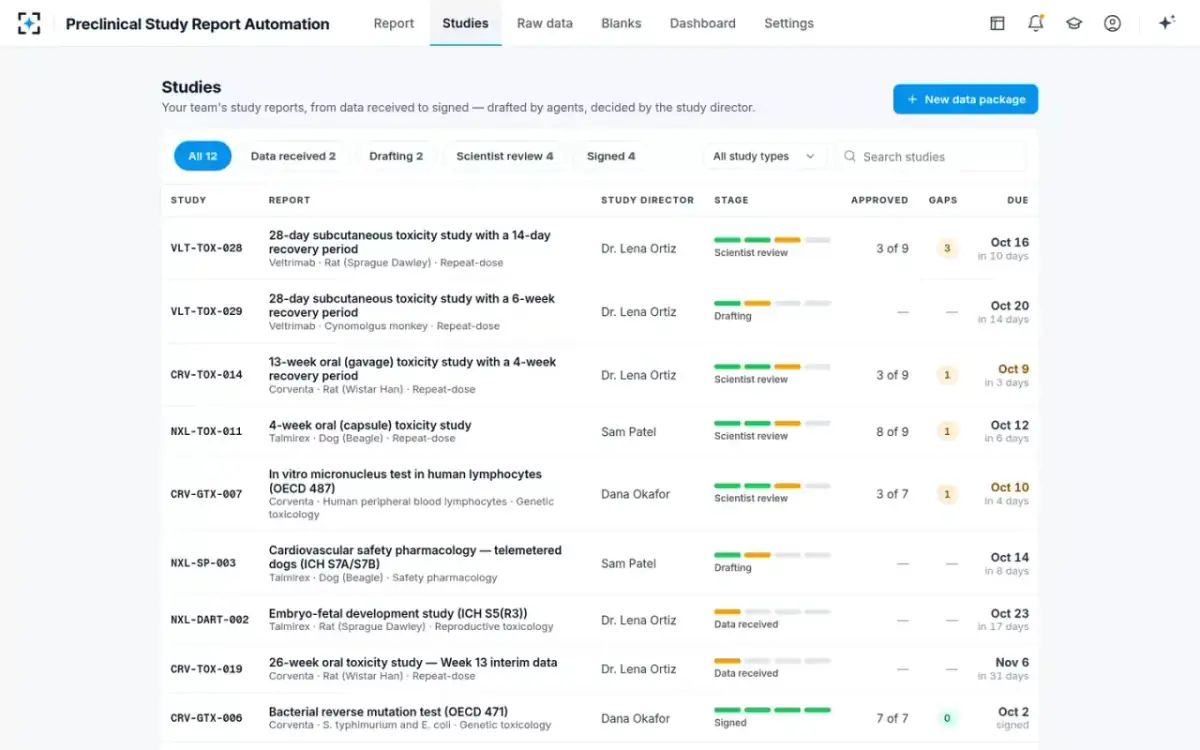
The time those dates measure is broken down in our guide to where the eleven days between data and signature go, and the design limits a buyer should test are set out in the six agents and what none of them may do. To run a pilot on three of your own closed studies, start from Preclinical Study Report Automation.
Questions people ask
Does report software replace a LIMS?
No, and a proposal that says it does should be read carefully. A laboratory information management system is where a value is first recorded and protected; a drafting tool reads an export of those values and must never write to them. Replacing a system of record is a data-migration project with its own validation, not a reporting improvement.
How long does it take to go live with study report software?
The honest answer is that configuration is fast and acceptance is what takes the time. Loading one template and writing down house style should take hours or days, not months; running three closed studies and comparing them number by number is a week or two of part-time work; agreeing acceptance criteria, writing the validation plan and executing it is the real schedule, and it belongs to your quality unit rather than to the supplier.
What should a supplier hand over for validation?
At minimum: a statement of intended use, the requirements the system was built against, the tests run against them and their results, known limitations, the release and change-control process, and a description of the audit trail including who can and cannot alter it. You then validate your own use in your own environment, and archive the documentation — the GLP principles list validation documentation for computerised systems as an archive item.
Can a contract research organisation use it on sponsor studies?
Nothing in the design prevents it, and two questions get sharper. Whose template and house style apply, study by study — a contract laboratory often needs several — and where the data is processed and retained, which is usually a term of the sponsor's own agreement. Both are configuration questions, but they should be answered before the first study rather than during it.
What if our house style conflicts with the standard pathology nomenclature?
It is a setting, and it should be an explicit one. Pathology terms can follow the standard nomenclature or the pathologist's recorded wording, and the choice belongs to the laboratory. What should not be configurable is substitution without a record: a term changed in the report should be traceable to what the pathologist actually recorded.
How do we know the tool has not quietly changed a number?
By checking the two things the rules already require. Every figure in the draft should resolve to a cell you can open in the export, and the audit trail should show every change with its author, time and reason, without obscuring what was there before. If either is missing, no assurance about the model is worth much.