NCUA call report software does three jobs: it builds the 5300 from the general ledger and the core, checks the draft against the errors and warnings the NCUA publishes each cycle, and produces the XML import file that CUOnline accepts. The NCUA allows all three and keeps one thing back: "regardless of the method the credit union uses to submit its Call Report, the credit union is responsible for ensuring that the data reported each quarter reflects fully and accurately the reporting requirements" (5300 instructions, September 2025). That sentence is the right test for any product. Botminds' NCUA 5300 Call Report meets it by splitting the work among seven agents that draft, tie, check and explain, under hard limits: none posts to the general ledger, clears a break on its own, uploads or certifies.
What software for the 5300 is checked against, this cycle
983
errors and warnings in the NCUA’s published edit file for September 2026
428
errors, each of which blocks submission until fixed
552
warnings and historical warnings a person must review
3
XML schemas, one per charter type, republished every cycle
What does NCUA call report software do? Three jobs, and one the NCUA keeps
NCUA call report software turns the books into a filed 5300: drafting, checking and producing the import file. Drafting means mapping general ledger accounts to the 5300's account codes and filling the statements and Schedules A to I from the general ledger, the core's loan and share data and the investment system. Checking means running the edits the NCUA publishes before CUOnline runs them. The import file is an XML document that has to match the schema the NCUA posts for that quarter.
The NCUA itself has asked whether software is doing enough of this. Its April 2026 request for information put the question directly: "For credit unions that use manual processes to gather and input into the NCUA's electronic Call Report, Corporate Call Report, and Profile systems, is there software available, from core system vendor(s) or elsewhere, to increase automation and efficiency? If so, what are the hurdles, if any, to utilizing such software?" (Federal Register, April 24, 2026). Less than six months later the agency raised its estimate of one 5300 filing from 4 hours to 47, citing what the public told it. The work is still largely manual, and the regulator knows it.
What no software does is take the responsibility. The rule that requires the report, 12 CFR 741.6, also requires a credit union to file a corrected report once it is told of an error or finds one (12 CFR 741.6). A product that files the wrong number does not file the correction; the credit union does.
Seven agents, one job each, and what none of them may do
NCUA 5300 Call Report is built as seven agents rather than one program because each step of the 5300 has a different owner and a different failure. The matrix below is the whole design: what each agent does, and the things it is never allowed to do, which are as much a part of the product as the work.
NCUA 5300 Call Report: what each agent does, and what it may never do
DoesDrafts the statements and Schedules A to I from the general ledger trial balance through the account-code mapping, the core, the investment accounting system and the loan servicing system, citing each field’s sources.
May neverPosts to the general ledger · maps a new general ledger account without the administrator’s approval · uploads
DoesTies each schedule to the general ledger, the core subledgers, the investment accounting system and the prior filing; opens breaks and matches top-side adjustments to them.
May neverClears a break by itself · lets an adjustment through without a preparer and a different reviewer
DoesRuns the NCUA’s published errors and warnings and the import file schema test before upload, and builds the import file.
May neverCertifies or uploads: filing stays with the certifying official in CUOnline
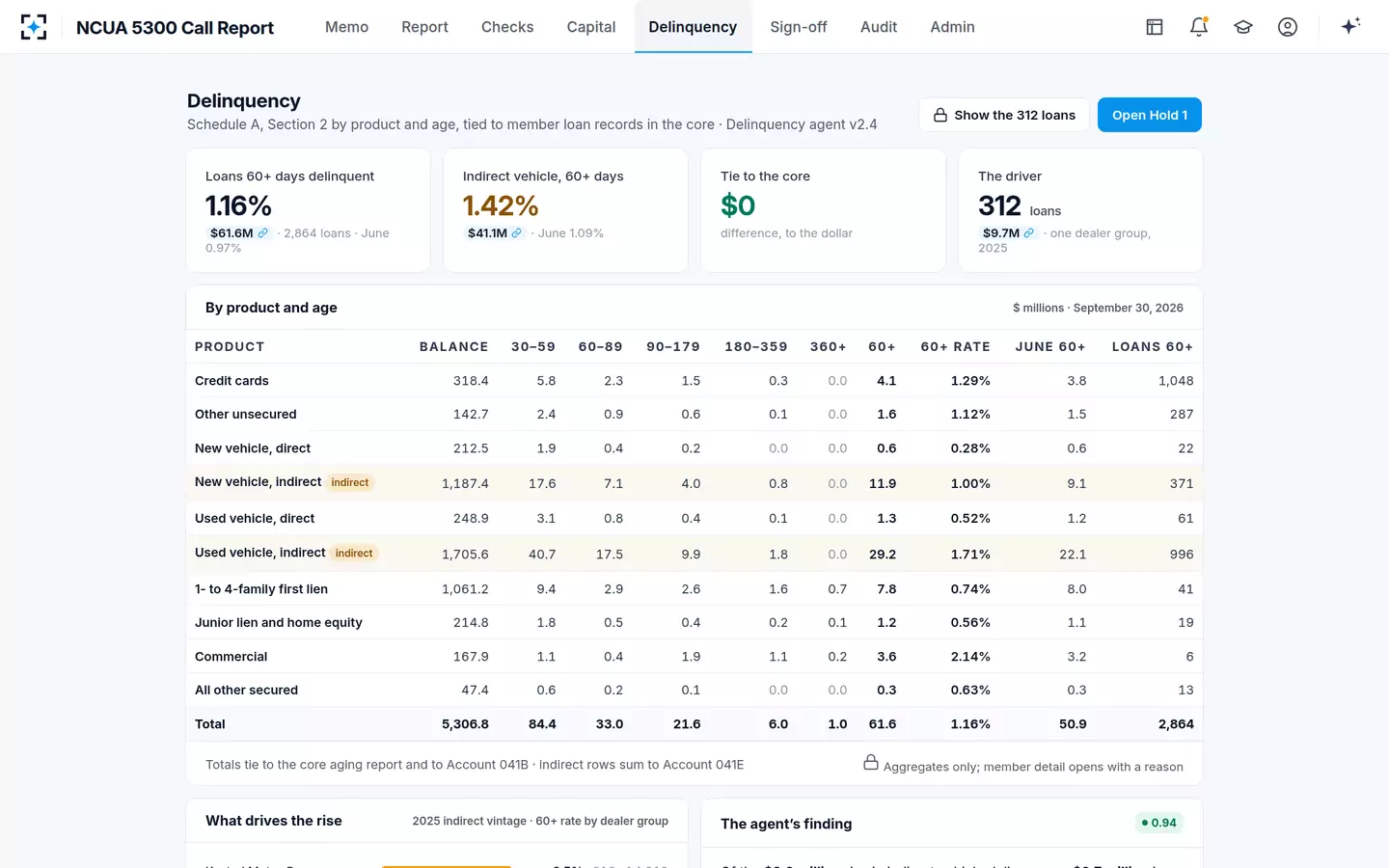
DoesTies delinquency by product and age, from 30–59 days to 360 days and more, to member loan records and finds the drivers by dealer, vintage, branch and credit tier.
May neverShows member detail outside a drill with a reason · changes a loan record
DoesExplains quarter-over-quarter moves past the credit union’s thresholds and drafts warning comments from evidence: prior filings, general ledger detail, board and ALCO minutes, rate sheets.
May neverSubmits an explanation a person has not accepted
DoesComputes net worth, the net worth ratio and the risk-based capital ratio under Part 702 with every input cited, and shows the headroom and a what-if on a loss.
May neverChanges the classification a person reports · writes a what-if into the report
DoesWrites the CFO a one-page sign-off memo from the drafted report: only what needs a decision, each sentence cited to the schedule line and its source.
May neverSays “ready” while a hold, an error or an unexplained warning remains
Two terms in the matrix need defining, because no NCUA text uses them. A break is a difference between a schedule and the system it should agree with: the general ledger against the investment accounting system, say, or Schedule A, Section 2 against the core's aging report. A top-side adjustment is an entry made for the report on top of the closed general ledger, usually to correct a timing or mapping difference without reopening the books. Both are where errors and fraud hide, which is why the Reconciliation agent can match an adjustment to a break but cannot approve it, and why the preparer of an adjustment can never be its reviewer.
What does call report software check before upload?
Good call report software runs, before upload, every edit the NCUA will run after it: in the September 2026 cycle, 983 of them. The NCUA publishes the list each quarter on the CUOnline page as "Call Report Edits: Errors and Warnings", with each edit's formula, message and the charter types it applies to (NCUA CUOnline). The four kinds behave differently in CUOnline, and the difference decides how much of the work is clerical and how much is judgement.
The NCUA's 983 published edits for September 2026, by kind
Errors are arithmetic and logic: "The total amount of delinquent loans (account 041B) cannot exceed the total amount of loans outstanding (account 025B)." CUOnline will not accept a report with one. Warnings are plausibility checks, such as E0989, which fires when loans are outstanding but no delinquency is reported; the user guide says "users must provide a comment for all warnings to submit the Call Report" (CUOnline user guide). Historical warnings compare this quarter with the last, and they are sized to the credit union. Total loans 60 days or more delinquent trips E5175 below $20 million in assets on a 75% move of at least $250,000, E5174 up to $200 million on a 75% move of at least $1 million, and E5478 above that on a 75% move of at least $2.5 million.
Those thresholds carry a lesson for buyers. A credit union of several billion dollars whose 60-day delinquency rises by a fifth in a quarter trips none of the 26 historical warnings on delinquency, which wait for a move of 50% or 75%, or for reported delinquency to vanish. The NCUA's checks catch the impossible and the extreme; they were never meant to explain a material move. Software that only reproduces the published edits leaves the explanation of everything in between to the CFO's memory. NCUA 5300 Call Report adds the credit union's own thresholds, in the sample settings 10% and $500,000 for any line and a 25 basis point rise in a product's 60-day rate, and drafts an explanation for each move past them.
Delinquency by product and age, tied to the core before anyone explains it
Can the NCUA call report be imported? Yes, through a schema that changes every cycle
CUOnline accepts an imported 5300, but only as XML that matches the schema the NCUA publishes for that quarter. "Data that is allowed to be imported must be in XML format and adhere to the XML schema published by the NCUA each cycle. Any attempt to import data that cannot be validated by the published schema will be rejected" (NCUA CUOnline). The CUOnline page lists separate schemas for federal credit unions, federally insured state-chartered credit unions and non-federally insured credit unions, an account descriptions file, sample XML files, and an Import File Test Utility that checks a file against the schema without importing anything.
The import has a trap that every buyer should ask about. "If the XML file only contains ten account codes, CUOnline will only overwrite these ten accounts in the pending Call Report. Accounts other than the ten in the XML file will be changed back to 0" (CUOnline user guide). A file built from last quarter's mapping, missing an account code the NCUA added, does not fail; it zeroes a field. That is why the Validation agent tests the file against the current schema and the Preparation agent will not map a new general ledger account without the administrator's approval. What you bring from your accounting software sets out the inputs and the mapping in detail.
Why the limits are part of the product, not a disclaimer
Every "never" in the matrix answers a rule or a known failure. The no-posting limit keeps the general ledger the single book of record, so a figure on the 5300 can always be traced back to an entry someone made and someone approved. The no-clearing limit exists because a break cleared by the same process that found it has not been reviewed by anyone. The member-detail limit keeps member data minimized: schedules and checks show totals, and a drill to individual loans needs a role and a reason, is masked and is logged.
There is also a supervisory reason to want these limits written down. The Government Accountability Office reported in May 2025 that the NCUA, unlike the banking agencies, cannot examine the technology firms credit unions depend on, and that its model risk management guidance is "limited in scope and detail" (GAO-25-107197; AI for credit unions covers what that leaves to the credit union). For a credit union, that means the oversight of a reporting tool falls on the credit union. A product whose limits are explicit, enforced and visible to the supervisory committee is far easier to oversee than one that simply promises accuracy.
Can software certify the call report? No: a person in CUOnline does
Software can prepare and check the 5300; it cannot certify or submit it. CUOnline is "the web-based program used by credit unions and state credit union supervisors to submit and certify a Call Report", and access requires a registered user with an NCUA Connect account, in one of two roles, Administrator or User. The Federal Credit Union Act asks a named officer to declare the report true and correct as far as that officer knows and believes (12 U.S.C. 1782(a)(1); credit union CFO job description quotes the section). Knowledge and belief are not things an agent has.
So NCUA 5300 Call Report stops at the import file. The Validation agent builds it, checks it against the published schema, and hands it to the certifying official, who uploads it, certifies the 4501A Profile if needed, answers any warning with the comments a person has accepted, and submits. The audit trail records who did each step and when.
How do credit unions automate the call report? A flow with people at the decisions
Credit unions automate the call report by automating the steps that are mechanical and keeping people at the decisions. In practice that is the order below, where every step marked in green is a person.
From the closed general ledger to a submitted 5300, with NCUA 5300 Call Report
Agent
DraftStatements and Schedules A to I from the trial balance, the core and the investment system, each field citing its accounts.
Never: post to the general ledger
Agent
Tie and checkEach schedule to the general ledger, the core, the investment system and last quarter; then the NCUA’s published edits, the credit union’s own thresholds and the XML schema.
Never: clear a break or upload
Agent
ExplainDrafts each warning comment and variance explanation from records, with sources.
Never: submit an unaccepted explanation
A person decides
Review and approveA reviewer signs each schedule, adjustment and explanation; the CFO approves the memo.
A person decides
Certify and submitThe certifying official uploads the checked file in CUOnline and submits.
Where NCUA 5300 Call Report fits, and where it does not
The solution fits a credit union whose 5300 is assembled from systems that already hold the data: a general ledger with a trial balance and an account-code mapping, a core with loan, share and delinquency data, an investment accounting system with holdings and prices, and imaged documents such as minutes and dealer agreements. It reads all of them read-only. It is built for the credit union where the hours go on mapping, tying and explaining, and where the CFO signs a report too long to read; the sample is a $6.8 billion credit union with 2,260 general ledger accounts.
It does not replace any of those systems, and it does not replace CUOnline. It does not post entries, file the report or certify it. A very small credit union with a few dozen general ledger accounts and a stable balance sheet may get most of what it needs from its core's call report export and a disciplined second review; the case for agents grows with the number of accounts, products and people involved. And no tool removes the need to read the NCUA's changes each cycle: the next one, a proposed stablecoin schedule from March 2027, adds 26 accounts.
What NCUA 5300 Call Report does, and what stays with you
| The work | The agents | Your people and systems |
|---|---|---|
| Mapping general ledger accounts to 5300 account codes | Apply the mapping and flag accounts it does not cover | Approve every new mapping (the administrator) |
| Statements and Schedules A to I | Draft every field, with its sources | Review and sign each schedule |
| Tie-outs and breaks | Tie to the general ledger, core, investment system and prior filing | Post and approve any adjustment, maker and checker |
| NCUA errors and warnings | Run all published edits and the schema test before upload | Fix errors; accept, edit or reject each drafted comment |
| Capital and delinquency | Compute the ratios and trace drivers, citing every input | Decide classification and what to tell the board |
| Submission | Build and check the import file | Certify the Profile, upload, submit and keep the confirmation |
What questions should we ask call report software vendors?
Ask questions that a demonstration on your own last quarter can answer, not questions a brochure can. The eight below follow the rules and the traps above; each has a right answer you can check.
Eight questions for any NCUA call report software
- Does every field open to the general ledger accounts or records behind it?
If a number cannot be traced, nobody can review it, and an examiner will ask.
- Which edit file did you run, and does it match this cycle’s?
The NCUA republishes errors and warnings each quarter; a product running last quarter’s list is checking the wrong report.
- What happens to an account code missing from the import file?
CUOnline sets it to zero. The answer should be a schema test and a mapping check, not silence.
- What does the product flag beyond the NCUA’s edits?
Historical warnings wait for a 75% move. Your own thresholds should catch the material move in between.
- Who writes the warning comments, and who accepts them?
A comment is the credit union’s statement to its regulator. A person should accept each one, with a reason code for rejections.
- Can a preparer approve their own adjustment?
If the software allows it, the control is a convention, not a control.
- Does anything post to our general ledger or submit to CUOnline?
Read-only access and a person at submission keep responsibility where the instructions put it.
- Can we see the full trail, and export it for the supervisory committee?
Who prepared, reviewed and approved each step, when, and on what evidence.
The strongest test is a back-run: give the product the trial balance, mapping and filed 5300 from a quarter you have already closed, and compare field by field. Where it differs, find out which of you was right. How the NCUA already uses machine learning on 5300 data explains why that comparison is worth doing before the regulator does it for you, and the full solution is on NCUA 5300 Call Report.
Questions people ask
What software do credit unions use for the 5300?
Many key the 5300 directly into CUOnline; others use a call report module from their core or accounting vendor, or build an XML file and import it. The NCUA's instructions tell credit unions to ask their data processing vendor whether import is available. Whatever the method, the instructions hold the credit union responsible for the accuracy of the data.
What is the 5300 XML schema?
It is the file format CUOnline accepts for an imported Call Report, published by the NCUA every cycle, with separate schemas for federal, federally insured state-chartered and non-federally insured credit unions. A file that cannot be validated against the current schema is rejected. The NCUA's Import File Test Utility checks a file against it without importing anything.
Does software have to run the NCUA's edits, if CUOnline runs them anyway?
It does not have to, but running them before upload moves the work from the last days to the first. CUOnline will refuse a report until every error is cleared and every warning has a comment, so finding them early is the difference between fixing and explaining calmly and doing both on the 30th.
Can call report software explain a warning for us?
It can draft the explanation from evidence, and NCUA 5300 Call Report's Variance and Delinquency agents do. The comment is still the credit union's statement to the NCUA, so a person accepts, edits or rejects each draft; the agents never submit an explanation a person has not accepted.
Is call report software a model under model risk guidance?
The NCUA's model risk management guidance is, in GAO's words, limited in scope and detail. Rule-based edits and arithmetic are deterministic checks. Agents that draft explanations are a different kind of tool, which is why every one of them here cites its sources, works under a confidence threshold and leaves the decision with a person.