Credit union accounting software, meaning the general ledger and the core's share and loan system, together with the investment accounting system beside them, already holds nearly every number on the NCUA 5300 Call Report. It does not hold them in the 5300's shape. Someone has to map general ledger accounts to the 5300's account codes, pull loan, share and delinquency figures from the core, tie the investment system to the general ledger and explain what moved. To have Botminds' NCUA 5300 Call Report draft that report, a credit union brings six things: the trial balance and account-code mapping, a core extract, the investment system's holdings and prices, the loan servicing data behind indirect lending, the documents that explain a quarter, and its last filings. The agents read all of them read-only and change none.
The distance from accounting software to the 5300, in a sample quarter
2,260
general ledger accounts mapped to 5300 account codes
Sample credit union
1,104
fields in the finished import file
Sample credit union
983
NCUA errors and warnings the draft must clear
September 2026 edit file
26
new accounts the NCUA proposes from March 2027
Schedule J
What accounting software do credit unions use? A general ledger, a core, and the rest
Credit unions run their books on a general ledger and a shares-and-loans system, sometimes from one core vendor and sometimes from two, plus specialist systems for investments and loan servicing. The NCUA asks every credit union exactly this on its Profile. Item 6 of the Information Technology section reads "Select the core applications the credit union uses", lists "General Ledger" and "Shares/Loans", and asks whether each record is kept "using a manual system, an internal system, or an external application", with the vendor and product name for each vendor-supplied one (Profile Form 4501A instructions, September 2026). Item 8 asks about any core conversion planned in the next 24 months.
Those answers are marked non-public, so there is no published count of which credit unions use which package, and this guide names none. What matters for the 5300 is the combination, not the brand. A credit union whose general ledger and core come from the same vendor may get a call report export with part of the mapping done; one with a separate general ledger, an outsourced investment accounting service and a dealer portal for indirect loans has four systems to tie every quarter. The question to put to any accounting software is not whether it "does the call report", but which of those ties it does and which it leaves to people.
What data is needed to prepare the 5300? Six inputs, each with an owner
The 5300 needs the general ledger for the statements, the core for loans, shares and delinquency, the investment system for securities, and evidence for every explanation. The table below is the list NCUA 5300 Call Report starts from, with the owner each input usually has at a credit union and how often the agents read it in the sample settings.
What you bring from your accounting software, and what each input becomes on the 5300
On the 5300The Statement of Financial Condition, the Statement of Income and Expense, and the net worth accounts on Schedule G
OwnerAccounting
ReadAt close, then hourly until sign-off
On the 5300Loan balances and counts (Schedule A, Section 1), delinquency by age (Section 2), shares and members (Schedule D)
OwnerOperations and IT
ReadNightly extract
On the 5300Holdings, classification and fair values for Schedule B, and the price file behind unrealized gains and losses
OwnerTreasury or ALCO
ReadDaily price file
On the 5300Dealer codes, vintages and credit tiers, for indirect loans (Schedule A, Section 5) and for explaining delinquency
OwnerLending
ReadWhen a draft is built or a driver is traced
On the 5300Board, ALCO and credit committee minutes, dealer agreements and allowance memos, the evidence behind each explanation
OwnerEach committee’s secretary
ReadWhen an explanation cites it
On the 5300The prior quarter for every historical edit, and the trend behind each variance explanation
OwnerThe CFO
ReadEach cycle
The last two rows are the ones credit unions forget. The NCUA's 349 historical warnings compare this quarter with earlier reports, so the prior filing is an input, not an archive. And a warning comment is only as good as the document behind it: a rise in indirect delinquency explained "from memory" is an assertion; explained from a dealer agreement amendment and the credit committee minutes that paused it, it is evidence. NCUA 5300 Call Report's explanations cite the passage they rest on.
How does accounting software feed the 5300? Keyed, exported, or imported as XML
Accounting software feeds the 5300 in one of three ways: someone keys the figures into CUOnline, the vendor's call report module produces them, or an XML file is built and imported. The instructions allow both: figures may be keyed straight into CUOnline or imported, and an import must be an XML file that fits the schema the NCUA posts on its CUOnline page each cycle (NCUA call report software quotes the import rule; 5300 instructions). They also tell credit unions to "contact their data processing vendor to determine the availability of this feature".
Keying the 5300 against importing it
Keyed into CUOnline: In the preparer’s spreadsheet or head, re-applied each quarter.
Imported as XML: In software, applied the same way every time, and visible to a reviewer.
Keyed into CUOnline: Every field typed; CUOnline requires a value in each, “even if that value is zero”.
Imported as XML: Every account in the file overwrites the pending report; accounts left out are set back to 0.
Keyed into CUOnline: As data is entered, often in the last week.
Imported as XML: Before upload, if the file is checked against the NCUA’s edits and schema first.
Keyed into CUOnline: Keying and transposition errors, and no time left to review.
Imported as XML: A stale mapping or schema that silently zeroes or misplaces a field.
Keyed into CUOnline: The filed numbers, unless the preparer kept workpapers.
Imported as XML: Each field with the general ledger accounts or records behind it, if the software keeps them.
Import is not automatically safer. The user guide is explicit about how an import treats what is not in the file: any account the file leaves out is set back to zero (the guide's own example is quoted in NCUA call report software), and "users can still edit the Pending Call Report after importing a file and are responsible for ensuring the data is accurate" (CUOnline user guide). A file built from a mapping that missed one account code does not fail; it reports a zero. Import moves the risk from typing to configuration, which is why configuration needs an owner and a test.
How do we map GL accounts to 5300 account codes?
Map each general ledger account to one 5300 account code, using the account descriptions the NCUA publishes each cycle, and treat every new general ledger account as a mapping decision that needs approval. The CUOnline page posts an "Account Descriptions" file for each quarter, and the NCUA recommends downloading it because it "further describes the accounts being collected for the Call Report" (NCUA CUOnline). The sample credit union in NCUA 5300 Call Report maps 2,260 general ledger accounts into a report of 1,104 fields, so most 5300 accounts collect several general ledger accounts.
The traps are classification, not arithmetic. Overdrawn share accounts sit in the general ledger as negative shares; on the 5300 the NCUA's FAQ says to report overdrawn non-commercial share accounts "in Schedule A, Section 1, line 4 - All Other Unsecured Loans/Lines of Credit (Accounts 994 and 397)", as loans (5300 FAQs). Overdraft protection advances go to the same line. A mapping that nets them against shares produces a balance sheet that adds up and is wrong.
The other trap is time. A general ledger account opened in the middle of a quarter has no mapping until someone gives it one, and a quarter-end trial balance with an unmapped account either drops it or lands it in a default bucket. NCUA 5300 Call Report's Preparation agent flags any account the mapping does not cover and will not map a new one without the administrator's approval; the Reconciliation agent then ties each schedule back to the general ledger, so an unmapped balance shows up as a break rather than a missing number.
One figure in NCUA 5300 Call Report, opened from the 5300 line to the general ledger
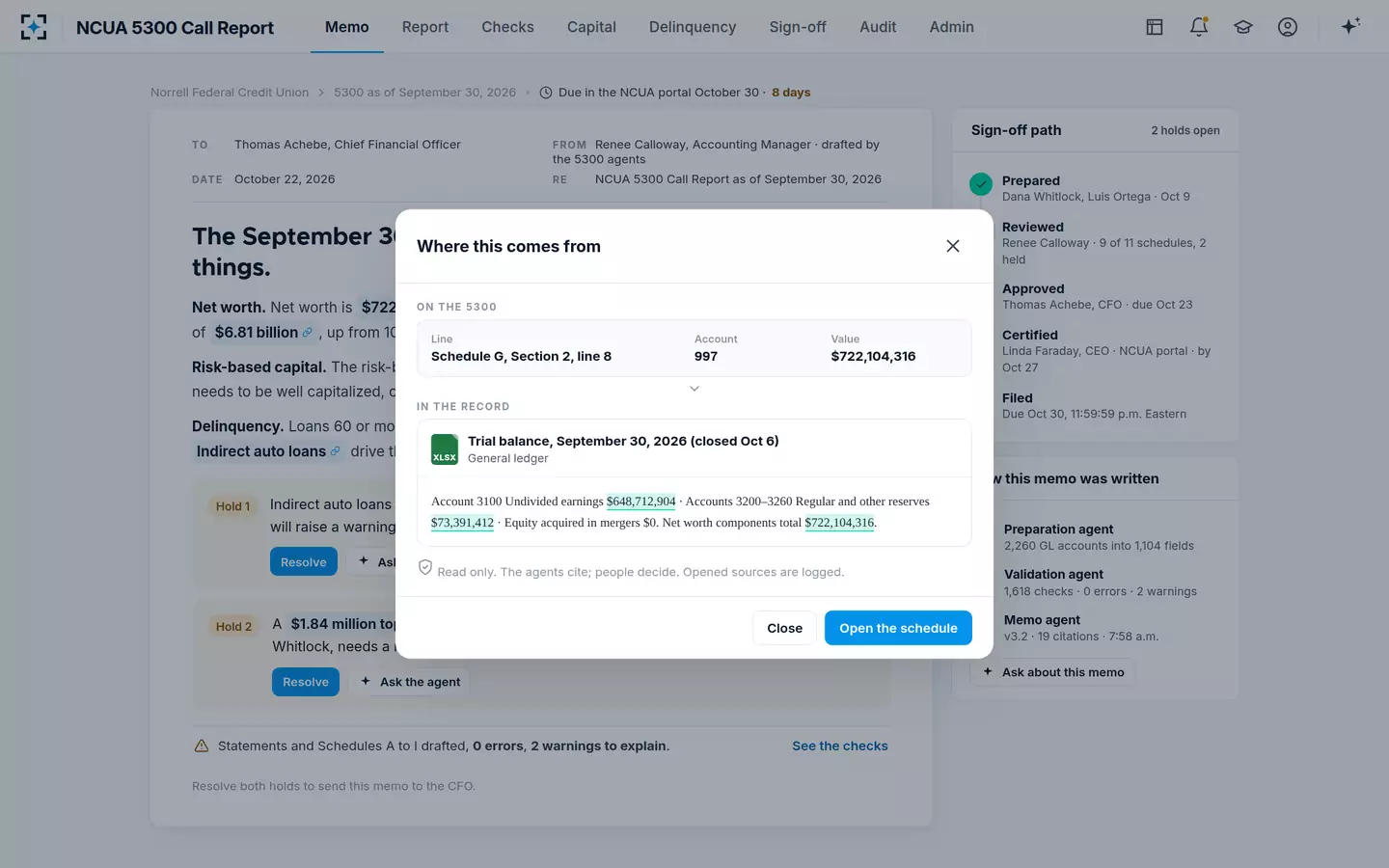
Does a credit union need GAAP for the call report?
Yes, from $10 million in total assets. Rule 741.6(b) requires the 5300's financial statements to follow GAAP once total assets reach $10 million, and lets a smaller credit union use other regulatory accounting principles, while a state supervisor may require GAAP of a state-chartered credit union at any size (12 CFR 741.6). The threshold bites in the quarter it is crossed: the NCUA's FAQ expects CECL in the 5300 for the very quarter the credit union reaches $10 million (5300 FAQs; quoted in 5300 call report instructions).
For accounting software, that means a credit union approaching $10 million needs its general ledger set up for GAAP reporting, including the CECL allowance, before the quarter it grows into, not after. Above the threshold, the 5300 follows the GAAP books, so a difference between the audited statements and the 5300 is a reconciling item somebody has to explain.
Bring the change process too: the schema, the accounts and the form change
The 5300 changes more often than most general ledgers do, so a credit union has to bring a way of absorbing changes, not just its data. The XML schema is published every cycle; the CUOnline page lists separate files for September 2026 and June 2026. Account codes are retired and replaced: in March 2025 the NCUA retired Overdraft Fee Income (IS0048) and Non-Sufficient Funds Fee Income (IS0049) "due to an NCUA policy change" (5300 changes, March 2025). And from the March 31, 2027 report date the NCUA proposes a new Schedule J for payment stablecoin activities, with 26 new accounts (Federal Register, October 9, 2026).
Each change touches the mapping. A retired account leaves general ledger balances with nowhere to go; a new account needs a source, even if the answer is zero. A credit union should decide who reads the NCUA's changes document each cycle, who updates the mapping, and who approves it. In NCUA 5300 Call Report the mapping, the thresholds and the deadlines are settings changed only by the administrator, each change saved as a new version. The March 2027 changes walks through the proposed schedule.
From your accounting software to CUOnline, with NCUA 5300 Call Report in between
Agent
ReadTrial balance, core extract, investment holdings and prices, loan servicing data and documents, all read-only.
Never: write to any of them
Agent
Map and draftApply the account-code mapping and draft every statement and schedule, citing sources.
Never: map a new account without approval
Agent
Tie and checkTie to the general ledger, core, investment system and prior filing; run the NCUA’s edits and the schema test.
Never: clear a break
A person decides
Review and approveReviewers sign schedules, adjustments and explanations; the CFO approves.
A person decides
Import and submitThe certifying official uploads the checked XML file to CUOnline and submits.
How long does it take to set up call report automation?
The honest answer is one closed quarter to prove it, and then as long as your mapping takes to clean up. The first step NCUA 5300 Call Report takes with a credit union is a back-run: the solution drafts a quarter you have already filed, from that quarter's trial balance, account mapping and core data, so that every field can be compared with what you submitted. Where the two differ, someone finds out which was right. The length of everything after that depends on things only you know: how many general ledger accounts you have, how many are unmapped or mapped by habit, and how many systems feed the report.
What you bring to that first run is a short list, and it is the same list that makes a credit union easy to examine.
What to bring for the first run on your own 5300
- The trial balance for a quarter you have already filed
Closed, at the account level, with the account descriptions.
- Your general ledger to 5300 account-code mapping
However it is kept today: a spreadsheet, a vendor table or the preparer’s notes.
- The filed 5300 for that quarter and the one before
The comparison for the back-run, and the prior quarter for historical edits.
- The core’s loan, share and delinquency data at quarter-end
Including the aging report the delinquency schedule should tie to.
- Investment holdings and the quarter-end price file
With classification as available-for-sale, held-to-maturity or trading.
- The documents behind last quarter’s warning comments
Minutes, memos and agreements: the evidence an explanation should cite.
- Who prepares and who reviews each schedule
So separation of duties is set up from the first cycle.
- Your thresholds and internal deadlines
The variance, delinquency and materiality levels that should trigger an explanation or the CFO.
What stays in your accounting software, and what the agents never touch
Everything stays where it is. The general ledger remains the book of record: the agents never post to it, and a top-side adjustment, an entry made for the report on top of the closed books, is prepared by one person and approved by another in the solution, with any adjustment above $5 million in the sample settings also going to the CFO. The core, investment and loan servicing systems are read on their own schedules. CUOnline is still where the credit union's own user submits.
Net worth and risk-based capital in NCUA 5300 Call Report, built from the general ledger
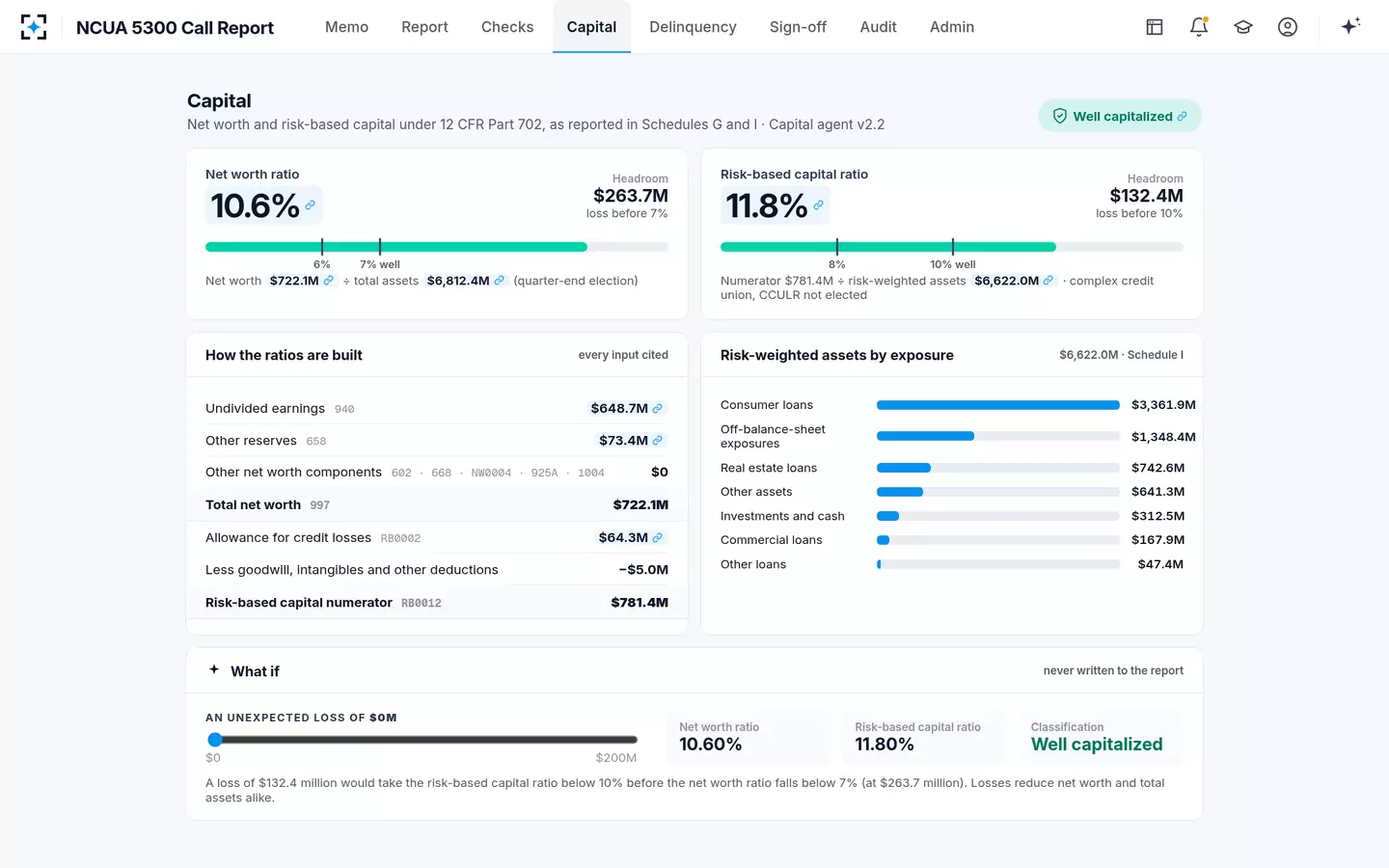
Which of those boundaries to insist on in any product is on NCUA call report software: seven agents and what none may do. The capital lines above are worked through on the net worth ratio formula, and the solution is on NCUA 5300 Call Report.
Questions people ask
Does our core's call report export replace a review?
No. An export applies a mapping; it does not prove the mapping is right or that the schedules tie to each other. The NCUA's instructions hold the credit union responsible for accurate data whatever method it uses, so the exported figures still need a tie to the general ledger and a second person.
Where do overdrawn share accounts go on the 5300?
As loans. The NCUA's FAQ says overdrawn non-commercial share accounts go in Schedule A, Section 1, line 4, All Other Unsecured Loans/Lines of Credit (Accounts 994 and 397), whether or not there is an overdraft protection program. Qualifying commercial overdrafts go on line 13.
What happens if our XML import leaves an account out?
CUOnline overwrites only the accounts in the file and sets the others in the pending report back to zero. A missing account therefore files as a zero rather than an error, unless an edit happens to catch it.
Do we need to change accounting software to automate the 5300?
No. NCUA 5300 Call Report reads the general ledger, core, investment and loan servicing systems you already have, read-only, and produces an import file for CUOnline. The work of setting it up is in the mapping and the owners, not in replacing systems.
Does the NCUA publish which core systems credit unions use?
No. The Profile asks each credit union to name its general ledger and shares-and-loans applications and any planned core conversion, but those fields are marked non-public. The NCUA uses them for supervision; it does not release them.