Clinical trial monitoring software is usually bought to solve a scheduling problem and then asked to solve a documentation one. A trial management system knows a visit was planned, performed and reported; it rarely knows whether the report says anything true. The questions below are written for the second problem — the monitoring visit report, the document an inspector reads to judge the monitoring — and they separate three kinds of tool that are often compared as though they were one. Botminds' Monitoring Visit Report Automation is the third kind, and this guide states what it refuses to do as carefully as what it does, because for this category the refusals are the specification.
No product other than our own is named here, and none is ranked. The rules quoted are FDA's risk-based monitoring questions and answers, its inspection programme for sponsors and CROs, 21 CFR 312.56 and ICH E6(R3). The screens are the solution's own sample study data, on fictional studies and people.
What clinical trial monitoring software is being asked to do
Start from the obligation rather than the category. The sponsor's duty in the US is stated in one line of regulation: it must monitor the progress of every clinical investigation conducted under its IND (21 CFR 312.56(a)) — and the clause immediately after it is the one software rarely helps with: a sponsor who discovers that an investigator is not complying with the agreement, the investigational plan or the regulations must promptly either secure compliance or end that investigator's participation and notify FDA.
Everything a monitoring tool does sits between those two sentences. It has to help a sponsor see what is happening at a site, and it has to leave a record that the sponsor acted. ICH E6(R3) adds the content obligation for the document in the middle: a monitoring report summarises what was reviewed, describes significant findings, states the actions required and follows up on their resolution, including those not resolved in previous reports — and the sponsor's own procedures must describe what its reports contain and how often they are produced.
So the evaluation question is not "does it do monitoring". It is: of the four things the report must carry, which does this tool produce, which does it check, and which does it leave entirely to a person at 9pm?
Is a CTMS enough to write monitoring visit reports?
No, and it is not designed to be. A clinical trial management system is a system of record for planning and tracking: sites, visits, dates, milestones, payments, and often the report's status and its attachment. That is genuinely valuable — and it is exactly what an inspector uses it for. FDA's inspection programme sends its investigators to the trial master file and the trial management system to find the monitoring reports and the records around them, and asks whether visits, reports and letters met the timelines the monitoring plan set.
What a trial management system does not do is read the visit notes, compare a drafted sentence against the randomisation system, or notice that an action raised three visits ago has quietly stopped appearing. It will tell you a report exists and whether it was late. The two shapes of finding inspectors write up about monitoring reports — something omitted, something contradicted — are invisible to it, because it never opens the document's contents. What inspectors actually find about monitoring sets out those two shapes and how often they appear.
Three kinds of tool, and what each one leaves to you
Three things get sold under the same phrase. The difference is not how modern each one is; it is where the work stops.
Where each kind of tool stops, and what is left on the monitor’s evening
| What the report needs | A trial management module | A writing assistant | Drafting with a review step |
|---|---|---|---|
| Read the visit notes and the checklist | No. It stores them if you attach them. | Yes, as a prompt. It will use what you paste. | Yes, as a source, with each fact tied to the paragraph it came from. |
| Write the sections in your template | A blank template, with fields prefilled from the visit record. | Yes, fluently — which is the risk as well as the benefit. | Yes, with a citation on every sentence so each one can be checked. |
| Compare the draft with the study data | No. | Only if you paste the data in and ask it to. | Yes, as a check that runs on every draft against named rows. |
| Account for the last report’s open actions | Tracks action items as records, if someone maintains them. | No, unless you supply the last report. | Yes: every action gets a fate, and none closes without evidence. |
| Apply your escalation rules | Workflow states, configured by a change request. | No. | Settings the sponsor owns, applied to the next draft. |
| Leave a per-report record of who decided what | Status history and attachments. | A chat history, usually outside the trial record. | A trail of each finding, fix, dismissal, reason, decision and signature. |
| Sign | Often yes — an electronic signature on the record. | No. | No. The signature belongs to the clinical trial manager, under a stated meaning. |
The writing assistant column deserves one more sentence, because it is where many teams start. A general writing tool will produce a fluent, plausible monitoring visit report from a set of notes, and it will not know that an action from August is still open, that the randomisation system says 23 where the notes say 22, or that consent on a superseded version has a two-working-day clock in this study's plan. Fluency without the comparisons makes the two findings inspectors write up easier to produce, not harder.
The twelve questions, and what a good answer sounds like
Ask these of any supplier, including us. Each one has a weak answer that sounds reassuring, which is why the weak answer is written down beside it.
Twelve questions for monitoring software that touches the visit report
- What does it read, and what does it do when a source is missing?
Name the four: visit notes, the visit checklist, the previous report, and the study systems. A weak answer is "it integrates with your stack". The important half is the failure behaviour — a tool that drafts anyway, silently, when the study data is unavailable, has just written an unchecked report.
- Does every sentence carry the source it came from, openable beside the report?
A citation per sentence is what makes a human check cheap enough to actually happen. "It is explainable" is not an answer; ask to click one.
- What does it do with the previous report’s unresolved actions?
Every action should appear with a fate — closed before, closed here, carried forward with its age, or not addressed — and none should close without evidence. "It carries items forward" without an evidence rule means it can close one on a sentence.
- Which comparisons run on the draft, and can you see the list?
You should be able to read the checks as a list and switch each on or off: enrolment, concomitant medications, deviations, queries, checklist coverage, wording. "AI quality checks" is a category, not a list.
- Whose escalation rules does it apply, and who can change them?
Your monitoring plan, as settings, changed by you. If a new rule is a change request to the supplier, the tool will be out of date with your plan for most of the study.
- What does it refuse to do?
A supplier who cannot name a limit has not thought about the record. Ask for the list, and ask what in the product enforces each one.
- What happens when the tool and the study data disagree?
It should show both sides and hand the decision over, not pick a winner. The monitor may be right and the database wrong; that is a finding, not an error.
- What is locked before signature, and what can be waived?
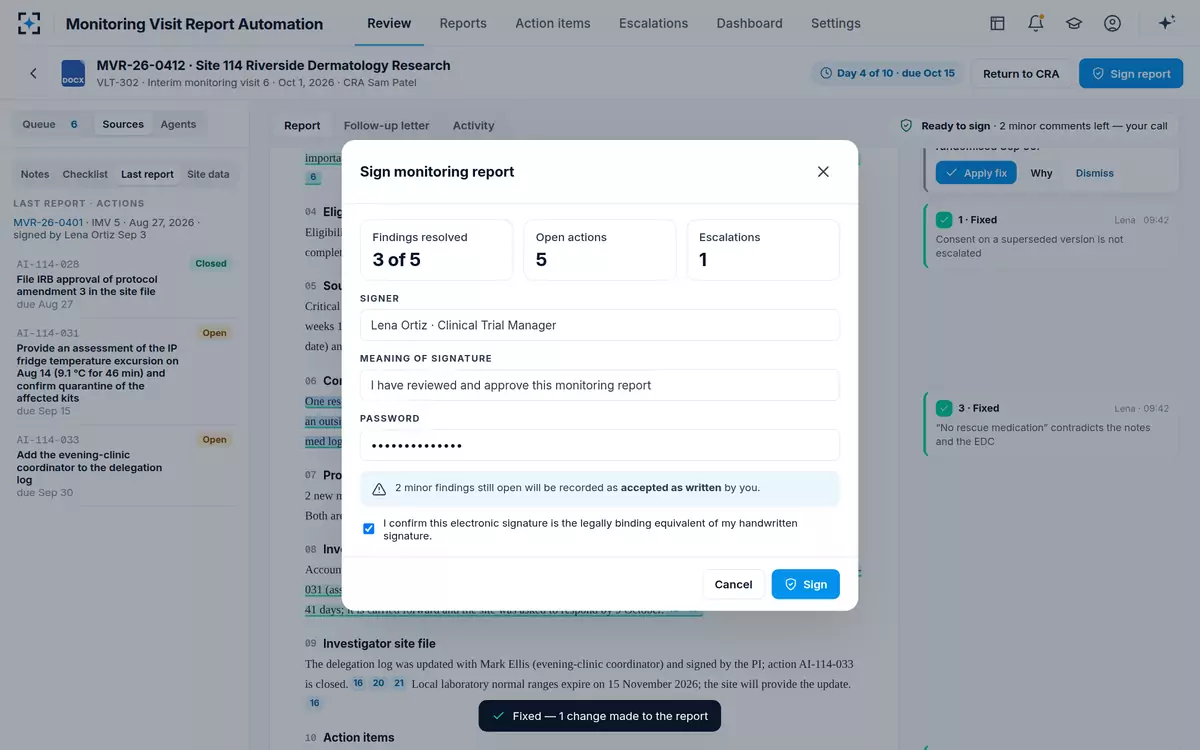
Ask which findings hold a signature, who may waive one, what reason is required, and where an open minor finding is recorded when the report is signed anyway.
- What does the signature mean, and can we set the meaning?
The sentence the signer confirms should be yours, and visible on the screen where they sign. Ask what the record shows if the same person later changes something.
- What is on the trail, can it be changed, and can you take it out?
Each agent step, fix, dismissal, reason, decision and signature, with who and when, unalterable — and exportable to the trial file, because an inspector reads your records, not a supplier’s screen.
- How do you validate it, and what happens at each release?
ICH E6(R3) asks for validation, audit trails, user management, backup, disaster recovery and security proportionate to the system and the data. Ask what the supplier qualifies, what you must qualify, and how you are told about defects.
- What do we get back if we stop?
Your reports, your letters, your action history and your trail, in a form your trial file accepts, without a project to extract them.
What should it refuse to do? The limits worth insisting on
In this category the refusals carry more weight than the features, because each one corresponds to a decision that GCP places with a person. ICH E6(R3) says the sponsor decides the appropriate action on findings requiring escalation, and that those decisions and their resolution are recorded. A tool that quietly applies its own fix removes both the decision and the record.
Six limits to insist on, and the question that tests each one
The limit: Nothing enters the report that is not in the notes, the checklist, the previous report or the study data.
How to test it in a demonstration: Ask for a report drafted from notes with a gap in them, and see whether the gap appears as a gap.
The limit: An open action cannot be closed without evidence, whatever the notes imply.
How to test it in a demonstration: Give it notes that say "everything from last time is sorted" and see what the action table does.
The limit: A check proposes a fix; a person applies, rewrites or rejects it.
How to test it in a demonstration: Ask what the report looks like before anyone has opened it, and whether anything has already changed.
The limit: Software does not sign, and does not decide an escalation.
How to test it in a demonstration: Ask what happens when nobody is available to sign. The answer should be "it waits".
The limit: Rejecting a finding is allowed; rejecting it invisibly is not.
How to test it in a demonstration: Dismiss a finding in the demonstration and ask to see where the reason is kept.
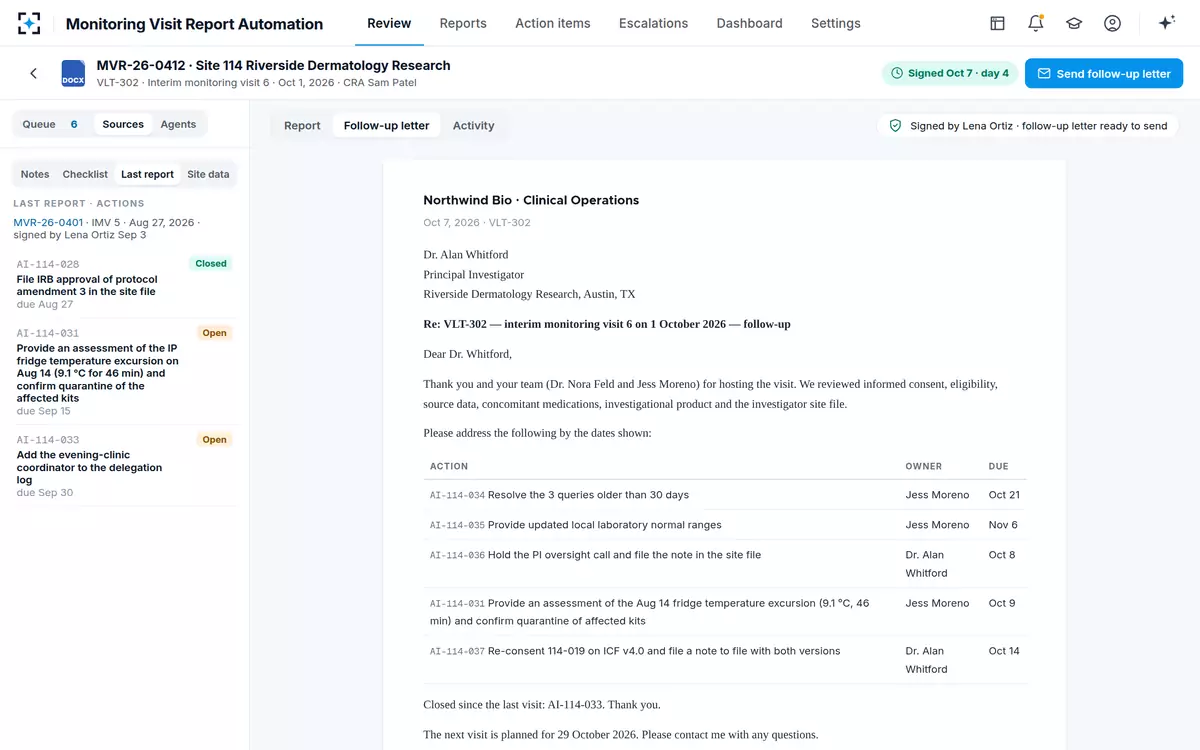
The limit: The follow-up letter is written from the signed report, with no internal assessments or escalations in it.
How to test it in a demonstration: Ask to send a letter from an unsigned report.
What belongs in the letter and what must not is a decision with its own rules; what the site may see works through them.
Your monitoring plan as settings, not as a change request
FDA's risk-based monitoring questions and answers lists what a monitoring plan should contain, and two of its items read like a specification for a settings screen. One is the trigger list:
"A description of the types of issues identified through monitoring that would trigger immediate issue escalation."
FDA, A Risk-Based Approach to Monitoring of Clinical Investigations: Questions and Answers, April 2023, Q6
The other asks for an approach to determining whether an important issue detected at one site may also be present at others, and whether a finding suggests a systemic problem with the protocol or the investigational plans that requires remediation. Both are study-specific. Both change during a study. Neither should require a supplier.
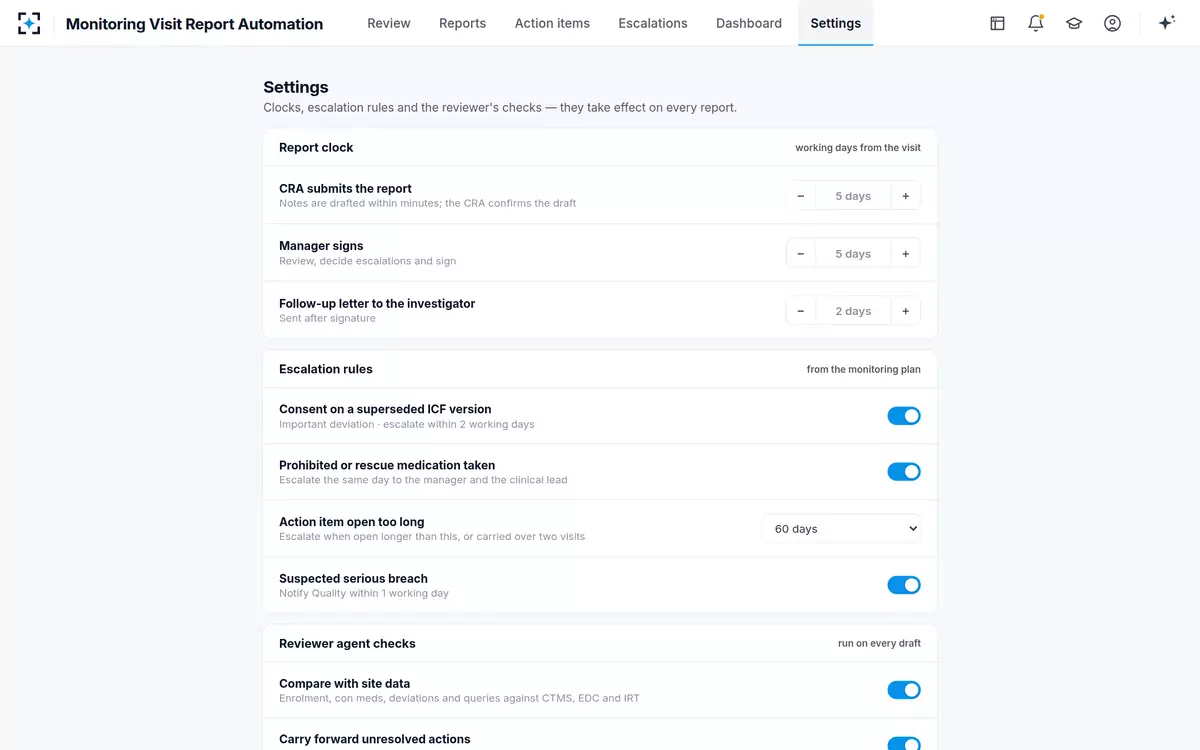
That is the test to apply to any product's configuration: can the people who own the monitoring plan change the rules the tool applies, see what is currently in force, and have the change take effect on the next draft? In the solution the clocks, the escalation rules, the reviewer's checks, the template per visit type and the meaning of the signature are all settings a sponsor owns.
The settings a sponsor should expect to own, with what each one controls
| Setting | What it controls | The options in the solution |
|---|---|---|
| CRA submits the report | Working days from the visit to the CRA’s submission. | Stepped up or down one working day at a time; five in the sample study |
| Manager signs | Working days for the sponsor-side review and signature. | Stepped up or down one working day at a time; five in the sample study |
| Follow-up letter to the investigator | Working days after signature for the letter to go out. | Stepped up or down one working day at a time; two in the sample study |
| Action item open too long | When an unresolved action is escalated on age or on how many visits it has been carried. | 30 · 45 · 60 · 90 days, or carried over two visits |
| Escalation rules from the monitoring plan | Which plan rules the reviewer applies to every draft. | Each rule on or off: superseded consent version, prohibited or rescue medication, suspected serious breach |
| Reviewer checks | Which comparisons run on each draft. | Each check on or off: compare with site data, carry forward unresolved actions, a statement for every checklist item, flag subjective wording |
| Report template | The sponsor template used for each visit type. | One per visit type: initiation, interim, close-out and remote |
| Signature meaning | The sentence the signer confirms. | Two meanings in the sample study, including escalations recorded |
A monitoring plan expressed as settings a sponsor can see and change
What it has to read: notes, checklist, previous report, CTMS, EDC and IRT
A report that only knows the visit notes can repeat the monitor's mistakes faithfully. The four sources exist because each one catches something the others cannot: the notes carry what happened; the checklist carries what was supposed to be looked at; the previous report carries what was promised; the study systems carry what the site's data actually says. A tool that reads one of the four is a writing aid, and should be priced as one.
In practice the integration conversation is where evaluations stall, so take it in this order. Which systems, by name, and read-only or read-write? Which fields — enrolment and randomisation, concomitant medications, deviations, queries, investigational product, visits per site? How current is the copy the comparison uses, and does the report show which extract it compared against? What happens when one system is unavailable: refuse to draft, draft and mark the check as not run, or draft silently? Only the third answer is unacceptable, and it is the one you have to ask for explicitly.
Output matters too. The signed report and the follow-up letter have to arrive in the trial master file in the zone your procedures name, with participant identifiers only, and in a form the file accepts without rework.
What the site receives, generated from the signed report and nothing else
How to validate clinical trial monitoring software, and the records you will be asked for
The obligation is proportionality, not a fixed package. ICH E6(R3) asks sponsors to "Ensure that the requirements for computerised systems (e.g., requirements for validation, audit trails, user management, backup, disaster recovery and IT security) are addressed and implemented", with documented procedures and training, adding that these requirements should be proportionate to the importance of the system and the data or activities they are expected to process. The system also belongs in the sponsor's record of important computerised systems, with its use, functionality, interfaces, validation status and the person responsible for managing it.
Three practical consequences follow for a tool that drafts reports. First, the supplier's validation is an input to yours, never a substitute: EMA's 2024 reflection paper on artificial intelligence is explicit that it is the clinical trial sponsor's responsibility to ensure the algorithms, models, datasets and data processing pipelines it uses are fit for purpose. Second, your qualification should test your own use — your templates, your escalation rules, your systems — because that is what will be inspected. Third, you need a defect route: E6(R3) asks for a process by which a service provider tells the sponsor about system defects, and you need your own answer for defects that touch reports already signed.
Where the use could be of high regulatory impact or high patient risk, more may be asked of you, and where a drafted report sits in the FDA and EMA frameworks works through that judgement and the record it needs.
Who should be in the room, and what each one is protecting
Today
Owns the clock from visit to signed report and the monitors whose evenings pay for it, and hears about a late report when it is already late.
With agents
Sees every report in the queue with its age, its open findings and its clock, and can say which study and which monitor the delay belongs to.
Still theirs: Whether the tool fits how this team actually works, not how a demonstration works.
Today
Reads reports after they are signed, when the only remaining fix is a documented correction.
With agents
Sees the categories of finding raised and resolved before signature, and the reason recorded for every dismissal.
Still theirs: Whether the sponsor can show, two years later, how a report was produced and who decided what.
Today
Fields the queries that follow when a report and the study data disagree, long after the visit.
With agents
Sees the disagreement raised on the draft, against named rows of the study systems, while the monitor still remembers the visit.
Still theirs: Which systems are read, how often, and what happens when one is unavailable.
Today
Adds the tool to the record of systems after it is bought, and discovers its interfaces during an audit.
With agents
Holds the validation status, the interfaces, the user roles and the defect route before the first report is drafted.
Still theirs: That the system record, access controls and release process satisfy the sponsor’s own procedures.
How to pilot it on reports you have already signed
The only honest pilot uses reports whose answers you already know. Take ten signed reports across at least two studies and two monitors, including one close-out and one that was sent back. Supply the tool with exactly what the monitor had at the time — the notes, the checklist, the previous report and a study data extract as at the drafting date — and keep the signed version out of its reach.
Then compare four things. What it raised that your reviewer also raised, which tells you it agrees with your standard. What it raised that nobody raised, which is where the value is, and which must be adjudicated by a person who can say whether each one was real. What it missed that your reviewer caught, which tells you what the checks do not cover. And the time a person needed to get from the draft to something they would sign, measured rather than estimated.
Judge the result on the categories, not on a total. Missing escalations, dropped carry-forward actions, statements inconsistent with the study data, missing statements and wording are five different problems with five different owners. Where the hours in a monitoring report actually go sets out the five measures worth taking while the pilot runs, so the before and after are comparable.
What a reviewer leaves behind for the signer, and what the signature records
What you need to bring before day one
Nothing on this list is unusual, and assembling it early is the difference between a pilot that starts in a fortnight and one that starts in a quarter. Your monitoring plans and the escalation rules inside them. Your report templates, one per visit type, in the form your sponsor procedures approve. A sample of past visit notes — dictated and typed — and the signed reports that came from them. Read access to the study systems the reports have to agree with, and the name of the extract the comparison will use. The identifier convention you require, participant identifiers only. The trial file zone the signed report and letter must land in. And a named person on each side of the signature: the CRA who confirms and the manager who signs.
We will not quote an implementation duration here, because the honest answer depends on which of those you already have. What we will do is run Monitoring Visit Report Automation on a sample of your own visit notes and past reports, which is also the first half of the pilot above.
Questions people ask
What does clinical trial monitoring software do?
It covers three different jobs that are often conflated: planning and tracking visits (a trial management system), producing the prose of a report (a writing assistant), and drafting the report from its sources and checking it against them before a person signs. Only the third touches the two things inspectors write up — something the report omitted, and something it contradicts.
Is a CTMS enough to write monitoring visit reports?
No. A trial management system is the system of record for sites, visits, dates and the report's status, and inspectors look there for the reports and their timeliness. It does not read the visit notes, does not compare a drafted sentence with the study data, and cannot see that an action from three visits ago has stopped being mentioned.
What questions should you ask a monitoring software vendor?
Group them in three. What it reads and what it does when a source is missing. What it compares, whose rules it applies, and what it refuses to do. And what it leaves behind: the per-report trail, the signature meaning, the validation and defect route, and what you get back if you stop. The weak answers are the reassuring abstractions — "it integrates", "it is explainable", "AI quality checks".
How do you validate clinical trial monitoring software?
Proportionately, and against your own use. ICH E6(R3) asks for validation, audit trails, user management, backup, disaster recovery and security proportionate to the importance of the system and the data it processes, with the system recorded in the sponsor's list of important computerised systems along with its interfaces, validation status and owner. The supplier's package is an input; the qualification that matters is on your templates, your escalation rules and your systems.
What data does monitoring software need from EDC and IRT?
Enough to test the statements a report makes: enrolment and randomisation counts, concomitant medications, protocol deviations, open and ageing queries, investigational product accountability and the visits recorded per site. Ask which extract the comparison used and whether the report shows it, and ask what happens when one system is unavailable — drafting silently without the check is the answer to rule out.
Can monitoring software enforce our own escalation rules?
It should, as settings you can see and change, taking effect on the next draft. FDA's risk-based monitoring questions and answers expects a monitoring plan to describe the types of issues that would trigger immediate escalation, and those are study-specific and change during a study. If a new rule means a change request to the supplier, your tool will spend most of the study out of step with your plan.