Garnishment software is any system that helps process garnishment orders, and the phrase covers two jobs that share almost nothing but the word. An employer's payroll team uses it to withhold from an employee's wages, within the federal limit of the lesser of 25% of disposable earnings or the amount above 30 times the federal minimum wage (Department of Labor Fact Sheet #30), and to keep withholding every pay period. A bank's legal order desk needs the opposite in most respects: a one-time review of money already deposited, protection of two months of federal benefits identified by two fields in an ACH batch header under 31 CFR Part 212, state account exemptions, a 21-day hold for IRS levies, quarterly child support matches, a customer notice with eleven required items, and a file an examiner can retrace. A buyer who searches "garnishment software" for a bank should start by ruling out tools built for the first job. Botminds' Garnishment & Levy Processing is built for the second, with agents preparing every order and two specialists deciding.
Wage garnishment software and bank garnishment software do different jobs
Wage garnishment (employer payroll): Future paychecks, withheld each pay period until the order ends.
Bank garnishment (legal order desk): Money on deposit when the order is reviewed; later deposits are not reached by the same order.
Wage garnishment (employer payroll): Consumer Credit Protection Act Title III: the lesser of 25% of disposable earnings or the amount above 30 times the federal minimum wage.
Bank garnishment (legal order desk): 31 CFR Part 212: two months of coded federal benefit deposits protected automatically, plus state account exemptions.
Wage garnishment (employer payroll): The employee's pay, deductions and disposable earnings.
Bank garnishment (legal order desk): Every account the debtor owns, two months of postings, and the ACH batch header of each deposit.
Wage garnishment (employer payroll): Continuous on salary and wages until released (26 U.S.C. 6331(e)).
Bank garnishment (legal order desk): Reaches deposits on hand at service; held 21 days; not continuous (IRM 5.11.4).
Wage garnishment (employer payroll): Income withholding orders from the state agency.
Bank garnishment (legal order desk): Quarterly data matches answered within 45 days, then the agency's lien or levy.
Wage garnishment (employer payroll): Set by the order and state law.
Bank garnishment (legal order desk): Within 3 business days of the review, eleven items, with a model in Appendix A.
What is the difference between wage garnishment software and bank garnishment software?
Wage garnishment software calculates a percentage of pay, repeatedly; bank garnishment software decides once what part of a balance is protected and what may be frozen. The difference runs through every rule. The tax code makes an IRS levy on wages continuing: its effect "shall be continuous from the date such levy is first made until such levy is released" (26 U.S.C. 6331(e)). An IRS levy on a bank account is not. The IRS manual says "unlike a levy on wages and salary, a bank levy is not continuous", and that "Once income is deposited in a bank, there is no exempt amount" (IRM 5.11.4.6).
Treasury's benefits rule draws the same line for creditor orders. A bank may not keep garnishing deposits that arrive after the review, and reviews each order only once (31 CFR 212.6(f), (g)). A payroll engine's central feature, withholding again every cycle, is exactly what a bank's system must never do on the same order.
Four numbers a bank's garnishment software must get right that payroll never sees
2fields
"XX" in positions 54–55 and "2" in the Originator Status Code mark a protected benefit
1review
per order, on first service; the same order served again gets no second review
0continuing
freezes of later deposits under the same order
11items
in the account holder's notice, due within 3 business days of the review
What should bank garnishment software do?
It should do what the rules require, in the order they require it, and leave a file that proves it. That sounds obvious; the test is whether each capability can be tied to a rule and checked. The table below is the list we would put in a request for proposal, with the rule behind each line and a way to test it.
What bank garnishment software should do, the rule behind it, and how to test it
| Capability | Rule | How to test it |
|---|---|---|
| Read each order and classify the issuer; flag a Notice of Right to Garnish Federal Benefits | 31 CFR 212.4 | Serve test orders from a court, the IRS and a child support agency with and without the notice |
| Find every account the debtor owns, without matching on name alone | 212.5(f); IRS levy form instructions | Plant near-miss names, a closed account and a second account |
| Identify benefits from the batch header, not the description | 212.3; Fiscal Service guidelines | Plant a commercial "XX" credit with status code 1, and a Treasury check |
| Set lookback dates from the review date, including month ends | 212.3; Appendix C | Run the four lookback examples in Appendix C |
| Compute the protected amount per account, once | 212.6(a), (b), (f) | Run the five protected-amount examples; re-serve the same order |
| Apply each state's exemptions from a dated, approved table | 212.9(b); state law | Ask to see the table version applied to each test order |
| Block any fee against the protected amount and out of IRS levy proceeds | 212.6(h); IRM 5.11.4.4.3 | Try to post a fee on a protected-only account |
| Draft the notice with all eleven items within 3 business days | 212.7 | Compare the draft with Appendix A, item by item |
| Hold IRS-levied funds 21 calendar days and surrender the next business day | 26 CFR 301.6332-3 | Serve a test levy before a holiday and read the computed date |
| Keep a file sufficient to show compliance for at least two years | 212.11(b) | Ask an examiner's question about a closed test order and time the answer |
The middle rows are the ones a demonstration rarely shows. A vendor's sample order will have one beneficiary, one account and a balance comfortably above the benefits. The cases that cause violations are the co-owner's benefits, the benefit moved to savings, the review across a month end, the deposit on the review date; they are listed with their right answers in how to test a garnishment protected amount.
What is legal order processing software, and where do the errors happen?
Legal order processing software, in the broad sense, is anything that moves an order from receipt to closure: intake, a case record, clocks, document templates, holds and remittances. The errors that reach customers and examiners rarely come from the case record. They come from the decisions inside it: which accounts, which deposits, which state's law, which amount. A system that tracks clocks perfectly but leaves the lookback to a specialist with a calculator has automated the safe part.
The decision, with its evidence, is the part to look for
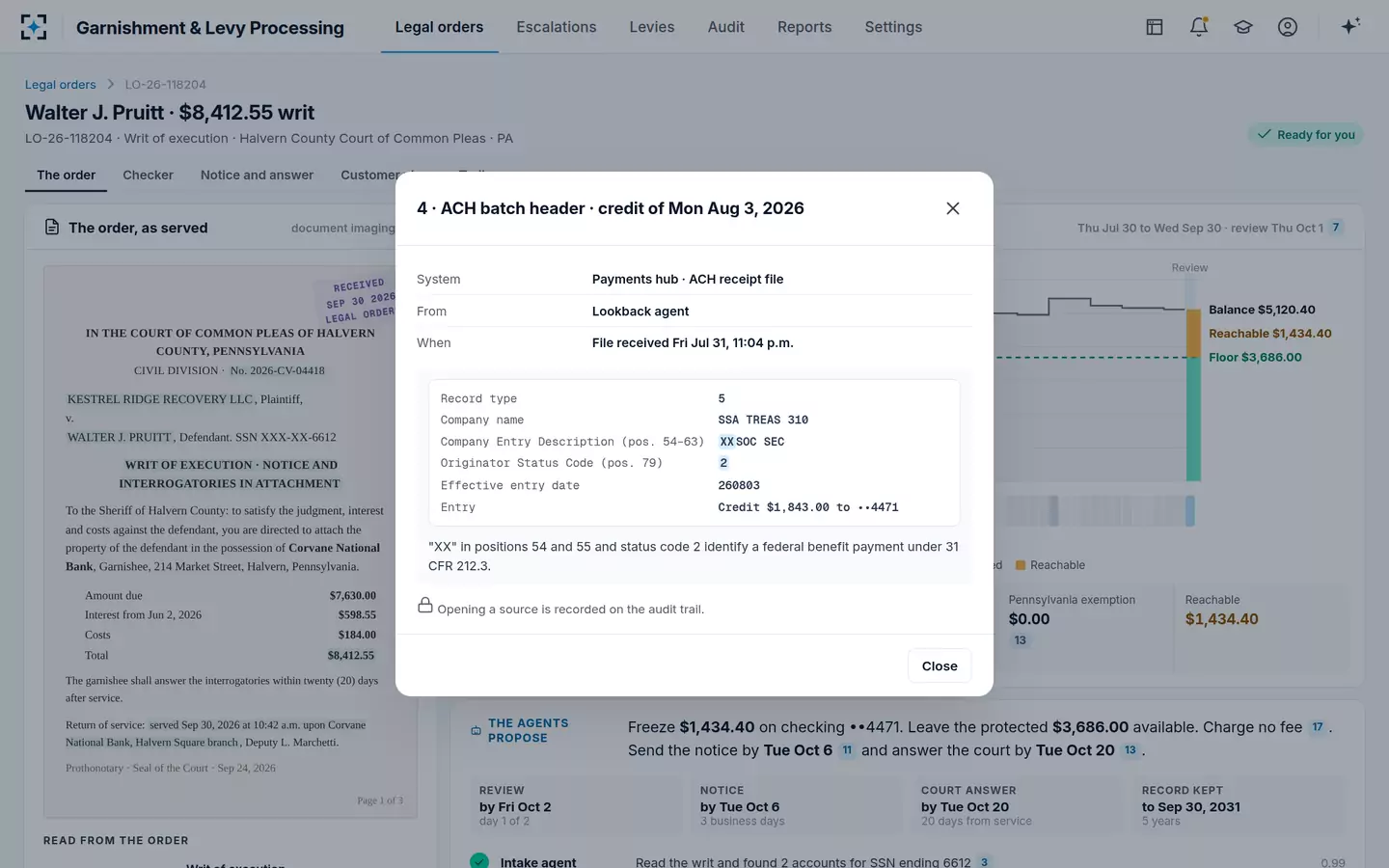
Ask any vendor to show, for one protected amount, which deposits it counted and why, from the source data. Treasury's guidelines tell banks they "may rely on the presence of an 'XX' encoded in Positions 54-55 of the 'Company Entry Description' Field and a '2' in the 'Originator Status Code' Field" (Fiscal Service guidelines). A tool that cannot show those two fields for each deposit it counted is asking the bank to trust it.
Can garnishment software apply state exemptions?
It can apply what the bank's Legal team writes down; it should not decide what a state's law says. State exemptions vary by debt type, change by statute and can depend on which state's law governs. Washington alone protects $500, $2,000 or $1,000 of a $2,500 exemption automatically, depending on whether the debt is general, consumer or private student loan debt (RCW 6.15.010). The CFPB's 2022 order against one bank found it applied the issuing court's state's exemptions to customers who lived elsewhere, and required it to keep a current, accurate list of each state's limits on out-of-state notices (CFPB consent order 2022-CFPB-0002); what a bank brings on day one shows how those tables are kept.
So the questions for a vendor are about the table, not the engine. Who writes it? Who approves each version? Does an order keep the version in force when it was received? What happens to an order from a state with no table? What states prohibit bank account garnishment covers the out-of-state rules in detail.
How do you evaluate garnishment software for a bank?
Evaluate it on your own orders, against the rules, with the examiner's questions in hand. The OCC's worksheet for this rule is a ready-made acceptance test: eleven yes-or-no questions, where a no in expanded procedures counts as a violation (OCC Comptroller's Handbook). The questions below go further, into how the tool behaves when it is unsure.
Ten questions to put to any garnishment software for a bank
- Was it built for deposit accounts, or adapted from payroll?
Ask how it handles a second service of the same order and deposits after the review.
- Does it read the ACH batch header, or the statement description?
And can it show the header for each deposit it counted?
- How does it find the debtor's accounts?
By SSN or date of birth, with name-only matches sent to a person.
- Does it handle IRS levies and child support orders on their own paths?
IRS levies sit outside 31 CFR 212; orders with the federal notice follow customary procedures.
- How does it count business days and holidays?
Ask for the computed dates on a test levy served the day before Thanksgiving.
- Who maintains the state tables, and how are versions approved?
An order should carry the version it was decided under.
- What does it do when it is unsure?
Confidence thresholds on the amount, debtor and service date, and a person when they are not met.
- Is the protected amount checked independently?
A second computation that cannot see the first, with a stated tolerance.
- Can it freeze, release, send or pay on its own?
If it can, ask how the bank would show reasonable procedures for a bona fide error.
- Can you export one order's full file for an examiner in minutes?
Order image, lookback, batch headers, computations, signatures, notice and answer.
Who is responsible when garnishment software makes a mistake?
The bank is. Treasury's rule says "Federal banking agencies will enforce compliance with this part" against the financial institution (31 CFR 212.11(a)), and the federal banking agencies' 2023 guidance on third parties leaves the duty to run an outsourced activity safely and lawfully with the bank that bought it (Interagency Guidance on Third-Party Relationships; read the guidance in plain words). GAO's 2025 review of AI in financial services found regulators supervising it mostly through the laws, guidance and examinations they already had (GAO-25-107197), which means the same garnishment rules, applied to the bank.
A garnishment tool that can freeze an account on its own reading has moved the bank's liability into a place the bank cannot see.
The safe harbor shapes the design. A bank that complies in good faith is protected against bona fide errors only where it maintained reasonable procedures to prevent them (212.10(d)(1)). A tool that prepares, explains and waits for two people supports that defense; a tool that acts alone makes the bank argue that the tool was the procedure.
Manual, rules-based or agents: three ways to run the desk
Banks run legal order desks in three broad ways, and each has a place. The comparison below is ours, written from the rules each approach has to meet rather than from any product.
Three ways to run a legal order desk, against what the rules demand
| By hand | Rules-based workflow | Agents with two signatures | |
|---|---|---|---|
| Reading the order | A specialist keys it | A specialist keys it into structured fields | Agents read it with a confidence per field; low confidence goes to a person |
| Finding benefit deposits | Statements scrolled by eye | Batch-header rules, where the data is wired in | Batch headers read for each deposit, cited |
| State exemptions | A procedure binder | Coded rules, changed by a developer | Versioned tables approved by Legal |
| Checking the protected amount | A sample, after the fact | Usually the same rule run once | A blind second computation on every order |
| The unusual case | Whoever notices it | Often outside the rules, so missed | Escalated with what was found and the options |
| Who moves money | One or two people | People, often after bulk approval | A maker and a checker on every order |
A rules-based workflow is a real improvement on paper, and for a bank whose orders come from one or two states in standard formats it may be enough. The case for agents is strongest where orders arrive as scans and faxes from many courts, where a third or more of orders touch accounts with benefits, and where the bank wants every order checked rather than a sample. At the fictional sample bank in the solution, 31% of 4,186 September orders touched an account with federal benefits.
Where Garnishment & Levy Processing fits, and where it does not
The solution is built for the bank's side of the word. Six agents read each order, find the debtor's accounts, run the lookback from the batch headers, apply the state's approved table, recompute the protected amount blind, and draft the hold, the notice and the court answer; a remittance and release agent watches IRS holds and court orders. A specialist approves, a second specialist checks, and nothing freezes, releases or remits before both sign.
Ask the order a question and get its sources
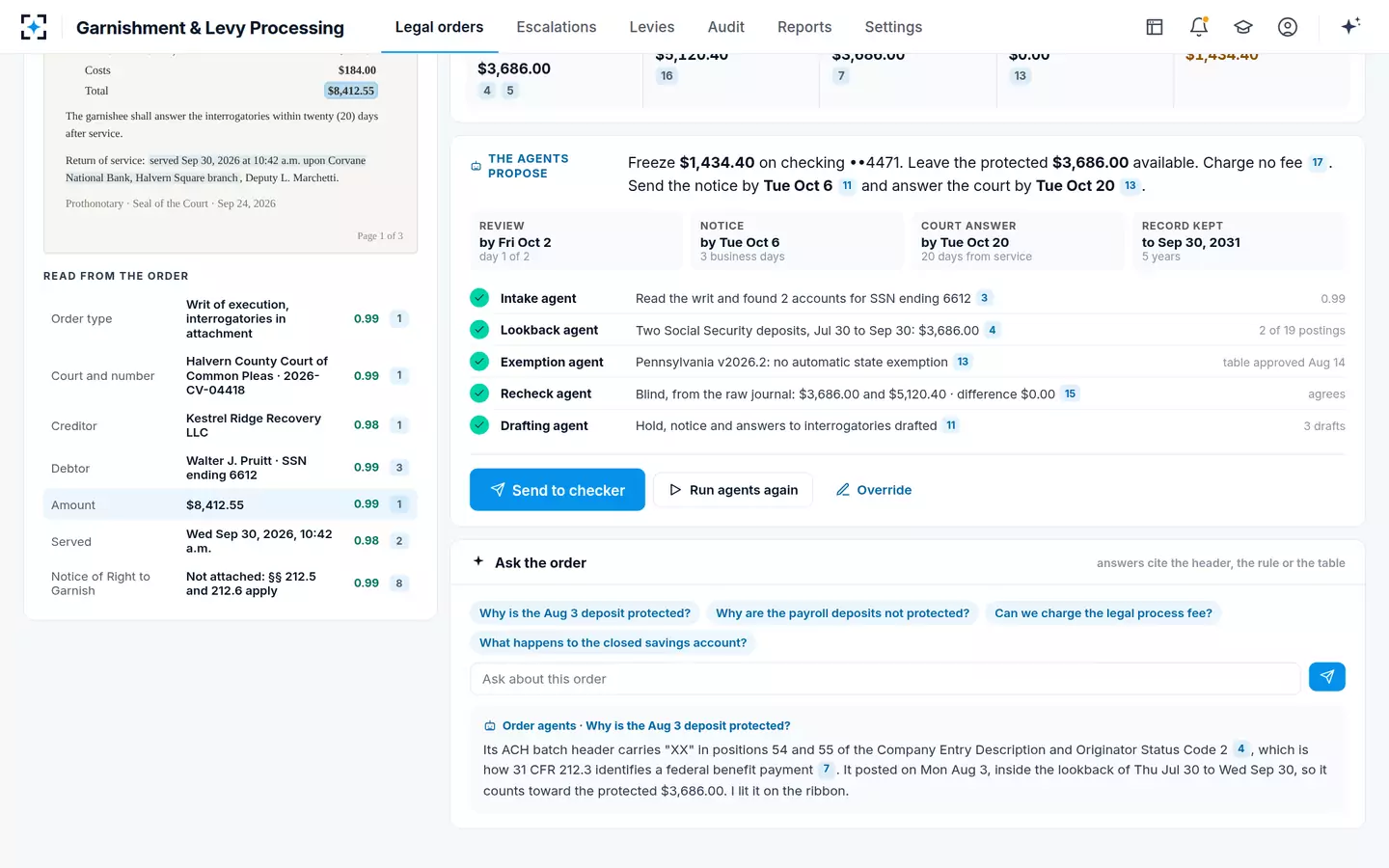
It does not replace payroll garnishment tools, and a bank that also needs to withhold from its own employees' wages needs one. It does not write the state tables; Legal does, and a state without one goes to a specialist. It does not send, pay or change customer records. And it is not a substitute for the bank's own legal advice on questions the rules leave open, such as whether a returned benefit still counts; it escalates those. To see it on a full order, start from Garnishment & Levy Processing, or read legal order processing, traced for every decision on one writ.
Questions people ask
Is garnishment processing software required by regulators?
No regulation requires software. 31 CFR Part 212 requires the steps, clocks and records, and the examiners test whether each was met. A bank can comply by hand; software is a way to meet the two-business-day clock on every order and to keep the evidence.
Can one system handle both wage and bank garnishments?
The two jobs share intake and some document handling, but the core calculations and rules differ: a percentage of disposable earnings, repeated each pay period, against a one-time protected amount from deposits. A bank should test a combined system specifically on the deposit-account rules, especially the ban on continuing garnishment.
What does a bank need to connect garnishment software to?
The core for customer search, balances, the posting journal and holds; the payments hub for ACH batch headers; document imaging for the orders; case management for clocks and answers; the general ledger for remittances; and the correspondence system for notices.
Should garnishment software send notices automatically?
It should draft them and track the three-business-day deadline, but a notice speaks for the bank and states amounts the customer will rely on. In Garnishment & Levy Processing a notice goes out only after a maker and a checker sign.
How is AI different from a rules engine for garnishments?
A rules engine applies fixed logic to structured data; it needs someone to key the order first. Agents can read unstructured orders and explain their results, but can be confidently wrong, so they need confidence thresholds, an independent check and people at the decision. The rules they apply are the same.