eTMF system requirements are easiest to get wrong by writing too many of them. The rules barely use the word eTMF, and where they do it is to say that an electronic trial master file is held to the same standard as a paper one — so a requirement specification written from the guidance rather than from a feature list comes out short and oddly specific: eight named controls, metadata defined once for the whole file, validation you perform yourself, a certified-copy process with its own checking, a verified migration, and access an inspector can use without your help. The requirements that inspectors keep writing about are not only the security ones everybody specifies; they are the navigational ones few people do. eTMF Quality Check is written to that list, and this page says where each line comes from and how to test it.
Figures tagged demo come from the solution running on a fictional sample study; typical figures are published. Nothing here describes a certification: validating a computerised system is the sponsor’s own exercise on its own installation, and no supplier can do it for you.
The shape of the thing you are specifying
11zones
and 249 artifacts in the TMF Reference Model your index has to map to, or your own company index
typical
25years
the minimum the EU Clinical Trials Regulation sets for keeping the file complete and legible after the trial ends
typical
240
documents read, classified and indexed in one batch on the sample study
demo
228of 240
filed without a person, at the 90% confidence the study had set; 6 held for review, 6 set aside
demo
What are the requirements for an eTMF system?
Start from the only document that enumerates them. The EMA’s guideline on the content, management and archiving of the trial master file describes the primary eTMF as “a system for managing documents that should contain the controls listed below”, and lists eight (EMA/INS/GCP/856758/2018, section 4.1.2). Everything else — validation, metadata, training, transfers between systems, migration, archiving — follows in the same section, as requirements on how you run the system rather than on what it holds.
The eight controls the guidance actually names
That list is unglamorous and short. It says nothing about dashboards, automatic classification or scoring — things a trial master file capability may do well or badly, but not what the guidance asks of the system holding the file. Keep the two apart in the specification and evaluation gets easier: the first list is pass or fail, the second is a judgement about your own study.
The eight controls the guidance names for a primary eTMF, and how to test each one in a demonstration
- User accounts
Ask to see a named account created, suspended and removed, and what the file shows about each action afterwards.
- Secure passwords for users
Ask how the password policy is set, who can change it, and whether a second factor can be required for signing.
- Locking or protecting individual documents or the whole file
Lock one document and try to change it; then ask what happens at archiving, when the whole file locks.
- Regular backup
A written schedule, not an assurance. Ask who is told when one fails.
- Periodic test retrieval or restore
A control often specified and rarely exercised. Ask for the last restore test and what it proved.
- An audit trail of creation, upload, deletion and change
Date, time and user for each, with an explanation where needed. Ask for the trail of a deleted document, not a filed one.
- Role-based permissions for the activity being undertaken
Including restricted access to randomisation codes and unblinded safety data. Ask for a blinded user’s view of a document they may not open.
- Suitability of the system for archiving
What the file looks like after close-out, who may still reach it, and in what form it would leave the system.
Does an eTMF have to be validated?
Yes, and the sentence is short enough to put in the specification verbatim: “The eTMF systems should be validated to demonstrate that the functionality is fit for purpose, with formal procedures in place to manage this process.” The EMA’s guideline on computerised systems then puts the file squarely inside its own scope, naming “eTMFs, which are used to maintain and archive the clinical trial essential documentation” among the systems it covers (EMA/INS/GCP/112288/2023, section 2).
Be blunt about what that means commercially. A supplier holds its own development and release evidence and should hand it over, but it cannot hold your validation, because fitness for purpose is fitness for your purpose — your index, your filing rules, your roles. Ask for the evidence package and the configuration specification, and do not accept “the system is validated” as a property of a product. The same applies here: this solution is configured to your TMF plan and your index, and qualifying that installation is yours.
Metadata: defined once, or inconsistent for twenty-five years
Metadata is the requirement that looks like a detail and behaves like architecture. The guidance asks that it be “formally defined to ensure consistency across all documents”, and specifically that a predefined document date — and, where it matters, a time on a standard time zone — be among the fields, so that documents can be displayed in chronological order. It adds one rule that catches hybrid files constantly: for documents under version control, a file name must not stand in for the version being visible on displays and printouts.
Write the field list into the specification, not into a configuration workshop six months later. Decide before anything is loaded which date drives chronology and which drives the clock on timeliness — receipt, filing, approval, expiry or the date on the document’s face — because a file that mixes them cannot be re-scored afterwards. Which clock starts, and what late looks like is the same decision from the metric’s side.
Requirement, the rule it comes from, and how you would prove it on your own study
| Requirement | Where it comes from | How to prove it |
|---|---|---|
| Eight named controls on the primary system | EMA TMF guideline 4.1.2 | Exercise each one in a demonstration on your own documents, including a deletion and a restore. |
| Validation that the functionality is fit for purpose | EMA TMF guideline 4.1.2; EMA computerised systems guideline, scope | The supplier’s evidence package, plus your own qualification of the configured installation. |
| Metadata formally defined, with a predefined document date, and versions visible on printouts | EMA TMF guideline 4.1.2 | One field list agreed before loading. Then print a versioned document and look at the page. |
| Audit trail that cannot obscure what was there before | 21 CFR 11.10(e), for records held under US requirements | Change a value and ask the system to show the previous one beside it. |
| Signatures that cannot be moved to another document | 21 CFR 11.70 | Ask what the signature is attached to, and what happens to it if the document is superseded. |
| A verified migration to new media or format | EMA TMF guideline 4.1.2 | A migration plan with verification criteria, run on a sample before the whole file moves. |
| The file findable by an inspector without your expert user | MHRA GCP Inspectorate | Give the index and a read-only account to a colleague outside the study; ask for six documents. |
Is an eTMF subject to 21 CFR Part 11?
Where the trial is run under a US investigational new drug application and the essential records are kept in electronic form, yes — Part 11 applies to records in electronic form created, modified, maintained, archived, retrieved or transmitted under agency records requirements. Two of its clauses do most of the work on a trial master file. The audit-trail clause asks for audit trails that are secure, generated by the computer and time-stamped, recording independently when an operator entered anything or took any action that creates, changes or deletes an electronic record — and adds the rule that decides a product’s design: a change to a record may not hide what was recorded before (21 CFR 11.10(e)).
The second is about signatures. A signature executed to an electronic record, whether handwritten or electronic, has to be linked to that record so that it cannot be cut out, copied or otherwise moved to falsify another record by ordinary means (21 CFR 11.70). Read that as a product question and it is a sharp one: when a document is superseded by a new version, what happens to the confirmation somebody signed against the old one? The honest answer is that it stays attached to what was signed. Ask the supplier to show you, rather than to assert it.
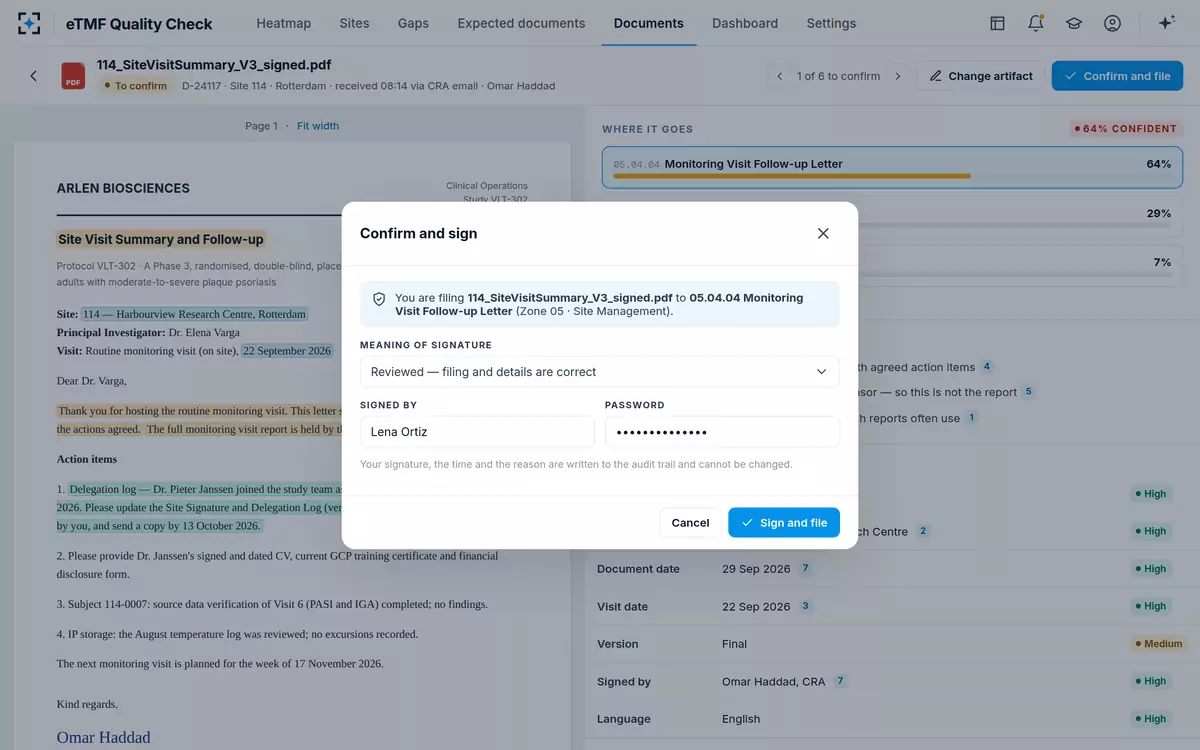
One electronic signature: what it has to carry, and why it cannot travel
Agent
The filing is proposedA document is matched to an artifact with its candidates, a confidence and the passage behind each reason. Below the confidence the study has set, it is held.
A person decides
A reviewer chooses the meaning of the signatureReview, approval, responsibility or authorship — chosen, not implied, because the rule requires the meaning to be recorded with it.
A person decides
They signThe name, the date and time, and the meaning are written together with what was signed.
Never: a signature is applied by anything other than its signer
Agent
The signature is bound to that documentIt stays attached to the content it confirmed, so superseding the document does not move it onto the new version.
Never: a signature is copied, excised or carried to another document
Agent
The change is written to the trail, beside what was there beforeWho, what, when, and the previous value — visible rather than replaced.
Never: a change overwrites what the trail already recorded
Certified copies, and the day you destroy the paper
Most trial master files begin hybrid and end electronic, which makes the certified copy a requirement rather than a courtesy. The guidance defines it precisely (EMA TMF guideline, section 5.1): a certified copy is a paper or electronic copy that has either been verified against the original — a dated signature is its example — or been produced by a validated process, so that it is an exact copy carrying all the same information as the original, including the data describing its context, content and structure.
Two things follow. There are two legitimate routes — a person verifying each copy with a dated signature, or a validated process producing copies you have demonstrated are exact — and the choice decides how much human time scanning costs. And the words “context, content and structure” mean a scan that loses a coloured annotation, a reverse-side stamp or a page is not a certified copy. Write the quality checking of scanning into the plan with its own sample size, and destroy no original until the copy has passed it.
The requirement few specifications carry: an inspector navigating alone
Every requirement specification has a security section. Few have a navigation section, and that is where inspections go wrong. The MHRA’s GCP Inspectorate has been explicit about the habit it sees and does not want to see.
It is common that the organisation being inspected provides expert users to navigate the inspection team around the eTMF. This should not be necessary following some basic training and an awareness of the eTMF structure
Gail Francis, GCP Inspectorate, MHRA, “Inspecting clinical trials — The trial master file”
The sharper version of the same point is in the inspectorate’s own published metrics, where one of the observations under a critical finding records that “there was no functionality to identify files not appearing in the binder view” (MHRA GCP Inspection Metrics 2018–2019). That is a requirement most buyers never think to write: the system must be able to show what is not in the view you are looking at. A file that can only list what it holds cannot answer the question an inspector is actually asking, which is what is missing.
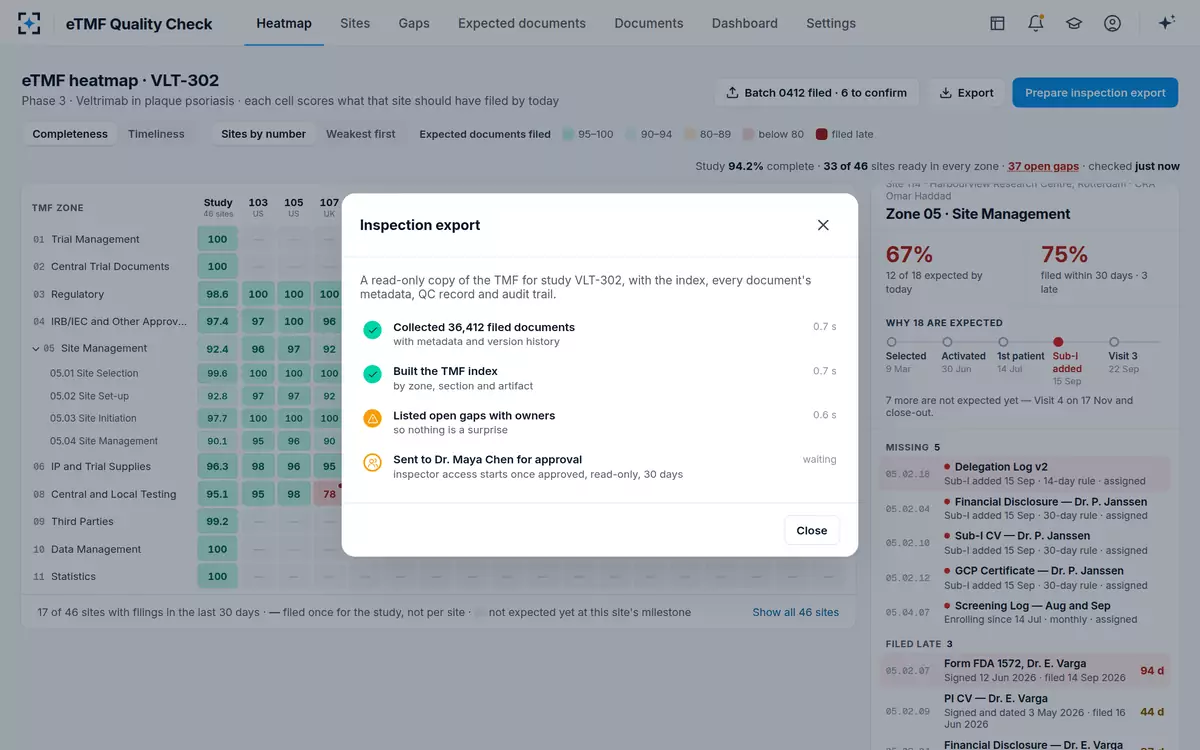
So add two lines to the specification. The system must give a read-only account a trained outsider can use to find documents from the index alone; and it must state, for a site or a zone, what is expected and absent, not merely what is present. The second line is the whole of the completeness score and the denominator that decides it.
What an inspector is given: a read-only copy, approved before it leaves
Shadow files, linked systems, and the TMF that is not one system
A trial master file is rarely one system, and the guidance allows for that: there should be a primary system holding the essential documents, while other systems holding essential documents “should therefore be part of the TMF”, and “the number of these other systems should be minimised with the priority focussed on placing documents in the primary TMF system”.
This is where the specification meets the TMF plan. Each of those systems has to be named as part of the file and held to the same controls, or its documents have to move into the primary one. The MHRA’s metrics record the failure directly: “For some trials, ancillary systems that contained essential trial documents had not been defined to be part of the TMF and were not subject to the same controls as a TMF.” And where documents move between systems — a vendor’s file uploading into a sponsor’s — the guidance asks that the transfer be robust and validated to prevent any loss.
Part of your trial master file, and not inside the eTMF
- The email repositoryCorrespondence that is an essential record. Either it moves into the primary system, or the repository is named as part of the file and held to the same eight controls.
- The procedure-management systemProcedures and their versions, across many trials. Documents applicable to several trials need not be duplicated, but the location has to be recorded.
- Central training records and delegation recordsOften held by another function or kept at the site, and the first pair an inspector asks to reconcile against each other.
- Software validation recordsYour own evidence that the systems holding the file are fit for purpose — part of the file, not an annex to it.
- The trial management system and vendor systemsReports generated from datasets may be filed as documents, but the original dynamic file is expected to stay in the system that produced it.
Migration, archiving, and reading the file in twenty-five years
Archiving has the longest tail and the least negotiating room. In the EU, Article 58 of the Clinical Trials Regulation requires the content of the file to be archived for at least 25 years after the trial ends, and sets the test for the medium: it “shall be such that the content remains complete and legible throughout the period”, with any alteration traceable. The United Kingdom sets the same 25-year minimum in regulation 31A of its clinical trials regulations; the United States runs on different and generally shorter periods, so a global study should write the longest applicable retention into the plan and keep one rule.
Twenty-five years guarantees at least one migration, which the guidance covers in a clause: “Any migration of data and documents to new media or a new format should be verified to ensure long-term readability and to maintain integrity.” Verified is the operative word, and the requirement falls on you. Ask during evaluation what leaving the system would look like — in what format, with which metadata, with the audit trail in what shape — because that is also how a migration into it will be verified. The order of the work in an implementation takes the question from the other end.
What to ask a vendor, and what to ask yourself first
Three questions to yourself come before any demonstration. Which index is this file built on — a published reference model, a version of one, or your own company index? Which dates drive chronology and the timeliness clock? And which documents are critical enough that a person confirms every one, whatever a system proposes? A supplier can configure any answer but cannot choose for you, and a specification that leaves all three open will be settled by whatever the software does by default.
A document repository against what a trial master file has to do
A good document repository: Folders someone designed, extended as needed.
A trial master file: A defined index, standardised across the organisation, that an outsider can navigate.
A good document repository: Versions kept, newest shown.
A trial master file: The version visible on displays and printouts, not only in the file name.
A good document repository: Full-text search over what is held.
A trial master file: Identification, version history, search and retrieval of records — and an answer about what is absent.
A good document repository: Who changed what, kept for whatever period the product happens to be set to.
A trial master file: Creation, upload, deletion and change, with an explanation where needed, kept as long as the file.
A good document repository: Read and write by folder.
A trial master file: Role-based by activity, including restricted access to randomisation codes and unblinded safety data.
A good document repository: Storage that keeps costs down.
A trial master file: Complete and legible for at least 25 years in the EU and the United Kingdom, with migrations verified.
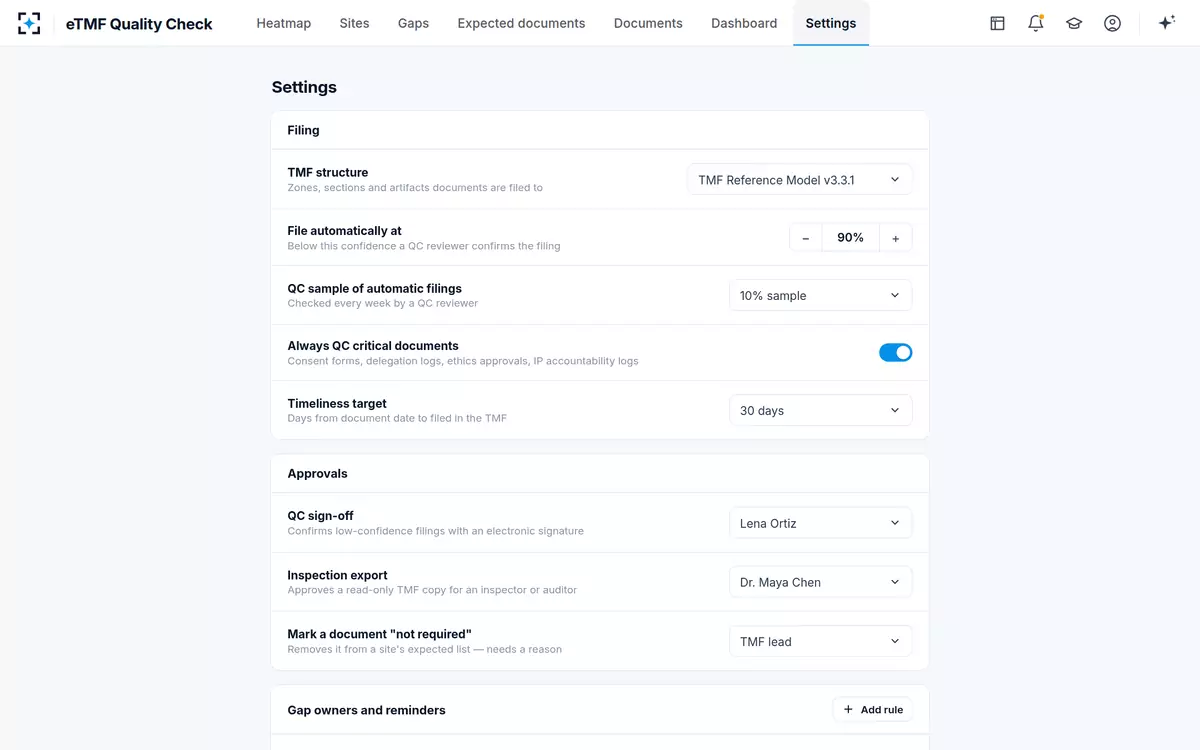
Then four to a supplier, each asking for a demonstration rather than an answer. Show me the audit trail of a document that was deleted. Show me a signature, and tell me what it is bound to. Show me what is missing at one site, and on what evidence. And show me the read-only view an inspector would get, on a study nobody prepared this morning. A supplier who can do the fourth without an expert user beside them has answered most of the others. Keep the thresholds in your own hands too: here the index, the confidence at which a document files without a person, the sample that is checked, the critical list, the timeliness target and the two approvers are all settings — which is the form your requirement should take.
The thresholds as settings, where the TMF plan can reach them
A signature that records its meaning, its signer and its time
Questions people ask
Does an eTMF have to be validated?
Yes. The EMA’s TMF guideline says eTMF systems should be validated to demonstrate the functionality is fit for purpose, with formal procedures managing it, and its computerised-systems guideline names eTMFs in scope. A supplier can give you its development and release evidence; qualifying the configured installation — your index, your rules, your roles — stays the sponsor’s exercise.
Is an eTMF subject to 21 CFR Part 11?
Where records required under US agency requirements are kept in electronic form, yes. The two clauses that shape the product are 11.10(e), which requires secure, computer-generated, time-stamped audit trails and says record changes must not obscure previously recorded information, and 11.70, which requires a signature to be linked to its record so it cannot be excised, copied or transferred.
What metadata should an eTMF capture?
Enough to describe the context, content and structure of each file — author or creator, dates, location in the file, title, version, file type — and the guidance asks that the set be formally defined so it is consistent across every document. Name the predefined document date, with a time zone where it matters, so files display in chronological order, and make versions appear on displays and printouts rather than only in file names.
What is a certified copy in an eTMF?
A copy verified against the original — by a dated signature, or by a validated process — reproducing all the same information, including the data describing the original’s context, content and structure. It is what lets a scan stand in for paper. Check scan quality with its own sample before any original is destroyed: a copy that drops an annotation or a reverse side is not certified by having been scanned.
What should an eTMF give an inspector?
A read-only view that someone trained but outside your study can navigate from the index alone, the metadata and audit trail for each document, and an honest statement of what is expected and absent. In this solution the export is prepared on request, approved by a named person before anyone outside sees it, and the inspector’s access is read-only and time-limited.
What questions should you ask an eTMF vendor?
Ask for demonstrations rather than answers: the audit trail of a deleted document; what a signature is bound to, and what happens to it when the document is superseded; what the system says is missing at one site, and on what evidence; and the inspector’s read-only view on a study nobody prepared. Then ask which thresholds are settings you control and which are the product’s own behaviour.