Claims operations software, in most property and auto carriers, is already a stack: a claim system of record holding notes, tasks, payments, reserves and diary dates; estimating and document tools; portals for body shops, contractors and independent adjusters; a rental program's direct-billing feed; a telephony or contact-centre system; and dashboards built over all of them. Each holds part of the story of an open file, and none of them answers the operational question a supervisor starts the day with: which files is nobody moving, and who is each one waiting on? A cycle-time layer answers that question by reading the existing systems, not by replacing them.
Claims Cycle Time Monitoring is Botminds' version of that layer. Six agents read every open property and auto file each morning, mark which activities moved a file, name the party each quiet file is waiting on, predict which will cross 14 quiet days, price the rental, storage and hotel bills running on them, and draft one next step for a named person to send or approve. It is read-only on the claim system. This guide is for the claims IT and analytics leads who would have to fit it in; examples come from a fictional sample team.
Read-only in, drafts out: how a cycle-time layer touches claims operations
Agent
Read the systems of recordPulls notes, tasks, payments, reserves and diary dates from the claim system, plus documents, shop status, rental and storage bills, hotel folios and customer contacts.
Never: Writes to, edits or deletes anything in the claim system.
Agent
Judge and predictMarks each activity as moving the file or not, names the waiting party, predicts the next crossing of 14 quiet days and prices each day.
Never: Predicts claim outcome, fraud or litigation.
Agent
DraftWrites the next step for each quiet file: a message, a call script, an approval to request, a diary date, a state status letter, and names who must act.
Never: Sends anything to a customer, shop or lender.
A person decides
Approve and sendThe adjuster sends; the desk appraiser approves supplements; the supervisor decides anything beyond authority, such as a rental past the policy days.
A person decides
RecordEach approved step lands on the file’s activity trail with who did it and when; agents’ entries are marked as AI.
What does claims operations software cover today?
It covers recording and processing well, and watching poorly. The claim system records first notice, coverage, reserves, payments and the diary; estimating platforms price repairs; vendor portals carry a shop's parts dates and a contractor's moisture logs; the rental program bills by the day; the contact centre logs every call. Dashboards then summarise the claim system's tables into counts by age, adjuster and line. Each tool is accurate inside its own boundary.
The waiting happens between the boundaries. A body shop's portal shows "waiting on supplement approval"; the claim system shows the supplement routed to a desk appraiser; the rental feed shows day 21 of 30; the contact centre shows the customer's second call. Only a person who opens all four sees that the shop is waiting on the carrier, the customer is about to lose his rental and nobody owns the wait. In the fictional sample, that file had been quiet for 12 days, with four diary entries in that time, none of which moved it.
Does cycle time monitoring replace the claim system?
No. The claim system stays the system of record; a monitoring layer reads it and the systems around it, and writes back only steps a person has approved, through the channels the carrier already uses. The integration map below shows the sample configuration: six sources read, and the only writes are approved actions that land on the activity trail.
Integration map: what a cycle-time layer reads, writes back and who approves
| System | What the layer reads | What it writes back | Who approves |
|---|---|---|---|
| Claim system | Notes, tasks, payments, reserves, diary dates, owners, authority | Approved next steps and diary dates, on the activity trail | The file owner; the supervisor past authority |
| Documents on the file | Estimates, supplements, independent adjusters’ reports, invoices, payoff letters | Nothing | None needed |
| Shop and contractor status | Repair status and parts dates | Messages drafted for the adjuster to send | The adjuster |
| Rental direct bill | Daily rate and days billed, nightly | Nothing; extensions are made in the rental program by a person | Adjuster to the policy days; supervisor beyond |
| Storage and hotel bills | Yard invoices and hotel folios as they arrive | Nothing | None needed |
| Customer contacts | Calls, texts, emails and complaints | Call scripts and messages, drafted | The adjuster sends |
Read-only access is a design choice with a regulatory reason. Claim files must let an examiner reconstruct what the insurer did: Ohio, for instance, requires that an insurer "maintain claim data that is accessible and retrievable for examination". A layer that edits notes or reclassifies entries in the system of record muddies that record; a layer that reads it and adds clearly marked, approved steps does not.
What data does cycle time monitoring need?
It needs dated, typed activity on every open file, the vendor bills that price each day, the state on each file, the authority table, and a history of closed files to learn how each waiting party behaves. Most of it is data regulators already require insurers to keep. California obliges insurers to keep claim data for all open and closed files "for the current year and the four preceding years", including the dates of payment, acceptance, denial or closing without payment, and to record when each material document was received, processed and sent.
The data a cycle-time layer needs, and where it usually lives
- Every activity on open files, with a timestamp and a type
Notes, tasks, calls, documents, payments, reserve changes, decisions. From the claim system and contact centre.
- The documents themselves
So an estimate, supplement or invoice can be recognised as arriving, not just as a task.
- Vendor status
Shop and contractor repair status and parts dates, from their portals or messages.
- Daily cost sources
The rental direct bill, storage yard invoices and hotel folios, priced against each policy’s limits.
- The state on each file and the rules in force
With each rule’s trigger and the date it was read; Washington changed its clocks on 18 October 2026.
- Closed files for each waiting party
In the sample, 388 closed supplements since January for one desk appraiser; predictions cite the closed files they come from.
- The authority table
Who may approve what, so a drafted step that exceeds the owner’s limit is flagged for the supervisor.
Claims operations workflow: where the drafts land
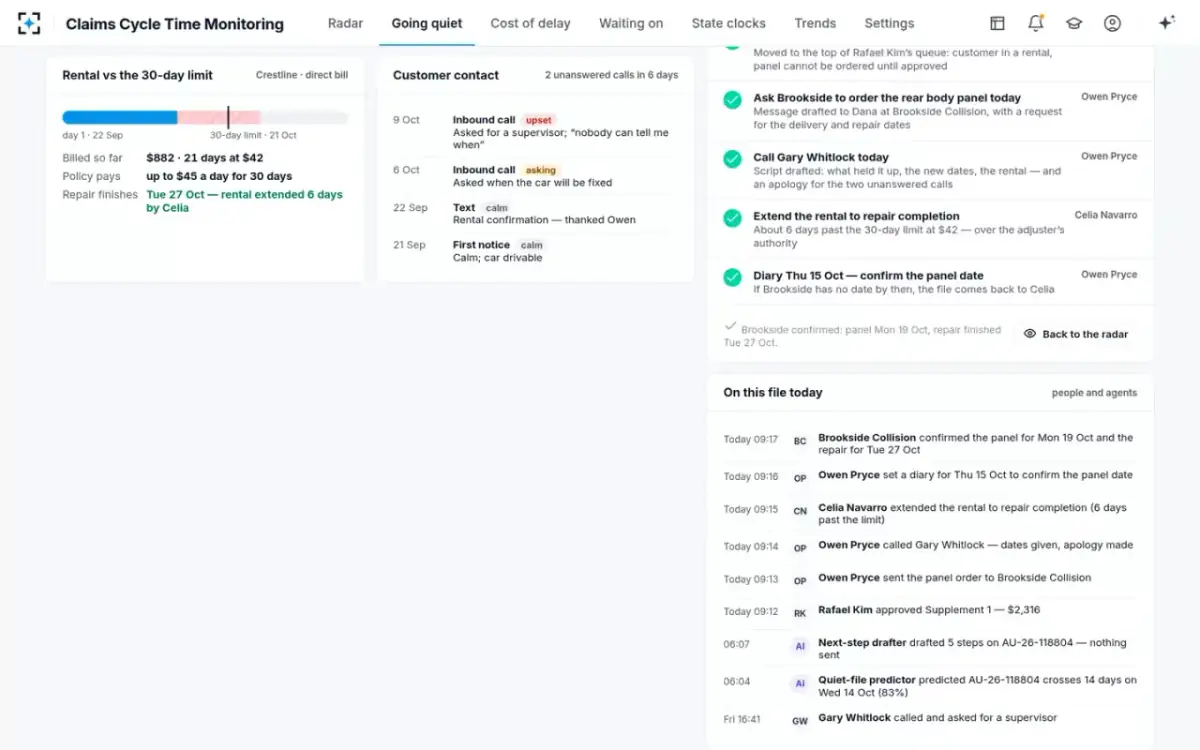
Drafts land with the person who has to act, before the morning huddle, and nothing reaches a customer, shop or lender until that person sends it. In the sample, the sweep runs at 06:00; the adjuster finds the next step for each file predicted to cross 14 quiet days within three days; the supervisor sees the plans that need a decision beyond an adjuster's authority. On Gary Whitlock's claim, five steps were drafted and one flagged: extending the rental past its 30 days needed the supervisor.
When the supervisor approved the plan at 09:12, each step was carried out by the person named and written to the file's activity trail: the desk appraiser approved the $2,316 supplement, the adjuster sent the panel order and called the customer with dates and an apology, the supervisor extended the rental to the end of the repair, six days past the policy limit, and a diary date was set for Thursday. By the same morning the shop had confirmed the panel and a repair date, and the file's quiet clock read zero.
A plan approved: every step on the activity trail, with who did it
Who sees the alerts?
The person who can act on a file sees its alert first, and more senior people only when a file is already quiet. The sample's defaults send the file owner a drafted next step three days before a predicted crossing of 14 quiet days, tell the supervisor when a file crosses 14 days and in a morning list, and tell the customer experience lead at 30 quiet days or when a customer's second call goes unanswered. Predictions under 60% confidence are shown on screen without a notification. All of these are settings the claims operations manager changes, and every change is kept as a new version.
Alerts should arrive where people already work. A supervisor who runs the huddle from a list wants an export of the files crossing this week; an adjuster wants the drafted message beside the file; an operations manager wants the weekly trend of files past 30 quiet days, days to close and rental days per claim. The KPIs behind those views are set out in claims management KPIs that lead the money.
Claims operations automation without automated decisions
Automate the reading, the arithmetic and the drafting; keep decisions, approvals and every outbound message with named people. That split is where state regulators are heading. The NAIC's 2023 model bulletin on artificial intelligence, adopted by many states, holds an insurer responsible for decisions made with AI systems it builds or buys, and asks for a written program covering uses that include claim administration (NAIC model bulletin). Washington's amended claims rules, in force since 18 October 2026, make insurers responsible for the accuracy of evaluations made on their behalf and require them, on request, to say where database or estimating-software data came from (WAC 284-30-380(7)–(8), as amended).
A monitoring layer fits that frame easily because it decides nothing about the claim. It never approves a supplement or payment, never extends or ends a rental, never reassigns a file and never contacts anyone. Its predictions use only the waiting party's behaviour, what is booked and the file's own dates, never the claimant's personal characteristics, and each cites the closed files it was made from.
Open claims inventory analysis in Power BI, and what it leaves out
Keep it. A business-intelligence model over the claim system's tables is the right tool for open inventory by line, age and adjuster, for finance and reserving views, and for board packs. What it cannot do by itself is judge whether a note moved a file, follow a wait past the first party, or price a quiet day from a hotel folio, because those judgments need each entry and document read. The useful arrangement is to feed the layer's outputs, quiet days, waiting party and daily cost per file, into the existing BI model as new fields.
Diary and inventory tools against a quiet-file layer
Diary and inventory tools: Reminders and counts: next diary date, files by age.
A quiet-file layer: Movement: the last activity that changed the file, and the party it waits on.
Diary and inventory tools: The diary resets; the file looks worked.
A quiet-file layer: Recorded; the quiet clock keeps running.
Diary and inventory tools: Shows "waiting on shop".
A quiet-file layer: Follows the chain: the shop is waiting on the insurer’s supplement desk.
Diary and inventory tools: Not shown, or an average.
A quiet-file layer: Priced daily from the rental, yard and hotel bills.
Diary and inventory tools: A report to read.
A quiet-file layer: One drafted next step per quiet file, with the person who must act.
Going live on your own files: a short plan
Start read-only, on a sample of the carrier's own open and closed files, and prove the reading before switching on any alert. The steps below are the order that keeps the claim system untouched until people trust what the layer says.
A go-live plan for a cycle-time layer
- Connect read-only to the claim system and documents
No write access in the first phase.
- Write down what moves a file
Agree the reset list with supervisors before any number is reported; it is the definition every trend will rest on.
- Check the reading against people
Have supervisors mark a sample of files as moving or stuck, and compare with the layer’s marks.
- Test predictions on closed files
For files whose outcome is known, compare the predicted crossing with what happened.
- Freeze a baseline
Files past 30 quiet days, days to close and rental days per claim, weekly, before alerts go on.
- Switch on drafts, then alerts
Drafts first, so people see the suggestions in their own work; alerts once they agree with them.
- Measure against the design target
The solution’s target is 40% fewer files past 30 quiet days three weeks after go-live, measured on your own baseline.
Where it does not fit should be said as plainly. The layer adds nothing to a book with few open files and short, simple claims, and it does not replace triage at first notice, estimate review or litigation management. Files that stall on the insurer's own supplement queue are the subject of when a pending claim is waiting on the insurer, and the narrower supplement process itself is covered in who waits on an auto body supplement.
Questions people ask
What is claims operations?
The work and systems that move claims from first notice to closing: intake, assignment, investigation, estimating, vendor management, payments, reserving and reporting, and the people and rules that run them. Claims operations software is the stack of systems that supports that work.
What is claims monitoring?
Watching open claims for problems while they can still be fixed. Cycle-time monitoring watches for files that stop moving, names who each is waiting on and prices the delay; other kinds watch for leakage, fraud or litigation risk and need their own models and controls.
Can claims operations be automated?
The reading, sorting, arithmetic and drafting can be, and much of the clerical work already is. Decisions on coverage, payments, supplements and rentals, and messages to customers, should stay with named people; regulators hold the insurer responsible for decisions made with AI systems, including ones bought from vendors.
What is diary management software in claims?
Software that schedules follow-up dates on each claim and reminds the owner when one falls due. It is useful for not forgetting a file, but a diary date can be pushed forward without anything happening, so it cannot by itself show whether a file is moving.
Can open claims inventory analysis be done in Power BI?
Yes, for counts by line, age, adjuster and reserve. Judging whether each file is moving needs each entry read and classified first; those results can then be added to the Power BI model as fields such as quiet days and waiting party.