Claims dashboard examples usually show inventory: open claims by age bucket, new against closed, average days to close, payments and reserves by adjuster, often built in Power BI on top of the claim system. Those are useful for managing a book, and they share a blind spot: they count files, but they cannot tell which open file nobody is moving, because a file's age and its diary dates change whether or not anything happened. A dashboard that finds stalled claims has to read the activity on each file and judge it. In the sample described here, one morning's sweep read 2,914 activities on 318 open files and found that only 1,087 of them had moved a file.
That sweep is the core of Claims Cycle Time Monitoring, Botminds' solution that reads every open property and auto file each morning, works out who each file is waiting on, predicts which will go quiet and drafts the next step for a person to send. This guide compares four kinds of claims dashboard and then traces the sweep step by step, so a buyer can see exactly what a monitoring agent touches and what it never does. The team, files and figures in the trace are fictional sample data.
One 06:00 sweep, step by step: six agents read and draft, people decide
Agent
Activity readerReads every note, task, document, payment, call and vendor update on 318 open files and marks each as moving the file or not.
Never: Edits or deletes a note in the claim system.
Agent
Waiting-on classifierNames who each file is waiting on and since when, following the chain when that party is waiting on the insurer.
Never: Reassigns a file.
Agent
Quiet-file predictorPredicts when each file crosses 14 and 30 quiet days from the waiting party’s record on closed files and what is booked.
Never: Uses the claimant’s personal characteristics, or predicts outcome, fraud or litigation.
Agent
Cost-of-delay meterPrices each quiet day from rental direct bills, yard invoices and hotel folios, against each policy limit.
Never: Extends, ends or cuts a rental or a hotel stay.
Agent
State clock keeper and next-step drafterTracks each state deadline, drafts status letters and the one next step per quiet file, naming who must act.
Never: Approves a supplement or payment, or contacts anyone.
A person decides
Adjuster, desk appraiser and supervisorSend every message, approve supplements, and decide anything past authority, from the drafted plan.
What should a claims dashboard show?
A claims dashboard should answer three questions in order: how big is the open inventory, which files are not moving and why, and what that costs in money and deadlines. Most examples stop at the first. The second needs activity data read file by file; the third needs vendor bills and the state rules on each file. The table sets out the widgets that answer each question and the trap in each.
Claims dashboard widgets, the question each answers, and its trap
| Widget | Question it answers | Data it needs | The trap |
|---|---|---|---|
| Open claims by age bucket | How big and how old is the inventory? | Report date, open or closed status | Age is not progress: a busy old file and a stuck young one look alike |
| Closed vs new, by week | Is the backlog growing? | Open and close dates | Closing files without payment shortens the list and the cycle time |
| Files past N quiet days, by waiting party | Which files is nobody moving, and on whom do they wait? | Activity typed as moving or not, and the waiting party | If every note resets the clock, the widget measures effort |
| Crossing this week | Which files will stall next? | Quiet days plus booked events | A threshold alert fires after the stall, a prediction before it |
| Daily cost of waiting | What are the stuck files spending? | Rental, storage and hotel bills | Averages hide the one family in a $200-a-night hotel |
| Deadlines due | Which letters and decisions are due on quiet files? | Notice and proof dates; the state on each file | A clock with the wrong trigger gives a wrong date |
Claims dashboard examples, from inventory counts to a quiet-file radar
Four kinds of claims dashboard are in common use, and each serves a different reader. An inventory dashboard, often the first thing built in Power BI over the claim system's tables, shows open claims by line, age bucket and adjuster. A performance dashboard adds closure rates, days to close, severity and reopen counts, and suits monthly management reviews. A compliance dashboard lists acknowledgements, decisions and letters due under state rules. A quiet-file view, the newest kind, places each open file by who it is waiting on and how long since anything moved it.
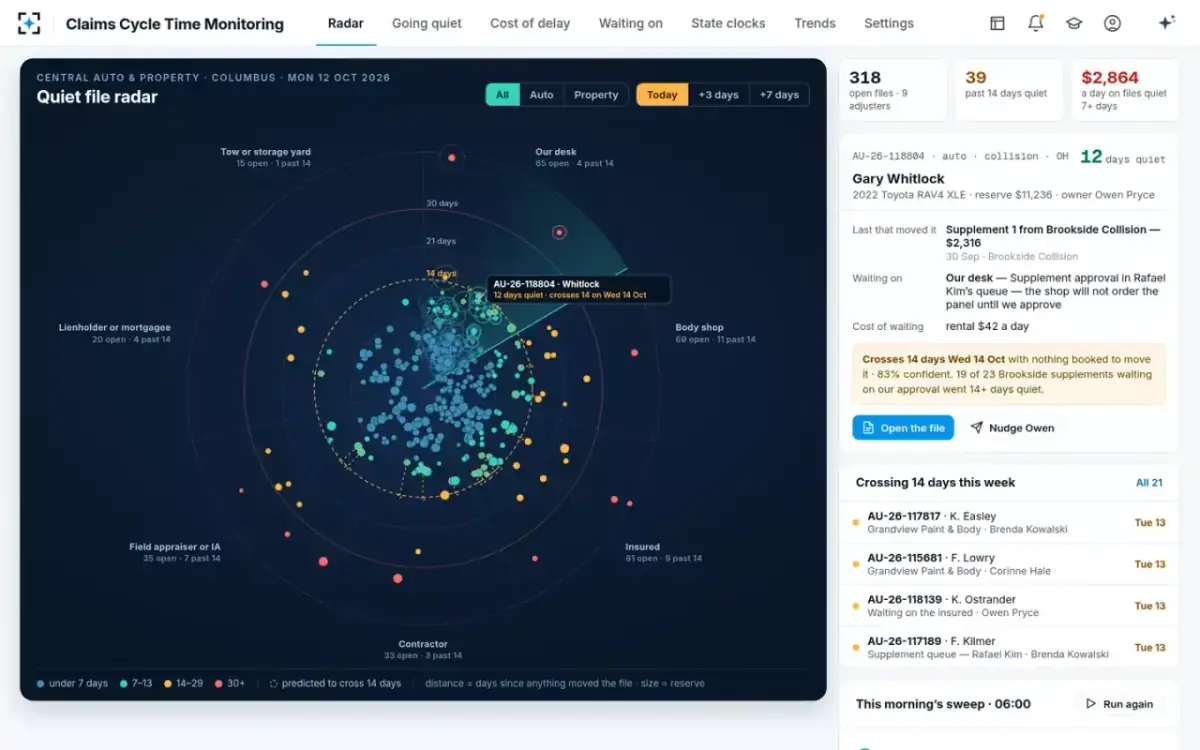
The quiet-file view is the only one of the four built for the morning huddle. In the sample's radar, each dot is a file, its angle the party it waits on (the insurer's own desk, a body shop, the insured, a contractor, a field appraiser or independent adjuster, a lienholder or mortgagee, a tow or storage yard) and its distance the days since anything moved it. Rings mark 14, 21 and 30 days. A time scrubber moves every file three or seven days ahead, so files with nothing booked drift outward before they cross.
A quiet-file radar: each open file by who it waits on and days since it moved
One 06:00 sweep, traced: what the agents read on 318 files
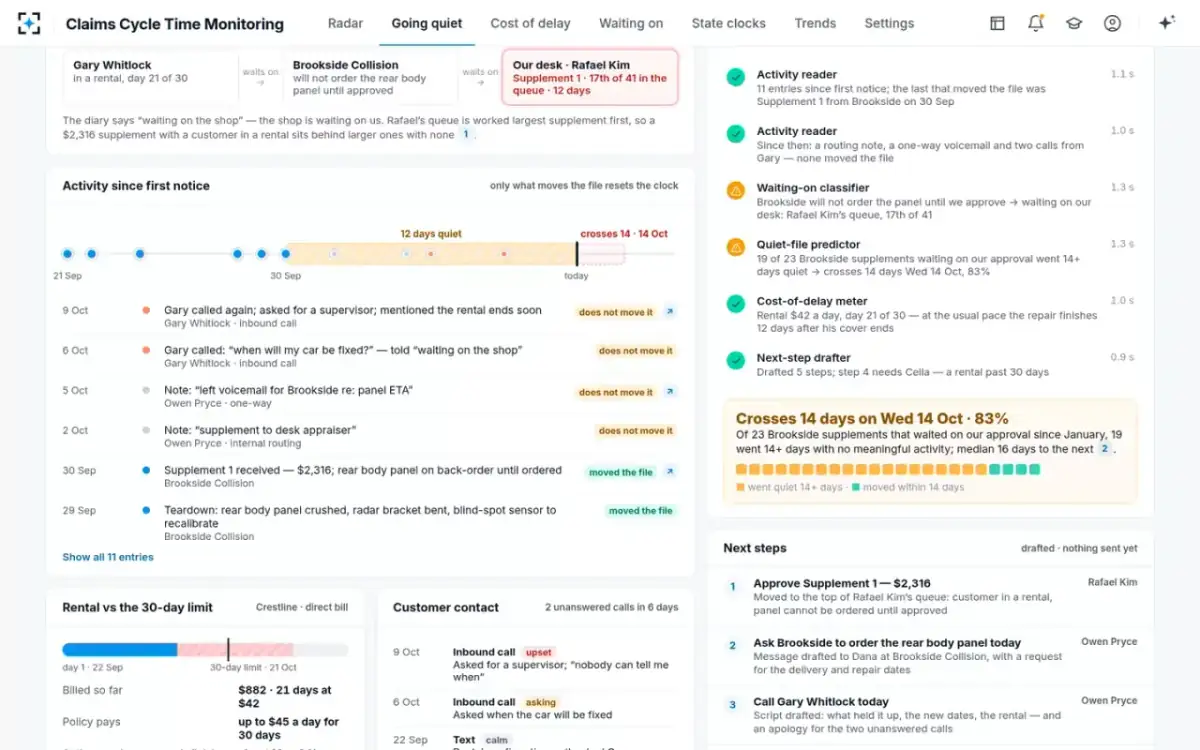
The sweep's first job is to read everything and keep only what moved a file. In the sample, the activity reader went through 2,914 activities logged on 318 open files: notes, tasks, documents, payments, reserve changes, calls, texts and vendor updates. It marked 1,087 as moving a file. The other 1,827 were notes, routing between desks or one-way calls: recorded, but not progress.
The sample morning sweep in four numbers
318
open property and auto files read
2,914
activities read on those files
1,087
moved a file
1,827
were notes, routing or one-way calls
The rule for what moves a file is a setting, not a guess. By default four events reset the quiet clock: a document arrives, a payment or reserve changes, an approval or coverage decision is made, or a two-way conversation takes place. A note, routing between desks, an outbound voicemail or unanswered email and a pushed diary date are recorded and do not. The data to apply that rule already sits in most claim files because regulators require it: the NAIC model regulation says each relevant document "shall be noted as to date received, date processed or date mailed", and Florida requires dated records of every claim-related communication, information request and inspection on a residential property claim (§627.70131(4)(b)).
Next the waiting-on classifier names the party for each quiet file, and the predictor estimates when it will cross 14 quiet days. On Gary Whitlock's auto claim, 12 days quiet, the diary said the file was waiting on the body shop. The classifier found that the shop would not order a back-ordered panel until its $2,316 supplement was approved, and that the supplement was 17th of 41 in the desk appraiser's queue. The predictor then looked up how supplements from that shop had fared: of 23 that waited on the carrier's approval since January, 19 went 14 days or more with no meaningful activity. Hence the prediction, 83% confidence of crossing 14 days on Wednesday 14 October.
The agents’ work on one file, each step with what it found
How do you find stalled claims?
Find stalled claims by asking two questions of every open file each day: when did anything last move it, and who is it waiting on now. A claim is stalled when the answer to the first is older than the team's threshold, 14 days by default in the sample, and its owner has nothing booked to change that. The second question decides the fix: a file waiting on the insured needs a call, one waiting on a contractor needs a deadline, and one waiting on the insurer's own desk needs an approval.
The best predictor of the next stall is the waiting party's own record. In the sample, insureds answered in a median of 5.0 days and 27% of 1,904 such files stalled past 14 days; the sample's own supplement desk answered in a median of 9.8 days, with 41% of 388 supplements since January stalling past 14. A file waiting on a slow party with nothing booked is a likely stall days before it becomes one. Why the oldest-first list misses these is the subject of the claim aging report and its blind spot.
Claim inactivity alert: who should be told, and when
A claim inactivity alert should reach the person who can move the file before it stalls, and someone more senior only when it has. In the sample, the file owner hears three days before a predicted crossing of 14 quiet days, with a drafted next step; the supervisor hears when a file crosses 14 days, and every morning; the customer experience lead hears at 30 days or when a customer's second call goes unanswered. Predictions below 60% confidence show on screen but notify nobody, and the prediction looks seven days ahead. Each is a setting the operations manager changes.
The order matters because alerts that fire on a threshold are alerts about yesterday. State reply clocks run on the customer's messages, not on the file's quiet days: Ohio, for instance, requires a response within fifteen days to any claimant communication that suggests a response is appropriate (Ohio Adm. Code 3901-1-54(F)(3)). By the time a file crosses 14 quiet days, the customer may already have called twice, as Gary Whitlock had. A three-day warning, the solution's design target, leaves time to send something worth sending.
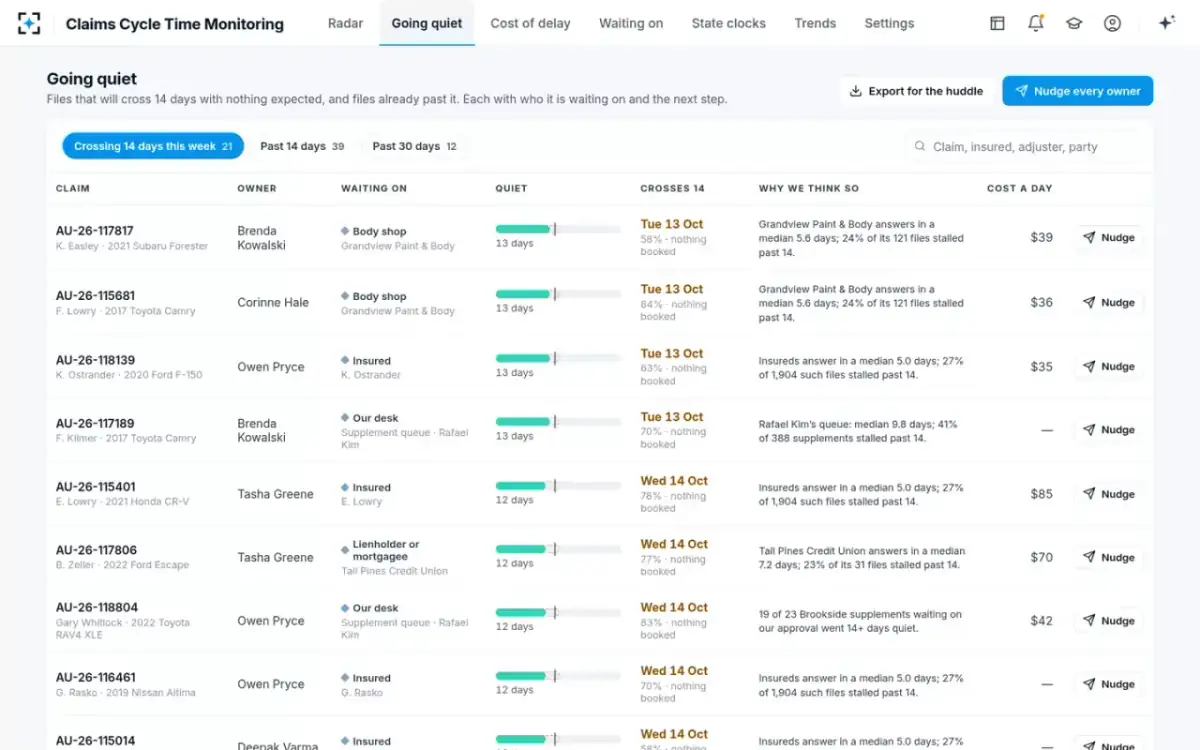
Files crossing 14 quiet days this week, each with its reason
Claims dashboard in Power BI or a monitoring layer: what to look for
Choose by the question, not the tool. A business-intelligence dashboard over the claim system's tables is the right home for inventory, performance and finance views, and most carriers already have one. A monitoring layer earns its place only if it does the reading those dashboards cannot: classifying each activity, following each wait to its real owner, predicting the next stall and pricing it. Ask any vendor, including us, to show those steps on your own files.
Questions to put to any claims dashboard or monitoring vendor
- What resets the clock, and can we change it?
If a note or a pushed diary counts as activity, the dashboard measures effort, not progress.
- Does it follow the chain past the first party?
A file "waiting on the shop" may be waiting on your own supplement desk.
- Can a supervisor open the evidence behind every flag?
The entry, document or bill, and for a prediction the closed files it rests on.
- Does it write to the claim system?
Read-only access keeps the file of record clean; drafts should land only after a person approves them.
- Where does the money come from?
Daily costs priced from the rental, yard and hotel bills, not from an average.
- Which state rules does it apply, with what trigger and as of what date?
Washington changed its clocks on 18 October 2026; a stale rule table gives wrong dates.
- What does it never predict?
Outcome, fraud and litigation belong to other models with other controls; personal characteristics belong in none of these predictions.
Where Claims Cycle Time Monitoring does not fit is just as plain. It does not replace an inventory or finance dashboard, a reserving model or the claim system itself; it reads them. It covers open property and auto files and the waits inside them, not underwriting or litigation. In the sample it connects to the claim system, the documents on each file, shop and contractor status, the rental direct bill, storage and hotel bills and customer contacts; connecting those sources to a carrier's own systems is the first piece of work in any pilot. How the layer sits beside the claim system is set out in cycle-time alerts beside your claim system.
What the agents leave alone
Every agent in the sweep reads and drafts; none acts on the claim. They never edit or delete a note, reassign a file, extend or end a rental, approve a supplement or a payment, or contact a customer, shop or lender. The adjuster sends each message, the desk appraiser approves supplements and the supervisor decides anything beyond authority. Every agent step and every human action is written to the file's activity trail with who and when, and agents' entries are marked as AI.
That design follows the direction of state insurance regulators. The NAIC's 2023 model bulletin on insurers' use of artificial intelligence, adopted by many states since, holds insurers responsible for decisions made with AI systems, including systems bought from vendors, and expects a written governance program covering claim administration (NAIC model bulletin). A sweep that only reads, cites and drafts keeps every regulated decision with a named person. How regulators view AI that decides claims is covered in where the line on AI claim denials sits.
Questions people ask
What is a claims dashboard?
A screen that summarises an insurer's claims for the people who manage them: open inventory, new and closed claims, cycle time, payments and reserves, and sometimes deadlines and costs. The most useful versions also show which open files nobody is moving and on whom they wait.
Can a claims dashboard be built in Power BI?
Yes, and many inventory and performance dashboards are, reading the claim system's tables. What a business-intelligence tool does not do by itself is read each note and document and judge whether it moved the file; that classification has to happen before the numbers reach the dashboard.
What belongs on a claims performance dashboard?
Days to close, closure and reopen rates, severity and loss adjustment expense for monthly review, and leading measures for daily use: files past a quiet threshold, files crossing it this week, deadlines due and the daily cost of waiting. In the sample, files past 30 quiet days are tracked weekly beside days to close and rental days per claim.
What counts as a stalled claim?
An open claim with no meaningful activity for longer than the team's threshold and nothing booked to change it. In the sample the threshold is 14 days, and meaningful means a document received, a payment or reserve change, a decision or a two-way conversation.
What is a claim inactivity alert?
A notice to the file's owner or supervisor that a claim has gone, or is about to go, without meaningful activity. Alerts that warn before the threshold, three days ahead in the sample's design target, leave time to act; alerts after it report a stall that has already happened.