A claim status portal is a page where a policyholder sees where their insurance claim stands and what happens next, without calling; it is ready to launch when every status a customer can see has plain words, names the one item the claim is waiting on and who has it, and is drawn from the claim file with a source the customer can open. A portal that shows the claim system's status codes, or "In progress" for weeks, does not end calls; it starts them. Botminds' Claim Status Self-Service is claim status portal software that shows each property claim as a tracker drawn live from the claim file, Reported, Inspected, Estimate and Payment for a homeowners water claim, names the waiting item on the current stage, answers questions with sources and hands judgment to the adjuster. This guide is a go-live plan for any such portal, with the solution's settings as the example.
The examples come from a fictional sample: Halverton Mutual, an invented property insurer, its settings and its policyholder Alicia Brennan in Folsom, California, as the solution runs on sample claims. Those details are sample data, not a customer's result. Rules are quoted as published on 27 October 2026.
The readiness test: every waiting item has words, an action and a source
In the claim systemContractor’s estimate
What the customer reads“We need your contractor’s estimate”
What they can doUpload
Where it comes fromThe waiting item and its request date, from the claim system; guideline G-6 on documents
In the claim systemSigned proof of loss
What the customer reads“Please sign your proof of loss”
What they can doSign on the page
Where it comes fromThe proof-of-loss request on the claim
In the claim systemItemised hotel receipts
What the customer reads“Send your hotel receipts”
What they can doUpload
Where it comes fromThe living-expense request; G-6 says what an acceptable receipt shows
In the claim systemLender endorsement
What the customer reads“Your lender needs to sign the check”
What they can doThe lender’s number
Where it comes fromThe payment and the policy’s mortgage clause; guideline G-8
What is a claim status portal?
It is the policyholder's view of their own claim: the stage it is at, what it is waiting on, who has it, the dates that matter and the documents that belong to the customer. Good ones let the customer act there too: upload the estimate the claim is waiting on, sign the proof of loss, ask a question and see when the answer will come. A portal is sometimes called a claimant self-service portal, a digital claims portal or a policyholder portal; the names differ, and the test is the same.
What it is not is a window onto the claim system. Internal status codes, adjuster notes and reserve figures are written for the people who work the claim. A portal translates the first, never shows the others, and adds the one thing the claim system rarely holds in a form a customer can use: the next step, in words.
When is a claim status portal ready to launch?
When a reviewer can open any sample claim, at any stage, and find plain words for its status, the item it is waiting on with who owes it, the next date that is actually on the file, and a source for each of those. If any status on any sample claim fails that test, the portal will produce calls for that status, so it is not ready for that claim type.
Readiness test for a claim status portal
- Every internal status maps to one customer stage
No code shown raw; no code left without a stage.
- Every waiting item has words, an owner and an action
Upload, sign, call your lender, or nothing to do: with who has it and since when.
- No date appears that is not on the file
An estimate of when a decision can be made is fine if it is the adjuster’s; an invented one is a promise.
- Every answer and every detail shows its source
The claim document, policy clause or approved rule it was drawn from, which the customer can open.
- Questions that need judgment go to a named person with a reply-by time
Coverage, unagreed amounts, exceptions, complaints, attorney or public adjuster mentions.
- What is never shown is listed and tested
Reserves, internal notes, fraud or subrogation activity, anyone else’s data.
- The portal is never the only way in
Phone, email and post still work, and agents see what the customer sees.
Start from your claim stages, not your status codes
A customer needs four or five stages and the item the current one waits on; a claim system may hold dozens of codes. The first design decision is how many stages each claim type gets and what each means. The sample carrier uses four for a homeowners water claim, Reported, Inspected, Estimate and Payment; adds Contents for fire, wind and hail, because belongings become a stage of their own; and gives auto physical damage its own flow, Reported, Photos, Repair estimate, In the shop and Paid.
Stages, waiting items and clocks are settings, per claim type
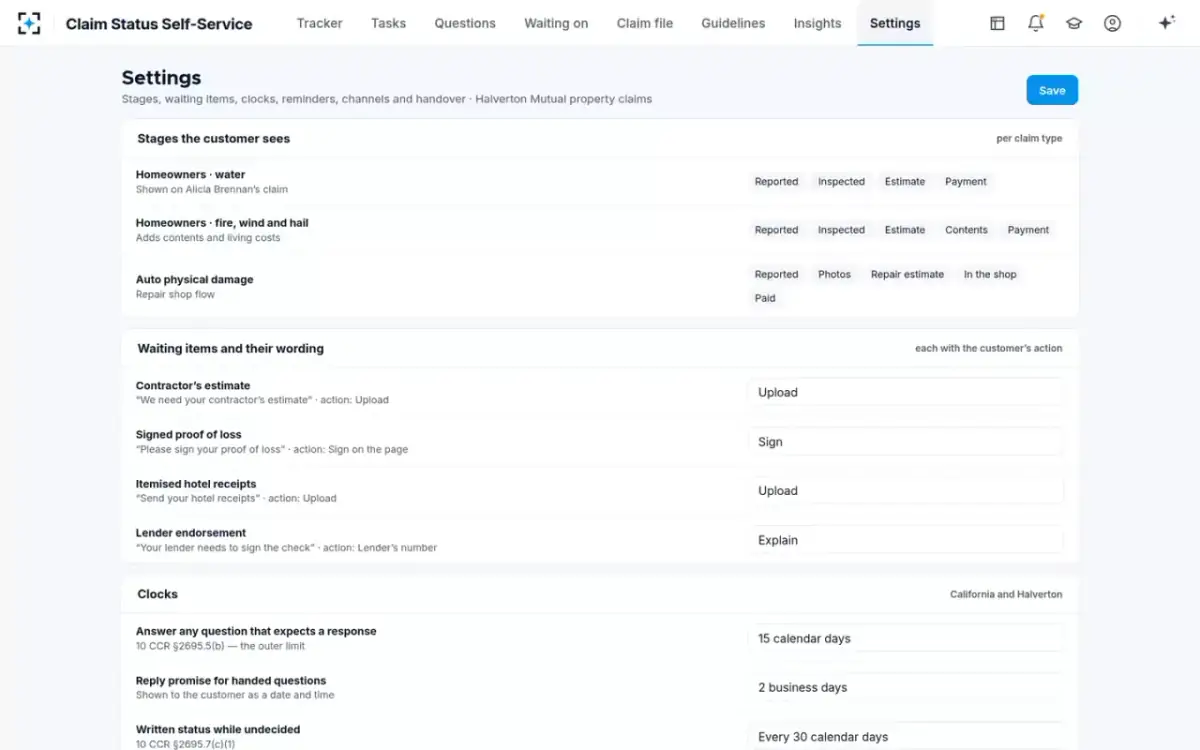
Mapping codes to stages exposes awkward cases early. A claim reopened for a supplement goes back to Estimate, not forward; a claim paid in part sits in Payment while an estimate for hidden damage is still open. Decide those cases on paper first, because the portal will show them to customers whose patience is already thin. The longer case for four visible stages is made in the guide to the homeowners insurance claim process in four stages.
The waiting items and the words for them
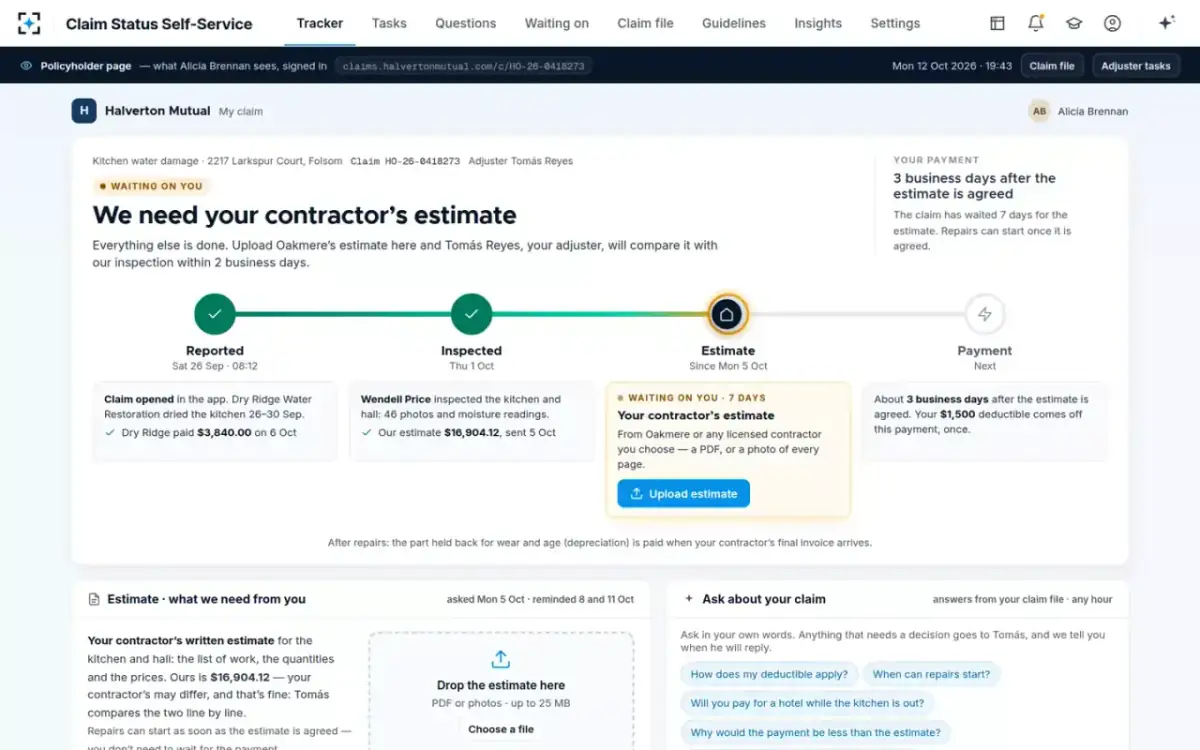
The waiting item is the part of a portal that ends calls. A claim that says "Waiting on you: your contractor's estimate, asked for on 5 October" answers the question the policyholder would otherwise phone about, and tells her what to do. On the sample claim, Alicia Brennan's estimate stage showed exactly that, with an upload button beside it; she uploaded the estimate from her phone in the evening and the stage moved to her adjuster with a reply date.
An upload is checked in front of the customer, then handed to the adjuster
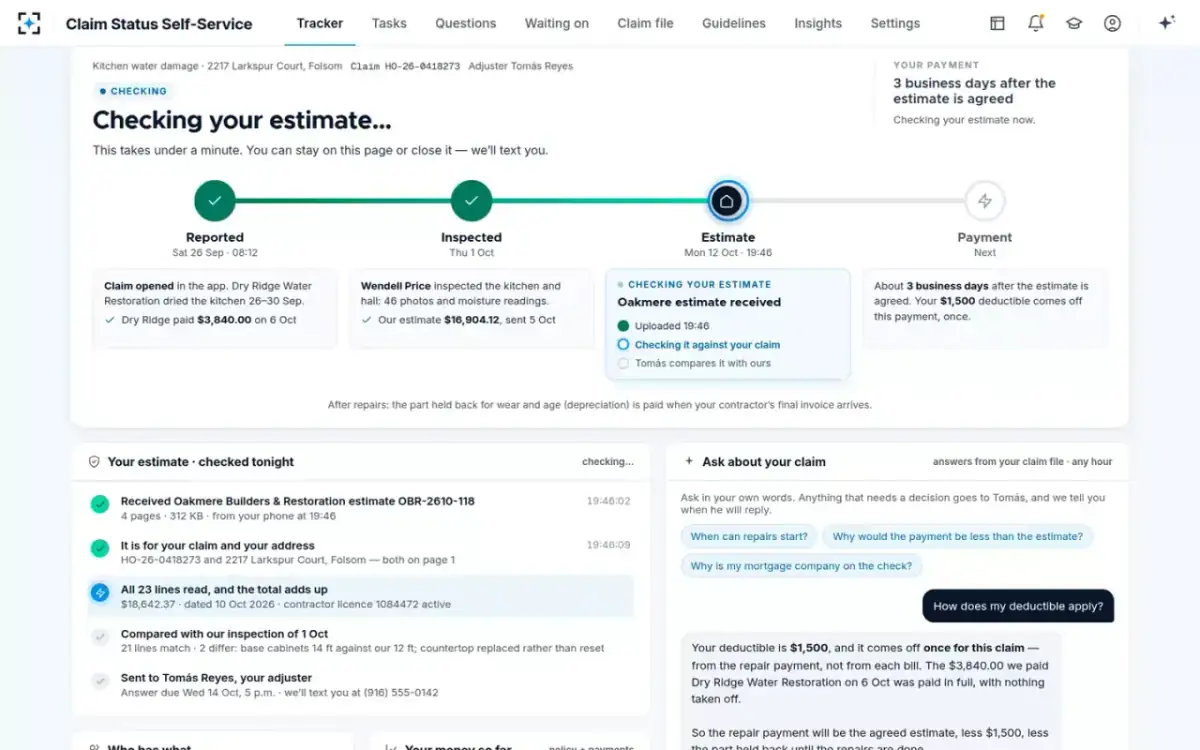
The words are a compliance matter as much as a design one, because they are statements to a claimant. In the sample, every customer-facing phrase sits in an approved rule set: twelve rules, owned by the claims customer-experience lead, changed only with claims compliance approval. One of them, G-12, sets the house style: plain words, no status codes, name the person and the date, never promise a date that is not on the file.
The rules a portal must follow: clocks, files and channels
A portal does not suspend the claims rules; it makes them visible. Three groups matter at launch.
Rules that shape a claim status portal, by what they touch
| What it touches | The rule | What a portal should do |
|---|---|---|
| Answering questions | California: a complete response within 15 calendar days to a communication that calls for one (10 CCR 2695.5(b)). Florida: acknowledge within 7 days. Washington: reply within 10 business days. | Counts the clock per question from the moment it is asked; shows the customer the reply-by time on handed questions |
| Undecided claims | California: written notice every 30 calendar days until a decision, with an estimate of when one can be made if it waits on a future event (2695.7(c)(1)). | Shows the reason and the expected date on the stage; the 30-day letter says the same |
| Estimates and the file | Florida: a copy of any detailed estimate within 7 days of the adjuster generating it. Washington: insureds may request any portion of the first-party claim file. | Puts the estimate on the page the day it is sent; routes file requests the page does not cover to a person |
| Channels | Washington, for auto claims: a claimant cannot be required to use only an internet-based application, and email, post, fax and delivery in person must be accepted. | Stays one door among several; agents see the same tracker |
| Texts | Federal rules: autodialed calls and texts to a mobile number need prior express consent; telephone solicitations are barred before 8 a.m. and after 9 p.m. local time. | Text only numbers the customer has agreed to; the sample carrier’s quiet hours, 21:00 to 08:00, match the federal hours |
Washington's new claims rule deserves a careful read, because it reaches what a portal may hide. Insureds may request any portion of the first-party claim file, and the rule spells out what that includes: "all written reports, claim notes, estimates, bids, plans, measurements, drawings, engineer reports, contractor reports, statements, photographs, video recordings, or any other documents or communications." A portal that never shows internal notes is right not to show them by default; it must not become a reason to refuse a request the rule allows. The safe design routes such a request to a person, with the clock running.
The federal text rules are simpler. Calls using an automatic dialling system to a mobile number need the called party's prior express consent unless they are made for emergency purposes, and telephone solicitations may not be made to a residential subscriber "before the hour of 8 a.m. or after 9 p.m. (local time at the called party's location)". A claim reminder is not a solicitation, but a portal that texts at 23:00 about a missing receipt will hear about it.
Who can see the claim: sign-in, lookups and what each shows
Decide what each way in may show before launch. The sample carrier offers two: signed in to the policyholder account, or a lookup with claim number, ZIP code and date of birth, which suits a customer who never set up an account. Those three details are things a person knows, not things they have, and the U.S. federal identity guidelines say plainly that knowledge-based verification is not to be used to verify identity in the systems they govern (NIST SP 800-63A-4). An insurer is not bound by federal identity rules, but the point carries: a lookup is weaker than a sign-in, so it is worth deciding whether a lookup shows the same documents and amounts, or only the stage and the waiting item.
Accessibility belongs in the same decision. A portal is a public service page for people at a bad moment, often on a phone. The W3C's Web Content Accessibility Guidelines 2.2 are the usual yardstick, and testing against them at level AA before launch is cheaper than fixing a live portal.
A go-live plan in seven steps, each with an exit test
The plan below starts from a carrier's own material, its claim types, waiting items, message rules and a sample of open claims, and moves only when each step's exit test passes. It does not promise a number of weeks: the length depends on how many claim types launch first and how quickly compliance approves the rules. The sample carrier went live on one region's property claims on 3 August.
Seven steps to a claim status portal, and how to know each is done
| Step | What goes in | Exit test |
|---|---|---|
| 1. Map the stages per claim type | The claim types you will launch with and the stages a customer should see for each | Every internal status code maps to exactly one customer stage; none is left over |
| 2. Name the waiting items | Every item a claim can wait on, who owes it, and the customer’s action | Each item has plain words, an owner and an action the customer can take, or the number to call |
| 3. Write and approve the message rules | What is answered, what goes to a person, what is never shown, and how disclosure is worded | Claims compliance has signed the rule set; each rule has an example |
| 4. Set the clocks and reminders | Your states’ response and written-status deadlines, the reply promise for handed questions, reminder days and quiet hours | Each clock cites its rule; reminders stop the moment the item arrives |
| 5. Connect read-only, then test | Claim status, policy, inspection estimates and payments; a sample of open claims and a fixed set of real questions | Every status on the sample shows plain words and a source; the question set passes the scoring rubric |
| 6. Go live on one slice | One region or one claim type, with adjusters and the contact centre seeing the same tracker | Status calls, handovers and clocks are counted from day one against a baseline |
| 7. Widen by claim type | The next claim type’s stages and items, through steps 1 to 5 again | The first slice’s numbers have settled and its rule changes are logged |
Step 6 is where the baseline matters. Count status calls to adjusters for at least four weeks before going live, and keep counting. On the sample team the weekly status calls to adjusters fell from a July average of 1,284 to 501 ten weeks after launch, and every response clock stayed at 100 percent.
One sample region, ten weeks after going live
501
status calls to adjusters in the week of 5 October, against a July average of 1,284
94%
of 3,358 questions answered by self-service, each with its source
212
questions handed to adjusters, each with a reply-by time
What to look for in claim status portal software
Look for software that reads your claim system rather than replacing it, that is configured from your stages and words rather than a vendor's template, and that can show the readiness test passing on your own sample claims. The comparison below is what that means in practice.
A portal that shows codes, and one built from your claim stages
A portal that shows the claim system: “In progress”, or the internal code.
A portal built from your stages: The stage, the one item it waits on, who has it and since when.
A portal that shows the claim system: A contact form, answered when someone gets to it.
A portal built from your stages: Answers from the file with a source; judgment questions handed over with a reply-by time.
A portal that shows the claim system: An upload box with no checks.
A portal built from your stages: The upload checked for claim, address and totals, then handed to the adjuster.
A portal that shows the claim system: Whatever the screen designer wrote.
A portal built from your stages: An approved rule set owned by a named person and changed with compliance approval.
A portal that shows the claim system: Agents see something different from the customer.
A portal built from your stages: Adjusters, supervisors and agents see the same tracker and answers.
A portal that shows the claim system: Page views.
A portal built from your stages: Every question, answer, upload and handover on the claim’s contact log, with its clock.
Claim Status Self-Service connects to the systems a carrier already runs, its claim system, policy administration, inspection estimates and claim payments, and to two-way text and a phone status line. It reads them; it does not take over claim handling, agree amounts or change the inspection estimate. What it will cost to run on your claims is best answered against the arithmetic in the guide to insurance virtual assistant cost, and the sample claim can be seen screen by screen from Claim Status Self-Service.
The finished portal: one stage, one waiting item, one action
Questions people ask
How long does it take to launch a claim status portal?
It depends on how many claim types launch first and how fast the message rules are approved, so a fixed number of weeks is a promise to be wary of. Launching one region or one claim type first, as the sample carrier did on 3 August, gets a measured result sooner and makes the next claim type mostly settings work.
Can an insurer require me to use its claims portal?
Not everywhere. Washington's 2026 rule says an insurer may not require an auto claimant or repair shop to use only an internet-based application to send claim information, and must accept email, post, fax and delivery in person. Check your state's rules and your policy.
What should a policyholder portal show?
The stage of each claim in plain words, the one item it is waiting on and who has it, the next date that is actually on the file, the documents sent to the customer such as estimates, and the payments made and held back. It should not show reserves, internal notes or fraud activity.
Does a portal replace calling the adjuster?
For status questions, mostly; for decisions, no. In the sample week 3,146 of 3,358 questions were answered on self-service, and 212 that needed a decision went to adjusters with a reply-by time.
Can I see my adjuster's estimate on the portal?
A well-built portal shows it as soon as it is sent. Florida already requires insurers to send residential policyholders a copy of any detailed estimate within 7 days of the adjuster generating it, so the portal is a faster route to something the customer is owed anyway.