ACORD form software for insurance agents fills the industry's standard application forms, such as the ACORD 125 commercial insurance application and its line sections, from information the agency already holds, and the choice between products comes down to where that information comes from. A forms module inside an agency management system fills them from the client's record, which is only as current as the last person who updated it. Botminds' Broker Submission Automation takes a different route: its agents read the client's documents for this renewal, build a fact sheet in which every fact carries its sources, and fill the ACORD forms, each insurer's own supplement and the insurers' portal screens from those facts, then file the results back to the agency system. It sits beside the system the agency already runs; it does not replace it.
This guide describes the forms by their names and numbers as they appear on the forms themselves, and uses a fictional sample renewal (Halvorsen Millwork & Cabinetry, placed by the fictional Corbett Lane Insurance Partners with four invented insurers) to count fields and show screens. It does not reproduce the forms.
Broker Submission Automation as a fact layer: from the client file to every form, supplement and portal, and back to the agency system
Agent
Reads the client fileFrom the agency mailbox and document store: prior applications, expiring policies, loss runs, the statement of values, the client's questionnaire, the payroll register.
Never: Edits the documents it reads.
Agent
Builds the fact sheetOne value per client fact, each with the documents and pages it came from; facts current documents agree on are confirmed.
Never: Confirms a fact from last year's application alone.
A person decides
Account manager settles the restChooses where current documents disagree, and confirms changed rating facts such as a roof year or an officer exclusion.
Never: Has a choice made for her silently.
Agent
Fills forms, supplements and portalsMaps each fact to every field it feeds, using a field map for each form edition, supplement and portal screen.
Never: Submits a portal page or emails an insurer.
A person decides
Client signs, account manager releasesThe client e-signs the applications; the account manager releases each package by email or portal.
Never: Is bypassed: release is a person's action.
Agent
Files everything backEvery form, letter and portal receipt, with the facts behind each field, to the client's account in the agency system.
Never: Keeps the only copy outside the agency's own systems.
What software fills ACORD forms?
Four kinds of tool fill ACORD forms, and they differ in where the values come from. A forms module in an agency management system fills forms from the client's record in that system. A standalone PDF filler fills whatever a person types, and saves retyping only between forms that share fields. A comparative rater asks its own questions and may prefill some forms from the answers, for the risks it rates. And a fact layer, the approach this guide argues for, reads the client's documents and fills every form from facts that carry their sources.
The question to ask of any of them is the same: when a field is filled, where did the value come from, and is it this year's? A form filled instantly from last year's record is fast and wrong in exactly the places a renewal changes: payroll, sales, buildings, vehicles, officers and losses. In the sample, last year's application still gave a 2009 roof for a building whose roof was replaced in 2021.
What are the types of ACORD forms in a commercial package?
A commercial submission is built from a common application and a section for each line. In the sample renewal the package uses five: the ACORD 125 Commercial Insurance Application (applicant information shared by every line), the ACORD 126 Commercial General Liability Section, the ACORD 140 Property Section, the ACORD 130 Workers Compensation Application and the ACORD 131 Umbrella / Excess Section. Certificates of insurance are a separate family of forms with a separate workflow; how insurance agents issue certificates of insurance covers them.
196 fields in eleven documents: the ACORD forms are only two-thirds of the work
The bar chart is the main reason an ACORD-only tool disappoints on a remarketed renewal. Each insurer adds its own supplement, and some rate in their own portal, so a third of the fields in the sample sit outside any ACORD form. Those are also the fields most likely to be retyped from memory, because they are asked differently by each insurer. Supplemental application insurance looks at those questions one by one.
Does my agency management system fill ACORD forms?
If it has a forms module, yes, from the client's record, and that is both its strength and its limit. The record holds what someone keyed into it: names, addresses, locations, the policies the agency placed. It rarely holds this year's payroll by class, the roof replaced after a hail claim, the officer the client has asked to exclude from workers' compensation, or the loss year one insurer's loss run skips. Those arrive as documents, and someone has to read them and update the record before the forms are right.
A fact layer does that reading and keeps the result with its evidence. The agency system stays the system of record; after release, the solution files every form, letter and portal receipt back to the client's account, with the facts behind each field. Nothing has to be migrated or replaced for a first renewal.
Integration points: what the agents read from each system, and what they write back
| System | What the agents read | What they write | Who acts |
|---|---|---|---|
| Mailbox and document store | The client file as it arrives: questionnaire, loss runs, statement of values, payroll, emails from the client | Nothing | The account assistant requests documents; the agents read them |
| Agency management system | The client's account, prior applications and expiring policies | Completed forms, letters and portal receipts, filed to the client's account | The account manager owns the record |
| Field maps for forms, supplements and portals | Each form edition's, supplement's and portal screen's fields | Proposed updates when a form or question changes | The placement specialist approves a new version |
| E-signature | Whether each application is signed | Nothing until signed | The client signs; an officer signs an exclusion form |
| Insurers' portals | The quote screens' questions | Answers entered for review | The account manager reviews and submits |
| Insurers' email | Underwriters' replies | Nothing | The account manager releases each package |
Can ACORD forms be filled automatically from a PDF?
From a PDF of last year's application, yes, and that is the danger: it copies last year. From the PDFs of this year's documents, yes, if the software reads them, can say which page each value came from, and refuses to choose when two documents disagree. Scanned loss runs, a statement of values in a spreadsheet, a payroll register and a questionnaire filled in by hand are the inputs that matter, and they rarely agree with each other on every point.
In the sample the client file was 63 documents and 412 pages, and the agents lifted 1,284 values, each with its page and line. Forty-one of 46 client facts were confirmed because current documents agreed; five went to the account manager. That is the difference between filling a form from a PDF and filling it from evidence.
How do carrier portals connect to agency systems?
Often they do not, at least not for the questions that matter on a commercial renewal, which is why, in Botminds' estimate, portal entry is 4 of the 11 keying hours on a renewal like the sample's. Some insurers rate a line only in their portal, and the portal asks its own questions in its own order. In the sample, one general liability and property insurer rates in its portal and reads the roof year and sprinkler answers there directly, and the workers' compensation insurer takes the application through an agent portal.
An insurer's portal, filled from the same facts, waiting for the account manager's review
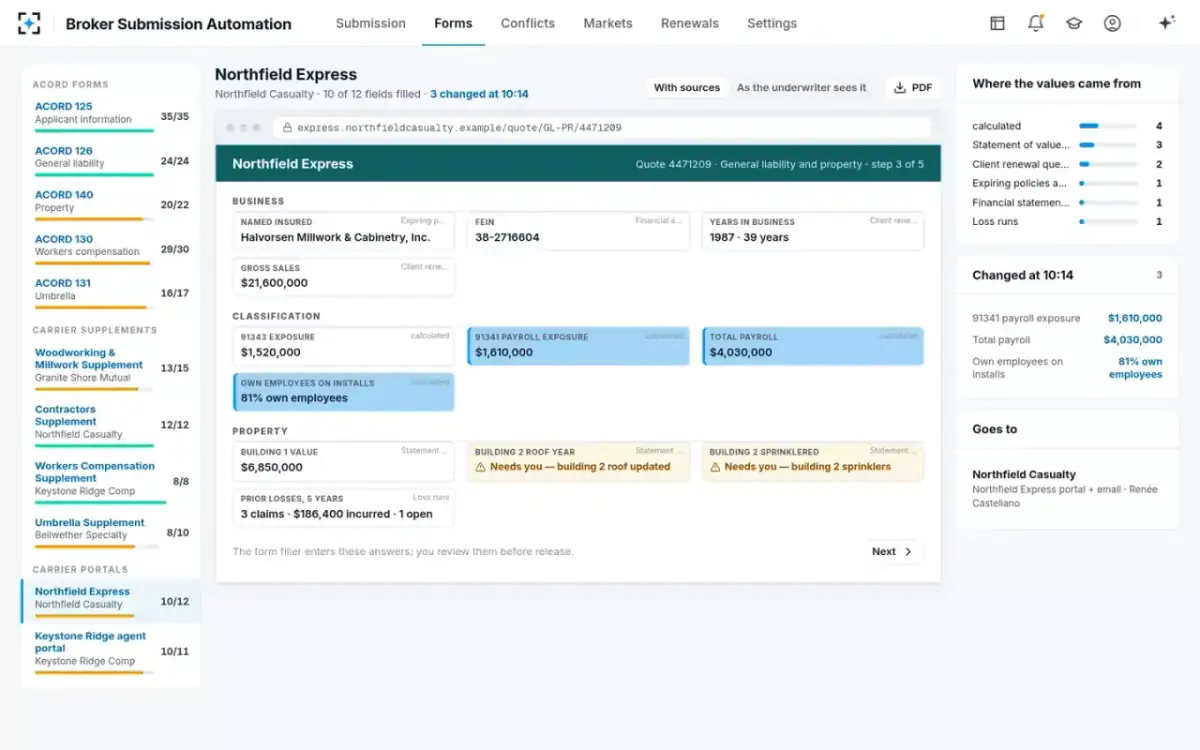
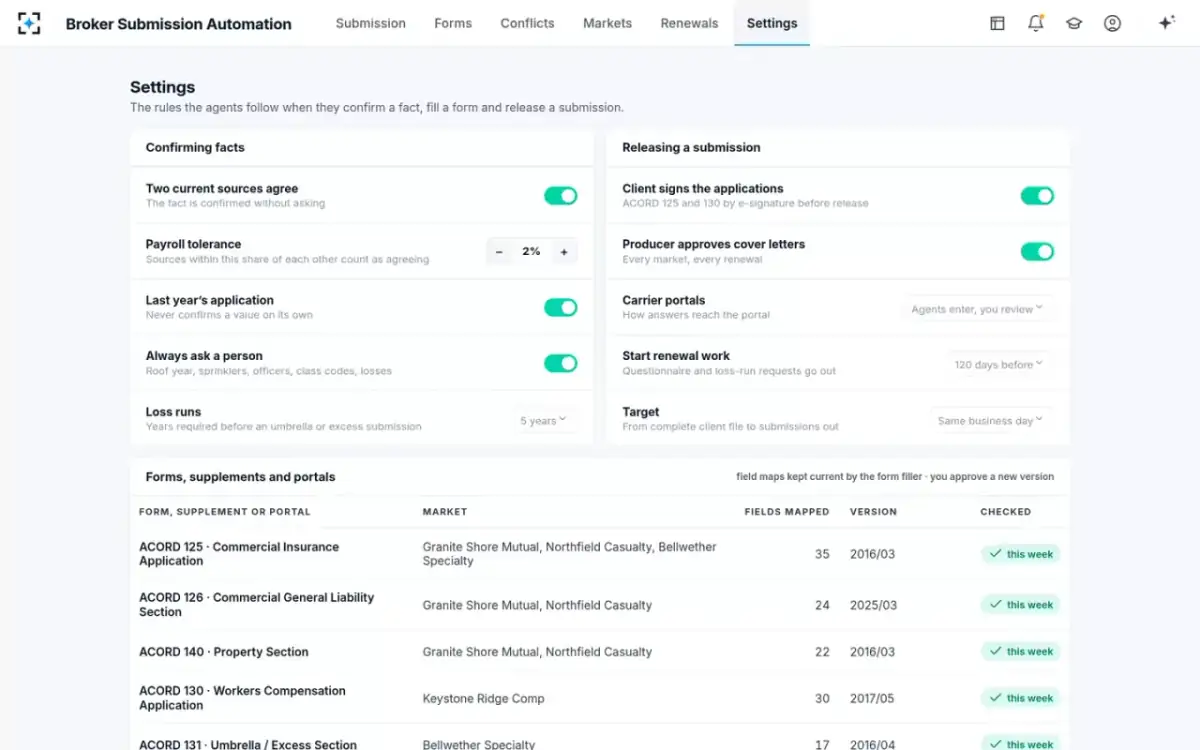
The setting for portals has two positions: agents enter the answers and a person reviews them, or a person enters them and the agents check each answer against the fact sheet. The second suits an agency that wants a person's hands on every portal entry. Either way the same facts reach the portal as the forms, which is the point.
Form editions and field maps: who approves a new version
A person should, every time. Each ACORD form carries an edition date, and in the sample the ACORD 125, 140 and 131 are mapped at their 2016 editions while the ACORD 126 is at 2025/03. When a form or an insurer's supplement changes, a field map built for the old version puts values in the wrong place or misses a new question.
Your agency's rules, and the field map for every form, supplement and portal with its version
How are e-signatures handled on ACORD forms?
The client signs the applications, electronically if the parties agree, and federal law treats that signature as valid for insurance. The E-SIGN Act says so in terms: "It is the specific intent of the Congress that this subchapter and subchapter II apply to the business of insurance." Examiners, for their part, check that applications are complete and signed where required, electronic signatures included (NAIC Market Regulation Handbook, chapter 21).
The same statute gives agents and brokers a narrow shield that software choices can affect. An agent or broker acting at a party's direction is not liable for deficiencies in the electronic procedures the parties agreed only if it was not negligent, did not deviate from the procedures, and "was not involved in the development or establishment of such electronic procedures" (15 U.S.C. § 7001(j)). An agency that builds its own signing flow inside a forms tool may be outside that shield; one that uses an agreed e-signature process and records each signature is inside it. In the sample, the client's CFO e-signed the ACORD 125 and 130 at 10:32 and nothing was released before.
When a forms module is enough, and when a fact layer earns its place
A forms module is enough when the client record is current and the renewal goes to one insurer on standard forms. A small account renewing with its incumbent, with no change in operations and no supplement, is filled from the record in minutes, and a fact layer adds little. The case for reading the documents grows with three things: the number of markets, the number of insurer-specific questions, and how much the account changed since last year.
The sample renewal sits at the far end of all three. It goes to four insurers, two of them new to the account; it carries four supplements and two portals; and its installation payroll rose 29.8% because a second crew started in March, while a building's roof and an officer's status also changed. An account like that is where retyping from memory goes wrong, and where an underwriter's question a week later costs the most.
Be clear about scope, too. The forms shown in Broker Submission Automation today are the ACORD 125, 126, 130, 131 and 140, each insurer's supplement and portal screens, loss runs, statements of values and payroll documents. A commercial auto schedule or another line's section would need its own field map, so ask which maps exist before you assume a line is covered.
Do you need a separate forms tool, and how long does setup take?
You need one only if your current system cannot fill the insurers' supplements and portals from current, sourced facts; the ACORD forms alone are rarely the bottleneck. Setup time is driven by field maps, not by installation: one map per form edition, per insurer's supplement and per portal screen you use. The sample renewal needed eleven maps and 196 fields, and a second renewal going to the same insurers reuses all of them.
That makes the first market the slow one and the tenth fast. A sensible order is to map the insurers that receive most of your remarketed accounts first, then add others as renewals come due. How the hours and the cost come out per submission is in insurance submission automation, and which tasks move to agents is in insurance broker automation.
Questions to ask any ACORD form software before you buy it
- Where does each filled value come from?
The client record, last year's form, or this year's documents with a page reference. Click a field and see.
- Does it fill insurers' supplements and portal screens?
In the sample they are 68 of 196 fields. An ACORD-only tool leaves them to be typed.
- What does it do when two documents disagree?
Show both and ask a person, or pick one quietly.
- Which form editions does it support, and who approves a new one?
An edition change should be a reviewed update, not a silent one.
- How are signatures captured and recorded?
Through an e-signature process the parties agreed, with each signature's time on the record.
- Does it write back to our agency system?
Completed forms, letters and receipts belong on the client's account, not only in the tool.
- Can it enter portal answers without submitting them?
Entry for review is useful; submission should stay with a person.
Questions people ask
What software fills ACORD forms?
Agency management systems with a forms module, standalone PDF fillers, comparative raters with prefill, and tools that read the client's documents and fill forms from sourced facts. They differ in where the values come from; for a renewal, the right answer is this year's documents, with a page reference for each value.
What is a fact sheet in a submission tool?
A list of the client's facts for one renewal, such as payroll by class, buildings, vehicles, officers and losses, in which each value carries the documents and pages it came from and the person who confirmed it. In the sample, 46 facts fill 196 fields; confirm a fact once and every field it feeds changes.
Can the same ACORD 125 go to several insurers?
Yes: it is the common application, and each insurer adds the line sections and its own supplement. In the sample the ACORD 125 goes to three of the four insurers, so its 35 fields would be typed three times by hand; filled from one fact sheet, the three copies cannot disagree.
How long does it take to set up form automation?
It depends on the number of field maps: one per form edition, per insurer's supplement and per portal you use. The sample renewal needed eleven maps covering 196 fields; once an insurer's package is mapped, every later renewal going to that insurer reuses it.
Do I need a separate forms tool if my agency system already fills ACORD forms?
Only if your system cannot keep up with what a renewal changes, or cannot fill insurers' supplements and portals. In the sample, a third of the fields were outside the ACORD forms, and the values most likely to be stale in a client record, such as payroll by class and a roof year, were the ones that changed.