An SOV template for insurance is the spreadsheet layout a carrier or broker uses to list every insured location with its address, construction, occupancy, protection, exposure and values, one row per building. In practice every carrier keeps its own layout and every broker sends a different one. The useful template is therefore not a blank form but the carrier's own layout with each column tied to the source that can check it and the person who owns it. That is the starting point for Botminds' Schedule of Values Validation, which reads whatever layout a broker sends, maps it to the carrier's template, and checks each column against its source before the account is priced. This page lists the columns, the files to gather before switching it on, and what to leave to the broker.
Two public forms anchor the column list: the property reporting form North Carolina's state agencies use to insure state buildings, and FEMA's guide to the flood insurance application for non-residential buildings. The screens come from the solution's sample data, a fictional Gulf Coast logistics renewal.
What to gather before switching on schedule validation
- Your own schedule layout, field by field
The columns you price and model on, with the codes each field allows. This is the template every broker file is mapped to.
- Last year’s confirmed column mapping for each regular broker
A mapping someone has already checked is the fastest start for the same broker’s next file.
- A sample of past schedules, in the layouts brokers actually sent
Include the messy ones: several tabs, notes columns, merged cells. They are the test set.
- Prior-year schedules for the accounts you renew
Matched by parcel, they show values that have not moved and rows that appear twice.
- Your rebuild cost tables, or the valuation service you license
The value check is only as good as the cost per square foot it compares against.
- Risk engineering surveys and inspection reports
The best evidence for sprinklers, construction and occupancy, cited by page.
- The thresholds and approvers you want
Under-insured and over-insured flags, placement needed before pricing, blank fields that stop pricing, and who co-signs above what size.
- Your underwriting guidelines for property
So the checks stop where your appetite and referral rules already draw the line.
Is there a standard SOV format?
Not one that everyone uses. Insurers and brokers work from their own spreadsheets and from industry forms, and a schedule for a 300-location account looks nothing like one for a single building. What is standard is the information: an underwriter needs to know where each building is, what it is made of and used for, how it is protected, what surrounds it, and what it is worth.
Public forms show what a minimum looks like. North Carolina's State Property Office and the risk management division of its Office of State Fire Marshal ask agencies reporting a state building for its address and ZIP code, latitude and longitude, year constructed, main use, gross and net square feet, number of floors above and below ground, fire alarm, fire sprinkler system, flood zone, the fire department providing primary response, roof, floor and exterior wall construction, and the replacement value for building and contents (NC Property Reporting Form). That is close to a full commercial template, written by a public owner insuring its own buildings.
What columns should a statement of values have?
Every column should have a reason, a source that can check it and an owner. Without the last two, a template is a request for data nobody verifies. The table below is a working layout, close to the one in the solution's sample, with the check for each field.
SOV template columns: why each is there, how to check it, who owns it
| Column | Why it is there | Source that can check it | Owner |
|---|---|---|---|
| Street address, city, state, ZIP | Identifies the building; feeds geocoding | Postal address file; parcel records | Broker, from the insured |
| Latitude, longitude, placement precision | Where the hazard is read | Geocoder: roof, parcel, street, or postal-code centre | Carrier |
| Construction class | Fire and wind vulnerability; the rate | Risk engineering survey; permits; property records | Broker proposes, carrier decides |
| Occupancy | What burns and what floods inside | Survey; permits; business records | Broker proposes, carrier decides |
| Year built, roof year | Code era and roof age | Property records; re-roof permits | Broker, checked by carrier |
| Stories, floor area | The size of the building; value per square foot | Property records; permits for additions | Broker, checked by carrier |
| Sprinkler type, alarms | Fire protection inside the walls | Survey; sprinkler contractor certificate | Insured |
| Protection class | Fire protection outside the walls | Public protection classification for the area | Carrier |
| Flood zone, distance to coast | Flood and wind exposure | FEMA flood maps; coastline layer | Carrier |
| Building value | Limit, premium, coinsurance test | Rebuild cost table or appraisal | Insured, checked by underwriter |
| Contents value | Second limit at the location | Insured’s asset records | Insured |
| Business income | Loss of earnings if the location stops | Insured’s financials | Insured |
| Total insured value | Sum of the three values | Arithmetic | Carrier |
Two columns deserve more care than they usually get. Placement precision is rarely on a broker's schedule at all, yet it decides how much to trust every hazard column next to it. And protection class, flood zone and distance to the coast are better looked up by the carrier from the pin than accepted from the broker, because they change when the pin moves. COPE in insurance underwriting explains what each building column means for the rate, the model and the claim.
Address and coordinates: the building's location, not the mailing address
The address column should describe where the building stands, which is often not where the insured receives mail. North Carolina's form says so in a parenthesis that every template could copy: "Please provide zip code for the building location, not for the mailing address." It also asks for latitude and longitude in decimal degrees, which is the format a geocoder and a catastrophe model read.
Industrial and port sites make the point sharply. A distribution yard may have a postal address on one road and its buildings on another; a cold store on a ship channel may share an address range with an office park. In the sample renewal, one cold store's address was not in the address file at all and matched only its postal-code centre, 5.6 km from the building. An address column that asks for the building's location, with a column for coordinates if the insured has them, saves the hours spent finding it later.
Area, stories and year built: the columns that size the building
Floor area is the column every value check depends on, so define how it is measured. FEMA's guide to the flood application for non-residential buildings gives a usable rule: "Include stairwells and elevator shafts," and leave out basements, enclosures and mezzanines and garage areas used only for parking, storage or access; where floors are the same size, multiply the ground floor area by the number of floors (FEMA NFIP, Risk Rating 2.0 simple guide for non-residential buildings). A carrier's own rule may differ; what matters is that the template says which rule it uses.
Stories and year built size and date the building, and both are easy to check against property records. In the sample renewal the agents corrected a year built of 2060 to 2006 and a stories count of 2 to 1 without asking anyone, and filled a missing year built of 1974 from the property record, each change marked in the cleaned schedule with what the broker had sent. A freezer addition that a 2021 building permit showed, taking one cold store from 48,000 to 74,500 square feet, went to the broker as a question, because it changes the value.
Three values per location: building, contents and business income
Each location needs three values, each with its own definition, and the template should say what goes in which. North Carolina's guidance to agencies is precise about the building: "please do not include any costs associated with the purchase of land. Also, do not include any 'movable equipment' costs in the building value since these costs are usually part of the contents" (NC Office of State Fire Marshal, State Property Fire Insurance Fund).
Contents values have a trap of their own. The same guidance warns that an agency which reports only the assets recorded in its fixed asset system, which skips items below a threshold such as $500 or $5,000, "may be substantially under-insured in the event of loss," and recommends adding an amount for those items. A broker's contents figure taken straight from an insured's asset register has the same gap.
FEMA's default contents value, as a share of building value
100%
Warehouse and wholesale trade (COM2), retail, office
150%
Industrial occupancies IND1 to IND5, hospitals and medical offices
50%
Residential occupancies and parking garages
Why the values column matters more than any other
Because it is the only column the insurer will be held to after a loss. North Carolina's fund states the rule plainly for its own agencies: "Accuracy in reporting values is important since the Fund cannot pay more than the amount reported." The same paragraph warns the other way too: an agency that reports values above replacement value "may pay needless insurance premiums."
A template cannot make a value right, but it can make it checkable. Ask for the building's floor area, construction and occupancy in the same row as its value, and the value per square foot falls out of the spreadsheet. Compared with a rebuild cost table for that construction, occupancy and area, it shows within seconds which buildings are under-valued, which is the comparison the solution's valuation checker makes on every row. What an under-valued building costs under an 80% coinsurance clause shows why it is worth making.
The settings a team brings: thresholds, cost tables and approvers
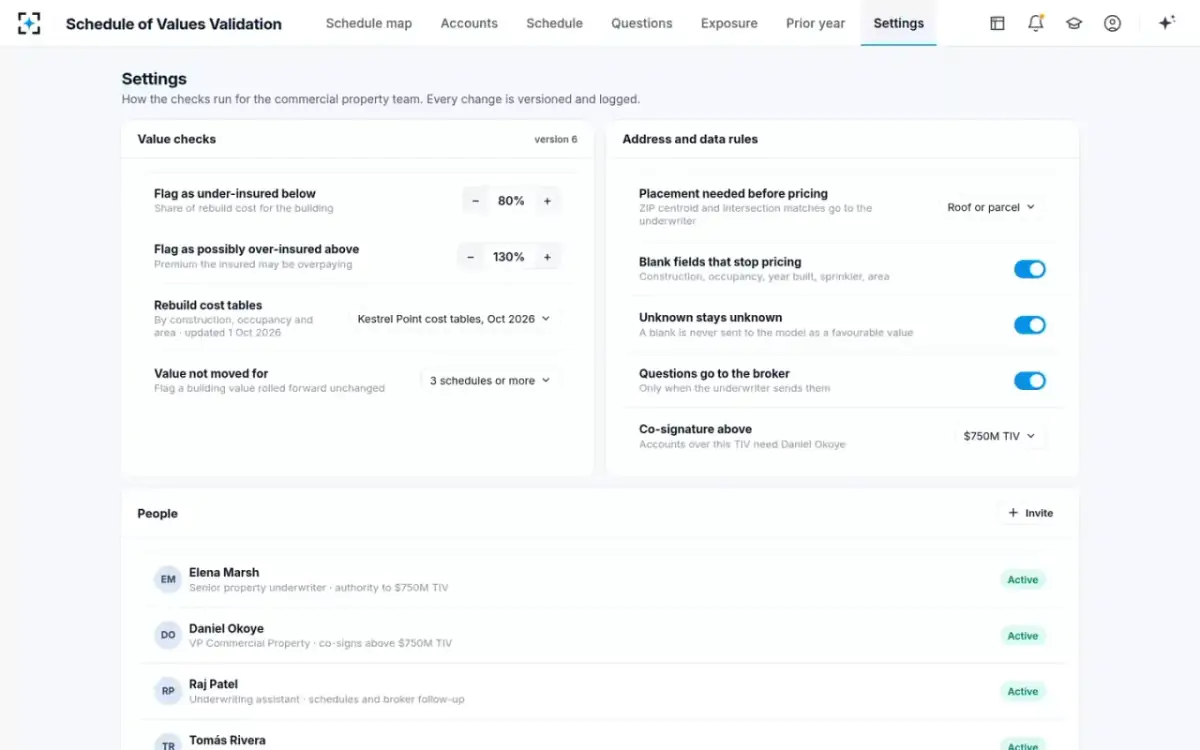
What to leave to the broker, and what to ask for
Leave to the broker and the insured what only they can know, and ask for it once, with evidence. The insured knows whether a warehouse has had a sprinkler system installed since the last survey, whether an addition was built, and what the business would lose if a location stopped. The carrier can look up the flood zone, the protection class and the year a building was permitted. A template that asks the insured for what the carrier can look up wastes the insured's time; one that looks up what only the insured knows invents data.
Changes during the year belong in the same conversation. North Carolina tells its agencies that new property "should immediately be reported" to the fund, because "Failure to report this property may result in a lack of insurance coverage should a loss occur prior to reporting the property to the Fund." A commercial schedule is a snapshot; buildings bought, sold or extended between renewals are where it goes wrong first.
How to build a statement of values from a broker's spreadsheet
Map, place, check, then ask. The mapping comes first because nothing else can run until the broker's columns are in the carrier's fields; it is also the step a remembered mapping shortens most. Placement comes next, because hazard fields follow the pin. Checks against records, surveys, permits and last year's schedule come third. Questions go last, in one email, with each answer's effect on the total insured value shown.
The same schedule, as the broker sent it and as the template needs it
Broker's spreadsheet as sent: 31 columns across three tabs, in the broker’s order
Carrier template after mapping and checks: 24 fields in the carrier’s order, one row per building
Broker's spreadsheet as sent: Words: “tilt-up”, “steel/masonry”, “Masonry”
Carrier template after mapping and checks: A class code, with the broker’s words kept beside it
Broker's spreadsheet as sent: In a notes column for some rows, blank for others
Carrier template after mapping and checks: Its own field; blanks flagged, never filled with a guess
Broker's spreadsheet as sent: Partial for some locations; one with no street number
Carrier template after mapping and checks: Standardised, placed on a roof or parcel, precision recorded
Broker's spreadsheet as sent: One building listed twice under two row numbers
Carrier template after mapping and checks: Matched by parcel and removed, with the value it carried shown
Broker's spreadsheet as sent: Building values rolled forward or unchanged for years
Carrier template after mapping and checks: Value per square foot against rebuild cost, flagged for the underwriter
Where Schedule of Values Validation fits in the template work
It fits the step between the broker's file and the carrier's template. It reads any spreadsheet layout and any number of tabs, maps the columns using last year's confirmed mapping for that broker first, places and checks every location, and produces the cleaned schedule in the carrier's layout, a model-ready exposure file and one email of questions. It reads property records, permits, geocoding and hazard data, prior-year schedules, surveys and the carrier's rebuild cost tables.
It does not write the insured's values, sign the statement or replace a valuation where one is needed; the values remain the insured's declaration and the underwriter's decision. It is set up from the team's own layout, cost tables, guidelines and a sample of past schedules, and run on those past schedules first, so the team sees what it finds on files it already knows. Which of the 24 fields an agent may change sets out the limits field by field.
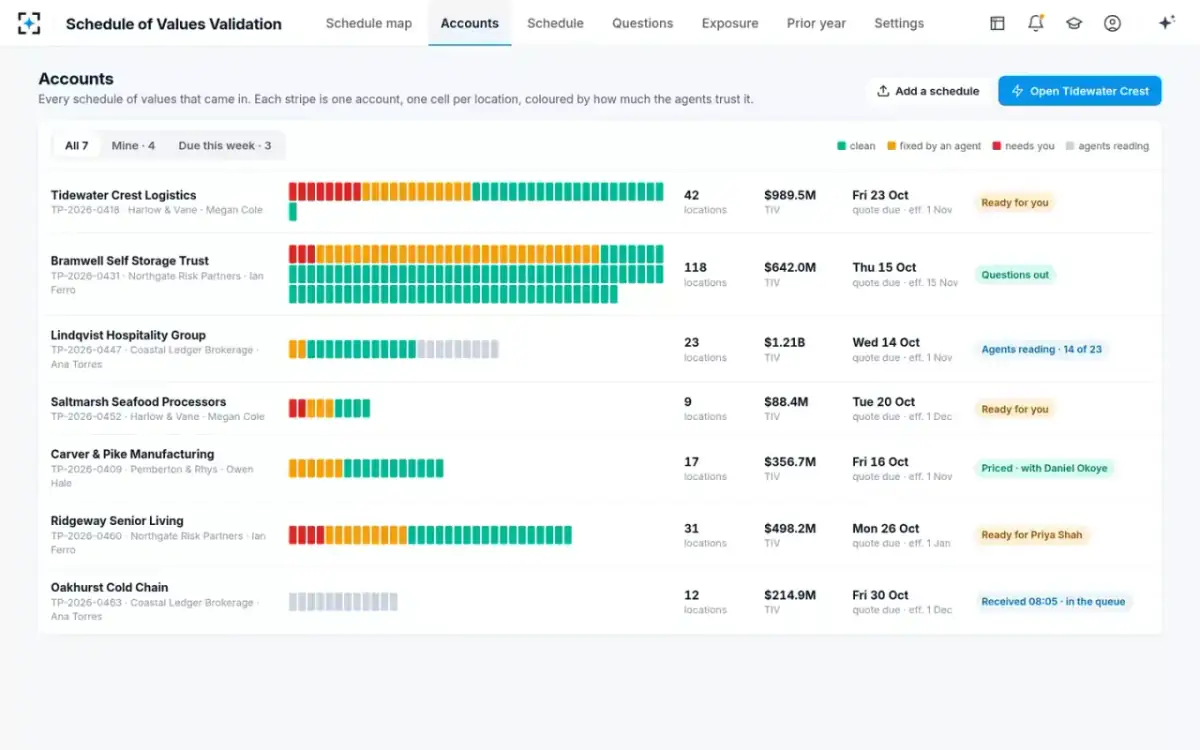
Every schedule that came in, one stripe per account
Questions people ask
Who fills out the schedule of values?
The insured, usually with the broker, because the values and many building details are the insured's to declare. The carrier's underwriting assistant then maps it into the carrier's layout, and the underwriter decides what to accept. Hazard fields such as flood zone and protection class are best looked up by the carrier from the location rather than taken from the schedule.
Is there a free SOV template in Excel?
Any spreadsheet will do; the columns matter more than the file. The table on this page is a complete working layout, and public forms such as North Carolina's property reporting form show the fields a public owner asks for. What a downloaded template cannot supply is the check behind each column.
What is TIV on a statement of values?
Total insured value: for each location, the sum of building, contents and business income values, and for the account, the sum across locations. In the sample renewal the broker's schedule totalled $989.49M across 42 rows; after the duplicate was removed and the evidence weighed, the checked figure would be $1,001.71M if the broker confirms the answers.
What information does an underwriter need for each location?
Where the building is, precisely enough to read its hazard; what it is made of and used for; how it is protected inside and outside; what surrounds it; and what it costs to rebuild. That is COPE plus values, with a placement precision for the address and a source for each figure.
Should an SOV include buildings bought after the policy started?
Yes, as soon as they are acquired, under whatever newly-acquired-property terms the policy has. North Carolina's fund warns its agencies that unreported new property may lack coverage if a loss comes first, and a commercial schedule carries the same risk between renewals.