SOV software, in commercial property insurance, is software that takes a broker's statement of values (the spreadsheet listing every location, its construction, occupancy and insured values), maps it into the carrier's own layout, geocodes each address, checks the building data and values against other sources, and produces a clean schedule and a file the catastrophe models can read. That is the job underwriting assistants and cat modeling analysts do by hand today, and it is slow because no two brokers send the same layout. Botminds' Schedule of Values Validation does it with six agents and one rule that matters more than any feature: agents may standardise, place and propose, but every value, limit and message to the broker is decided by the underwriter. The useful buying question is therefore not "can it read our schedules" but "which of our fields may it change, and which may it only propose."
A note on the search term. In construction, "SOV software" usually means billing software for a contractor's schedule of values, the line items of a pay application. This page is about the insurance schedule of values; the examples come from the solution's sample data, a fictional 42-location Gulf Coast logistics renewal.
A 24-field carrier layout, and who may change each field
Address
Placement and hazard
Building
Values
Agent standardises; the broker’s entry stays visible
Agent derives from the pin; re-runs when a person moves it
Agent proposes with its source; a person accepts or overrides
Agent flags against rebuild cost; only the underwriter decides
What does SOV software do for a property underwriter?
It turns a schedule nobody can price into one somebody can, in five steps: read the broker's layout, map it to the carrier's fields, place every address on a building, check the building's characteristics and value, and ask the broker about what is left. Each step is mechanical until it is not. A column called "Const." may hold "tilt-up," "CB" or "steel/masonry"; an address may be a street with no number; a building value may be the same figure it was five renewals ago.
The software is worth buying for the steps that repeat, and dangerous for the steps that look mechanical but are judgments. Moving a pin across a flood-zone line, choosing a construction class from a survey, or replacing a building value changes the price and, at claim, what the insured is paid. A good product makes the repetitive steps disappear and makes the judgments faster, without quietly making them itself.
Regulators look at the same boundary from the other side. Among the questions the NAIC's catastrophe modeling primer suggests a department ask about the data behind a rate filing: "To what extent has the company relied on data supplied by others? How did the company review the data for reasonableness and consistency?" (NAIC Catastrophe Modeling Primer, exposure draft, December 2024). A broker's schedule is data supplied by others. SOV software is, among other things, the record of how it was reviewed.
Twenty-four fields, and who may touch each one
Divided field by field, the work falls into four kinds, and each kind gets a different rule. Address fields can be standardised with the broker's entry kept beside the new one. Placement and hazard fields follow from the pin, so they are derived rather than edited. Building fields can be checked against records, permits and surveys, so an agent proposes a value and cites where it came from. Value fields are the underwriter's alone: an agent compares them with the cost to rebuild and flags the gap, and never changes them or the limit.
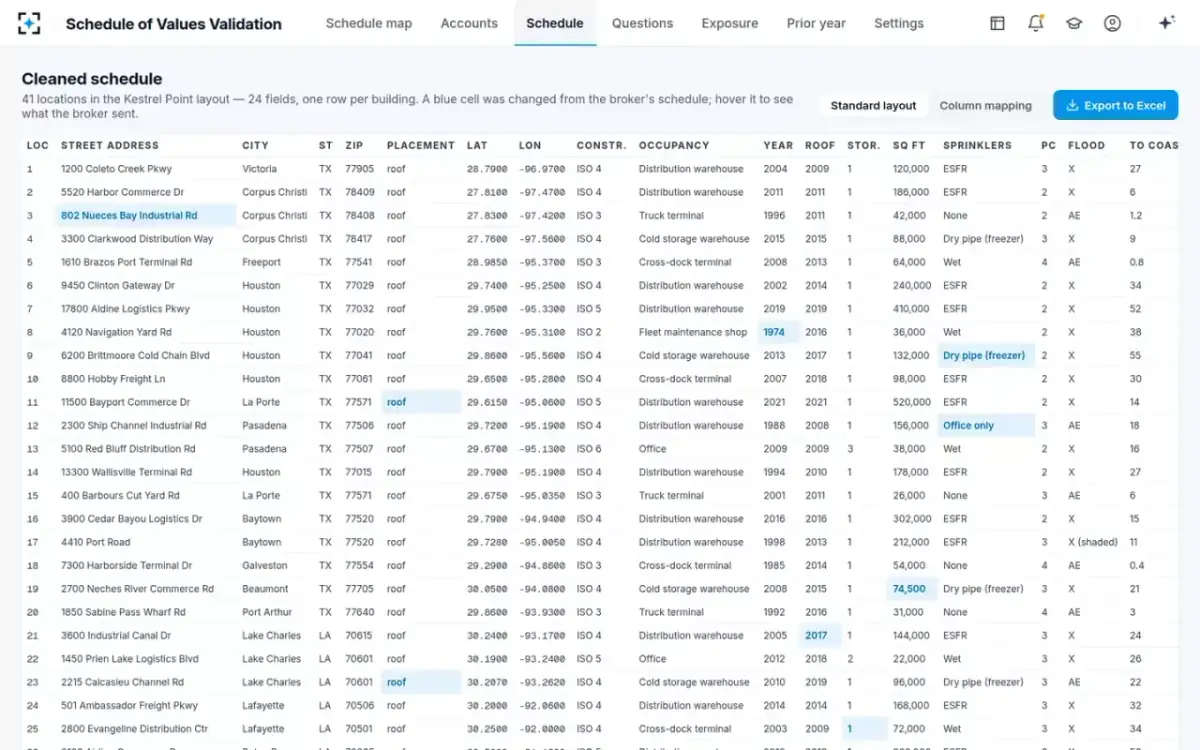
In the sample renewal, the agents made twelve small corrections without asking anyone: a ZIP code filled from the address, a year built of 2060 corrected to 2006, a stories count of 2 corrected to 1, a vague "Masonry" turned into a joisted masonry class, a roof year taken from a re-roof permit. Each changed cell is marked in the cleaned schedule, with what the broker sent. Material findings, such as sprinklers a survey found only in the office, or a freezer addition a permit shows and the schedule does not, become questions instead.
The cleaned schedule: every changed cell marked, the broker's entry one hover away
How does SOV software handle broker layouts it has never seen?
It should read the layout, propose a mapping and remember the confirmed one, rather than demand a template. In the sample, the schedule reader maps the broker's 31 columns across three tabs to the 24 standard fields, with the year built found in a notes column. For a broker it has seen before, it starts from last year's confirmed mapping for that broker, so the underwriting assistant confirms a mapping instead of building one.
Two behaviours matter more than the mapping itself. A blank must stay blank and be flagged; software that fills a missing year built with an average, or a missing construction class with the most common one, has made up data the model will treat as real. And every normalised code should show the broker's words beside it, so the underwriter can see that "CB" became masonry non-combustible and decide whether that was right.
Six agents and one underwriter: who does what, and what each agent never does
Agent
Schedule readerReads any layout and any number of tabs, maps columns to the carrier’s fields using last year’s confirmed mapping for that broker first, and normalises construction and occupancy codes.
Never: Fills a blank with a guess, or hides the broker’s value; it shows it beside every change.
Agent
GeocoderStandardises each address and places it on the roof, then the parcel; flags postal-code and intersection matches and suggests the building it believes is right.
Never: Moves a pin silently; low-precision matches go to the underwriter.
Agent
Property data checkerCompares construction, occupancy, area, year built and roof with property data, permits, risk engineering surveys and last year’s schedule.
Never: Overwrites the broker’s value; every difference carries its source passage.
Agent
Valuation checkerCompares value per square foot with the cost to rebuild that construction and occupancy in that area, and finds values rolled forward unchanged.
Never: Changes a limit; it compares on the checked area and occupancy.
Agent
Hazard mapperAdds flood zone and base flood elevation, distance to the coast, wind tier and protection class to each placed location.
Never: Reads anything but published hazard layers, or skips a re-run when a pin moves.
Agent
Broker query writerDrafts one email of questions, each with its evidence, leaving out what the agents already fixed.
Never: Sends; the underwriter sends.
A person decides
Property underwriterMoves pins onto buildings, accepts or overrides each finding, decides every value, and sends the questions. Accounts above the co-signature threshold go to the VP Commercial Property.
Can AI geocode an SOV without moving pins behind your back?
Yes, if the software separates finding the building from moving the pin. Geocoding is the step where automation helps most and where a silent change does most damage: a pin that slides 500 metres can cross a flood-zone line or a coastal wind band, and the price follows. The test for any product is whether a person can see, for every location, how it was placed, where it was before, and who moved it.
Florida's hurricane model standards hold the model builders to that bar. "Geocoding of the exposure location shall be justified," the standard on insured exposure reads, and its audit items include reviewing "Examples of geocoding for complete and incomplete street addresses" (Florida Commission on Hurricane Loss Projection Methodology, Hurricane Standards Report of Activities, as of 1 November 2025, standard A-3). An underwriting desk is not a model builder, but the same habit, a justified placement for every location, is what lets the desk answer a reinsurer's or an examiner's question later.
In the sample, the geocoder placed 39 of 42 locations on a roof and flagged three. One, a cold store in Lake Charles, had matched only its postal-code centre in flood Zone X; the agents found the building 5.6 km away on a ship channel, in Zone AE, drew a dotted line to it and stopped. The underwriter dragged the pin. The flood zone, the base flood elevation and the exposure file updated together, and the move was logged with its before and after coordinates. Five measures of geocoding accuracy for a property schedule explains how to tell whether placement is good enough to price on.
Who should approve a change to an SOV value?
The underwriter, always, and above a set size a second signature. A building value is not data in the way a ZIP code is: it is the insured's declaration of what the building is worth, the base of the premium, and under a coinsurance clause the number that decides how much of a partial loss is paid. Software can show that a value is out of line; it cannot know whether the insured has an appraisal, a renovation, or a reason.
The sample shows what that looks like in practice. A 212,000 square foot warehouse in Baytown, Texas, carries $9.8M, the same figure since 2019, against a rebuild estimate of $20.35M from the carrier's own cost tables: 48% of rebuild. The valuation checker flags it, shows the build-up (area × cost per square foot × the area factor), and puts it in the questions to the broker. The underwriter decides whether to accept the checked value, keep the broker's, or ask. Thresholds are the underwriting leader's: in the sample, under 80% of rebuild is flagged, over 130% is flagged as possibly over-insured, and a new rule sending anything under 60% to the VP for review was added in one sentence and logged as version 7 of the settings. What an old value costs at claim under an 80% coinsurance clause works through the money.
The use of AI in model development and implementation shall be documented.
Florida Commission on Hurricane Loss Projection Methodology, standard G-3, Artificial Intelligence Use (new in the 2025 hurricane standards)
Florida's new standard applies to the organisations that build hurricane models, not to underwriting desks, but it points where documentation expectations are going. A desk that uses agents to prepare exposure data should be able to show, for any location, what each agent did and what a person decided. In the solution, every agent step and every human decision is on an activity trail with who, what and when, and every change to the thresholds is versioned.
What the agents send the broker, and what they keep to themselves
The broker gets one email, not a week of them, and only the questions that need the insured's knowledge. In the sample, the broker query writer drafted ten questions: five building values under 80% of rebuild, sprinklers a 2025 risk engineering survey found in the office only, a freezer addition a 2021 permit shows and the schedule does not, a construction class that changed between years, and a row counted twice. The twelve small corrections the agents made are listed for the broker to see, not asked.
One email, every question with its evidence, nothing sent until the underwriter sends it
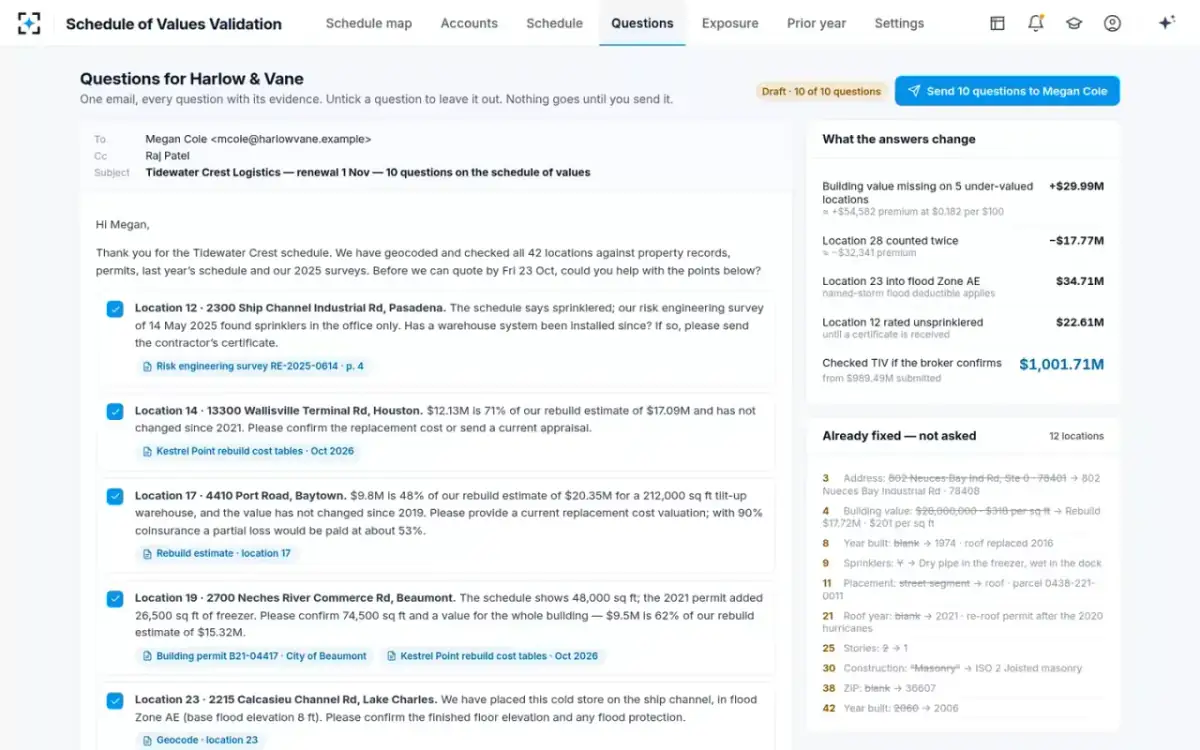
Two details are worth copying into any evaluation. The draft says what each answer would change, so the underwriter can decide which questions are worth a broker's time. And the language is plain: no internal field codes, no class numbers the insured has never seen. A question a risk manager can answer from memory gets answered the same day.
Eight questions to put to any SOV software vendor
The demonstration will show a messy spreadsheet becoming a clean one; that proves little. These eight questions find out what the software does when the spreadsheet is ambiguous, which is most of the time.
Before you buy SOV software: eight questions with the answer to listen for
- Run it on three of our past schedules, in their original layouts
Including one with several tabs and one from a broker you have never shown it. Count what it mapped wrongly, not what it mapped.
- What happens to a blank year built or construction class?
The right answer is that it stays blank and is flagged. An average or a default is invented data.
- Show us a pin the software moved, and the log of the move
Before and after coordinates, who moved it, and which hazard fields changed with it.
- Which fields can it change without a person, and can we change that list?
Address standardisation, yes; building values and limits, never; the line in between should be your setting.
- Where does each proposed change come from?
A named property record, permit, survey page or prior-year row you can open, not a confidence score.
- How does it find a value that has not moved in years?
Rows matched across years by parcel, not by row number, so a reordered schedule does not hide a stale value.
- What goes to the catastrophe model for an unknown field?
Unknown, so the model uses its neutral assumption; never a favourable value.
- Can it send anything to the broker on its own?
It should not. Questions are a draft until the underwriter sends them.
Where Schedule of Values Validation fits, and where it does not
It fits a carrier or managing general agent writing multi-location commercial property from broker schedules, where an underwriting assistant re-keys layouts and a cat modeling analyst geocodes them before pricing. It works with data the team already buys or keeps: property and building records, permits, geocoding and hazard layers, prior-year schedules, risk engineering surveys, and the carrier's own rebuild cost tables or a valuation service. It produces the cleaned schedule in the carrier's layout, the questions to the broker, and a model-ready exposure file.
It does not run the catastrophe model, price the account, set appetite or replace an appraisal. Its value check is only as good as the cost tables behind it, which is why the tables are a setting and every comparison names the table it used. And it does not take the decision away from anyone: the product team's design target is about an hour from schedule to clean, geocoded file for a 42-location account, against the team's own estimate of about two and a half working days by hand, but the hour includes the underwriter reviewing what the agents found. What to gather before switching it on lists the files and settings a team needs ready.
To see the sample renewal end to end, from the broker's file to the exposure file, start from Schedule of Values Validation.
Questions people ask
What is an SOV scrub?
An SOV scrub is the clean-up of a broker's statement of values before pricing and modeling: mapping it to the carrier's layout, standardising addresses, geocoding, coding construction and occupancy, removing duplicates and checking values. In most property shops it is done by hand by an underwriting assistant and a cat modeling analyst. SOV software automates the mechanical part and leaves the judgments marked for a person.
What fields are in a schedule of values?
At minimum, for each location: the address, construction, occupancy, year built, area, number of stories, sprinkler protection, and the insured values for building, contents and business income. Carriers add placement precision, roof year, protection class, flood zone and distance to the coast for modeling. There is no single regulatory format; each carrier and many brokers keep their own.
Is insurance SOV software the same as construction schedule of values software?
No. In construction, a schedule of values breaks a contract price into line items for progress billing, and "SOV software" usually means pay-application tools. In commercial property insurance, the schedule of values lists the insured locations and what each is worth. The two share an abbreviation and nothing else.
Does SOV software replace the catastrophe model?
No. It prepares the input. The catastrophe model simulates events against the locations, construction and values in the exposure file; SOV software makes sure that file places each location correctly, codes what is known and marks what is not, so the model's own defaults are used only where the data is genuinely missing.
How long does it take to go live?
That depends mostly on what you bring: your schedule layout, your rebuild cost tables, your underwriting guidelines and a sample of past schedules to test against. The solution is configured from those, run on your own past schedules first, and the thresholds and approvers are settings your team owns from day one.