Provider data management software keeps a health plan's record of its network providers, and the directory built from it, complete and current. Whatever the product, it can only test a listing against the sources it is given: a tool without paid claims cannot tell that a doctor stopped seeing patients at an address, and a tool without rosters cannot see a departure the group never announced. The hard part of buying is therefore not the feature list but the inputs. Provider Directory Accuracy, from Botminds, reads group rosters, paid claims, credentialing, the national provider registry, state licence boards and provider replies, and drafts each correction for a provider data analyst to approve.
This guide is for provider data directors and the IT teams who will connect a tool. It lists the sources to assemble before go-live, what each one can and cannot prove, and the gaps that leave stale listings in place no matter which software is bought.
The sources provider data management software needs, and what each must carry
| Source | Fields it must carry | Refresh | Usual owner |
|---|---|---|---|
| Directory and network file | Listing ID, NPI, address, phone, specialty, networks, panel status, last verification date | Daily | Provider data |
| Group rosters | Practitioner, NPI, every practice address, start and end dates | Monthly, by a due date | Provider relations |
| Paid claims | Rendering NPI, service address, billing tax ID, month, visit codes; counts only | Nightly or weekly | Claims or data warehouse |
| Credentialing | Approved sites, licence, recredentialing dates | Nightly | Credentialing |
| National provider registry | Practice locations, taxonomy codes, deactivations | Weekly or monthly files | Public download |
| State licence boards | Licence status, discipline, address of record | Weekly | Public look-ups |
| Outreach and attestation history | Every request, reply and attestation with its date and channel | As received | Provider relations |
| Member inquiries and grievances | Listing reported wrong, date, outcome | Daily | Member services |
What is provider data management software?
The term covers two different jobs. The first is a system of record: the database of providers, locations, contracts and networks from which claims systems, directories and regulatory files are fed. The second is checking: testing that record against the outside world and correcting it. Many plans own the first and do the second by hand. Software that only stores data faithfully publishes whatever is wrong in it, which is why CMS's directory reviews kept finding listings that every internal system agreed on and that the office, when called, denied.
Provider Directory Accuracy is checking software. It sits on top of the plan's system of record and directory, reads the sources below, and returns drafted corrections with their evidence. It does not replace the system of record, and it writes nothing back without a person's approval.
What data does provider data management software need?
Four sources are essential: the directory itself, group rosters, paid claims and credentialing. Each answers a different question. The directory says what members see. Rosters say who the group thinks works where. Claims say where each NPI actually billed. Credentialing says which sites were approved and when.
The public sources come next. The national provider registry publishes, free, the practice locations and taxonomy codes providers report, with a full replacement file monthly, a weekly incremental file and a deactivation file. Its own download page cautions that an NPI is no proof of a licence or of credentialing (CMS, NPPES data dissemination), which is why licence boards are a separate input. NPPES data in a directory check covers the registry in detail.
The last two sources, outreach history and member reports, make the tool smarter over time. A group that answered in two days last quarter should not get the same reminder schedule as one that never answers, and a listing a member reported last month should rise to the top of the queue.
What each source can prove, and what it cannot
No single source settles every field of a listing, and the regulator agrees. In its October 2026 proposal for the Medicare Advantage accuracy score, CMS restricted which method may verify which element. Internal plan information may confirm only network participation and specialty, "because it is possible that internal plan information may be dated and contain information about a provider that is not current (for example, an old address)". Claims may confirm the same two. Telephone and email cover contact details, address, panel status, accessibility and telehealth, and no CMS data source counts toward the score yet (CMS-4214-P, proposed § 422.123(d)(3)). The proposal is not final, but it is a sound map for software design.
Which source can settle which part of a listing
| Field | Can settle it | Supports, cannot settle |
|---|---|---|
| In the network | Contract and network file; claims paid in network | Roster, attestation |
| Practising at this address | Claims at the service address; roster and reply agreeing | Registry, credentialing |
| Phone number | A call that reaches the practice; the office’s reply | Roster, registry |
| Specialty | Credentialing; taxonomy and visit codes in claims | Registry taxonomy |
| Accepting new patients | The office’s reply | New-patient visit codes in claims |
| Telehealth and accessibility | The office’s reply | Telehealth claims |
Does provider data management software use claims data?
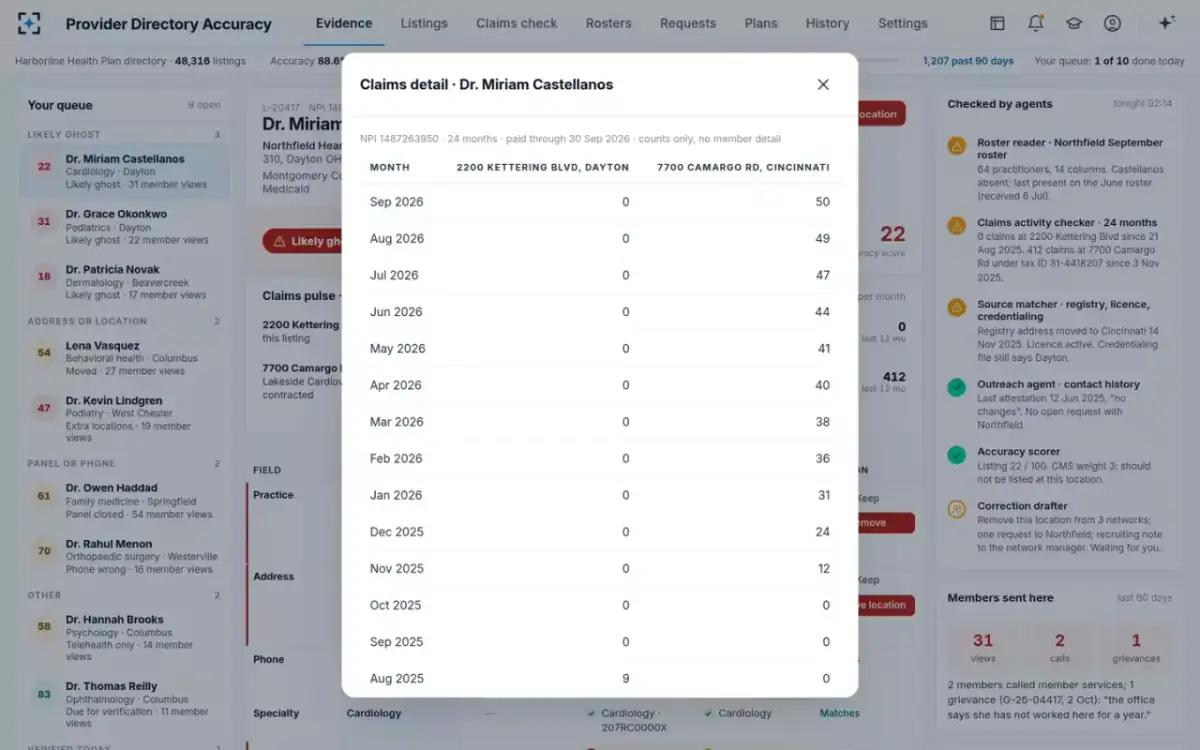
It should, because claims are the only source that records where a provider actually saw patients, whatever anyone has said. CMS lists claims data among the verification methods in its October 2026 proposal, describing it as "data containing information on recent claims between the contracted provider and the MA organization" (CMS-4214-P). HHS's Inspector General went further in 2025, recommending that CMS push plans to monitor their networks with encounter data after finding many listed behavioral health providers had not served a single enrollee in a year (OIG, October 2025).
The fields matter. A claims feed for directory work needs the rendering NPI, the service facility address, the billing tax ID, the month and the visit codes, as counts. It does not need, and should not move, member names or diagnoses. The rules then need exclusions: providers credentialed in the last few months, hospital-based specialties such as radiology, anaesthesia, emergency medicine and pathology who rarely bill from an office, and telehealth-only providers, who should be tested against telehealth claims instead. The thresholds themselves are a policy choice the plan should write down and version, because a regulator may ask why a listing was flagged.
Where one NPI billed, month by month, as counts
How do rosters feed a provider directory?
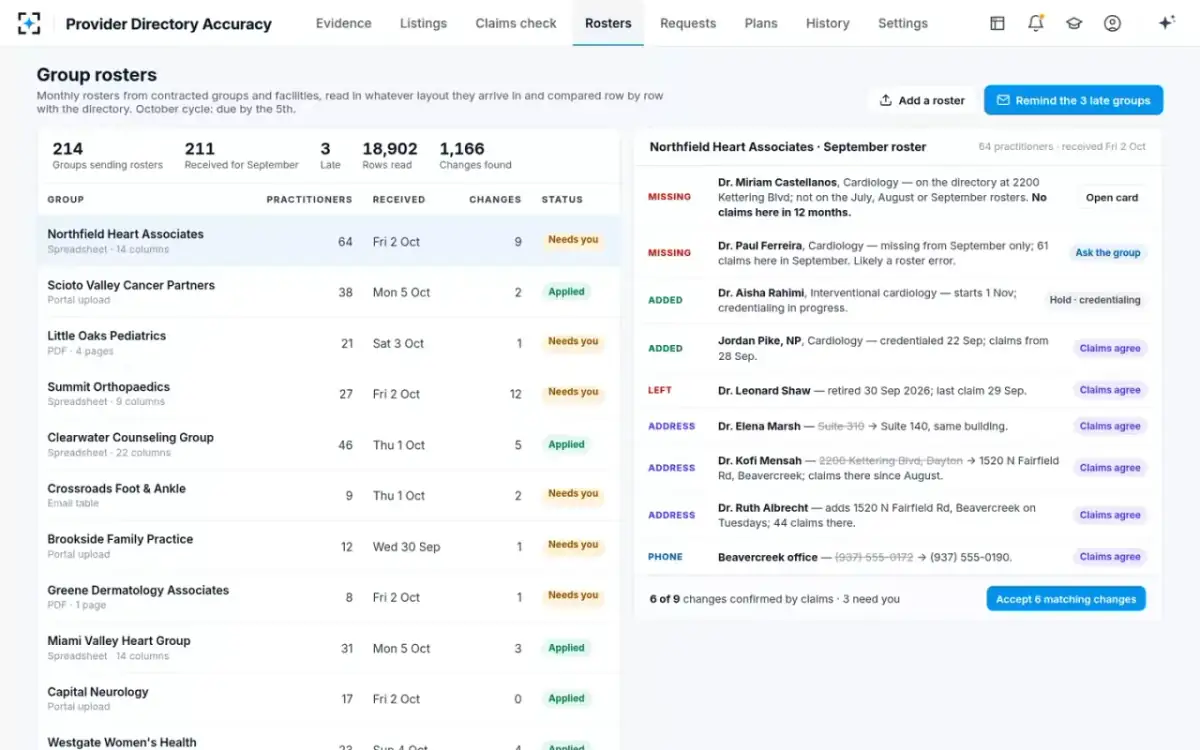
Rosters arrive monthly from contracted groups and facilities, each in its own layout, and the software's first job is to read them as they come: spreadsheets with different columns, PDFs, emailed tables and portal uploads. It then compares every row with the directory and reports four kinds of change: additions, departures, moves and contact changes. Departures are the dangerous ones, because they often appear only as a practitioner missing from the file.
A roster tells the plan what the group believes, which is not always what members find. Groups list practitioners at every office the group runs; a doctor can be dropped from one month's file by mistake. Good software treats a roster change as a hypothesis and checks it against claims before anyone acts. Providers have their own duty to send directory information when an agreement starts or ends and when there are material changes (42 U.S.C. 300gg-139); a roster due date in the contract turns that duty into a monthly habit.
Rosters in any layout, read row by row and checked against claims
The gaps that leave ghost listings in place
Every missing input leaves a class of error invisible. Without claims, a provider who retired but never told anyone stays listed until a member complains. Without rosters, a group's departures surface only in the next attestation. Without credentialing, the tool cannot tell a new starter with no claims from a ghost. Without the registry and licence boards, reported moves and lapsed licences go unseen.
The size of the gap between sources is measurable. When CMS compared Marketplace issuers' machine-readable provider files with their own published directories, "only 73 percent of the providers reviewed could be fully matched", and fewer than a third matched the national registry on name, address and specialty (CMS, October 2022). Plans should expect the same: the first run of any tool will find thousands of disagreements, most of them small, and the software's value is in ranking them.
What a missing source costs, on the same five listings
Tool with the directory and rosters only: Stays listed; still on the group roster the group never updated
Tool with claims, credentialing and the registry too: Flagged: no claims at any address for 14 months
Tool with the directory and rosters only: Stays listed at the old address
Tool with claims, credentialing and the registry too: Flagged: claims now under another tax ID in another city
Tool with the directory and rosters only: Six listings look fine
Tool with claims, credentialing and the registry too: Five flagged: claims at only one address
Tool with the directory and rosters only: Looks fine
Tool with claims, credentialing and the registry too: Left out of the claims test: credentialed two months ago
Tool with the directory and rosters only: Looks fine
Tool with claims, credentialing and the registry too: Flagged by the licence board match
What the first full check finds, by kind of conflict
Expect the first run to find conflicts of every kind, and expect the kinds to need different sources to settle them. On the fictional sample plan in Provider Directory Accuracy, 2,384 of 48,316 listings, about one in twenty, were in conflict at the start of a quarter. The filters below split most of them by the question each raises.
Open conflicts on a sample directory, by the source that settles them
The split explains why the inputs matter more than the software. The two largest groups, likely ghosts and moves, come from claims and the registry; a tool without them would see neither, and the plan would learn of them one member complaint at a time. The roster group exists only because rosters were loaded. Phone numbers and panel status are the residue that needs a person to ask, which is why a plan that assembles its sources first spends its outreach where nothing else can help.
How long does it take to clean a provider directory?
Plan for one full verification cycle, about 90 days, after the data is connected. The data work comes first and usually takes longest: claims by NPI and service address, roster intake from every group, the credentialing extract. Then a back-test on corrections the team already made last quarter shows whether the tool finds what the team found, and what it finds that the team missed. The timeline below is our planning estimate for a mid-size plan, not a measured result.
From connecting the sources to the first full cycle, in weeks
- Data access4 wk
- Back-test2 wk
- First 90-day cycle13 wk
Who has to say yes before the software can read anything
Today
Answers ad hoc queries for the provider data team, weeks later.
With agents
Provides a nightly feed of counts by NPI, service address and tax ID, with no member detail.
Still theirs: Control of what leaves the warehouse.
Today
Owns a file the directory team copies by hand.
With agents
Shares a read-only extract; the software flags disagreements and never writes back.
Still theirs: The credentialing record and its audit trail.
Today
Collects rosters by email in every layout.
With agents
Sets one due date and a portal; late groups get one reminder.
Still theirs: The relationship with each group.
Today
Hears about the project at the end.
With agents
Reviews a design in which claims leave as counts and nothing about members goes to offices.
Still theirs: The approval of the data flow.
A go-live checklist for provider data management software
Before the first cycle starts
- Directory extract with stable listing IDs
One row per provider, address and phone, keyed by NPI, with networks and last verification date.
- Claims feed agreed
Counts by rendering NPI, service address, tax ID, month and visit code, 24 months back.
- Exclusions written down
New starters, hospital-based specialties, telehealth-only providers; and how each is tested instead.
- Every group’s roster
A due date in the contract and a portal or address to send it to.
- Credentialing extract
Sites, licences and recredentialing dates, read-only.
- Registry and licence feeds
The weekly or monthly registry file and the states where the plan’s providers are licensed.
- Clocks and approvers set per program
Commercial, Medicare Advantage and Medicaid run on different clocks; decide who approves removals that affect network adequacy.
- A back-test
Last quarter’s corrections held back, to see what the software finds and misses.
How the agents use these inputs, and what each is never allowed to do, is in provider directory software with agents. The claims test itself, and how to set its thresholds, is in finding ghost networks in your own claims.
Questions people ask
What is a provider data management system?
It is the plan's system of record for providers: identities, locations, contracts, networks and the attributes the directory shows. It feeds claims, directories and regulatory files. Checking software such as Provider Directory Accuracy works on top of it rather than replacing it.
How do you implement provider data management software?
Connect the four essential sources first: the directory, rosters, paid claims and credentialing. Back-test on last quarter's corrections, then run one 90-day cycle with every change approved by the team. Most delays come from data access agreements, not configuration.
Does provider data management software need member data?
No. Directory checks need claims counts by provider, address and month, not who the patients were. Requests to offices should carry the counts and nothing about any member, which also keeps them safe to send by fax or email.
Can provider data management software rely on the national registry?
Not alone. The registry is self-reported, carries no network status and does not say whether a provider accepts new patients. When CMS compared Marketplace provider files with it, fewer than a third of names, addresses and specialties matched. It is a useful signal of a move and a poor arbiter of truth.
What is the first step in cleaning a provider directory?
Run the claims test: list every listing with no paid claims at its address in the last 12 months, after the exclusions. On most directories it finds the listings no roster or attestation would, and it can be done before any software is bought.