NPPES data is the public part of the National Plan and Provider Enumeration System, the CMS system that issues every National Provider Identifier (NPI) and keeps a record for each provider. CMS publishes it free in two forms: the NPI Registry, a search that is updated daily, and downloadable files, a full replacement each month, weekly increments and a monthly list of deactivated NPIs. For a health plan keeping a provider directory, the data shows where providers say they practise and which taxonomy codes they claim. It cannot show whether a provider is in the plan's network, takes new patients or actually sees members at that address, and it is only as current as the provider keeps it. Provider Directory Accuracy, a Botminds solution, reads the registry weekly as one of six sources it tests each listing against.
The public registry in a directory check
What NPPES data can tell a plan: That an NPI exists, for an individual (type 1) or an organisation (type 2), and whether it has been deactivated.
What it cannot: That the provider is licensed or credentialed: CMS says an NPI does not ensure or validate either.
What NPPES data can tell a plan: The practice locations the provider reported, including non-primary ones in a reference file.
What it cannot: Where the provider actually sees the plan’s members, or how often.
What NPPES data can tell a plan: The taxonomy codes the provider selected.
What it cannot: The specialty the plan credentialed, which can differ.
What NPPES data can tell a plan: Nothing about any plan.
What it cannot: Network status, panel status or whether the provider accepts new patients.
What NPPES data can tell a plan: Changes the provider made, published within days.
What it cannot: Changes the provider has not made; the 30-day duty is often missed.
What is NPPES data?
It is the subset of each NPI record that CMS has decided must be disclosed under the Freedom of Information Act. The NPI was adopted as the standard identifier for health care providers in 2004, and NPPES assigns it. A provider can apply on paper, online or through an approved electronic file interchange organisation, and providers who apply online can then "submit updates to their NPPES data electronically via the internet". CMS set out which data it would disclose in a May 2007 notice and began publishing in September 2007 (CMS, Federal Register, 31 July 2025).
For directory work the useful fields are the provider's name, practice address and phone, the taxonomy codes, other identifiers, the enumeration and last-update dates and any deactivation. CMS describes the published record as including "the provider's name, location, phone number" and "specialty (taxonomy), practice address, and other identifiers" (CMS, October 2022). Since 2018 the registry has also held digital contact information such as Direct addresses and FHIR endpoints, though CMS reported 2.9 million providers still missing digital endpoints in 2021.
How do you download NPPES data?
From CMS's NPPES downloads page, at no charge. In October 2026 the page offered the monthly "NPPES Data Dissemination V.2" file as a ZIP of 1,106 MB, a monthly deactivation file, and weekly incremental files of about 6 MB each; version 1 files were no longer supported from 3 March 2026. Each monthly ZIP includes three reference files: other names for organisations, a practice location reference file with "all the non-primary Practice Locations associated with Type 1 and Type 2 NPIs", and an endpoint file (CMS, NPI Files, capture of 20 October 2026). When we checked on 27 October 2026, the page displayed a notice that the site was down for maintenance; plans that depend on it should keep the last good file.
The NPI Registry is the other route: a query-only search, updated daily, for looking up one provider at a time. A directory check uses the files, because it needs every listed NPI compared at once and a history of changes.
The NPPES files a directory check uses
| File | How often | What a plan uses it for |
|---|---|---|
| Full replacement monthly file (V.2) | Monthly | The baseline: every NPI with its primary practice location and taxonomy codes |
| Weekly incremental file | Weekly | Changes since the last file: the earliest signal that a listed provider reported a move |
| Deactivation file | Monthly | NPIs deactivated, which no listing should still carry |
| Practice location reference file | With the monthly file | Every non-primary location a provider reported, to compare with all of a listing’s addresses |
| NPI Registry search | Updated daily | Checking one provider by hand during a conflict |
How often is NPPES updated?
The publication is frequent: daily for the registry, weekly and monthly for the files. The data inside is not. Every covered provider must "communicate to the NPS any changes in its required data elements in the NPS within 30 days of the change" (45 CFR 162.410(a)(4)), and the registry publishes what providers report; CMS's own download page cautions that an NPI does not validate a licence or credentials. A provider who moves and updates promptly appears in the next weekly file; one who moves and forgets can sit at the old address for years.
The fastest a move can reach a plan through NPPES, in days
- Provider’s 30 days to update30 d
- Weekly file≤7 d
- Plan load≤7 d
Does NPPES show where a provider practices?
It shows where the provider says it practises: a primary practice location in the main file and any other locations in the practice location reference file. That is useful and limited. A physician who reports a group's main office may see patients at three of its branches, and one who reports five branches may work at one. CMS's 2018 directory review found the same habit in rosters: groups listing providers at locations where they "rarely or never" see patients (CMS, 2018).
So NPPES answers "has this provider told the government they moved?", not "is this provider seeing our members at this address?" The second question needs claims at the service address, which is why the registry and claims belong together in a check. Finding ghost networks in your own claims explains the claims side.
Can NPPES data verify a provider directory?
Partly, and less than plans hope. When CMS compared Marketplace issuers' machine-readable provider files with the registry over plan years 2017 to 2021, "only 28 percent of the provider names, addresses, and specialties matched" (CMS, October 2022). Some of that gap is the plans' error and some is the registry's; a mismatch tells you to look, not which side is wrong.
CMS has used NPPES as a safe harbour of sorts. A January 2020 memo to Medicare Advantage plans offered enforcement discretion for directory errors that matched NPPES data updated in early 2020, if corrected within 30 days. A June 2022 memo went further: an error matching NPPES would not count "so long as the organization contacts the provider, whose information was incorrect, within 30 days to encourage the provider to correct their information in NPPES". The October 2026 proposal would make NPPES one of the permitted verification methods for the 90-day cycle and rescind that guidance if finalised. It would not let NPPES verify any element for the annual accuracy score, and it notes NPPES lacks information "such as whether a provider is accepting new patients" (CMS-4214-P).
How well three versions of the same providers agreed, Marketplace plans, 2017–2021
Provider files matched to the plan’s own published directory
- Fully matched · 73%
- Not fully matched · 27%
Provider files matched to NPPES on name, address and specialty
- Matched · 28%
- Did not match · 72%
A match with NPPES means two self-reported records agree. A mismatch means someone has moved, or someone has not updated. Neither is a verdict.
Using NPPES as one source in a directory check
The registry earns its place by being early and broad. A weekly file can reveal a move before the next roster arrives, and it covers solo practitioners who send no roster at all. The table shows how each NPPES signal should be read against the directory.
Reading NPPES signals against a listing
| NPPES shows | Likely meaning | What to check next |
|---|---|---|
| A new primary practice address in another city | The provider moved | Claims at both addresses; the group’s last roster |
| The listed address absent from all reported locations | The listing may be a group-level address, or stale | Claims at the listed address |
| NPI deactivated | Retired, deceased or replaced NPI | Remove after confirming with credentialing |
| A different taxonomy from the listed specialty | Reporting difference, or a real change of practice | Credentialing and visit codes in claims |
| Last update many years ago, nothing else wrong | Nothing yet | Do not treat as verification |
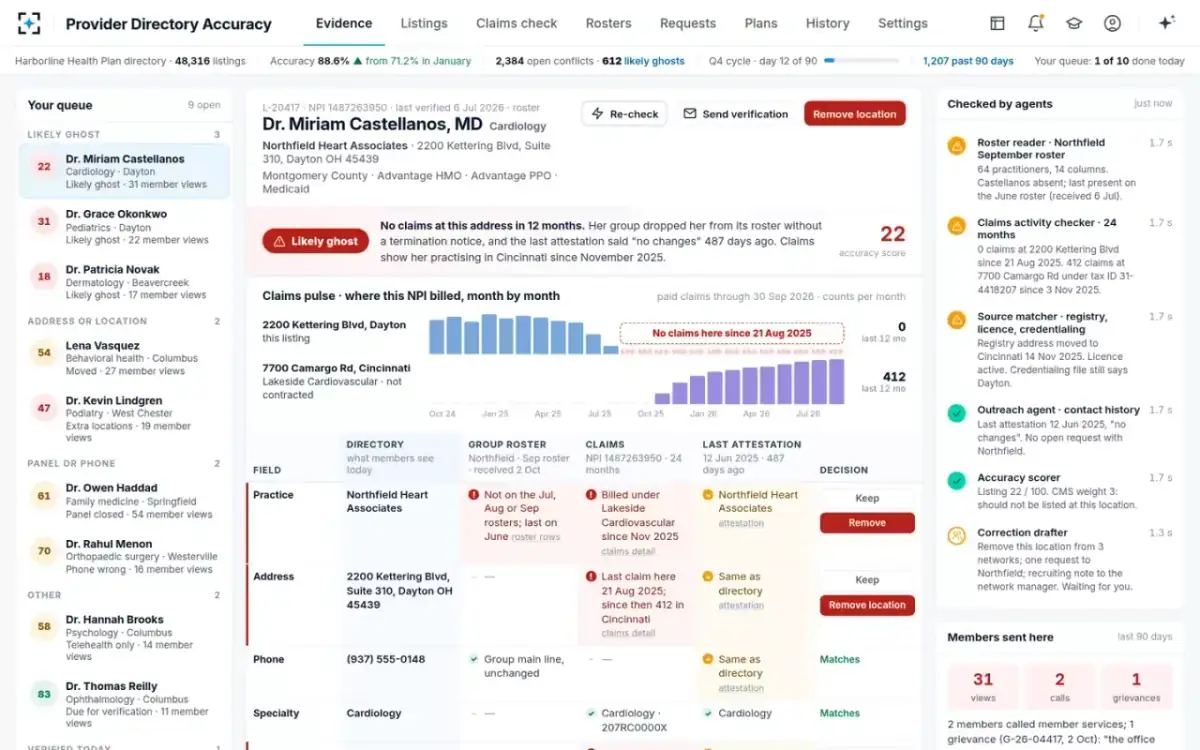
The registry move that explains a listing's missing claims
Matching NPPES to a directory: the practical problems
Joining the registry to a directory is harder than joining on NPI, for four reasons. First, NPI types: a listing may carry a group's type 2 NPI while the practitioner's own type 1 NPI holds the address that matters, so a check must know which NPI each listing should use. Second, addresses: the same office is written many ways, and the comparison has to standardise before it compares. CMS took the same view in its proposed scoring, where an address with "st" for "street" or "ct" for "court" would still count as accurate because such differences are "non-material" (CMS-4214-P).
Third, taxonomy: a provider can report several taxonomy codes, and CMS notes that "providers can have many NUCC taxonomy codes", and expects to propose treating a provider as being in a specialty if any of its codes match. A directory check should do the same before it calls a specialty wrong. Fourth, history: the monthly file is a snapshot, so a plan that wants to know when a provider reported a move must keep its own sequence of files or the weekly increments. The sample card above can date the move to 14 November 2025 only because the weekly changes were kept.
None of these is exotic, and all of them produce false conflicts if ignored. A first comparison of a directory with the registry usually throws up thousands of differences; most are formatting, and the ones worth a person's time are a new primary location, a deactivation, or an address the provider no longer reports anywhere.
Who updates a provider's NPPES record?
The provider does, or someone acting for it; a health plan cannot. That is why CMS's earlier memos asked plans to contact providers and encourage them to correct their own records, and why its 2022 request for information noted that a provider who changes office must update "at least two separate CMS systems, NPPES and the Medicare Provider Enrollment, Chain, and Ownership System (PECOS)", the second of which is not public (CMS, October 2022). CMS has since said it is developing a National Provider Directory intended to be an authoritative source across plans (CMS-4214-P).
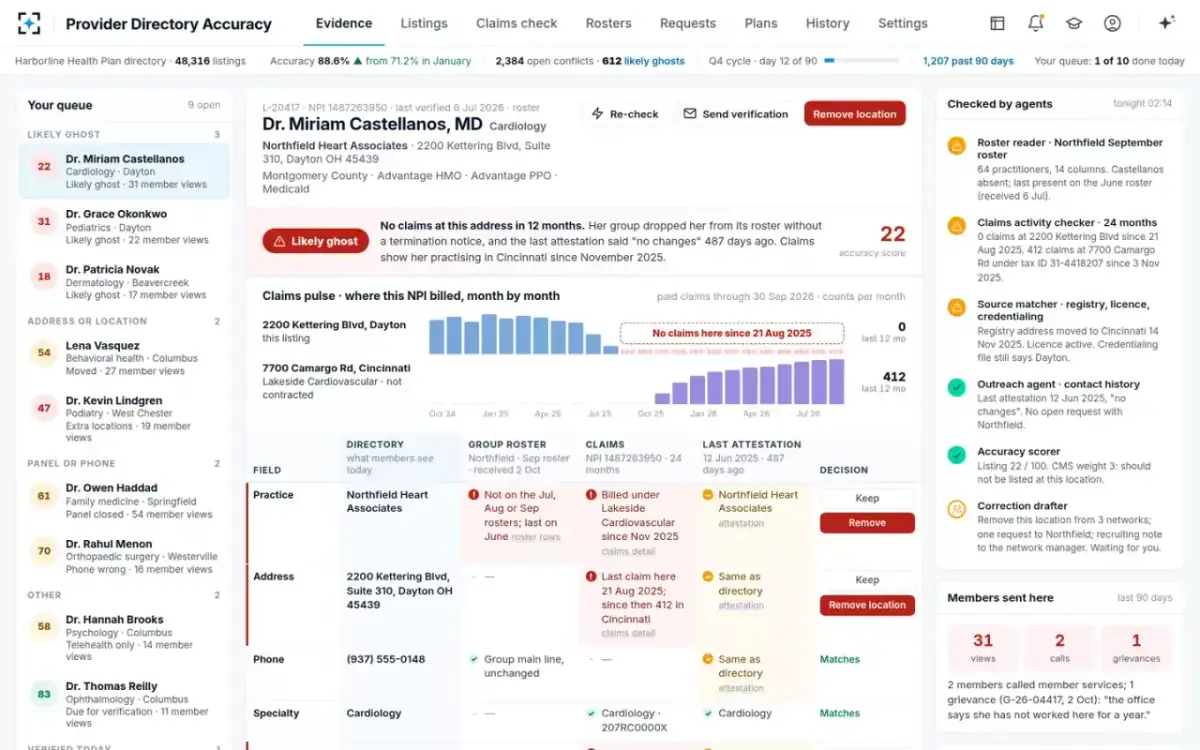
Until that exists, a plan's best use of NPPES is as a weekly early warning. In Provider Directory Accuracy, the source matcher compares each listing with the registry, state licence boards and credentialing every week and records what disagrees; it never edits the credentialing file, and the change goes to an analyst with the claims and roster evidence beside it. The full list of inputs a check needs is in the sources provider data management software must read, and how the Medicare Advantage rules will treat NPPES from 2028 is in the REAL Health Providers Act guide.
Registry, licence and credentialing on the same row as the claims
Questions people ask
What is the NPPES data dissemination file?
It is the downloadable file of all FOIA-disclosable NPI records, replaced in full each month and supplemented by weekly incremental files and a monthly deactivation file. Since 3 March 2026 only version 2, with longer name fields, is supported.
Is NPPES data free?
Yes. CMS has published both the NPI Registry and the downloadable files at no charge since September 2007. The monthly file is large, about 1.1 GB compressed in October 2026, so most plans load it into a database rather than open it directly.
Does NPPES show which insurance a provider accepts?
No. NPPES identifies providers; it holds nothing about contracts with health plans, network status or whether a provider takes new patients. Those come from the plan's own contract file, claims and the provider's replies.
What is a taxonomy code in NPPES?
It is a code from the National Uniform Claim Committee's provider taxonomy that the provider selects to describe its type and specialty, such as a code for cardiovascular disease. CMS publishes a crosswalk between Medicare specialty codes and taxonomy codes twice a year, which plans can use to compare a listing's specialty with the registry.
Can a plan count a match with NPPES as verification?
For commercial plans no federal rule says so. For Medicare Advantage, CMS has proposed NPPES as one permitted method for the 90-day cycle from 2028, but not for the annual accuracy score. A match is at best one source of two; most directory errors CMS has found were about practice, network and panel status, which NPPES does not hold.