A profit commission Excel template is a workbook that takes a binder's commission terms, the premium and claims bordereaux totalled to the valuation date, the agreed IBNR and any deficit brought forward, and calculates the sliding-scale commission, the profit and the profit commission due. A sound one keeps those four kinds of input on separate sheets, labels every term with the clause it came from, and carries last year's deficit forward by formula rather than by memory; most finance teams already have one, and the weakness is rarely the formulas but the inputs pasted into them each year. Botminds' Profit Commission Calculation replaces the pasting rather than the logic: agents read the clause, total the bordereaux and apply the agreed reserves, and the workbook you used last year becomes the test that proves it reaches the same signed figure.
The values used here are the solution's fictional sample: Harrowgate Specialty Underwriters' Corner Table Restaurant Program under binder HSU-CPI-24 with Calder Point Insurance Company, underwriting year 2024, first adjustment at 30 September 2026.
What inputs does a profit commission calculation need? Seven, with who holds each
Binder and endorsements
Who holds itCarrier and MGA, signed
Sample valueHSU-CPI-24, signed 18 Dec 2023; endorsements 1–2
Check before useThe version in force for the underwriting year
Commission terms
Who holds itRead from clauses 14–15
Sample value27.50% at 55%, ±0.50/pt, 22.50–32.50%; 20% profit commission; 4.50% expense; 3-year deficits; 5% cap; 50% at first adjustment
Check before useEach term quotes its clause
Premium bordereaux
Who holds itMGA
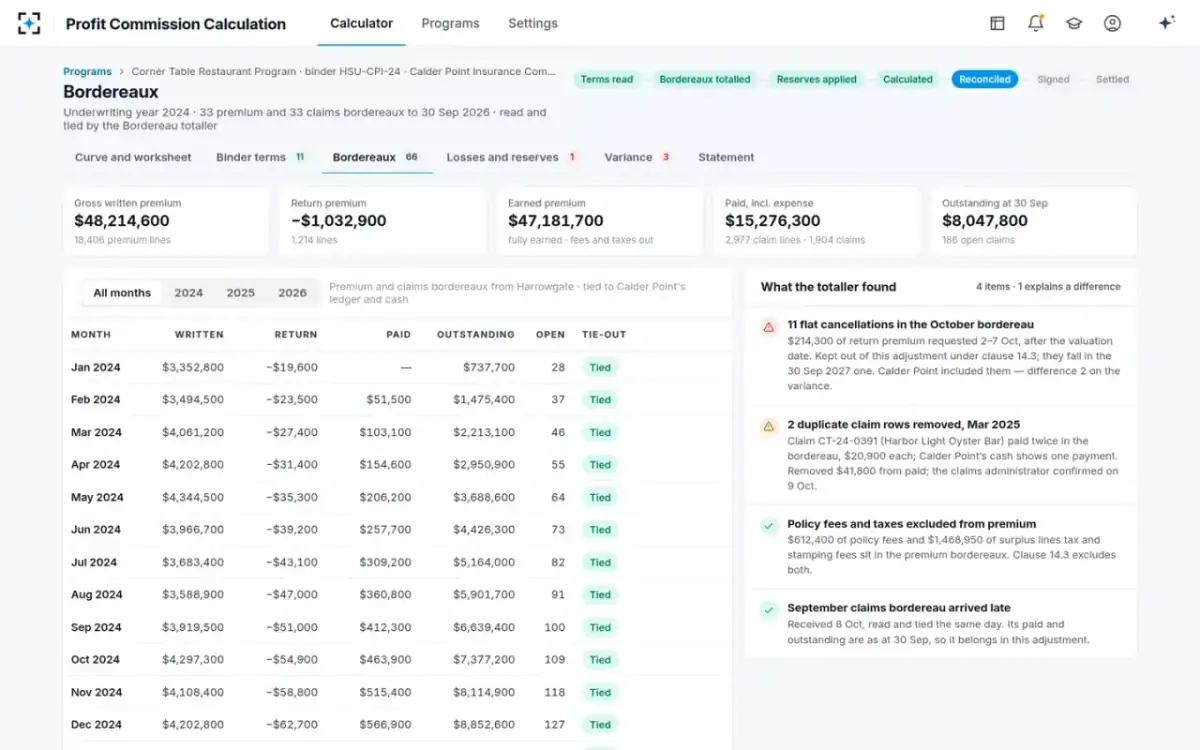
Sample value33 monthly files, 18,406 lines: $48,214,600 written, −$1,032,900 returned
Check before useTied to the carrier’s general ledger and cash
Claims bordereaux
Who holds itMGA or claims administrator
Sample value33 files, 2,977 lines: $15,276,300 paid, $8,047,800 outstanding
Check before useDuplicates removed; late items held
Agreed IBNR
Who holds itBoth parties, from actuaries
Sample value$3,182,000, Schedule 4 letter of 2 Oct 2026
Check before useSigned for this valuation date
Prior-year balances
Who holds itLast year’s signed statement
Sample value2023 deficit $1,346,948
Check before useWithin the deficit window
Payments already made
Who holds itCarrier general ledger
Sample valueProvisional commission $12,974,968
Check before useMatches cash
Is there a profit commission Excel template?
There is no standard one, because every binder writes its own clause, but every sound template has the same structure. It separates what the contract says, what the data says, what the parties agreed and what the arithmetic produces, so that each can be checked by the person who owns it. A template that mixes them, with a rate typed into a formula or IBNR pasted over last year's, works until the year it does not.
A profit commission workbook in five sheets
| Sheet | What it holds | Who fills it | What must never happen |
|---|---|---|---|
| Terms | Every parameter of the clause, one per row, with its clause number and the binder version | Finance, from the signed binder | A term with no clause reference |
| Premium | Bordereau totals by underwriting year and month to the valuation date; return premium; excluded fees and taxes | Finance, from the bordereaux | Months after the valuation date included |
| Losses | Paid, outstanding and IBNR by underwriting year; the reserve letter’s date | Finance, from claims bordereaux and the reserve letter | An IBNR nobody signed |
| Calculation | Loss ratio, rate, commission, expense allowance, deficit, profit, profit commission, settlement | Formulas only | A typed number |
| Carry-forward | Each year’s profit or deficit, the window, and what later years absorbed | Formulas, from prior calculations | A deficit copied by hand |
Profit commission Excel formula: the cells that matter
The formulas are short; the care is in rounding and in the order of operations. Below are the cells for the sample binder, written as Excel formulas with named cells, and the value each returns for underwriting year 2024.
The sample binder's calculation as Excel formulas
| Cell | Formula | Returns |
|---|---|---|
| Earned | =WrittenExFees − Returned | $47,181,700 |
| Incurred | =Paid + Outstanding + IBNR_agreed | $26,506,100 |
| LossRatio | =ROUND(Incurred / Earned, 4) | 56.18% |
| Rate | =ROUND(MAX(Floor, MIN(Cap, Pivot − Slope × (LossRatio − PivotLR))), 4) | 26.91% |
| Commission | =ROUND(Rate × Earned, 0) | $12,696,595 |
| Expense | =ROUND(ExpensePct × Earned, 0) | $2,123,177 |
| Profit | =Earned − Commission − Incurred − Expense − DeficitBF | $4,508,880 |
| ProfitComm | =MIN(CapPct × Earned, MAX(0, Profit) × PCPct) | $901,776 |
| NetDue | =ProfitComm × PaidNowPct − (Provisional − Commission) | $172,515 |
Three details decide whether the workbook matches the clause. Excel's ROUND rounds halves away from zero, which is "half up" for positive numbers; a clause that rounds down needs ROUNDDOWN. Whether the loss ratio is rounded before the scale is applied is a choice the clause may not make: in the sample, the kitchen-fire what-if gives 25.36% if the loss ratio is rounded first and 25.35% if it is not, worth about $4,700 of commission. And the MIN and MAX around the rate and the profit commission are where caps, floors and the zero for a loss year live; a template that applies the cap before the percentage, or lets a negative profit produce a negative commission, gets a different answer every bad year.
Carrying a deficit in Excel without copying it by hand
The deficit is the input most often lost between years, because it lives in last year's file. A carry-forward sheet keeps every underwriting year's profit before any deficit in one column, and calculates for each year how much of each earlier deficit it absorbs, in date order, inside the window the clause allows. In the sample, 2023 produced a deficit of $1,346,948 and 2024, with $5,855,828 of profit before it, absorbed all of it; the profit commission fell from $1,171,166 to $901,776.
The sheet should also record whether the deficit is re-measured at each valuation. If it is, a worsening deficit year changes every later year's figure, and the workbook has to recalculate all open years when a new bordereau arrives; Profit Commission Calculation does that every month for every open underwriting year. The deficit carried forward, valued both ways shows what each choice is worth.
Why spreadsheets get profit commission wrong
Research on spreadsheet errors is consistent, and it does not flatter careful users. Raymond Panko of the University of Hawai'i, reviewing field audits of real organisational spreadsheets for the European Spreadsheet Risks Interest Group in 2000, found errors in 24% of the 367 spreadsheets in seven audits, but noted that older audits used methods unlikely to catch most errors and that the more recent ones found errors in at least 86% (Panko, 2000). His 2015 review counted 85 intensive inspection studies, most of them by commercial spreadsheet-auditing firms, which together found errors in 94% of the spreadsheets studied (Panko, 2015).
How often audited spreadsheets contain errors, by how hard the auditors looked
A profit commission workbook is exposed in a particular way: its formulas change little from year to year, but its inputs are rebuilt by hand each time. The errors that matter are inputs, not formulas: a bordereau month after the valuation date pasted in, a duplicate claim row left in (the sample found two, $41,800 paid twice in the file but once in the carrier's cash), fees and taxes left in premium ($612,400 and $1,468,950 in the sample), or last year's IBNR left in a cell nobody updated.
The bordereaux behind the template's premium and losses sheets, totalled and tied in Profit Commission Calculation
Who holds each input, and who fills the workbook today
The template is usually one person's file, but its inputs belong to four people. The head of finance holds the binder and the bordereaux, the carrier's accountant holds the general ledger and cash, the actuaries hold the reserves, and the claims administrator holds the case reserves and the large-loss reports.
Four people whose numbers go into one profit commission workbook
Today
Pastes 66 bordereaux into the template, strips fees and taxes, picks an IBNR, carries last year’s deficit across by hand.
With agents
Reviews totals already tied to the carrier’s general ledger, with the exclusions listed, and decides what the agents flag.
Still theirs: The template’s logic as the test case
Today
Pastes the same files into his own workbook and gets a different answer.
With agents
Sees the same totals and their clauses through a shared statement link.
Still theirs: The general ledger and the cash
Today
Sends a study that may or may not be the figure in the cell.
With agents
Sees which IBNR was used and what the others would change.
Still theirs: The reserve figures
Today
Hears about the adjustment when someone asks about a large loss.
With agents
Reserve moves above $250,000 are watched every morning and put on the curve.
Still theirs: Case reserves; no agent sets one
How your old template becomes the test case
The best evidence that a new tool works is that it reaches the figure you already signed, from the same documents, without your workbook. That turns the template from something to be replaced into the acceptance test.
Turning last year's profit commission workbook into an acceptance test
- Pick an adjustment both sides signed
Ideally one that took weeks to agree, so the test covers real differences.
- Gather what you had on the day
The binder and endorsements, the bordereaux to that valuation date, the reserve letter, last year’s deficit, the carrier’s first statement.
- Run the new tool from the documents, not the workbook
Give it no numbers from your template.
- Compare line by line with the signed figure
Every difference should trace to an input or a reading of the clause.
- Check what it asked
Silent terms, like rounding direction, should have produced questions, not defaults.
- Replay the carrier’s statement
It should explain the original gap difference by difference.
- Change one term and one late loss
Every open year should recalculate; the late loss should stay out of the adjustment.
- Keep the workbook as a control
Run both in parallel for one valuation before retiring it.
What a profit commission spreadsheet cannot see: late items and versions
A workbook calculates whatever it is given, and the two things it is worst at noticing are timing and versions. Timing: the binder measures premium and losses as at the valuation date, but files keep arriving after it. In the sample, eleven flat cancellations worth $214,300 were requested between 2 and 7 October, after the 30 September valuation date, and belong to the next adjustment; the September claims bordereau arrived on 8 October and belongs to this one, because its paid and outstanding figures are as at 30 September. A template that pastes "everything received so far" gets one of those wrong.
Versions: the clause that applies is the one in force for the underwriting year, with its endorsements, and the reserve figure is the one signed for this valuation date, not the latest study. The sample carrier's expense allowance came from an older 2021 binder's wording still sitting in its own template, which cost $11,224 of difference. A sound workbook records the binder version and the reserve letter date on its terms sheet; the solution records both with every signature.
When to keep Excel, and when to move off it
Excel is a reasonable home for a profit commission when one person can see all the inputs and nobody else needs to check them; it stops being one when the inputs multiply and the counterparty rebuilds the figure. For carriers there is also a control question: under the NAIC's Annual Financial Reporting Model Regulation, insurers with $500 million or more of annual direct written and assumed premiums file a management report on internal control over financial reporting (NAIC Model #205, §17), and a profit commission accrual built in a spreadsheet becomes part of that control environment.
Excel template or a calculation with agents: where each fits
Keep the Excel template: One or two, with simple clauses
Move to Profit Commission Calculation: Several, each with open underwriting years
Keep the Excel template: A few clean premium and loss totals
Move to Profit Commission Calculation: Monthly bordereaux in each delegate’s own layout
Keep the Excel template: One IBNR nobody disputes
Move to Profit Commission Calculation: Several studies, one agreed per valuation date
Keep the Excel template: Accepts your figure
Move to Profit Commission Calculation: Rebuilds it and argues each difference
Keep the Excel template: Re-performed from a frozen copy
Move to Profit Commission Calculation: Each signature recorded with the worksheet, binder and bordereaux it used
The template's choices, kept as versioned settings in Profit Commission Calculation
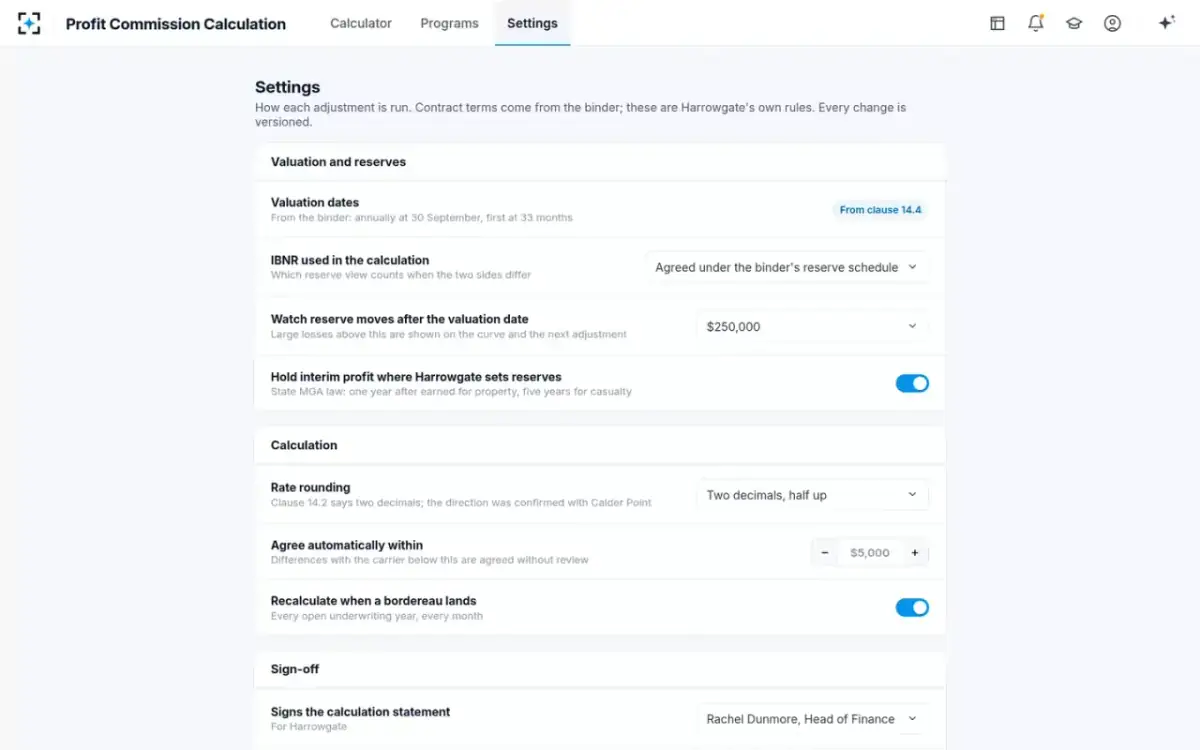
For most MGAs the right move is not to delete the template but to stop feeding it by hand. The logic it encodes, the clause's terms and the order of operations, is what the agents need to reproduce; the hours it costs are in the pasting and the arguing. What to ask contingent commission calculation software lists the questions that separate tools, and the profit commission formula, line by line gives the arithmetic any template must reproduce.
Questions people ask
Is there a free profit commission Excel template?
There is no standard template, because each binder writes its own clause, but the structure on this page is free to use: five sheets for terms, premium, losses, calculation and carry-forward, and the formulas above. It reproduces the sample's $901,776 profit commission and $172,515 net due.
How do you build a profit commission model in Excel?
Put each clause term in its own labelled cell with its clause number, total premium and losses by underwriting year to the valuation date on separate sheets, and calculate loss ratio, rate, commission, expense allowance, deficit, profit and profit commission with formulas only. Carry deficits on their own sheet so they never depend on last year's file.
What is a profit commission worksheet?
It is the line-by-line calculation from earned premium to net settlement, usually signed by both sides. In the sample it runs from $47,181,700 earned premium through a 56.18% loss ratio and a 26.91% adjusted rate to a $901,776 profit commission and $172,515 net due.
How should rounding be handled in a profit commission spreadsheet?
Exactly as the clause says, and where the clause is silent, as the parties agree in writing. Excel's ROUND rounds halves away from zero; ROUNDDOWN truncates. In the sample, rounding the loss ratio before the scale or not changes a what-if rate by 0.01 point, about $4,700.
Should we keep our template after moving to software?
Keep it for one valuation as a parallel control, then as the account of how past years were calculated. The solution's worksheet has the same lines, each with its clause or bordereau source, so a reviewer can rebuild any figure in a spreadsheet if they want to.