Legal invoice review software reads each law firm invoice line against the client's billing guidelines, rate agreements, staffing approvals and budgets before it is paid, and drafts the reduction and its reason where a line breaks a rule. For an insurer paying panel firms to defend policyholders, going live is mostly a schedule of the insurer's own inputs, not of the software: the LEDES files firms already send, the guideline as each section is actually applied, the rates and approvals on file, and the budgets by litigation phase. Botminds' Legal Bill Review is set up from exactly those, your billing guidelines, rate agreements, budgets and a sample of past invoices, and the plan below is the order we would assemble them in. The weeks are an illustrative estimate for a carrier whose records are in order, not a promise; the slowest input sets the pace.
An illustrative go-live plan for legal invoice review software: what the insurer does, and what panel firms see
- Collect inputsweeks 1–2
- Rules approvedweek 3
- Seeded testweek 4
- Parallel monthweek 5
- Liveweek 6
- No change: LEDES as todayweeks 1–4
- Firms notifiedweek 5
- Reasons per lineweek 6
What is legal invoice review software?
It is the part of the legal spend stack that decides what to pay on each invoice, line by line, and explains why. E-billing systems receive the file and route it; payment systems pay it; invoice review sits between them and answers the question a bill reviewer answers: does this line comply with what the insurer and the firm agreed?
In Legal Bill Review that question is split across seven agents. An invoice reader turns the LEDES or PDF file into lines and re-adds them; a rate and staffing checker, a guideline checker and a duplicate and pattern finder test each line; a budget tracker applies it to the case budget by phase; a reduction writer drafts the reason and the adjustment file; an appeal reader checks the firm's answers. The legal bill reviewer applies, waives and approves. Go-live is the work of giving each of those steps the records it checks against.
How long does it take to implement legal bill review?
As long as it takes to gather the records the checks need and to prove the rules on invoices already paid; for a carrier with its approvals in order, our estimate is about six weeks to the first live reductions. The software is not the slow part. The slow parts are the staffing approvals scattered across emails, the guideline section everyone applies differently, and the budgets that were approved but never broken out by phase.
The plan above puts the seeded test and the parallel month before anything reaches a firm, because the cost of a wrong reduction is an appeal and a strained panel relationship. A rule that fires too often in the parallel month is cheaper to fix than one that fires too often on a live invoice. How to run that test, and what to plant, is in plant the errors, count what comes back.
What do you need to start legal invoice review?
Nine sets of records, most of which a claims legal team already holds somewhere. The list below is in the order the checks use them.
What to gather before legal invoice review software goes live
- A year of invoices with what was paid
LEDES 1998B or XML files, and PDFs where firms send them, with the amounts actually paid; these are the test bed and the duplicate check’s history.
- The billing guideline, section by section
With each section’s effective date and any firm-specific variations agreed in writing.
- Rate agreements by firm and year
Agreed rates by timekeeper or class, and written approvals of any increase.
- Staffing approvals by case
Who may bill each suit, approved by whom and when.
- Approved budgets by phase
Each suit’s budget split by UTBMS phase, with revisions and their dates.
- Prior approvals on file
Research, expert and travel approvals, usually emails, tied to the case.
- The appeal history
Last year’s disputed reductions and how they ended; it shows which rules have been applied too hard.
- Approval limits and people
Who may reduce how much, who decides appeals, who approves timekeepers and budgets.
- The consent position
Claims counsel’s view, state by state, on the insured’s consent to any outside review of defense bills.
Does legal bill review software read LEDES files?
It has to, because LEDES is how most U.S. panel firms already bill. The LEDES Oversight Committee calls LEDES 1998B, an ASCII, pipe-delimited format of 24 fields, "currently the most-widely used ebilling standard in the legal industry in the US", and says it does not intend to modify it. Firms billing internationally may send 98BI or XML, and some smaller firms still send PDFs.
The invoice formats legal invoice review software should read, from the LEDES standards
| Format | Structure | Status, per the LEDES Oversight Committee |
|---|---|---|
| LEDES 1998B | ASCII, pipe-delimited, 24 fields | The most widely used U.S. e-billing standard; not intended to be modified |
| LEDES 98BI | ASCII, pipe-delimited, 52 fields | International version, current release ratified January 2020; not intended to be modified |
| LEDES XML Ebilling 2.2 | XML, 216 data elements in 18 segments (2.2.2) | Current XML release; the 2.2.2 update was authorised in April 2026 |
| PDF invoice | Unstructured | Not a LEDES format; read into lines by the software, and the firm asked to move to LEDES |
Reading a file is not the same as trusting it. Before any guideline check, the line totals should re-add and the codes should be valid; the checks a LEDES file must pass before the guideline checks sets those out. In Legal Bill Review the invoice reader re-adds every line and the total, cites the line and field for every value, and never alters a billed figure; a difference is reported, not fixed.
How do you load billing guidelines into software?
Section by section: each section becomes a rule with a test, the data the test reads, any parameter, and a version with an approver. Prose such as the sample guideline's "Every entry must describe the work done, its subject and its purpose" becomes a test the guideline checker runs on every description, quoting the words that fail it. Numbers in the prose become parameters someone owns.
Turning billing guideline sections into rules: four sections of a sample carrier's guideline
| Guideline section | The rule as applied | What it reads | Parameter, and who changes it |
|---|---|---|---|
| §3.1 Over agreed rate | Pay each line at the agreed rate for the year | Rate agreement; LINE_ITEM_UNIT_COST | Rates by timekeeper; changes need written approval |
| §3.3 Unapproved timekeeper | Time from anyone not on the staffing approval is not payable | Staffing approval; timekeeper ID | Approved names; the litigation specialist adds them |
| §5.2 Block billing | Entries combining two or more tasks under one time charge are paid at a set share | Description; units | 50% in the sample; a change is a new guideline version |
| §6.1 Research without approval | Research above a threshold on one issue needs prior approval | Description; task code; approvals on file | 3.0 hours in the sample; a new version to change |
The guideline in Legal Bill Review: each section's text beside the rule applied, with its hits and dollars this quarter
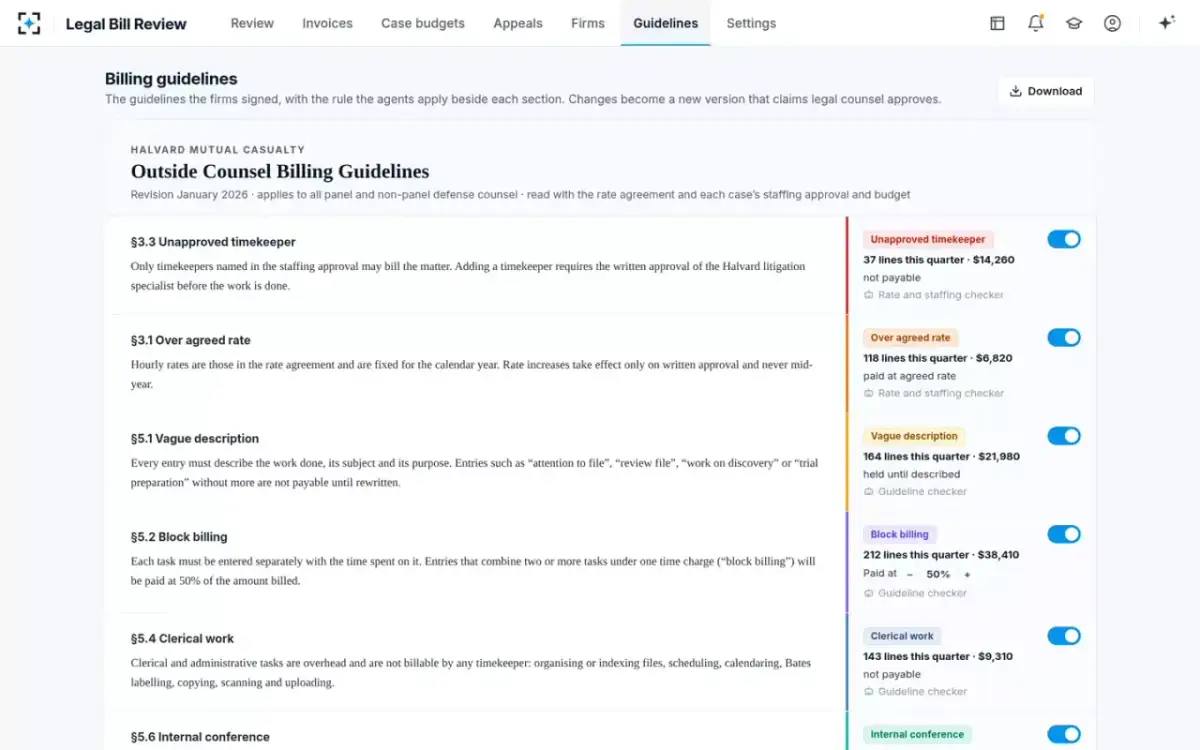
This is also where a go-live finds its first disagreements. The quarter's hits beside each section show which rules carry the money; in the sample, block billing and vague descriptions dominate. If reviewers have been applying a section more leniently than its text, the parallel month will show it, and counsel can either change the rule or tell the firms the text will now be applied as written.
Do panel firms need to change how they bill?
Mostly not, if they already send LEDES files with UTBMS codes; what changes for them is what comes back. Firms receive one row per reason with its guideline section, an adjustment file that carries the reason on every changed line, and a window to answer each line; the sample carrier in Legal Bill Review allows 30 days.
Where a carrier does change what it asks of firms, the standards body's advice is to phase it in. When it revised the UTBMS expense codes, the LEDES Oversight Committee suggested giving firms "at least a four month phase-in cycle before rejecting invoices containing the original expense codes"; for revised activity codes it suggested "notifying every active timekeeper in the client’s system". Its 2024 error codes standard asks clients to append a code to each rejection message, such as "Bulk billing not allowed [1012-0053]", so a firm's billing staff know exactly what to fix.
Who does what during go-live
Five people, each owning one set of inputs and one decision. The table of roles below is how the sample carrier is set up in Legal Bill Review; the names are fictional, the seats are not.
Who owns which input when legal invoice review software goes live
Today
Applies the guideline from memory and samples.
With agents
Runs the seeded test and the parallel month; decides each reduction from day one live.
Still theirs: Reductions up to the limit, waivers, approval for payment
Today
Holds staffing and research approvals in email.
With agents
Gathers approvals and phase budgets per suit; approves revisions before the work.
Still theirs: Timekeepers, research approvals, budget revisions
Today
Owns a guideline document.
With agents
Approves each section as a rule and its parameters; sets the consent position.
Still theirs: Guideline versions and appeals above the threshold
Today
Routes firm files to reviewers.
With agents
Supplies a year of LEDES files and the payment history; connects intake and payment.
Still theirs: The file flow and the payment run
Today
Receives cuts without reasons.
With agents
Receives the notice of the reasons format, then a reason on every changed line.
Still theirs: The firm’s answer to each reduction
The consent question to settle before any outside review
Settle with claims counsel, before go-live, whether any part of the review counts as disclosure of defense bills outside the insurer, and what the insured must consent to. Bar ethics opinions from the late 1990s and 2000 dealt with insurers sending bills to outside audit firms; Kentucky's, for example, says the defense lawyer "must obtain fully informed consent from the Insured, the client, before forwarding legal billing information to the Insurer if the attorney knows the Insurer will send the billing information to an outside auditor."
Software run by the insurer's own reviewers is not an outside audit firm, but where invoices are processed is still a question counsel should answer and write down, state by state. The opinions, and how far they reach, are set out in the legal bill auditor's seat between the insurer and defense counsel.
Which review numbers to watch in the first ninety days live
Measure whether the rules hold up once firms can answer them. Four numbers say most of it: the share of lines read (it should be every line from day one), the appeal reversal rate by guideline section, the median days to answer an appeal, and the share of invoices paid within the agreed terms. Add flags per 100 lines by firm, which shows whether firms change how they bill once every line is read and every reduction carries its reason.
Set a rule in advance for what happens when a number goes wrong. A guideline section whose reductions are reversed on appeal more often than they are upheld goes back to parallel running until counsel has looked at it; a firm whose flags do not fall after two quarters gets a review meeting with its own line-level data. How each of those KPIs is computed, and what distorts it, is set out in the legal spend KPIs that show a programme paid.
What go-live looks like on the first live invoice
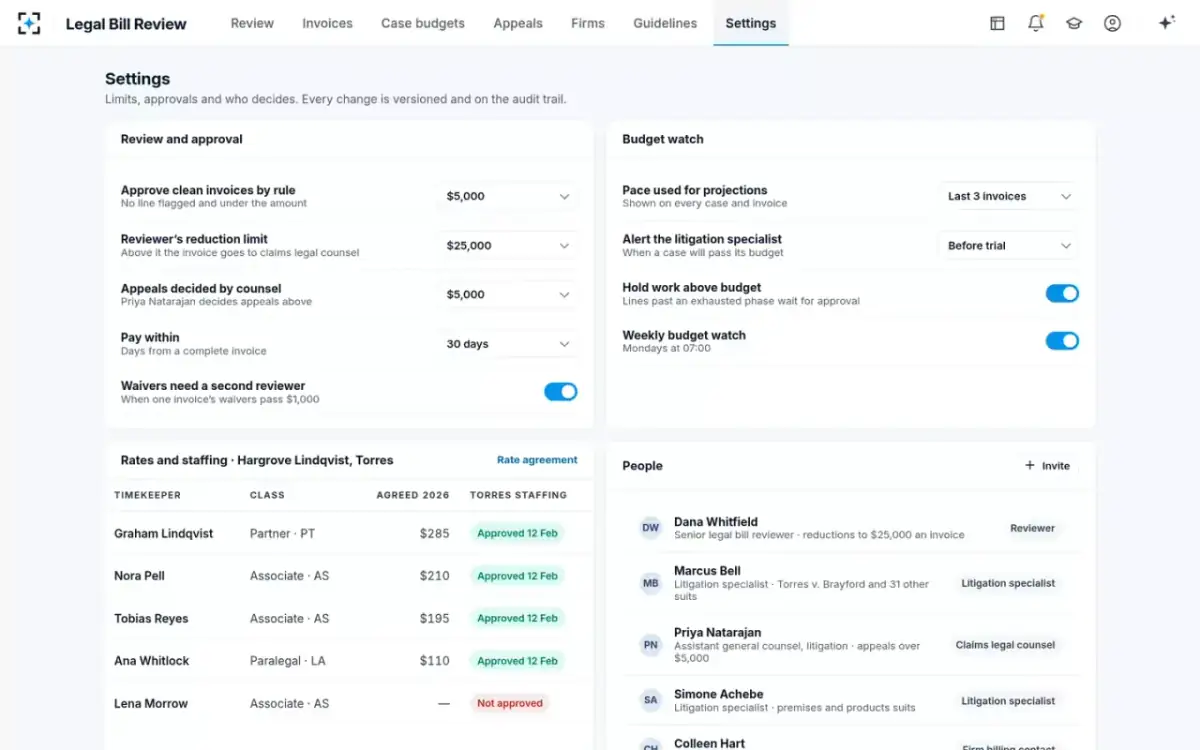
On the first live invoice the reviewer opens a file that has already been read. In the sample, Hargrove Lindqvist LLP's September invoice on Torres v. Brayford Logistics, 143 lines and $44,995.62, arrives with 52 lines flagged under nine sections, and the reviewer approves $34,814.62: $8,723.00 reduced and $1,458.00 held until four entries are described, within a $25,000 reduction limit. The limits that govern that approval were set during go-live, on the settings screen.
The limits set at go-live in Legal Bill Review: who approves what, how budgets are projected, and each case's rates and staff
Questions people ask
What is legal bill review software?
Software that checks law-firm invoices against the client's outside counsel billing guidelines, rate agreements and case budgets before payment. Legal invoice review software is the same category under another name; the better tools read every line and give each reduction a reason the firm can answer.
Can legal invoice review software run alongside our e-billing system?
Yes. Legal Bill Review reads invoices arriving through e-billing or email, sends the approved amount to claims payment and the reasons and adjustment file back to the firm, so the channel firms submit through can stay as it is.
What if our staffing approvals are only in emails?
Gather them per suit before go-live; the staffing check is only as good as the approval list it reads. The first weeks of the plan are mostly this work, and a parallel month will show any suit where the list is incomplete.
Should the first month's reductions be sent to firms?
Not until the rules have been tested on paid invoices and run in parallel with the existing review. A wrong reduction in the first live month costs an appeal and some goodwill; the same error in the parallel month costs nothing.
Do firms need to use UTBMS codes?
The review works best when they do, because the task code ties each line to a budget phase. Where codes are missing or wrong, the description still carries the work, and the mismatch is itself worth reporting to the firm.