A LEDES file validator is software that checks a law firm's electronic invoice file against the LEDES format before the invoice is reviewed: that it is the format it claims to be, that every line has its fields, that required values are present and well formed, that codes are valid, and that every line total and the invoice total recompute. For an insurer paying panel firms to defend policyholders, those checks come first because every guideline check is built on the file's numbers; a rate check run on a line whose total does not add up produces a reduction nobody can defend. Most of the checks are written into the standard itself, the LEDES 1998B specification and the LEDES Oversight Committee's 2024 standard error codes. Botminds' Legal Bill Review runs them on every invoice as it arrives, re-adding every line, before any guideline rule is applied. The checklist sets out what a validator should test.
Twelve checks a LEDES 1998B file validator should run before any billing guideline check
- The first line names the format
LEDES1998B, as in the standard’s sample file, and the file is the format the firm said it uploaded.
- The header lists the 24 field names in order
Every following line carries 24 pipe-delimited values ending in [], as the sample file shows.
- Required values are present
Invoice date and number, client ID, firm matter ID, invoice total, line number, type, line total, line date and firm ID: the specification says a null value in each "would be an error".
- Dates are YYYYMMDD
And each line date typically falls between the billing start and end dates.
- Line numbers are unique per invoice
They “must be unique per INVOICE_NUMBER but need not be consecutive.”
- The line type is F, E, IF or IE
Fee, expense, or an invoice-level adjustment on fees or on expenses.
- Units and unit cost are non-zero on fee and expense lines
Zero or empty is an error except on invoice-level adjustments, where the fields are ignored.
- Each line total recomputes
Unit cost × units + adjustment, within a reasonable variance such as 0.1%.
- The invoice total equals its lines
INVOICE_TOTAL is “The sum of all LINE_ITEM_TOTAL values in this invoice.”
- Codes are valid and paired
Task codes on fee lines and expense codes on expense lines from the sets the client accepts; no activity code without a task code.
- Fee lines identify the timekeeper
ID, name and classification; the name is for information only and must not be used as the key.
- The firm ID is the taxpayer ID
The specification requires the firm’s Federal Taxpayer ID where it has one, which lets bills route automatically.
What is a LEDES file?
A LEDES file is a law firm's invoice in a standard electronic format, so the client's systems can read it line by line. LEDES stands for Legal Electronic Data Exchange Standard, and the formats are maintained by the LEDES Oversight Committee, a not-for-profit standards body formed in 1995. Its most common format, LEDES 1998B, is "an ASCII, pipe delimited format containing 24 fields", and the committee says it is the most widely used e-billing standard in the U.S. legal industry.
Each line of a 1998B file is one fee, expense or adjustment, and repeats the invoice-level fields; one file may carry several invoices. The fields run from INVOICE_DATE and INVOICE_NUMBER through LINE_ITEM_NUMBER, the units, unit cost, adjustment and total, the task, expense and activity codes, the timekeeper, the description, the firm's ID and the client's matter ID. Firms billing across borders may use 98BI, now 52 fields, or the XML formats, the latest of which has 216 data elements in 18 segments.
What does a LEDES validator check?
Three things, in order: that the file can be read as the format it claims, that each value is present and well formed, and that the numbers recompute. The twelve checks above cover all three for 1998B. None of them needs the client's billing guideline; they need only the standard, and that is what makes them a fair first test for every firm on the panel.
The arithmetic checks deserve the most attention, because the standard itself flags them. The specification defines the line total as "(LINE_ITEM_UNIT_COST * LINE_ITEM_NUMBER_OF_UNITS) + LINE_ITEM_ADJUSTMENT_AMOUNT", encourages the receiving system to verify it, and says that if a line is not within a reasonable variance of the formula, "there is clearly an error that must be resolved by the sending law firm before payment." It also asks both sides to agree a rounding tolerance below which payment counts as complete.
How do you validate a LEDES file? One sample, worked
Read it line by line, recompute each total from its own fields, then add the lines and compare with the invoice total. The LEDES Oversight Committee publishes a sample 1998B file, and the table works its first invoice through the arithmetic checks.
Validating the LEDES Oversight Committee's sample 1998B invoice 96542, line by line
| Line | Type and code | Units × unit cost + adjustment | Line total in file | Check |
|---|---|---|---|---|
| 1 | F · L510 / A102 | 2.00 × $350 + (−$70) | $630.00 | Recomputes: a $70 discount on a partner’s research |
| 2 | F · L510 / A102 | 2.00 × $350 + 0 | $700.00 | Recomputes |
| 3 | F · L510 / A107 | 0.200 × $200 + 0 | $40.00 | Recomputes |
| 4 | E · E111 Meals | 1 × $24.95 + 0 | $24.95 | Recomputes; no timekeeper on an expense line |
| 5 | E · E110 Out-of-town travel | 1 × $289.50 + 0 | $289.50 | Recomputes |
| Total | $630.00 + $700.00 + $40.00 + $24.95 + $289.50 | $1,684.45 | INVOICE_TOTAL equals the sum of its lines |
Line 1 shows why the formula includes the adjustment. The unit cost is the standard, undiscounted rate, and the specification defines a negative adjustment as a discount, so a $350 rate billed at $315 an hour appears as $350 with a −$70 adjustment, not as $315. A validator that compares totals without the adjustment would flag a correct line; a rate check that compared LINE_ITEM_UNIT_COST with an agreed $315 would flag it too, wrongly. Getting the format right is what keeps the guideline checks honest.
What errors are common in LEDES invoices?
Enough of them, and described differently enough by different systems, that the standards body standardised the error messages. In 2024 the LEDES Oversight Committee ratified version 2 of its error codes, listing 65 unique errors that can apply to the fields of its formats, because firms and law departments were losing hours to error messages that gave "no indication of what needs to be fixed."
The 65 standard LEDES error codes, by where the error comes from
The split says something about where invoices really fail. Only nine of the 65 are format errors in the narrow sense: a missing required value, a bad date, a badly formed money or units field. Five are fatal: the file cannot be opened, or is not the format it claims, and the workbook says that in each case "the receiving system cannot work with the file and it is rejected outright." Most of the rest are the client's own rules: procedures such as a budget or accrual report required before an invoice is accepted, and guideline errors such as "Bulk Billing" or "Timekeeper Rate Not Approved". One, number 41, is simply "Math Error": a value "does not match total calculated by receiving system."
The committee also asks clients to show the code in every rejection, so that a message reads "Bulk billing not allowed [1012-0053]": field 1012, the time-entry description, and error 53, bulk billing. A validator that speaks this vocabulary saves the firm's billing staff a call.
LEDES 1998B, 98BI or XML: which format should a validator expect?
Whichever the client's e-billing instructions name; a good validator accepts the formats the client allows and rejects the rest with a fatal-file code. The LEDES Oversight Committee answers the question "Which format should I use?" by asking first "did your client provide instructions on which format to use for their ebilling implementation?"
The formats differ in what a validator must test. 1998B is fixed at 24 fields and the committee does not intend to modify it. 98BI, revised from 1998B to add the fields global e-billing needs, has 52 fields in its current release, ratified in January 2020. The XML formats carry far more structure, 216 data elements in 18 segments in release 2.2.2, so their validation includes checks the flat formats cannot have, such as a tax reference or a timekeeper ID that is used but never defined; three of the 65 standard error codes are XML construction errors of exactly that kind.
Can a PDF invoice be converted to LEDES?
A firm's billing system can produce LEDES from its time records, which is the right fix; a client can also read a PDF invoice into lines, which is the practical one for firms that cannot yet send LEDES. The standards body anticipates the second: its error list includes "Fatal File Error - AI File Parsing Error", for a file that could not be parsed using AI.
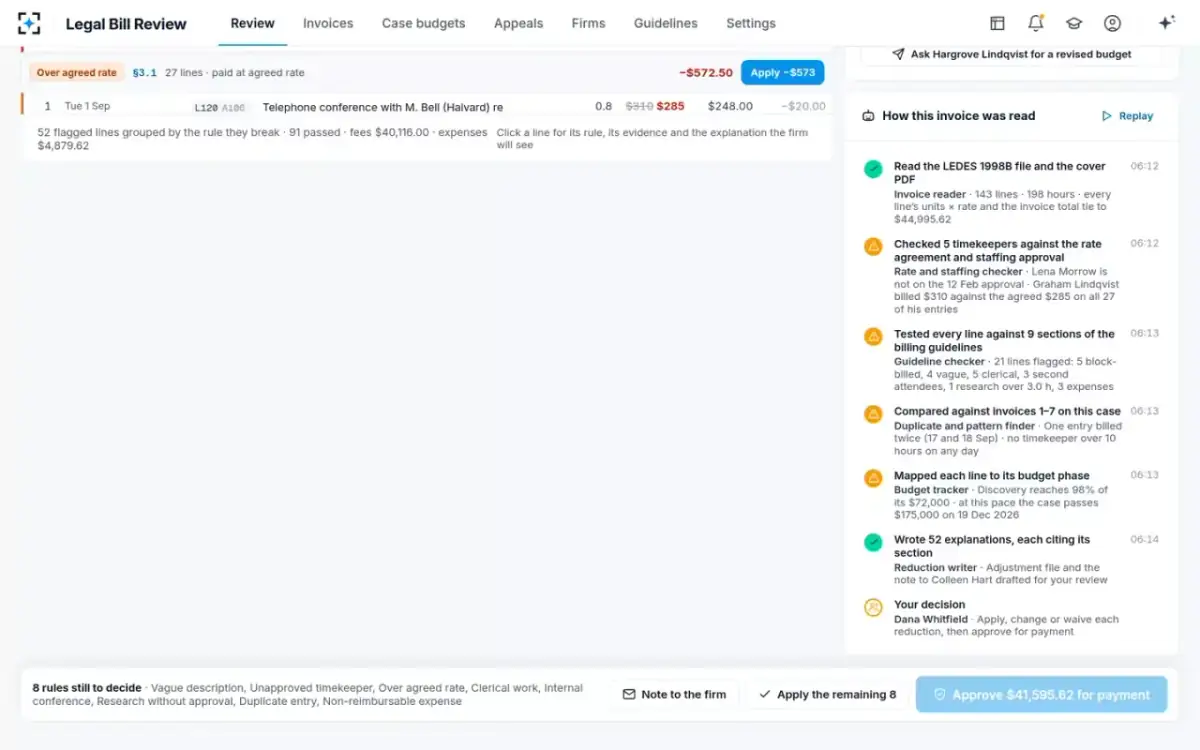
Reading a PDF raises the stakes on validation, because the reader, not the firm's system, produced the numbers. Legal Bill Review's invoice reader turns LEDES 1998B, LEDES XML or a PDF invoice into lines with timekeeper, task and activity codes, hours, rate and amount, cites the line and field for every value, and re-adds every line and the total. It never alters a billed figure; a difference is reported to the reviewer and, through the reviewer, to the firm.
Validation first in Legal Bill Review: every line's units × rate and the invoice total tied out before any rule is applied
Why validation comes before the guideline checks
Because every guideline check reads fields the validator has just confirmed. The rate check reads the unit cost and the adjustment; the staffing check reads the timekeeper ID, which the specification says must be the key rather than the name; the budget check reads the task code; the duplicate check reads the dates and line numbers. A reduction built on an unvalidated field inherits its error, and the firm's appeal will find it.
From a firm's LEDES file to a decision: validation, then the guideline, then a person
Agent
Invoice reader: formatConfirms the format line, the 24 fields, required values, dates, types and unique line numbers.
Never: guesses a missing value
Agent
Invoice reader: arithmeticRecomputes each line from units, unit cost and adjustment, and the invoice total from the lines.
Never: alters a billed figure; it reports the difference
Agent
Code checkMaps each task code to its budget phase and checks expense and activity codes against the accepted sets.
Agent
Guideline checksRates, staffing, description rules, approvals and duplicates, each flag citing its section.
Never: questions counsel’s legal judgement
A person decides
Legal bill reviewerReturns a file that fails validation to the firm; decides each reduction on a file that passes.
A person decides
Firm billing coordinatorCorrects and resubmits the file, or answers each reduction line by line.
Returning a broken file is a kindness to the firm, not a delay. A firm whose invoice is rejected for a math error on day one can fix it in minutes; a firm whose invoice is reduced on a miscomputed line, and finds out on appeal, has lost weeks. The order of checks in the go-live plan for legal invoice review software follows the same logic.
Where Legal Bill Review fits as a LEDES validator, and where it does not
It validates on the receiving side, as part of reviewing the invoice: every file is read, re-added and code-checked when it arrives, and the result sits on the invoice for the reviewer. It is not a tool for firms to build or edit LEDES files, and it does not correct a firm's file; differences go back to the firm with the line and field named.
Every invoice that week in Legal Bill Review, every line read, worst first
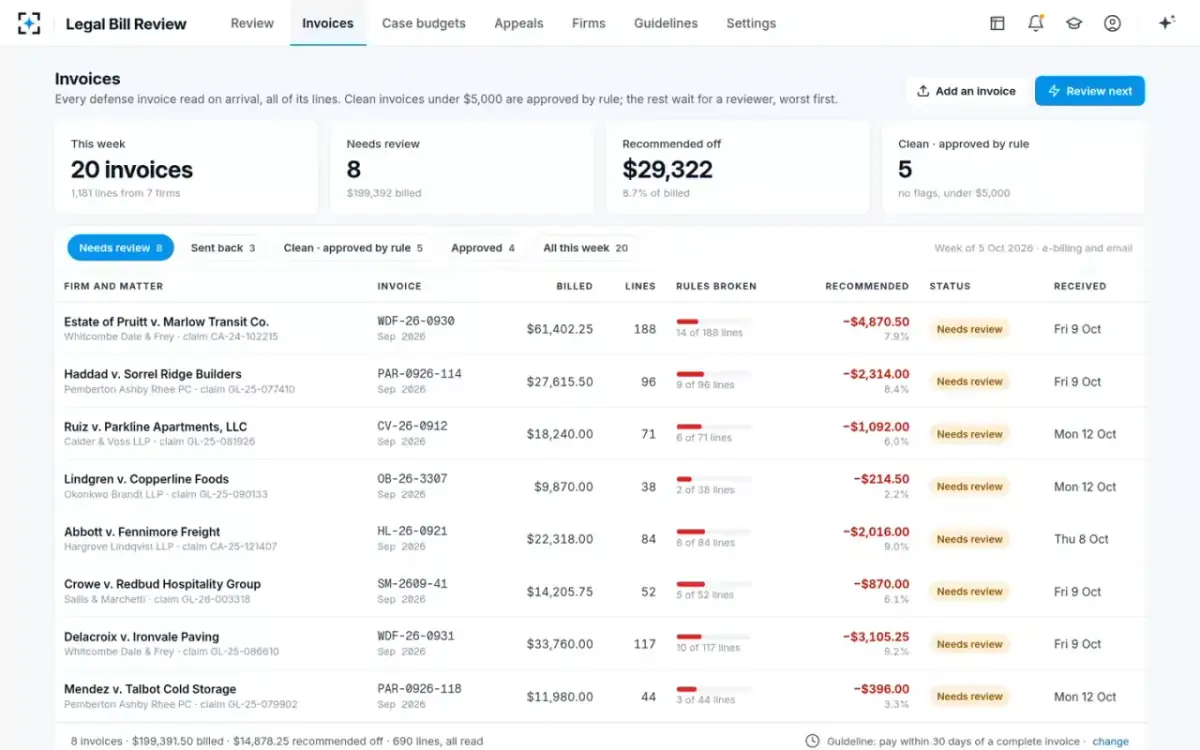
A buyer should ask any validator three questions. Does it recompute every line using the adjustment, and report the difference rather than silently accept the firm's total? Does it name the field and the error in the LEDES Oversight Committee's vocabulary? And does it stop at validation, or carry the same line on into the guideline checks, so that the firm gets one consistent answer per invoice? What those guideline checks are, line by line, is set out in AI legal bill review: which line checks move to agents.
Questions people ask
Is a LEDES file checker the same as a LEDES validator?
Yes; both names describe software that tests a LEDES invoice file against the format's rules before it is accepted. Some also apply a client's guideline rules, which is a second, separate step.
What is the [] at the end of each LEDES line?
It closes every line of a 1998B file, including the format line and the field-name line, as the LEDES Oversight Committee's sample file shows; a validator expects it at the end of each record.
Can one LEDES file contain more than one invoice?
Yes. The 1998B specification allows multiple invoice numbers in one file, and the committee's own sample file holds two invoices; only the first invoice date, total and billing dates for each invoice number count.
How much rounding difference is acceptable in a LEDES invoice?
The specification gives 0.1% as an example of a reasonable variance for a line total, and asks the sending and receiving parties to agree a tolerance below which payment counts as complete.
Which LEDES errors are fatal?
In the LEDES Oversight Committee's 2024 error codes, the first five: the file cannot be opened, its layout does not match the format declared in the upload or in its first line, the declared format is not accepted, or parsing it with AI failed. The file is rejected outright.