An insurance commission tracking spreadsheet is a workbook an agency uses to list each carrier's commission statement lines, compare them with the commission it expected, and record what was disputed and what producers are owed. It is the most common way small agencies start, and with the right columns it can do the whole job: expected commission from the schedule, variance, reason, status, producer share. What limits it is not the software but the hours: every line has to be keyed or pasted, matched and rate-checked by a person, and past a few hundred lines a month the rate check is the step that gets skipped. This guide sets out a template that works, the research on spreadsheet errors, and where the agency management system or Botminds' Insurance Commission Reconciliation takes over.
Examples come from the solution's fictional sample agency and its 14 carriers' September 2026 statements; hours are our estimates, and the research figures come from the academic literature on spreadsheet errors, linked where they appear.
How often audited spreadsheets contain errors, by how hard the auditors looked
Is there a template for tracking insurance commissions?
Yes, and the columns matter more than the layout. A tracker that records only carrier, month, amount paid and amount expected can tell you a statement is short; it cannot tell you why, which line, or what to claim. The template below has one row per statement line and carries the three things a dispute needs: the line as the carrier printed it, the rate the schedule promised, and the reason for the gap.
A commission tracker, one row per statement line
| Column | What goes in it | Formula or rule |
|---|---|---|
| Carrier · statement · page · line | Where the line came from, so anyone can find it again | Keyed or pasted; never summarised |
| Carrier policy no. · agency policy no. | Both forms of the number | A lookup tab maps one to the other |
| Insured · line of business · transaction | New, renewal, endorsement, cancellation | From the statement; checked against the agency system |
| Effective date | The transaction's date, not the statement's | Decides which schedule revision applies |
| Commissionable premium | Written premium less what the schedule excludes | Taxes and fees out if the schedule says so |
| Schedule rate · revision · page | The rate the carrier agreed to | Lookup on carrier + line + transaction, latest revision on or before the effective date |
| Expected · paid · variance | What should have been paid, what was, the difference | =ROUND(premium × rate, 2); variance = expected − paid |
| Reason · status | Wrong rate, wrong premium, chargeback, duplicate, timing | Status: accept, carry, dispute, paid back |
| Producer · split % · share · held | Who is paid what, on what came in | Share = paid × split; held = disputed variance × split |
How do you track commissions in Excel?
Keep three tabs: statement lines, schedules and policies. The statement tab holds one row per carrier line; the schedule tab holds one row per carrier, line of business, transaction type and effective-from date, with the rate and the page it came from; the policies tab holds the agency system's export for the period. Every calculated column on the statement tab is a lookup into the other two.
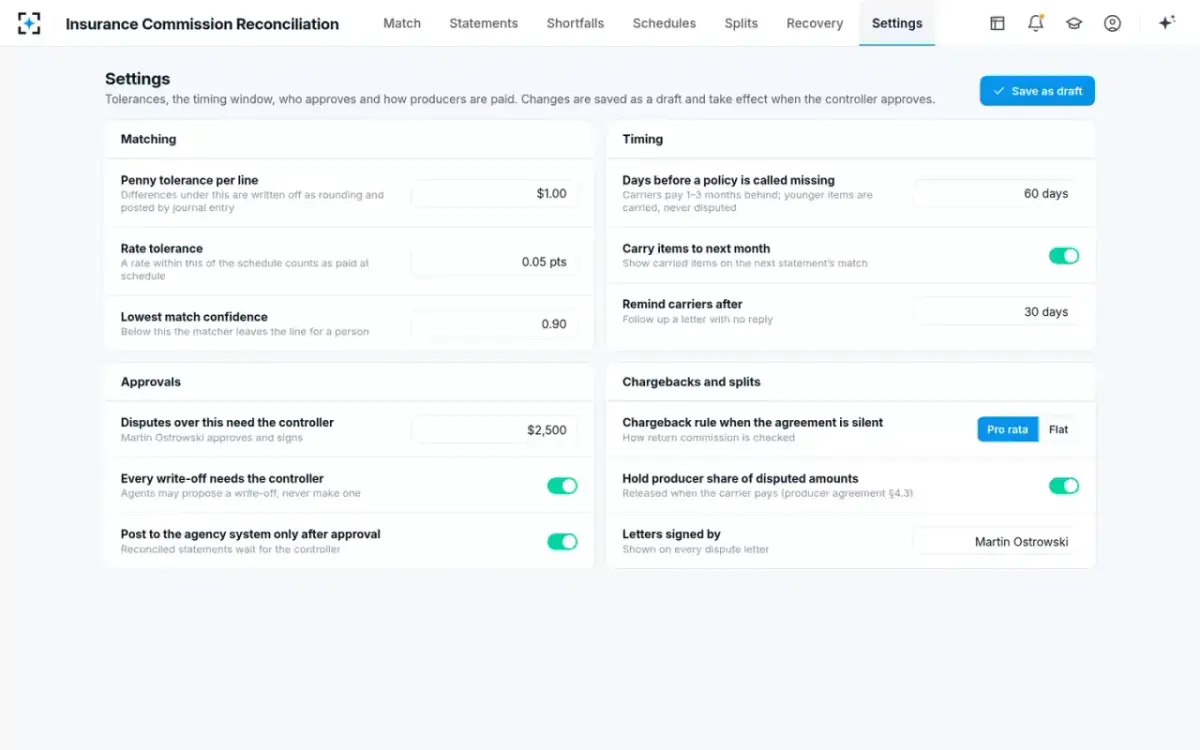
The rate lookup is the step that makes or breaks the tracker. It has to return the latest schedule revision on or before the line's effective date, not simply the current rate: a MAXIFS over the schedule tab finds that date for the carrier, line and transaction, and an XLOOKUP returns the rate for it. Then expected commission is the commissionable premium times that rate, rounded to the cent, and the variance is expected less paid. Flag any variance above a penny tolerance (the sample agency uses $1.00 a line) or a rate difference above a rate tolerance (0.05 points), and require a reason before the row can be closed.
Two checks keep the workbook honest. First, total the statement tab by statement and compare it with each carrier's printed total before matching anything; a pasted range that missed a page is a common silent error. Second, count rows by carrier and month to catch a statement pasted twice, which happens when an electronic commission download and an emailed copy of the same month both arrive.
The tracker's tolerances and windows, written down as settings
What does the research say about spreadsheet errors?
That they are common, hard to see and rarely caught by the person who made them. Raymond Panko's review of field audits found errors in 24% of 367 audited spreadsheets overall, but in 91% of the 54 audited in 1997 and later, when auditors used methods more likely to catch them (Panko, 2000). Cell-level error rates in the most thorough audits were 1.1%, 2.2% and 2.5% of cells. For a tracker with a formula per line, that range is the difference between a clean month and a handful of wrong expected figures nobody notices.
"These studies indicate that subjects working alone only catch about half of all errors"
Raymond Panko, University of Hawaii, EuSpRIG Spreadsheet Risk Symposium, 2000
The same paper reports that builders are confident: in one experiment with students, the median estimate of having made an error was 10%, while 86% had made one. The lesson for a commission tracker is practical. A second person reviewing rows does catch errors, and a lookup that checks every rate against the schedule catches the systematic ones (a whole carrier's renewals at last year's rate) that a reviewer scanning rows reads straight past.
Can my agency management system reconcile commissions?
It can reconcile receipts; whether it can reconcile rates depends on what rate it expects. An agency management system can usually import a carrier's commission download, match lines to policies and post the receipts, and it flags lines it cannot match. Its expected commission comes from the commission percentage stored on each policy or carrier record. If that percentage is kept current with every schedule revision, the system checks rates; if it was keyed once from last year's default, the system and the carrier agree on the wrong number and the line clears.
That is the one question to put to your own system before deciding anything: when a carrier raised a renewal rate on 1 January, who changed the percentage in the agency system, and on which policies? In the solution's sample, a carrier raised commercial package and businessowners renewals from 12.5% to 15.0% and kept paying 12.5% on 23 lines in September. Totals tie, receipts post and nothing flags unless something holds the 2026 schedule.
Three ways to close the same month
Spreadsheet or agency system: Key or paste PDFs and spreadsheets; import electronic downloads. Our estimate: about two days a month for 14 carriers.
Agents reading every line: Every format read, each figure tied to its page, lines proved to the printed total.
Spreadsheet or agency system: By hand in a spreadsheet; automatic in the agency system for clean downloads, by hand for the rest.
Agents reading every line: Normalised policy numbers and four keys; below the agency's confidence threshold, a person decides.
Spreadsheet or agency system: Spreadsheet: only if the rate lookup exists and is kept. Agency system: only if each policy's percentage is current.
Agents reading every line: Every line against the schedule revision in force on its effective date.
Spreadsheet or agency system: A reverse lookup someone has to build and run.
Agents reading every line: Policies past the agency's window listed with their carrier evidence.
Spreadsheet or agency system: Accepted as printed unless someone recalculates the return premium.
Agents reading every line: Checked against the premium returned and the agreement clause.
Spreadsheet or agency system: Letters written from scratch; producers paid on expected and clawed back.
Agents reading every line: Letters drafted with clause and lines for a person to send; producers paid on what came in.
How do you track missing commissions?
Run the tracker backwards once a month. Export from the agency system every policy and transaction that should produce commission in the period, and for each one count matching rows on the statement tab; a count of zero on a transaction older than your timing window is a missing commission. Without the window, the list fills with new business the carrier simply has not reported yet.
The sample agency uses 60 days past the effective date. On one September statement that rule found four July policies the carrier had issued and billed but never put on a statement: $3,518.74 of commission that a forward-only tracker, which starts from the carrier's lines, could not show. The five measures of a direct bill reconciliation include this reverse check as its own measure.
How do you track producer splits in a spreadsheet?
Add the split to the statement row, not a separate payroll sheet, so each producer's share comes from the same reconciled line. Share = commission paid × the producer's split for that transaction type (new or renewal); held = the disputed part of the variance × the same split. Pay the share now and the held amount on the statement where the carrier pays it back.
Two rules belong beside the formula. A split can only go to someone entitled to commission on that sale, which is a licensing question before it is arithmetic; who may be paid a split, and for what sets out the rules. And a split percentage should change only under the producer's agreement, never in the tracker.
When does an agency outgrow a commission spreadsheet?
When the rate check stops happening. The signs are concrete: statements arrive in more formats than the person closing them can import cleanly; carriers revise schedules during the year; the close runs past the middle of the month; producers question their statements; and the tracker is edited by more than one person without a log. Any two of those together mean the spreadsheet has become a record of payments rather than a check on them.
Line count is the plainest test. In our estimate for the sample agency's 2,984 lines, three days of matching works out at about 29 seconds a line, which is enough to find and tick a policy and not enough to open a schedule. The specialist's month-end shows the same arithmetic from the desk.
Signs your commission tracker has stopped checking rates
- The rate column is copied from the statement
Then expected always equals paid on rate.
- Schedules live in email, not in the workbook
No lookup means no rate check.
- Only statement totals are compared
Under- and over-payments can cancel out.
- Cancellations are accepted as printed
Full-term chargebacks on pro rata cancellations pass.
- No reverse check for missing policies
A policy the carrier never booked never appears.
- The close finishes after mid-month
Producer pay and dispute windows both run from it.
- More than one person edits without a log
Nobody can say which row changed or why.
What is the best way to track insurance commissions?
The best way is the cheapest one that checks every line's rate against the schedule in force, finds missing policies in reverse, recalculates chargebacks and pays producers on what came in. For a small agency with a few carriers and electronic downloads, a disciplined spreadsheet or the agency system with current percentages can do that. For an agency with a dozen or more carriers in mixed formats and schedules that change, the hours make the rate check the first casualty, and agents that read every line restore it.
Fourteen statements, every line read and checked: the month in one view
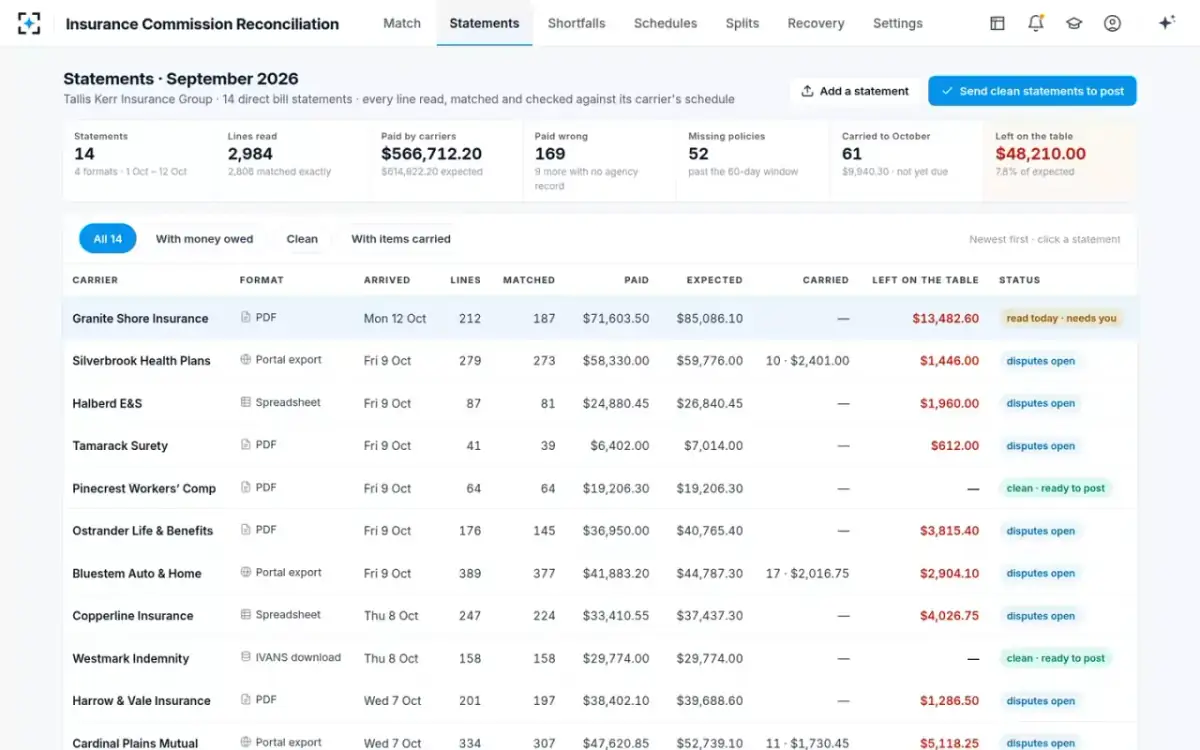
A trial costs little: put one closed month through both your tracker and the solution, and compare the variances each finds. One statement line, traced through the software shows what to look for in the result, and Insurance Commission Reconciliation shows the full sample month.
Questions people ask
What columns should a commission tracker have?
At minimum: carrier, statement, page and line; both policy numbers; insured, line of business, transaction and effective date; commissionable premium; schedule rate with its revision; expected, paid and variance; reason and status; producer, split, share and held amount. The schedule rate and reason columns are the ones that turn a payment log into a reconciliation.
Is there a free insurance commission tracker template?
The table on this page is a complete template you can build in any spreadsheet. The work is not the layout but keeping the schedule tab current with every carrier's revisions and effective dates.
How do I calculate expected commission in Excel?
Look up the rate for the carrier, line and transaction from the latest schedule revision on or before the line's effective date, then multiply by the commissionable premium and round to the cent. On a cancellation, use the return premium, not the full-term premium.
How do I stop a statement being counted twice in a spreadsheet?
Count rows by carrier and statement period after every paste, and keep the carrier's statement number on each row. A month that arrives both as an electronic download and as an emailed copy is the usual cause.
Can a spreadsheet handle agency bill and direct bill together?
It can, but on separate tabs, because the checks differ: direct bill checks the carrier's commission line, agency bill checks the agency's own premium collections and net remittance to the carrier. Mixing them in one variance column hides both.