A group term life imputed income calculator works out the taxable value of employer-provided group-term life insurance above $50,000. For each month, take the coverage in force, subtract $50,000, divide by 1,000, and multiply by the IRS Table I rate for the employee's age on the last day of the tax year; add the months, subtract what the employee paid toward the insurance, and report the result as wages in boxes 1, 3 and 5 of Form W-2, and in box 12 with code C. The input that calculators most often get wrong is the coverage itself. When supplemental life above the guaranteed issue amount needs evidence of insurability, the coverage in force is the approved amount from the date it was approved, not the amount the employee elected in open enrollment. Botminds' Evidence of Insurability Automation sends approved amounts and their effective dates, never elected ones, to enrollment and billing, which is the figure an imputed income calculation needs.
This guide is for payroll and benefits teams and for the enrollment specialists at carriers who feed them. It sets out the IRS rules from Publication 15-B and the Treasury regulation behind it, works a mid-year EOI approval month by month, and lists what to look for in a calculator. The worked example uses a fictional employee; the rates and rules are the IRS's own, as published for 2026.
IRS Table I: the monthly cost of $1,000 of group-term life coverage, by age
| Age on the last day of the tax year | Cost per $1,000 a month | A year on $100,000 above the exclusion |
|---|---|---|
| Under 25 | $0.05 | $60.00 |
| 25 to 29 | $0.06 | $72.00 |
| 30 to 34 | $0.08 | $96.00 |
| 35 to 39 | $0.09 | $108.00 |
| 40 to 44 | $0.10 | $120.00 |
| 45 to 49 | $0.15 | $180.00 |
| 50 to 54 | $0.23 | $276.00 |
| 55 to 59 | $0.43 | $516.00 |
| 60 to 64 | $0.66 | $792.00 |
| 65 to 69 | $1.27 | $1,524.00 |
| 70 and older | $2.06 | $2,472.00 |
How do you calculate imputed income on group term life?
Month by month, on the coverage above $50,000. Publication 15-B tells employers to figure the monthly cost by "multiplying the number of thousands of dollars of all insurance coverage over $50,000 (figured to the nearest $100) by the cost shown in Table 2-2", then to multiply that monthly cost by the number of months of coverage at that cost. The total is reduced by what the employee paid toward the insurance.
The publication's own example shows the shape. An employee aged 45 with $200,000 of coverage has $150,000 above the exclusion; at $0.15 per $1,000 a month that is $270 for the year; he paid $100 toward it, so $170 goes on his W-2 in boxes 1, 3 and 5 and in box 12 with code C. The amount is subject to social security and Medicare taxes, and income tax withholding on it is optional.
The calculation, term by term
Coverage above the exclusion
(coverage in force that month − $50,000) ÷ 1,000
Rounded to the nearest $100 of coverage; only coverage the employer carries counts.
Carrier: the approved amount and date
Monthly cost
× Table I rate for age on 31 Dec
One rate for the whole year, set by the age on the last day of the tax year.
Payroll
Annual cost
Σ monthly cost over the months covered
Prorate a part month; average a month in which the amount changed.
Payroll
Employee’s payments
− amount the employee paid toward the insurance
The result goes in W-2 boxes 1, 3 and 5, and box 12 with code C.
Payroll
What is Table I, and what age applies?
Table I is the Treasury's schedule of uniform premiums for $1,000 of group-term life coverage for one month, in five-year age bands, used only to measure taxable value. It is not what any carrier charges. The regulation sets the age rule in one sentence: "For purposes of Table I, the age of the employee is the employee's attained age on the last day of the employee's taxable year."
So an employee who turns 50 in November pays the 50 to 54 rate, $0.23, for every month of the year, not $0.15 for ten months and $0.23 for two. The rates rise steeply past 50, which is why an approval for an older employee matters far more to the W-2 than the same approval for a younger one.
What $250,000 of approved coverage above $50,000 adds to a year's taxable wages, by age
Is group term life over $50,000 taxable?
The cost of coverage above $50,000 is, measured by Table I, not by the premium. The first $50,000 is excluded from income and from social security and Medicare wages. Publication 15-B says the employer "must include in your employee’s wages the cost of group-term life insurance beyond $50,000 worth of coverage, reduced by the amount the employee paid toward the insurance."
Two limits on that rule matter to EOI. It applies only to insurance on the employee's own life, and only to coverage that qualifies as group-term life the employer carries. Coverage on a spouse or dependent is outside it, and supplemental coverage the employer does not carry does not count toward the $50,000 at all.
Does supplemental life count toward the $50,000?
It does if the employer carries the policy, directly or indirectly, and an employer can carry a policy it pays nothing towards. The regulation says a policy is carried by the employer if the employer "arrange[s] for payment of the cost of the life insurance by their employees and charge[s] at least one employee less than the cost of his or her insurance, as determined under Table I" and at least one other more: a straddle across the Table I cost.
Whether employee-paid supplemental life straddles depends on how its rates compare with Table I across the ages in the group; age-banded rates can sit below the Table I cost at some ages and above it at others. When the plan straddles, the supplemental coverage is added to any employer-paid basic life before the $50,000 is subtracted, and the employee's own premium payments then reduce the taxable amount. Whether a given plan straddles is a calculation on its rate table, and it belongs in the plan's tax file, not in an assumption.
A mid-year EOI approval, worked month by month
Take a fictional employee, 47 on 31 December, whose employer carries her group-term coverage. She elected $300,000 in open enrollment against a $150,000 guarantee. The guarantee took effect on 1 January; the carrier approved the excess on 1 July, after her evidence form was completed. Her coverage in force was $150,000 for six months and $300,000 for six.
One employee's coverage in force, and the Table I cost it creates
- Guarantee only, before approvalJan–Jun · $150,000
- Approved in full from 1 JulyJul–Dec · $300,000
- 100 × $0.15 = $15.00 a month, six months$90.00
- 250 × $0.15 = $37.50 a month, six months$225.00
The Table I cost for the year is $90.00 plus $225.00, or $315.00. If she paid $120.00 toward the coverage during the year, $195.00 goes on her W-2 in boxes 1, 3 and 5 and in box 12 with code C, and it is subject to social security and Medicare tax. The calculation is small. Getting the six-and-six split right is not, because it depends entirely on the approval date.
If the approval had come on 15 July instead, July would be a month in which the amount changed. The regulation handles that case: where the amount payable varies during the period, it "is considered to be the average of the amount payable under such policy at the beginning and the end of such period." July's coverage would be counted as $225,000, so $175,000 above the exclusion, or $26.25 for the month at $0.15, instead of $15.00 or $37.50.
Approved amount, not elected amount
An imputed income calculator is only as right as the coverage it is fed, and the common error is to feed it the election. If payroll had used the $300,000 election from January, the Table I cost would have been $450.00 instead of $315.00, and $135.00 of wages that never existed would have gone on the W-2, on top of six months of premium for coverage that was not in force.
The same employee's year, computed from the election and from the approval
From the elected amount: $300,000 all year
From the approved amount and date: $150,000 Jan–Jun, $300,000 Jul–Dec
From the elected amount: 250 × $0.15 × 12 = $450.00
From the approved amount and date: $90.00 + $225.00 = $315.00
From the elected amount: On $300,000 from January
From the approved amount and date: On $300,000 from July, after approval
From the elected amount: $450.00 of imputed income on coverage that never existed
From the approved amount and date: $100,000 above the exclusion all year: $180.00
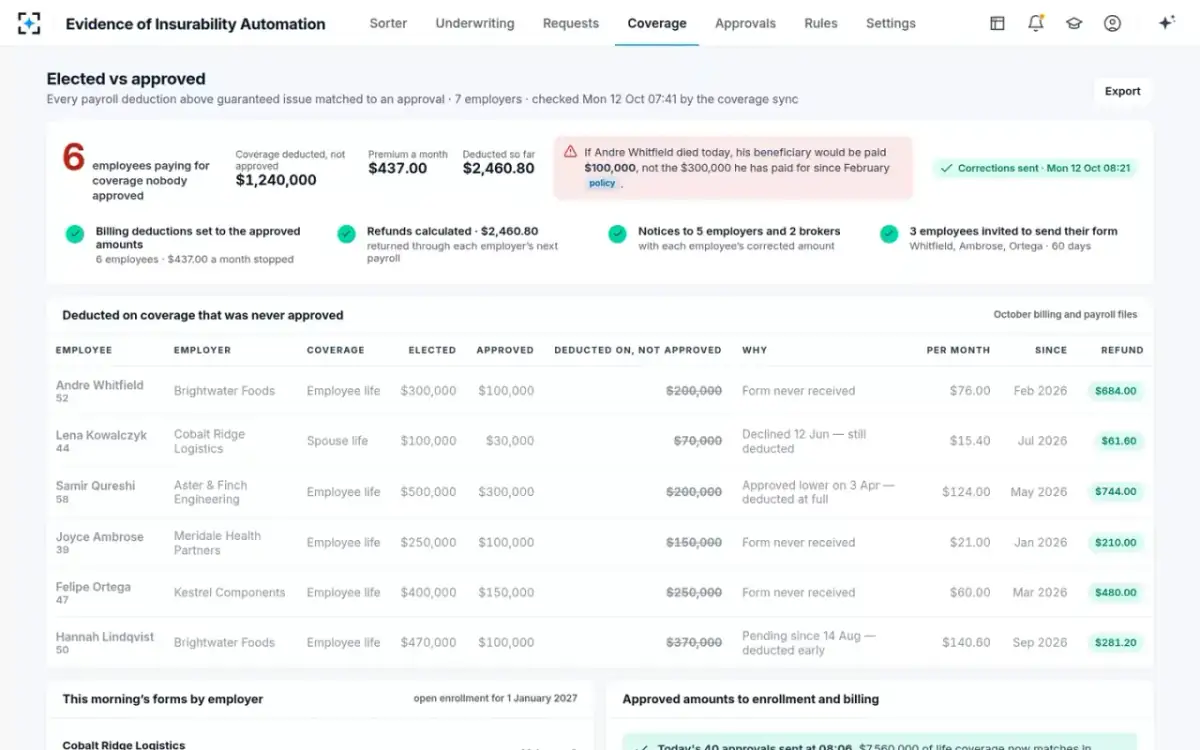
The bottom row is the case to watch. When an evidence request expires and nobody tells payroll, the employee pays premium on the election and is taxed on it too. The sample solution's daily check of payroll against approvals found six employees across seven employers in that position on one Monday, paying $437.00 a month on $1,240,000 of coverage nobody had approved. What happens to such files when a claim arrives is set out in what happens if EOI expires.
Evidence of Insurability Automation sends approved amounts, never elected, to enrollment and billing with the batch

Spouse and dependent life: the $2,000 line
Spouse and dependent life is not group-term life on the employee, so Table I and the $50,000 exclusion do not apply to it. Employer-paid coverage on a spouse or dependent can be excluded as a minimal fringe benefit: Publication 15-B says it "may be excludable from income as a de minimis fringe benefit if the face amount isn’t more than $2,000", and above that only if the excess of its cost over what the employee paid after tax is too small to account for.
For the evidence process that means spouse elections, which often need evidence above a small guarantee, do not change the employee's Table I calculation at all. A calculator that adds a spouse's approved $100,000 to the employee's own coverage overstates the employee's wages. How spouse guarantees compare with employee guarantees is shown in guaranteed issue amount vs benefit amount.
When evidence of insurability affects whether it is group-term life at all
For small groups, the evidence rule itself can decide whether the insurance qualifies. Group-term life generally has to be provided to at least ten full-time employees at some time in the year. One of the two exceptions for smaller groups applies only if, among other conditions, "If evidence that the employee is insurable is required, it is limited to a medical questionnaire (completed by the employee) that doesn’t require a physical."
A carrier that asks a small group's employees for medical examinations, rather than a questionnaire, may be taking that group's coverage outside the exception. The rule is narrow, and the regulation has the details, but it is a reason for benefits teams at small employers to know what the carrier's evidence process involves.
What to look for in an imputed income calculator
Most errors come from the inputs, not the multiplication. A calculator, whether it is a payroll system's module, a spreadsheet or a vendor tool, should be judged on whether it takes the right coverage, the right age and the right months, and whether it can show its work for one employee.
Tests for any group term life imputed income calculator
- It uses approved amounts and their effective dates
From the carrier’s decisions, not the open-enrollment election; a pending excess is not coverage.
- It applies one age for the whole year
The employee’s attained age on the last day of the tax year.
- It works month by month
Prorating a part month and averaging a month in which the amount changed.
- It counts only coverage the employer carries
Including employee-paid supplemental life that straddles Table I; excluding spouse and dependent life.
- It subtracts the employee’s payments toward the insurance
And shows the amount for box 12, code C, and boxes 1, 3 and 5.
- It recalculates when a decision changes
A late approval, a lower amount or a closed request should change the year’s figure automatically.
- It shows its work for one employee
Each month’s coverage, the rate, the arithmetic and the source of the coverage figure.
Where Evidence of Insurability Automation fits
Botminds' Evidence of Insurability Automation is not a payroll or tax calculator, and it does not prepare W-2s. Its part is upstream: it makes sure the coverage figure payroll uses is the approved amount with its date. Every fast-lane batch and every underwriter's decision sends the approved amount and effective date to enrollment and billing, never the election, and every day the coverage sync compares payroll deductions above guaranteed issue with the approvals on file and lists each difference with its cause.
When it finds a mismatch, the underwriter can send corrections in one step: deductions set to the approved amounts, refunds calculated for the employer's next payroll, and notices to employers and brokers. For the employer, that correction is also the trigger to rerun the imputed income for the months affected. Where an EOI tool connects to enrollment, billing and payroll files is covered in EOI automation tools, and why the approval date moves at all in EOI approval time.
Corrections that also change the next imputed income run
Questions people ask
How do you calculate imputed income on group term life?
For each month, take coverage above $50,000 in thousands, multiply by the Table I rate for the employee's age on 31 December, add the months, and subtract what the employee paid toward the insurance. A 45-year-old with $200,000 of coverage has $270 of Table I cost for a full year.
What age is used for Table I?
The employee's attained age on the last day of the tax year, for every month of that year. An employee who turns 50 in November uses the 50 to 54 rate, $0.23 per $1,000 a month, all year.
Is group term life over $50,000 taxable?
The Table I cost of coverage above $50,000, less the employee's payments toward it, is taxable wages and subject to social security and Medicare taxes. Income tax withholding on it is optional for the employer.
Does supplemental life count toward the $50,000?
Yes, if the employer carries it, which includes employee-paid coverage whose rates charge at least one employee less than the Table I cost and at least one more. Spouse and dependent coverage does not count.
Where does imputed income go on the W-2?
In boxes 1, 3 and 5 as wages, and in box 12 with code C. Coverage provided to former employees uses codes M and N in box 12 for uncollected social security and Medicare tax.
Does an EOI approval change imputed income?
Yes, from the month the approved coverage takes effect. Coverage still waiting for evidence is not in force and should not be counted, which is why the calculator needs the approved amount and its date.