EOI automation tools read evidence of insurability forms, check them against the employee's election and the carrier's rules, and route each one to a decision faster than a single manual queue can. The tools differ less in how they read a form than in what they connect to. An evidence decision changes three other systems: the enrollment record that says what coverage the employee has, the payroll deduction the employer takes, and the bill the carrier sends. A tool that stops at the decision leaves the costliest mistakes, premium taken on coverage nobody approved, exactly where they were. Botminds' Evidence of Insurability Automation reads every form from mail, portal and email, sorts it with a written reason, and sends the approved amount, never the elected one, to enrollment and billing, then checks every day that payroll deductions match the approvals.
This guide is for group underwriting operations and the enrollment and billing teams who will live with whatever is bought. It maps the connections an EOI tool needs, shows what courts have said about systems that keep the employer's data and the carrier's decisions apart, and sets out a pilot that tests the connections rather than the screens. Product examples come from a fictional carrier, Larkspur Life & Group, as it runs through the solution; the people, employers and amounts are sample data.
The map an EOI tool has to cover: forms and records in, decisions and amounts out
In
Mail room scan
Paper forms, scanned each weekday at 06:15
Employee portal
Electronic EOI, read as submitted
EOI inbox
Email attachments from employees, employers and brokers
Enrollment records
Elections, current coverage, guaranteed issue per plan
Prescription history and exchange
Checked only under the signed authorization
Seven agents
Form reader
Election matcher
Health screen
Lane sorter
Medical summarizer
Missing-information writer
Coverage sync
Medical underwriter
Approves the batch, decides every case
Out
Decision with its reason
To the approval log and the underwriting system of record
Approved amount and date
To enrollment and billing; never the elected amount
Deductions compared daily
Payroll files against approvals, each difference with its cause
Status for employers and brokers
Received, with an underwriter, waiting, approved
Requests and letters
Drafted for a person to send
What is EOI automation?
EOI automation is software that takes an evidence form from the moment it arrives, by mail, portal or email, through reading, matching to the election, health screening and an underwriting decision, to the approved amount in enrollment and billing. The reading and sorting are the visible part. The matching at both ends, election in and approved amount out, is where most of the risk sits, because the employer holds the election and the payroll, and the carrier holds the decision.
In the sample solution the work is split among seven agents and one person. The form reader, election matcher, health screen and lane sorter read and place every form with a reason; the medical summarizer prepares the cases that need judgment; the missing-information writer drafts requests; the coverage sync carries decisions to enrollment and billing and checks payroll every day. The medical underwriter approves the fast lane in one batch and decides every other case.
An EOI decision is finished only in the bill
A decision that has not reached payroll has not changed anything the employee can see. If the employer keeps deducting on the elected amount after a decline, or on the full amount after a lower approval, the paycheck says one thing and the certificate another. The cases that reach court start there, and they turn on how the systems were divided.
In Salyers, the employer handled enrollment and payroll, the carrier handled decisions, and the carrier did not see the elections. The Ninth Circuit attributed the employer's knowledge to the carrier for the purpose of collecting evidence, and explained why the rule matters: applying agency law "creates incentives for diligent oversight" and
"prevents an insurer from relying “on a compartmentalized system to escape responsibility.”"
Ninth Circuit, Salyers v. Metropolitan Life Ins. Co. (2017)
Five years later the First Circuit, in Shields, looked at the other side of the same gap. The carrier there told the court that it "makes the insurability determination when it is advised that an employee is enrolling for coverage that requires Evidence of Insurability". The employer sent the carrier a list of enrolled employees every two years, with coverage levels, and the carrier used it only to set rates. The data that would have shown an employee paying for coverage nobody approved was in the carrier's hands, in the wrong system. An EOI tool that does not read the enrollment and payroll side repeats that arrangement.
How does EOI integrate with enrollment?
Through the election. Every form is matched to the employee's election and current coverage, the plan's guaranteed issue amount, the amount above it and whether the employee is a late entrant. A form with no matching election is not decided; it goes back to the employer's enrollment team. In the sample queue, 3 of 112 forms had no matching election, and each was routed to the employer with the ask "confirm the election and amount".
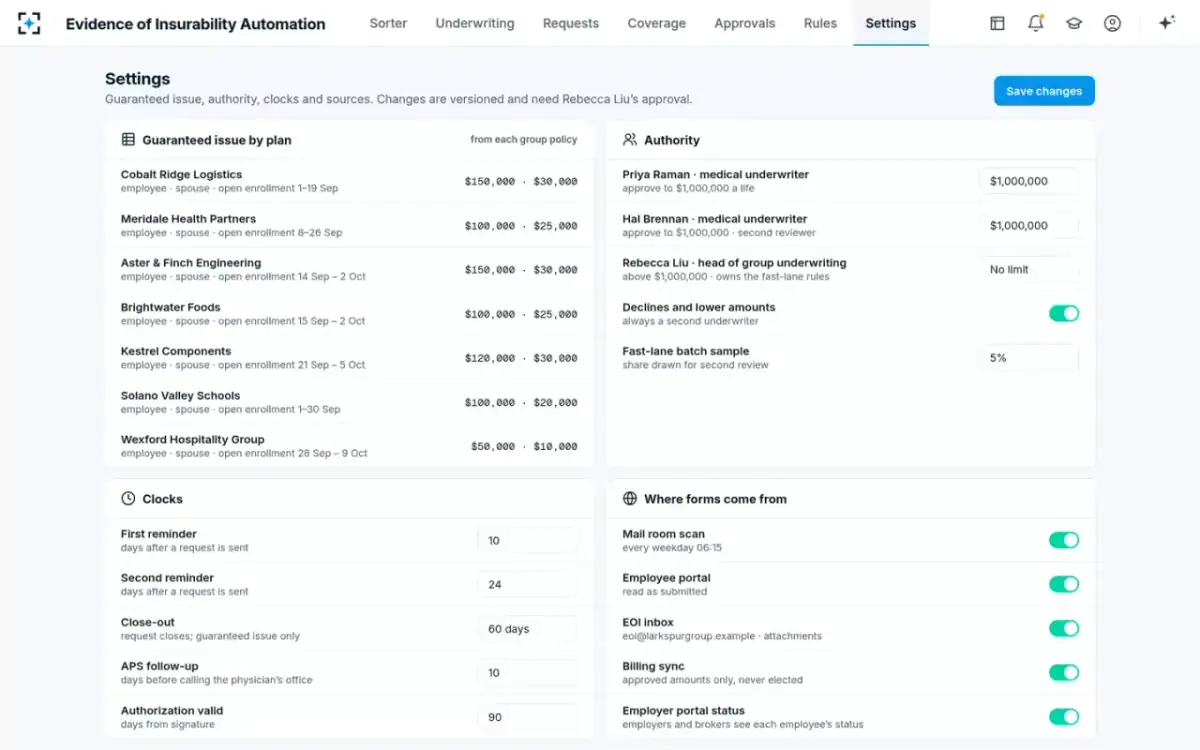
The guaranteed issue amounts themselves come from each group policy and differ by employer: in the sample settings they run from $150,000 for employees and $30,000 for spouses at two employers down to $50,000 and $10,000 at another. A tool that holds one guaranteed amount for all employers, or reads it from the form rather than the policy, will misplace forms on the line between guaranteed and evidence. How that line works for the employee is the subject of guaranteed issue amount vs benefit amount.
Which channels should an EOI tool read?
All of them, into one queue. Evidence forms still arrive on paper, through employee portals and as email attachments from employees, employers and brokers, and a tool that reads only its own portal leaves the rest to a second, manual process with its own backlog. Each form should carry its source and arrival time, because the arrival time is where the approval clock starts.
Paper is where reading is hardest and where a tool must know its limits. In the sample solution the form reader never fills in a blank answer, and handwriting it cannot read with confidence goes to Needs more information with the image of the answer rather than being guessed. The sample carrier's spouse-life rule makes that a written test: a form reaches the fast lane only if its handwriting was read with confidence above 98%, a condition added in the rule's seventh version.
Where 112 forms came from, and what they needed
By channel
- Employee portal · 61 · 54%
- Mail room scan · 38 · 34%
- EOI inbox · 13 · 12%
By what they needed
- Approve now · 40 · 36%
- Needs underwriter · 47 · 42%
- More information · 25 · 22%
Can EOI decisions update payroll deductions?
Not directly in most arrangements, because the employer runs payroll. What a tool can do is send the approved amount and effective date to enrollment and billing, which drive the deduction file, and then compare the next payroll file with the approvals. The second step is the one most tools omit, and it is the one that finds mistakes.
Deducted premium is not just the employer's bookkeeping. Under the Department of Labor's plan-asset rule, amounts withheld from wages for an ERISA welfare plan become plan assets, at the latest "90 days from the date on which the participant contribution amounts are received by the employer" or would have been paid in cash. Money deducted for coverage that does not exist is a fiduciary problem as well as a service one.
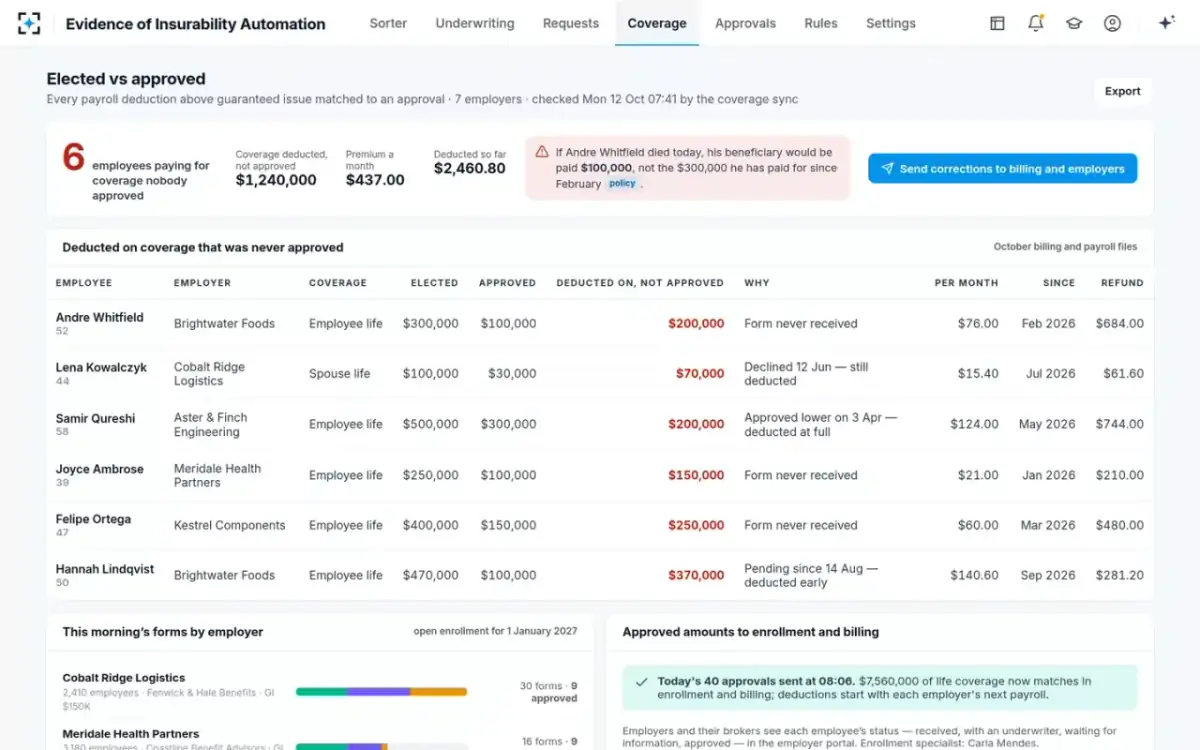
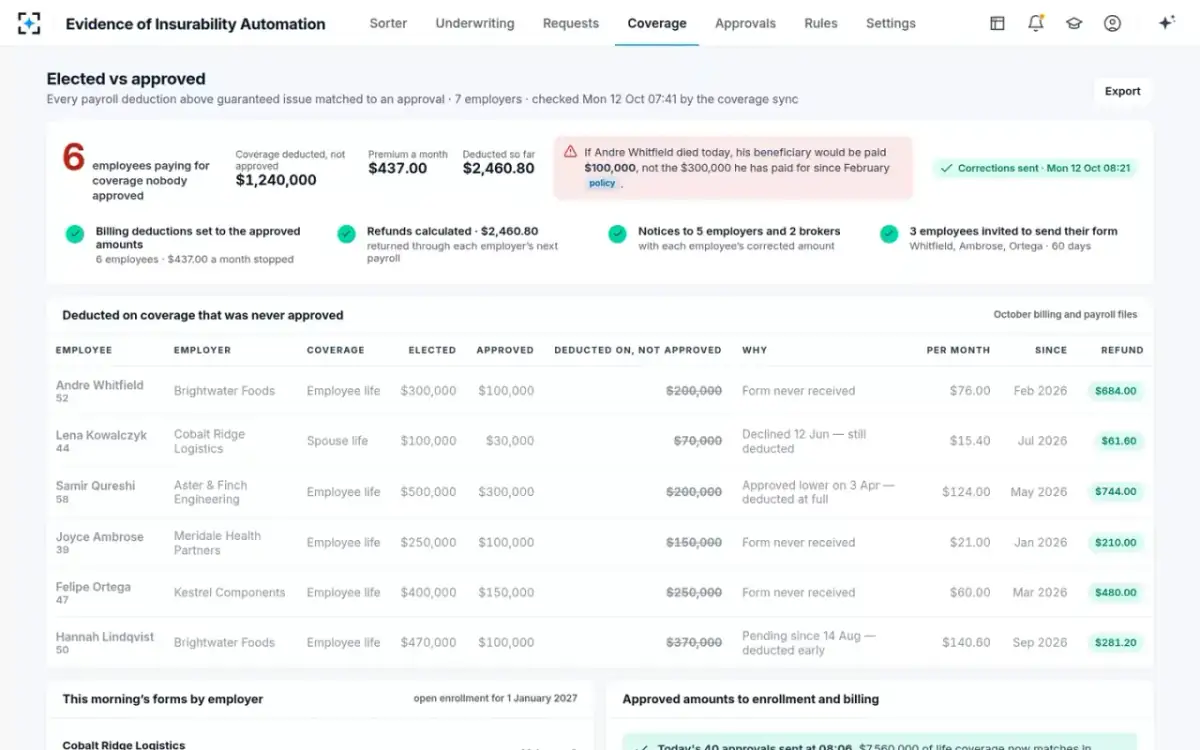
In the sample solution, the coverage sync compares every deduction above guaranteed issue with an approval across all seven employers each day. On the Monday it found six employees paying $437.00 a month on $1,240,000 of coverage nobody had approved: three forms never received, one declined, one approved lower and one still pending. One click by the underwriter set billing deductions to the approved amounts, calculated $2,460.80 of refunds to return through each employer's next payroll, sent notices to five employers and two brokers, and invited three employees to send their form within 60 days.
Elected against approved: the mismatch a decision-only tool never sees
What to leave in the underwriting system of record
Leave the policy, the certificate, the rates and the decision of record where they are. An automation tool should read guaranteed issue amounts, authority limits and the underwriting manual from the carrier's own sources, write each decision and its reason back, and keep its own log of what it checked and when. It should not become a second place where coverage is decided.
The split of ownership is the practical test. In the sample solution the settings that shape decisions, guaranteed issue by plan, underwriter authority, the second-review sample, reminder and close-out clocks and how long an authorization is valid, are versioned, and every change needs the head of group underwriting's approval. Fast-lane rule changes are back-tested on decided forms and co-signed by the medical director.
The settings an EOI tool should read from the carrier, not invent
One approved form in Evidence of Insurability Automation, from the decision to the payroll check
A person decides
Medical underwriter approvesReads the reasons and approves the fast-lane batch, or decides a case from its cited summary.
Agent
Coverage sync sendsSends the approved amount and effective date to enrollment and billing; deductions start with the employer’s next payroll.
Never: send an elected amount
Agent
Letters draftedApproval letters are drafted for the employee portal and email, and the employer sees the status in its portal.
Agent
Coverage sync checksCompares the next payroll file with every approval above guaranteed issue and lists each difference with its cause.
Never: issue a refund on its own; refunds need the underwriter
A person decides
Underwriter correctsSends corrections to billing and employers in one step: deductions to approved amounts, refunds, notices.
Where EOI automation tools fit, and where they do not
Three kinds of tool can sit in this space: electronic EOI portals that collect forms from employees, rules engines inside a carrier's underwriting or administration system, and agents that read, sort and summarise across channels. Each solves a different part of the problem, and none should be judged on the reading alone.
An employee-facing EOI portal against agents that carry the decision to the bill
Portal only: Forms submitted in the portal; paper and email handled elsewhere.
Agents across enrollment and billing: Portal, scanned paper and email read into one queue.
Portal only: Taken from what the employee entered.
Agents across enrollment and billing: Matched to the employer’s enrollment record; no match goes back to the employer.
Portal only: Rules on the answers; medical cases queued.
Agents across enrollment and billing: Reason per form, fast lane for a batch approval, cited summaries for the rest.
Portal only: A status update and a letter.
Agents across enrollment and billing: Approved amount to enrollment and billing, and a daily check of payroll against approvals.
Portal only: Forms that were submitted.
Agents across enrollment and billing: Also forms never received, declines still deducted and lower approvals billed at full.
Botminds' place is the right-hand column, and it is narrow by design. The solution does not replace the employer's benefits administration platform or the carrier's policy administration system, does not set rates, and does not approve or decline anything: every batch and every case is decided by a medical underwriter, and nothing reaches an employee until a person sends it. Connecting it to a carrier's own enrollment feed, billing system and payroll files is the first job of any pilot. The questions that separate one EOI product from another are collected in EOI software: twelve questions to ask before you buy.
A pilot on one employer's open enrollment
Run the pilot where the money moves: one employer, one open-enrollment season, from the first form to the first corrected payroll. Two tests matter more than any reading-accuracy figure. First, back-test the fast-lane rules on forms your underwriters already decided, and count how many the rules would have sent to the batch and how many of those the underwriters approved in full; in the sample, 781 of 2,140 September forms qualified and 780 had been approved in full. Second, run the daily payroll comparison on the employer's current files before the season starts, and count the elected-against-approved mismatches already there.
The second number is often the argument for the whole project, because every mismatch is a refund owed or coverage in dispute, and the four Department of Labor settlements described in EOI approval time put a three-month limit on how long a carrier can leave one unresolved. When imputed income is involved, the same approved amount also drives the employee's W-2, as the group term life imputed income calculator shows.
Connections to prove in an EOI automation pilot
- All three channels read into one queue
Portal, scanned paper and email, with the source and arrival time on every form.
- Every form matched to the employer’s election
With guaranteed issue read from each group policy, and no-match forms routed to the employer.
- Approved amounts, never elected, sent to enrollment and billing
With the effective date, the same day as the decision.
- Payroll compared with approvals after every cycle
Each difference listed with its cause: never received, declined, approved lower, pending.
- Corrections drafted for a person to send
Deductions, refunds and notices to employers and brokers, approved by the underwriter.
- Status visible to employers and brokers
So “which employees are still pending?” is answered without a phone call.
- Every decision written back with its reason
To the approval log and the system of record, exportable for audit.
Corrections sent from Evidence of Insurability Automation: deductions, refunds and notices in one step
Questions people ask
What is EOI automation?
Software that takes an evidence of insurability form from arrival through reading, election matching, health screening and an underwriter's decision to the approved amount in enrollment and billing. Good tools also check payroll against approvals afterwards.
How does EOI integrate with enrollment?
By matching each form to the employee's election and current coverage at the employer, and the plan's guaranteed issue amount. Forms with no matching election go back to the employer; in the sample queue that was 3 of 112.
Can EOI decisions update payroll deductions?
Indirectly: the tool sends the approved amount and effective date to enrollment and billing, which feed the employer's deduction file, then compares the next payroll file with the approvals and lists any difference with its cause.
What systems does an EOI tool connect to?
The channels forms arrive by, the employer's enrollment records, prescription and exchange reports under the employee's authorization, the carrier's underwriting system of record, billing, payroll deduction files and an employer or broker portal for status.
Who updates coverage after EOI approval?
The carrier sends the approved amount to enrollment and billing; the employer changes the payroll deduction. Because two organisations act, someone has to check that both happened, which is what a daily payroll comparison does.
How do carriers sync EOI with billing?
By sending approved amounts, never elected ones, with their effective dates, and reconciling each payroll file against the approvals. Mismatches are corrected with refunds and notices before a claim finds them.