SERFF filing search is how the public reads insurers' rate, rule and form filings in most US states: through SERFF Filing Access, the NAIC's public window onto the System for Electronic Rate and Form Filing, searched one state at a time by company, type of insurance, filing type, date or tracking number. It is free and thorough, and it is slow for competitive work, because a pricing team needs every filing by a set of rivals across several states, read for reasons and new rating factors, not one search result at a time. Competitor Rate Filing Analysis is Botminds' solution for turning that search into a standing watch: agents read the public filing systems of your states every night and answer questions about your rivals' filings, each answer cited to its page. What it needs from you is a short, exact list, and this guide is that list.
Examples come from a fictional sample carrier, Kestrel Point Mutual, watching six invented rivals in six Southeastern states. State rules and system details come from the NAIC and the state regulators' own pages, as of October 2026.
What to bring before a SERFF filing search becomes a rival watch
States
Each state you write in or plan to enter, and the public system that state uses
Sample: FL, TX, LA, SC, GA, AL: five on SERFF Filing Access, Florida on its own search
Lines and sub-types
The types and sub-types of insurance you price against
Sample: Homeowners HO-3, condominium HO-6, dwelling fire DP-3
Rivals, as legal entities
Every company in each rival group that files in your states, with NAIC company and group codes
Sample: Six rival groups; group filings list several companies
Filing types
Rate, rule and form filings; forms with no rate change can go to a digest only
Sample: All three, alerts on rate and rule
Look-back
How far back to read on day one
Sample: Two years: October 2024 to today
Alert rules
What is worth telling someone at once
Sample: Overall change of 5% or more; any new rating factor; any objection letter; any Florida filing
Reason list
The reasons you want noted, each only with a quoted passage
Sample: 12 reasons, from hurricane model change to roof age schedule
Your own filings
So a rival’s table can be set against yours
Sample: 64 of the carrier’s own filings, from the filing team’s library
People
Who asks, who approves the digest, who receives which alert
Sample: Analyst approves; four readers; your indication seen by pricing only
What is SERFF filing search?
SERFF is the System for Electronic Rate and Form Filing, the web application through which insurers, rating organizations and third-party filers submit rate, rule and form filings to state regulators. The NAIC's handbook for regulators says "SERFF processes over half a million transactions annually" (NAIC Product Filing Review Handbook, 2024). The public side is SERFF Filing Access, which the same handbook defines as "A link to SERFF that allows users to view information publicly available for form, rate, and/or plan management submissions."
The word that matters is "publicly available". Each state decides what it releases and when; SERFF only carries the state's decision. So a SERFF filing search returns what that state has made public, and nothing it has not. Are insurance rate filings public record? sets out the rules that decide what appears.
Which states publish through SERFF Filing Access, and which do not
Almost all of them. The NAIC's SERFF page, which describes Filing Access as providing "consumers and stakeholders with convenient online access" to publicly available rate and form filings, lists 49 states, the District of Columbia and Guam, plus the Interstate Insurance Product Regulation Compact (NAIC, SERFF). The state missing from the list is Florida, which publishes through the Office of Insurance Regulation's own IRFS Forms and Rates Filing Search.
Where the public SERFF filing search reaches, and how far back
49states
plus DC and Guam on the NAIC’s SERFF Filing Access list
Florida is not on it
2014
Texas: company filings received after 13 April 2014 searchable on SERFF Filing Access
Texas Department of Insurance
2001
Florida: filings from 5 January 2001 in the OIR’s own IRFS search
Florida OIR
History varies as much as coverage. A watch that starts today can read years of filings in some states and fewer in others, and the gaps are worth knowing before you compare a rival's history across states.
SERFF filing search in four large states: where to look, and what to expect
| State | Public system | What the state says about it |
|---|---|---|
| Texas | SERFF Filing Access | Filings received after 13 April 2014; you see a filing’s details only if the company or TDI marked it available for public access; confidential documents are left out of results |
| California | SERFF Filing Access, and the department’s Web Access to Rate and Form Filings (WARFF) | WARFF holds filings submitted on paper from 1998; SERFF filings are also available through it from 29 July 2009; advisory organization filings only in the public viewing rooms |
| Florida | IRFS Forms and Rates Filing Search (not on SERFF Filing Access) | Filings from 5 January 2001; search by company, file log number, NAIC company or group code, line, type and sub-type of insurance, filing type and dates; up to 2,500 matches; displayed rate changes may be affected by trade-secret claims |
| New York | SERFF Filing Access | Listed on the NAIC’s SERFF Filing Access page; check the Department of Financial Services’ own instructions for what it publishes |
How to search SERFF filings: tracking numbers, companies and codes
Search by what you know, and narrow by type. If you have a SERFF tracking number, search on it: the number is unique, and its first four characters identify the filer's instance, so a rival's filings tend to share a prefix across states (NAIC SERFF Glossary). If you have only a rival's name, search by company and then narrow by type of insurance and filing type, because a large group files dozens of form filings for every rate filing.
Three habits save the most time. Search every company in the rival's group, not the brand, because filings are made by legal entities. Narrow by the type-of-insurance code, 04.0 for homeowners in the NAIC matrix, rather than by words in the filing name, which filers choose freely. And note the date of each search: a filing that was pending last week may be closed this week, and SERFF's status will have changed with it.
SERFF filing search in California, Texas and Florida: the details that trip people up
California has two front doors. Its rate filing page says the WARFF system "contains filings that have been submitted in a non-electronic format from 1998 to the present", and that "As of July 29, 2009, filings made via SERFF (System for Electronic Rate and Form Filings) are also available via this system" (California Department of Insurance). The department also posts a public notice of filings received every Friday, which is the fastest way to see that a rival has filed at all.
Texas publishes through SERFF Filing Access and tells you where to look for withheld material: open the filing's supporting documentation and find the company's answer to "Does this filing contain confidential information?" (Texas Department of Insurance). Florida is the outlier: its IRFS search covers filings back to 2001 and lets you search by NAIC company and group code, but it is a separate system with its own file log numbers, and it warns that its displayed rate changes can miss increases and decreases a company has claimed as trade secret (Florida OIR).
Five mistakes in SERFF filing searches for competitor filings
Many missed filings are not hidden; they were searched for the wrong way. Five habits explain a good share of them, and each is cheap to fix once you know it.
Searching the brand, not the companies. A rival group may file the same change for three or four legal entities, and a search on the brand name misses the ones named differently. California's weekly notices show this plainly: one filing appears as several entries, one per company, under a single SERFF number. Reading only rate filings. A new roof surcharge or a percentage deductible for older roofs often arrives in a rule filing with no overall rate change at all. Trusting a status you saw once. SERFF's status changes as objection letters are sent and answered and a disposition is entered; a search result is true only on the day you ran it.
Forgetting Florida. A watch built only on SERFF Filing Access has no Florida filings, because Florida publishes through IRFS. Skipping the correspondence. The regulator's objection letters, in the filing correspondence, are where a state questions a rival's trend, model or new factor, often weeks before a disposition; they are also a preview of what the same reviewer may ask your own filing. How to read insurance rate filings walks through each part of a filing in the order worth reading it.
What a standing watch adds to a SERFF filing search
A search answers the question you thought to ask, in one state, today. A watch reads everything new in every watched state every night, so the question can be asked afterwards and answered across states. The difference shows most on rule filings, which carry no headline percentage and are where a new surcharge, deductible or rating factor usually appears.
The same public filings, searched or watched
SERFF filing search, by hand: The rival, state and dates you searched.
A rival watch built on the same public filings: Every watched rival in every watched state, nightly.
SERFF filing search, by hand: A second system, with its own search and numbers.
A rival watch built on the same public filings: Read alongside the SERFF states, in one timeline.
SERFF filing search, by hand: As of the day you searched.
A rival watch built on the same public filings: Refreshed as each state updates it; pending said as pending.
SERFF filing search, by hand: Found by opening each memorandum.
A rival watch built on the same public filings: Quoted from the memorandum, with the points each contributed.
SERFF filing search, by hand: Seen if someone compares manual pages.
A rival watch built on the same public filings: Flagged by comparing each filing’s manual pages with the last approved ones.
SERFF filing search, by hand: Notes and a spreadsheet.
A rival watch built on the same public filings: Cited answers, alerts and a weekly digest a person approves.
Before a rival-filing watch: the setup, item by item
Most of the setup is decisions, and the decisions are easier made before anyone sees a dashboard. Settle the states and systems first, because they decide what can be read at all. Then the rivals, as legal entities with their NAIC codes, because filings are made by companies, not brands. Then the lines and sub-types, the look-back and the alert rules. The reason list and the people come last, and they are the ones you will revisit.
Competitor Rate Filing Analysis settings: sources, answer rules and the reason list
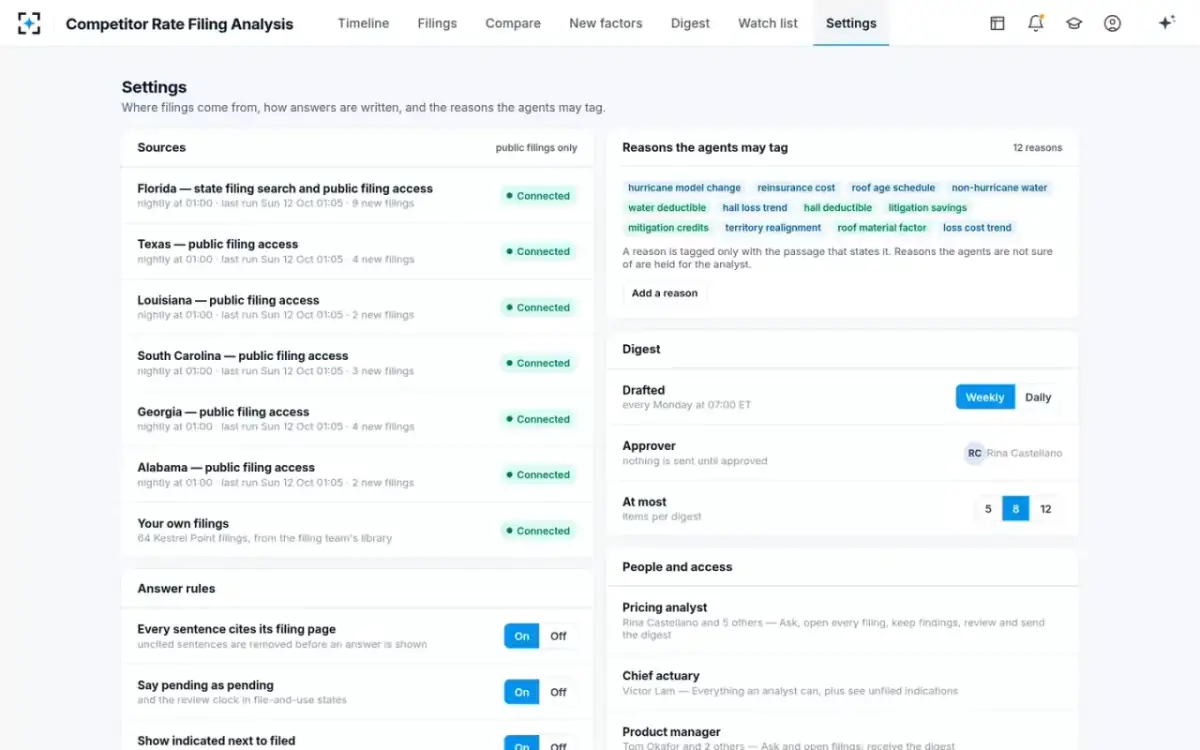
Nine decisions to make before you switch on a rival-filing watch
- List your states and the system each uses
SERFF Filing Access for most; Florida’s IRFS separately. Note each system’s history.
- Name each rival’s filing companies
With NAIC company and group codes. A brand files through several legal entities.
- Choose lines and sub-types
Homeowners owner-occupied, condominium and dwelling fire are separate filings.
- Decide the filing types
Rate, rule and form. Rule filings carry most new factors.
- Set the look-back
Two years is enough to see a factor spread across states.
- Set alert thresholds
An overall change of 5% or more, any new factor, any objection letter: start narrow.
- Agree the reason list
Twelve is plenty to start. A reason is noted only with its quoted passage.
- Load your own filings
So a rival’s factor table is compared with yours band by band.
- Name the approver and readers
Who sends the digest, who receives which alert, who may see your indication.
Where the solution fits, and where a search is enough
A search is enough when you need one filing, once: a regulator mentioned a rival's filing, or a colleague sent a tracking number. A watch earns its place when the questions repeat across rivals and states, when reasons matter as much as percentages, and when a new rating factor in one state is a warning for another. In the sample, a rival's roof age schedule was flagged in South Carolina in August 2025, 13 months before the same schedule took effect in Florida.
The solution reads only what states publish, so it inherits their gaps: confidential exhibits, trade-secret redactions and underwriting rules never filed. It reads Florida's system alongside the SERFF states, but cannot make Florida's history match Texas's. And it starts from your list. What a rate filing tracker in Excel costs prices the alternative, and homeowners rate filings by state shows what a year of one state's filings looks like when it is counted.
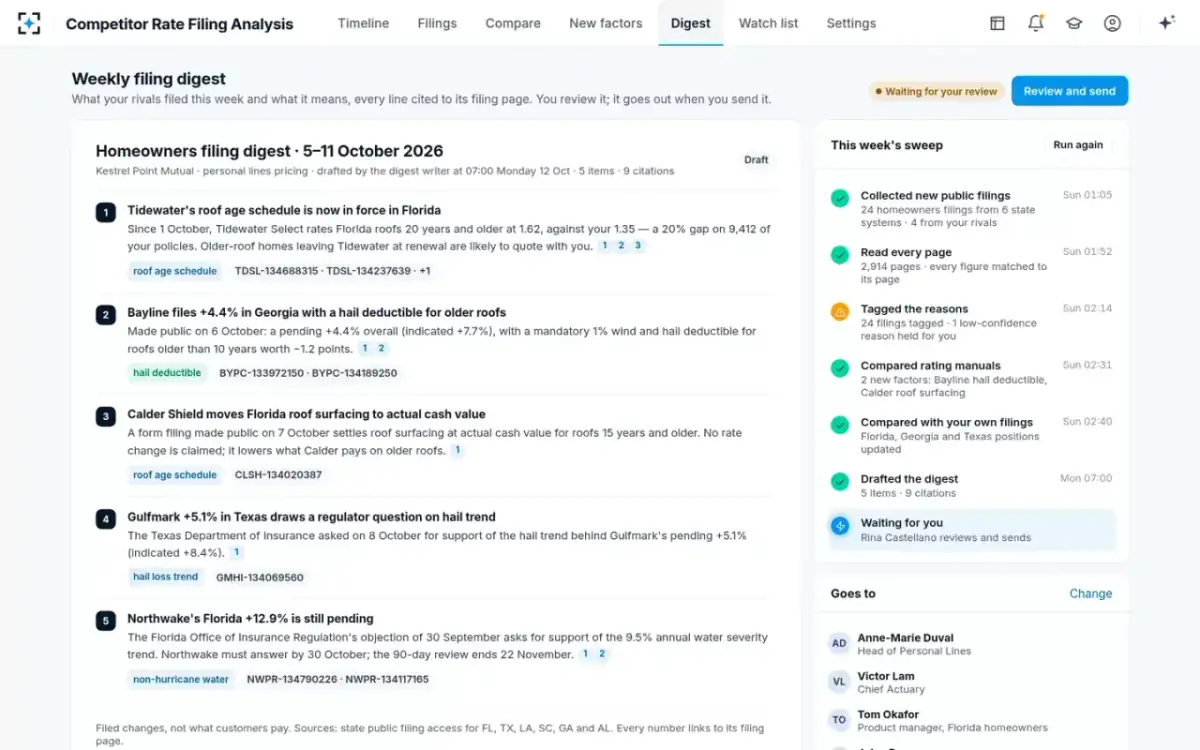
What the watch produces each Monday: a digest the analyst approves
Questions people ask
What is a SERFF filing?
A SERFF filing is a rate, rule, form or advertising filing an insurer submits to a state regulator through the NAIC's System for Electronic Rate and Form Filing. The NAIC's glossary calls it a package of information sent from an insurance company to a state's review department, made up of schedules, supporting documentation and correspondence.
Is there a SERFF filing lookup by tracking number?
Yes. SERFF Filing Access lets you search a participating state's public filings by SERFF tracking number as well as by company, type of insurance and dates. The first four characters of the number identify the filer's instance, so one company's filings share a prefix.
Where is the SERFF public access portal?
The NAIC links SERFF Filing Access from its SERFF page, where you choose a participating state or the Interstate Compact. The list covers 49 states, the District of Columbia and Guam; Florida is not on it.
How do I search SERFF filings in California?
Through SERFF Filing Access, or through the California Department of Insurance's WARFF search, which carries paper filings from 1998 and SERFF filings from 29 July 2009. The department's weekly public notices list each new filing with its file number and SERFF number.
Does Texas use SERFF Filing Access?
Yes. The Texas Department of Insurance points the public to SERFF Filing Access for company filings received after 13 April 2014, and says filings or documents a company marked confidential do not appear in results. For anything you cannot find, it suggests an open records request.
How do I find Florida OIR rate filings?
In the Office of Insurance Regulation's IRFS Forms and Rates Filing Search, which covers filings from 5 January 2001 and can be searched by company name, file log number, NAIC company or group code, line and filing type. Florida does not publish through SERFF Filing Access.