Docket management software keeps every court deadline in a lawsuit on a calendar: answer dates, hearings, discovery cut-offs, expert disclosures, pretrial conferences and trial. It computes the dates that rules fix, records the dates that orders set, and reminds whoever is responsible. For an insurer's claims legal team the arithmetic is the easy part. The hard part is the source: a carrier's dates arrive second-hand, in court orders, notices of electronic filing, defense firms' reports and emails, and each deserves a different level of trust. Botminds' Claims Litigation Management is built around that difference. Its agents docket dates from orders and notices with the source kept, add dates from a firm's report with the line quoted and confirm them against the docket, and hold any date mentioned only in an email for the litigation manager to confirm.
Docket, or ask: how each date reaches the calendar
Agent
Read the sourceAn order, a notice of electronic filing, a firm report or an email arrives. The agent finds every date in it and what each date is for.
Agent
Order or notice: docket itA date set by the court is added with the order or notice kept on the case, and any date it replaces is retired, not deleted.
Agent
Firm report: add it, quotedA date the firm reports from an order is added with the report line quoted, then confirmed against the docket.
Never: treats the report as the order
A person decides
Email only: askA date mentioned only in correspondence is held. The litigation manager confirms it, or asks the firm for the order behind it.
Agent
Rule date: compute and showWhere a rule fixes the date (21 days to answer, 90 days before trial for experts), it is computed with the rule shown beside it.
What is docket management software for a claims legal team?
For a law firm, docket management software is the firm's own calendar of court deadlines, run by docketing staff (the job title "litigation docketing specialist" exists for that seat) and backed by the firm's professional duty to meet them. For an insurer it is a different object. The carrier is not counsel of record in most of its suits, it does not receive every filing directly, and it relies on dozens of firms, each with its own docket, to tell it what the court did. A carrier's docket is a second calendar built from other people's calendars.
That second calendar matters because the carrier owns decisions the dates drive: when to set settlement authority, when to mediate, when a trial week is overbooked, when a reserve must be reviewed before an evaluation becomes a verdict. It also matters for the claim file. The NAIC's model claims regulation expects claim files to be documented well enough that the insurer's activities on each claim can be reconstructed, with each relevant document noted by the date it was received. A trial date typed once into a claim system, and never updated, fails both purposes.
Three sources of a date, three levels of trust
A deadline is as reliable as the document that set it. A court order binds the parties; a firm's report is counsel's account of the order; an email is a conversation. Treating all three the same way is the most common docketing error a carrier can make, because it either over-trusts chatter or under-uses good reports.
Where a carrier's dates come from, and how far to trust each
| Source | Example | Why it can be trusted | How to docket it |
|---|---|---|---|
| Court order or notice of hearing | Amended case management order: trial set for 1 Feb 2027 | It is the court’s own act; under the federal rules a schedule may be changed only for good cause and with the judge’s consent | Docket it; keep the order; retire the dates it replaces |
| Notice of electronic filing | E-mailed notice of an order entered today, with a link to the document | Generated by the court’s system the moment a document is filed | Docket it from the linked document, not from the notice text alone |
| Firm report quoting an order | Pre-trial report, p.2 ¶1, describing the amended order | Counsel is reporting the court, and can be checked against the docket | Add it with the line quoted; confirm against the docket |
| Rule-based date | Answer due 21 days after service | The rule is public and the trigger date is known | Compute it; show the rule and the trigger; replace it if an order sets a different date |
| Email or call only | “We’ll likely push the mediation to March” | It is a plan, not an order; nothing has changed on the court’s calendar | Hold it for a person to confirm; ask for the order or notice |
The federal rules make the hierarchy explicit. A scheduling order "must limit the time to join other parties, amend the pleadings, complete discovery, and file motions", may "set dates for pretrial conferences and for trial", and once entered can be changed only for good cause and with the judge's agreement. Two lawyers agreeing by email to move an expert deadline have not moved it. A carrier that dockets their email has a calendar that disagrees with the court's.
Notice of electronic filing meaning, and why it is the best source
A notice of electronic filing (NEF) is the e-mail a court's electronic filing system sends when a document is filed in a case. In the federal courts' CM/ECF system, the notice "is sent by e-mail to the filer and all registered participants in the case immediately after each electronic filing" and contains a hyperlink to the document and the docket sheet. It is the closest thing a litigation team has to a feed of what the court did today.
It is also the cheapest. The judiciary's own FAQ says that "Litigants receive one free copy of documents filed electronically in their cases through a link in the e-mailed Notice of Electronic Filing"; later copies cost ten cents a page through PACER, capped at $3.00 a document. A docketing process that opens the linked order the day the notice arrives captures the order once, at no cost, with its date of entry.
Electronic filing also changed the arithmetic. Service through the court's system is "complete upon filing or sending" under Rule 5(b)(2)(E), and since 2016 electronic service no longer earns the three extra days that service by mail does. The committee note is blunt: the three added days "cannot be retained by consenting to service by electronic means." A docketing tool still adding three days to every response period computes the wrong date for e-served papers.
How do insurers track litigation deadlines today?
Mostly second-hand, and late. A typical carrier's claim system holds one trial date per suit, typed in by an adjuster from a firm's report, and nothing for the dozens of other dates that decide whether that trial is ready. The real calendar lives in the firms' own dockets and in narrative reports that arrive every 90 days. Between reports, an order can move a trial and the carrier hears about it when the next report arrives, or when the partner calls.
Tracking litigation deadlines: the usual way, and what a carrier needs
Typical carrier practice: One date per file, typed from a report, often stale.
What a portfolio of suits needs: The current date from the latest order, with the order kept and the old date retired.
Typical carrier practice: Left to each firm’s docket; the carrier sees them only in reports.
What a portfolio of suits needs: Discovery close, expert disclosures, motions, pretrial conference and mediation on one calendar.
Typical carrier practice: Seen at the next status report, up to 90 days later.
What a portfolio of suits needs: Read from the notice the day it is filed, or from the firm’s report the morning it arrives.
Typical carrier practice: Sometimes typed in, sometimes not, with no record of which.
What a portfolio of suits needs: Held and confirmed by a person, with the confirmation logged.
Typical carrier practice: No view of two trials in the same week or one partner in two courtrooms.
What a portfolio of suits needs: Weeks counted against a limit; first chairs checked day by day.
Should dates from email be docketed?
Not as deadlines. A date that appears only in correspondence is a statement of intent or a recollection, and the court has not acted on it. Docketing it creates two errors at once: a false date the team may rely on, and a missing date where the court's order still stands. The safer practice is to hold the date as a lead, ask for the order or notice behind it, and docket the order when it arrives.
Holding is not ignoring. An email saying the parties "will ask the court to continue trial" is useful early warning, and the litigation manager should see it. Claims Litigation Management therefore keeps such dates visible but separate, marked as unconfirmed, and asks the litigation manager to confirm or reject each one. A carrier can change that setting and let email dates through; by default they are held, because the cost of a false date on a trial calendar is a team preparing for the wrong week.
Who confirms a docketed deadline?
The court confirms it, and a person confirms anything the court has not. In practice that means three rules. A date taken from an order or notice is confirmed by the document itself, which stays on the case. A date taken from a firm's report is confirmed against the court's docket; in the product, the docket watcher looks for the order within two days and flags the date if it cannot find it. A date from email is confirmed by the litigation manager, by name, with the time recorded.
The same discipline applies at the other end. A deadline is not "met" because the date passed quietly; it is met when the filing that meets it is on the docket. The docket watcher never marks a deadline met without that filing. The difference matters most for the dates with the harshest consequences: if an answer is missed, the federal rules say "the clerk must enter the party's default", and a party that fails to disclose an expert on time loses the use of that witness at trial unless the failure was substantially justified or harmless.
The docket management process, step by step: one report, five dates
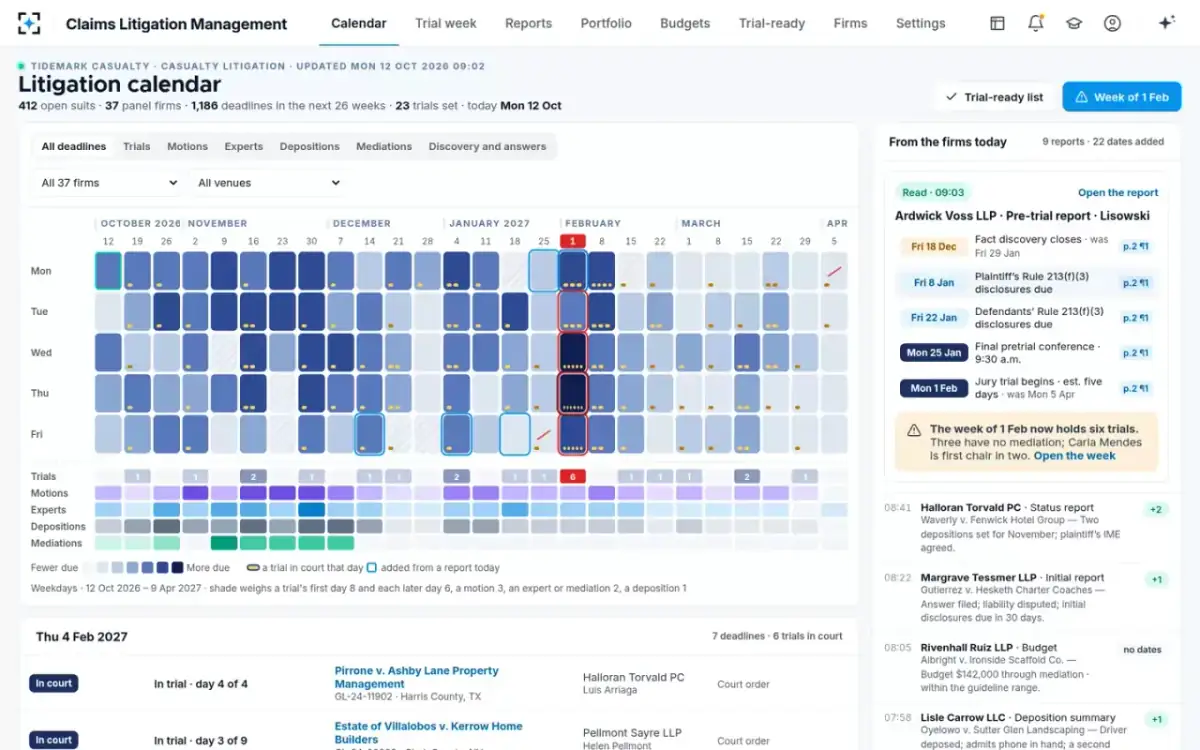
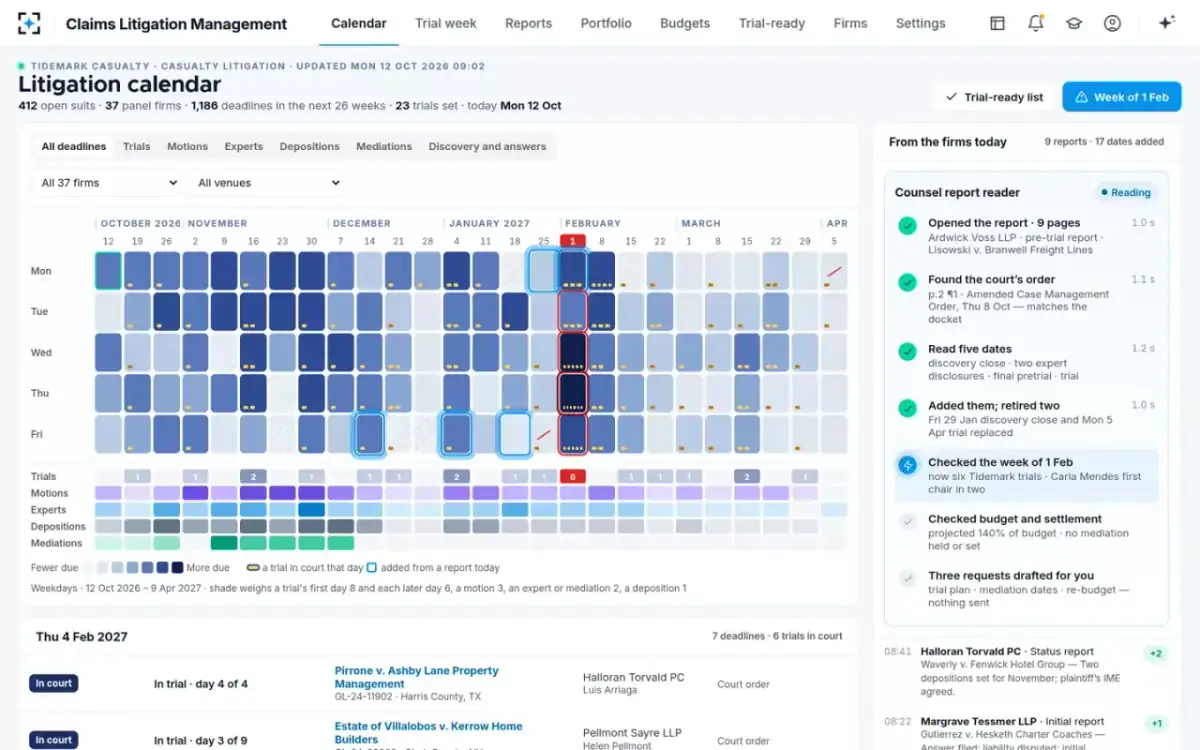
One morning on a fictional sample portfolio shows the whole process. At 09:02 on Monday 12 October, Ardwick Voss LLP sent its pre-trial report on Lisowski v. Branwell Freight Lines, a commercial auto injury suit in Cook County. Page two described an amended case management order entered on Thursday 8 October. The counsel report reader opened the report, found the order, checked that the court's docket showed it filed that day, and added five dates, each citing page two, paragraph one.
The Lisowski calendar before and after one order, counted in days from 12 October
- To fact discovery close, Fri 29 Jan109 d
- To trial, Mon 5 Apr66 d
- Discovery closes Fri 18 Dec67 d
- Plaintiff’s experts Fri 8 Jan21 d
- Defense experts 22 Jan, trial 1 Feb24 d
The arithmetic is simple; the consequences are not. Discovery now closed six weeks earlier, the defense expert disclosure fell ten days before trial, and the new trial week already held five other trials for the same carrier. Of those dates, the docketing step's job was only to get them right and on time. The decisions they triggered, a trial plan, mediation dates and a re-budget, went to people as drafted requests.
Five dates, one citation each, two dates retired
What deadlines should a claims litigation system track?
Every date that changes what the carrier must decide, not only the dates counsel must meet. The court's dates come first, but a carrier's calendar also needs its own: guideline report clocks, mediation, authority and notice to an excess carrier. The list below is the minimum for a casualty portfolio in federal and state courts. How each court date is computed, and how to test a calculator against the orders that override it, is set out in court deadline calculator vs the court's order.
Deadlines a claims litigation calendar should carry
- Answer or responsive pleading
Federal: 21 days after service under Rule 12(a), longer after a waiver; state rules differ. The first date with a default behind it.
- Removal window
A notice of removal is due within 30 days of receiving the initial pleading under 28 U.S.C. § 1446(b); the carrier’s choice of forum depends on catching it.
- Scheduling order dates
Joinder, amendment, discovery close and motions, which the order must limit; issued within 90 days of service or 60 of appearance under Rule 16(b)(2).
- Expert disclosures, both sides
By order, or 90 days before trial under Rule 26(a)(2)(D) where the order is silent; rebuttal 30 days after.
- Dispositive motions and pretrial disclosures
Summary judgment by the order’s date; pretrial disclosures at least 30 days before trial under Rule 26(a)(3).
- Mediation and settlement conferences
Set by order or agreement; the carrier’s authority has to be ready before them.
- Final pretrial conference and trial
The fixed points; count trials per week and first chairs per day across the whole portfolio.
- The carrier’s own clocks
Initial report, budget, status and pre-trial report deadlines from the litigation guidelines, and written notice of trial to the insured and any excess carrier.
What to ask any docket management system before buying
The questions that separate products are about sources and people, not features. Every docketing tool can store a date and send a reminder. Fewer can say where each date came from, which ones a person has confirmed, and what happened to the dates an order replaced.
Questions for a docket management system vendor
- Show me the source of this date.
Every deadline should open the order, notice or report line it came from. A date without a source cannot be defended to a court, an examiner or an insured.
- What happens to a date an order replaces?
It should be retired and kept on the history, not overwritten. A changed trial date is a fact about the case.
- How does it treat dates from email?
Held for confirmation, docketed, or ignored? Ask who confirms, and where the confirmation is recorded.
- Does it show the rule behind a computed date?
Including the trigger date, the rule’s number and whether mail service added days; e-service under the federal rules no longer does.
- Which courts does it read directly?
Federal notices of electronic filing are uniform; state systems vary by court. Ask for the list, and for what happens in courts not on it.
- Can it see across firms?
A carrier’s risk is the stacked week and the partner in two courtrooms, which no single firm’s docket shows.
- What can it do on its own?
Reading and computing, yes. Filing, writing to counsel or moving a reserve should never be on the list.
Where Claims Litigation Management fits, and where it does not
Claims Litigation Management is a carrier's docket, not a law firm's. It does not replace the docketing systems panel firms run for their own professional obligations, and it does not file anything with a court. What it adds is the portfolio view a carrier cannot get from any single firm: every order, notice and report read the day it arrives, every date sourced, email-only dates held for a person, and weeks counted across all firms.
The reader at work: order found, matched to the docket, dates added
It is also honest about its edges. Where a court is not connected, the calendar depends on firm reports, which are checked against the docket but arrive on the firms' schedule. A carrier comparing products should test on its own suits: take 30 recent orders, and count how many reached each system's calendar, how fast, and with what source attached. The cost lines of running a portfolio this way, against outsourcing it or doing it by hand, are compared in litigation management software for insurers, and the case for a claims view over general matter tools in legal matter management software vs a claims litigation view.
Questions people ask
What is docket management software?
Software that records court deadlines for each case, computes dates that rules fix, and reminds the people responsible. Law firms use it for their own filings; insurers use a version of it to see deadlines across many firms' cases. The important difference is whether each date carries the order or document it came from.
What does notice of electronic filing mean?
It is the e-mail a court's electronic filing system sends to registered participants when a document is filed, with a link to the document and the docket. In the federal system it is sent immediately after each filing and gives litigants one free copy of the filed document. It is the most reliable early source of a new order.
What does a litigation docketing specialist do?
A docketing specialist, usually at a law firm, enters court deadlines into the firm's calendar from orders, notices and rules, and checks that each one is met. The role exists because a missed date can mean a default or excluded evidence. On the carrier side, the same discipline is applied across all the firms' cases rather than one firm's.
Can a default from a missed answer date be undone?
Sometimes. Under the federal rules, "The court may set aside an entry of default for good cause", and a final default judgment only under the narrower grounds of Rule 60(b). Either way it costs a motion, delay and risk, which is why the answer date is docketed first.
Is a docket management system the same as a litigation calendar?
A docket management system produces a litigation calendar, but the calendar is only as good as its sources. A calendar of typed dates can look complete while disagreeing with the court. A docketed calendar keeps the order, notice or report line behind each date, so anyone can check it.