Actuarial AI agents are software agents that each take one bounded task in actuarial work, such as reading a statement version, tying a report's numbers to it, drafting a paragraph or checking documentation against the rules, and hand the result to an actuary who decides. In the year-end opinion work the agent that matters most is not the one that writes; it is the one that keeps every number in the Actuarial Report and the Statement of Actuarial Opinion tied to the annual statement that will actually be filed. That is hard because statutory reporting keeps posting versions in the last weeks before 1 March, and a figure pasted into the report a week ago can be wrong today without anyone noticing. Botminds' Actuarial Opinion & Report Automation uses six agents for this work. This guide follows its tie-out checker through one late version, on a fictional sample insurer's year-end, and shows what it blocks and what it may never change.
Three statement versions in thirteen days, and what each did to the report
- v12, first full statement12 Feb
- v13, after audit adjustments19 Feb
- v14, umbrella book reclassified25 Feb
- 3 links broke, fixed the same day
- 312 of 312 hold
- 4 broke, re-tied, signed16:40
What can actuarial AI agents do in the year-end opinion work?
At year-end they can read, compare, tie, draft and check, and nothing more. The useful design splits the work so that no agent both produces a number and checks it, and none decides. In Actuarial Opinion & Report Automation the split is six agents, each with limits written into it.
Six agents, one job each, and the line each may not cross
| Agent | What it does | What it may never do |
|---|---|---|
| Statement reader | Reads every posted version of the annual statement, the Liabilities page, Schedule P Parts 1 to 3 and Schedule F, and compares it with the last, line by line | Infer a value that is not on a schedule; it is read-only on the statement |
| Tie-out checker | Keeps a link from every number in the report and the opinion to its statement line and re-checks them all when either side changes | Plug or round away a difference; a difference above $1k is never called rounding |
| Report drafter | Drafts exhibits and narrative from the reserve analysis, last year's report and the house style; redrafts sentences when a number moves | Change a selection, method or judgement, or write the opinion paragraph |
| Change explainer | Builds the change from the prior report by line and accident year | Explain a movement without a memo or triangle to cite |
| Documentation reviewer | Reads the report and opinion against the instructions and ASOP Nos. 36 and 41, and lists each gap by paragraph | Close a gap itself; it drafts text for the actuary |
| Reinsurance collectability reader | Reads Schedule F, ratings and balances over 90 days and drafts the relevant comment | Give an opinion on a reinsurer's financial condition |
The split is not decoration. The actuarial standard on models asks the actuary to test a model by "reconciling relevant input values to the relevant system, study, or other source of information, addressing and documenting the differences appearing in the reconciliation, if material," and by "reconciling the output of a model run to prior model runs" (ASOP No. 56, section 3.6.1). A tie-out checker that sits outside the drafting is that test, run every time a version posts, rather than once in a review round.
Can AI tie actuarial exhibits to the annual statement?
Yes, and it is the part of report automation that can be checked most strictly, because the instructions say exactly where the numbers come from. Exhibit A of the opinion takes unpaid losses from line 1 and unpaid loss adjustment expense from line 3 of the Liabilities page, and the direct and assumed amounts from the Schedule P, Part 1 Summary: losses from columns 13 and 15, line 12, and loss adjustment expense from columns 17, 19 and 21, line 12, each times 1,000 (2025 instructions, as reproduced in the Academy's practice note). The report's exhibit comparing the actuary's conclusions with carried amounts "ties to the Annual Statement" by rule (paragraph 7B).
The regulators' expectation reaches further than Exhibit A. "If there are any differences between the values reported in the Statement of Actuarial Opinion (SAO), Actuarial Opinion Summary (AOS), Actuarial Report, and the annual statement," the NAIC working group writes, it "expects Appointed Actuaries to include an explanation for these differences in the appropriate document" (AOWG 2026, section I.A). Some differences are legitimate: the working group's own example is non-tabular discounting, where Exhibit A's direct and assumed losses come from Schedule P gross of the discount while the report and summary may show them net. A tie-out agent has to know which differences are explained and which are errors, which is why a link can carry an explanation but never a plug.
Tying the report's figures to the statement is different from reconciling the actuary's analysis data to Schedule P, which the instructions also require (paragraph 7C) and which the 2026 instructions tightened. The data side, segment by segment and accident year by accident year, is set out in Schedule P reconciliation; the tie-out described here starts where that ends, with the numbers the report prints.
What happens when the annual statement is reposted?
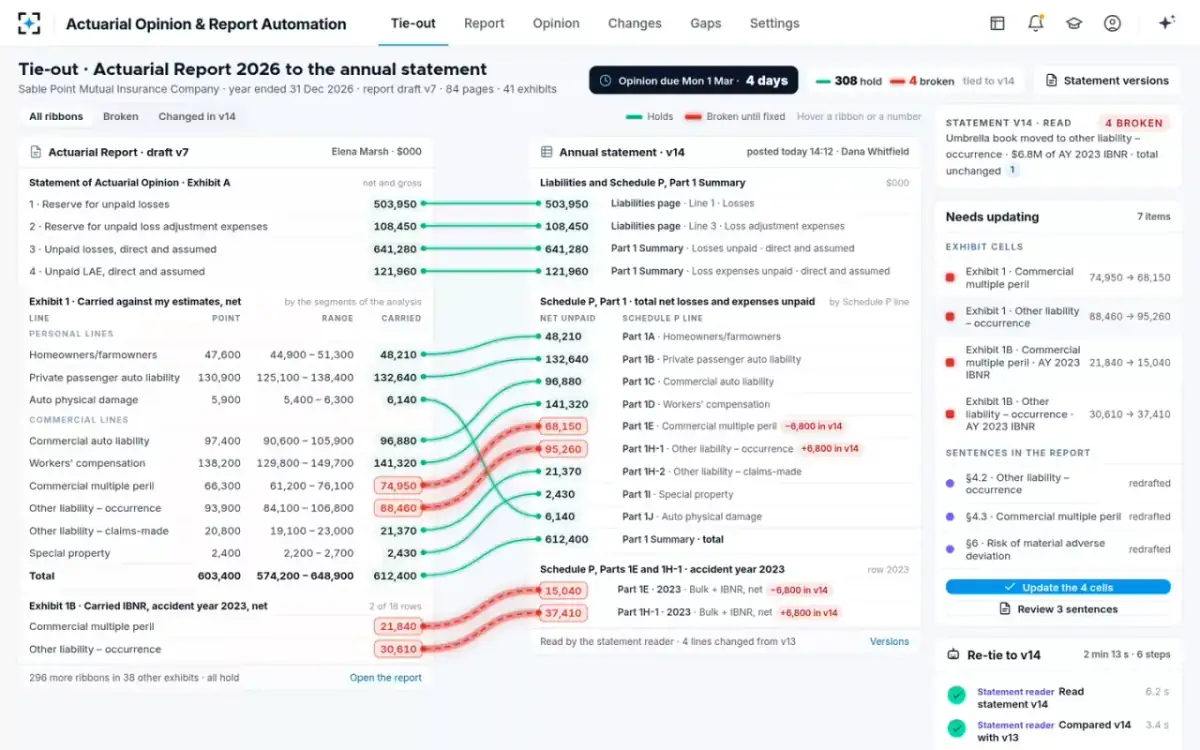
Every link that touches a changed line breaks at once, and the report shows exactly which cells and sentences depend on it. In the sample year-end, statement v14 was posted at 14:12 on Thursday 25 February, four days before the filing, after a reserve committee decided that an umbrella book written on commercial package forms belonged in other liability, occurrence. The change moved $6.8 million of accident year 2023 IBNR from Schedule P Part 1E to Part 1H-1. Four lines changed; the total stayed at $612.4 million.
Statement v13 to v14: six lines read, four moved, two still tie
Schedule P, Part 1E · commercial multiple peril
ItemTotal net losses and expenses unpaid
v1374,950
v1468,150
FeedsExhibit 1, carried for the line
Schedule P, Part 1E · accident year 2023
ItemBulk and IBNR, net
v1321,840
v1415,040
FeedsExhibit 1B
Schedule P, Part 1H-1 · other liability, occurrence
ItemTotal net losses and expenses unpaid
v1388,460
v1495,260
FeedsExhibit 1, carried for the line
Schedule P, Part 1H-1 · accident year 2023
ItemBulk and IBNR, net
v1330,610
v1437,410
FeedsExhibit 1B
Schedule P, Part 1 Summary
ItemTotal net losses and expenses unpaid
v13612,400
v14612,400
FeedsExhibit 1 total; still ties
Liabilities page, line 1
ItemLosses
v13503,950
v14503,950
FeedsExhibit A, item 1; still ties
The actuary pressed one button to re-check every link against v14. The statement reader read the new version in a few seconds and compared it with v13; the tie-out checker then re-checked all 312 links in the report and the opinion. The whole run took 2 minutes 13 seconds in six steps. Result: 308 held and 4 broke, the carried amounts for commercial multiple peril and other liability in Exhibit 1 and their 2023 IBNR in Exhibit 1B. Exhibit A and the opinion still tied, at net losses of $503,950k and loss adjustment expense of $108,450k, because the move was between lines, not out of the total.
Four links broken, and the seven items they reach
What a tie may not do: plugs, rounding and quiet fixes
A tie-out is only worth having if a difference can never disappear without a person seeing it. Three rules in the solution's settings carry that. The tie tolerance is $1k in the sample configuration, adjustable from $0 to $10k; above it the link breaks. A difference is never plugged, and a difference above $1k is never labelled rounding. And signing is blocked while any link is broken or any sentence disagrees with the statement.
Those settings answer the question an examiner or peer reviewer will ask about any automated tie-out: what happens to a $40k difference at 23:00 the night before filing? If the answer is "it is rounded" or "the agent adjusts the exhibit," the tool has moved a judgement out of the actuary's hands. The working group's guidance runs the other way: it expects differences to be explained, and it expects "a robust peer review process" to reduce reporting errors and non-reconciling items. A tie-out agent should feed that review, not stand in for it.
"The actuary may consider obtaining a review by another qualified professional, depending upon the nature and complexity of the model."
ASOP No. 56, Modeling, section 3.6.3
Can AI draft the actuarial report?
It can draft exhibits and narrative, and redraft sentences when a number moves, provided every draft waits for the actuary. The profession's own guidance lists drafting support as a legitimate use: the American Academy of Actuaries' professionalism paper on generative AI says such tools can "Offer support in writing actuarial reports or supporting documentation," while reminding actuaries that generative AI is a model and ASOP No. 56 applies (Academy, Actuarial Professionalism Considerations for Generative AI, 2024).
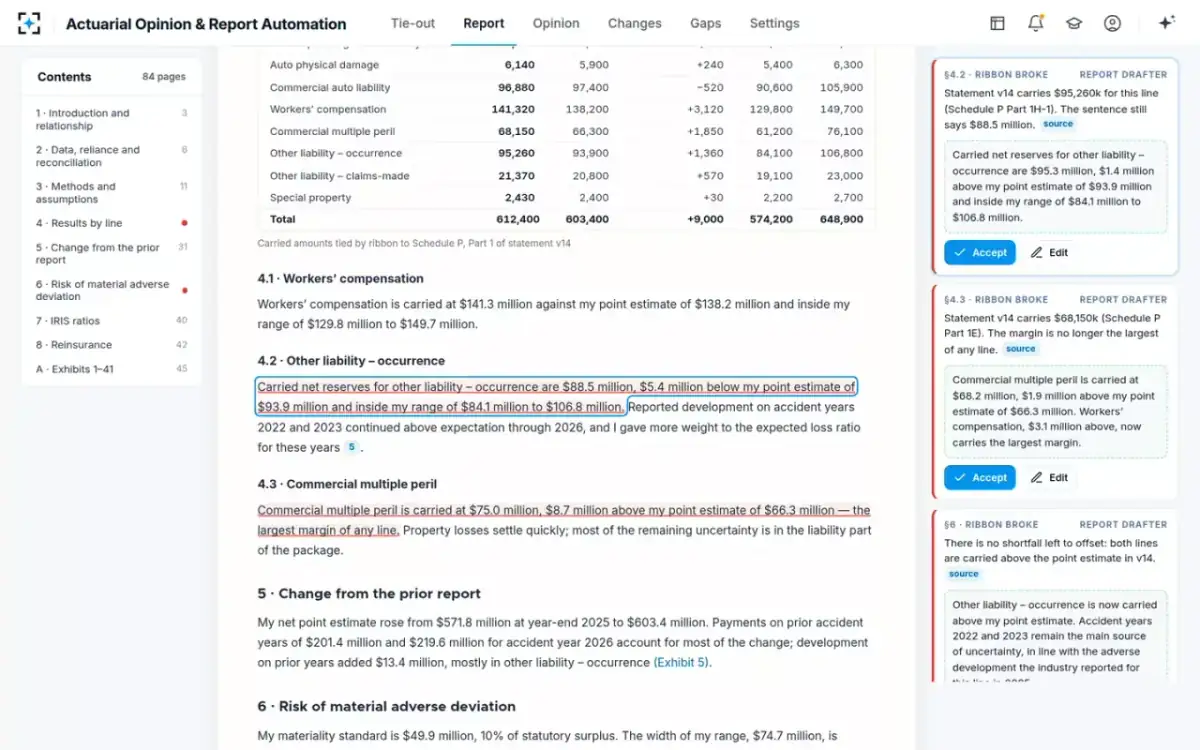
The v14 run shows why sentences matter as much as cells. Updating four cells took a moment and the links held again, 312 of 312. But three sentences still used the old numbers. Section 4.2 said other liability was carried at $88.5 million, $5.4 million below the point estimate of $93.9 million; under v14 it is carried at $95.3 million, $1.4 million above. Section 4.3 said commercial multiple peril carried the largest margin of any line; at $68.2 million it no longer did. And section 6 said one line's shortfall was offset by another's margin, which was no longer true of either line. A tie-out that checks only numbers would have passed a report whose argument had quietly become false.
Each stale sentence marked in the margin, with why its link broke
Does AI change the actuarial opinion?
It should not, and in this design it cannot. The report drafter never writes the opinion paragraph: the opinion starts from the instructions' illustrative wording, and the paragraph that says whether the reserves make a reasonable provision is the actuary's. Nor does any agent change a selection, a method or an assumption. In the sample run, the risk-of-adverse-deviation sentence in section 6 was redrafted because its supporting numbers moved, but the conclusion it supports stayed the actuary's, and she accepted the redraft at 14:23.
The opinion's numbers are protected by the same links as the report's. Exhibit A ties to the Liabilities page and the Schedule P Summary; if a late version had moved a total, the opinion's links would have broken too, and the sign button would have stayed grey. Whether the carried amount still sits inside the actuary's range after a reclassification is a judgement the agents can show but not make: in the sample, carried net reserves of $612.4 million stayed $9.0 million above the point estimate of $603.4 million and inside the range of $574.2 million to $648.9 million.
What checks run before an actuarial opinion is signed?
In the solution, six: every link holds; the report's words agree with the statement; Exhibit A ties to the Liabilities page and Schedule P; the data reliance certification from the officer named in the scope paragraph is attached; the reinsurance collectability comment is accepted; and peer review of the opinion is cleared. All six must pass before the sign button works, and the signature is logged with the time, the statement version and the report draft. In the sample, the opinion was signed at 16:40 on 25 February, tied to v14, with two peer-review comments on the report still open and due with the report on 1 May.
Those six are not the regulator's list; they are the mechanical preconditions for the actuary's own review. The regulator's list is longer and is mostly about substance: the relevant comments, which the working group values above anything else in the opinion, the materiality standard, the risk factors. A statement of actuarial opinion example with ten planted errors shows how to test whether a drafting process catches the substantive ones too.
What does an AI agent need from statutory reporting?
Every posted version, as it posts. The statement feed in the sample configuration reads each version exported from the annual statement tool; the alternatives are a nightly read or a read on request, and the difference is exactly the risk the tie-out exists to remove. Beyond the statement, the agents need the reserve analysis with selections, triangles, point estimates and ranges by segment and accident year; last year's signed report and opinion for house style and prior estimates; the assumption memos behind each change; and reinsurer ratings with balances over 90 days for the collectability comment. The report goes out as a Word document.
Questions to put to any actuarial AI agent before year-end
- Which agent checks, and is it a different one from the agent that drafts?
A drafter that checks its own numbers is one blind spot, not two controls.
- What happens to a difference above tolerance at 23:00 on 28 February?
The only acceptable answers are "it breaks and blocks signing" and "the actuary explains it."
- Can it list sentences, not only cells, that a late version made false?
In the sample, three sentences went stale when four cells moved.
- Does it read every posted version, or a nightly export?
In the sample, the last version arrived at 14:12, four days before filing.
- Is the annual statement read-only to every agent?
Statutory reporting owns the statement; the agents read and compare.
- Who can write the opinion paragraph?
Only the appointed actuary. Ask to see where the tool enforces that.
- What is logged with the signature?
Time, statement version and report draft, so the opinion can be traced to what it rests on.
- How does it fit your AI governance program?
State bulletins on insurers' use of AI apply; your governance owner should see it before year-end.
The last question belongs to a different team. Insurers' use of AI is governed by state insurance regulators, many of them through the NAIC's model bulletin; the inventory and governance side is covered by AI Governance & Model Inventory. For the plan to get these agents running before the next filing, see actuarial AI software: live before the 1 March opinion.
Questions people ask
What are actuarial AI use cases at year-end?
The well-bounded ones are reading statement versions, tying report figures to the statement, drafting exhibits and narrative from a finished reserve analysis, explaining the change from the prior report from cited memos, and checking documentation against the instructions. Selecting assumptions and forming the opinion are not use cases for an agent; they stay with the appointed actuary.
How fast can a report be re-tied after a late statement version?
In the solution's sample year-end, all 312 links were re-checked against a new version in 2 minutes 13 seconds, and the four broken cells and three stale sentences were listed in the same run. Updating them and accepting the redrafts took the actuary about ten minutes.
Does a tie-out replace the Schedule P reconciliation?
No. The instructions require a separate exhibit that reconciles and maps the data used in the analysis to Schedule P, and the 2026 instructions say it should compare the actuary's data to Schedule P. A report tie-out checks the figures the report prints against the statement; the data reconciliation checks the analysis inputs.
Can an AI agent write relevant comments?
It can draft some, from cited sources, for the actuary to accept. In the sample, the reinsurance collectability comment was drafted from Schedule F and ratings and accepted by the actuary, and it carries the instructions' own caveat that it does not imply an opinion on any reinsurer's financial condition.
What if the agents and the actuary disagree?
The actuary wins by design: agents cannot change a selection, close a documentation gap or alter the opinion. What the agents can do is keep the disagreement visible, as a broken link or an open gap, so it is resolved and explained before signing rather than discovered by a reviewer.