Fannie Mae's Income Calculator for self-employed borrowers is a free, Fannie-hosted tool that applies the Selling Guide to tax-return figures and returns a monthly qualifying income with a findings report. Its draw is one sentence in the Guide: "When the amount of qualifying income being used by the lender is not more than the amount of income calculated by Income Calculator, enforcement relief from representations and warranties on the accuracy of the income calculation may be provided but the lender remains responsible for the accuracy of the information submitted" (Selling Guide B3-3.1-03). That makes the calculator's figure a line. At or below it, Fannie will not pursue the lender for a miscalculation; above it, the income source is the lender's own risk again. Self-employed income is where that matters most, because it is rebuilt by hand from returns and easy to overstate. Botminds' Self-Employed Income Calculation, a set of agents for mortgage underwriters, builds the worksheet with every figure traced and compares the underwriter's figure with it before anything is signed. This page sets out where the relief starts, where it ends and how to use the line as a control.
The relief line, drawn on a sample file
How does the Fannie Mae Income Calculator work for self-employed borrowers?
It walks the user through the return and calculates by business. The user picks self-employed or rental income, enters the date the borrower started the business, optionally links the Desktop Underwriter casefile, chooses the business structure, says whether the latest year has been filed, ticks the forms in hand and then enters the figures screen by screen. Each evaluation covers one borrower and one business. If the start date shows 12 to 23 months of self-employment it asks for more history, and if the latest returns do not show a full 12 months it warns (Income Calculator user guide).
The output is a findings report: a findings summary with "the amount of monthly qualifying income for which Fannie Mae will offer enforcement relief from representations and warranties", the figures entered beside the figures used, the calculation shown line by line, a comparative income analysis labelled increasing, level or declining, a business liquidity analysis and four kinds of message. Fannie accepts the report in place of the lender's own written analysis on Form 1084 or Form 1088 (B3-3.1-03). Its user guide sells the benefit plainly: to "Be eligible for enforcement relief of rep and warrant on the income calculation".
What is Income Calculator rep and warrant relief?
It is Fannie Mae's agreement not to enforce the lender's warranty that the income was calculated correctly, for each income source the calculator handled, when four conditions are met. The Guide's terms: relief is given "on an income-source basis" if "All information submitted to Income Calculator must be accurate and complete", "A copy of the Findings Report must be kept in the loan file", "The amount of income used for qualifying cannot be more than the amount calculated by the tool", and the lender keeps complying with every other Selling Guide requirement, including DU messages (A2-2-04). The user guide adds a fifth, practical step: an associated DU casefile ID is required in the calculator "prior to delivery of the loan".
Why it is worth having: a representation and warranty is, in FHFA's words, "a lender's assurance that a mortgage loan sold to Fannie Mae or Freddie Mac … complies with the standards outlined in the Enterprise's selling and servicing guides", and "When mortgages don't comply, the Enterprises may require remedies, including issuing a repurchase request" (FHFA, Representation and Warranty Framework). Relief on the income calculation removes one of the commonest grounds for that conversation on a self-employed loan.
Five things that must all be true for Income Calculator relief
- Accurate, complete inputs
Every figure entered matches the tax returns used to document the income.
- Findings report in the file
Printed or saved from the calculator and kept with the loan.
- Income at or below the calculator’s
Per income source: any amount above it is outside the relief.
- DU casefile linked before delivery
The calculator evaluation must be associated with the loan’s Desktop Underwriter casefile.
- Every other requirement met
Document age, DU messages, contradictory information investigated and resolved.
The relief line: your figure against the calculator's
The line is drawn income source by income source, not file by file. A borrower with an S corporation and a Schedule C business has two evaluations, and two lines. A lender can stay under the line on one and go over on the other; the relief then covers only the first. That makes the comparison a per-business habit, not a final check on the total.
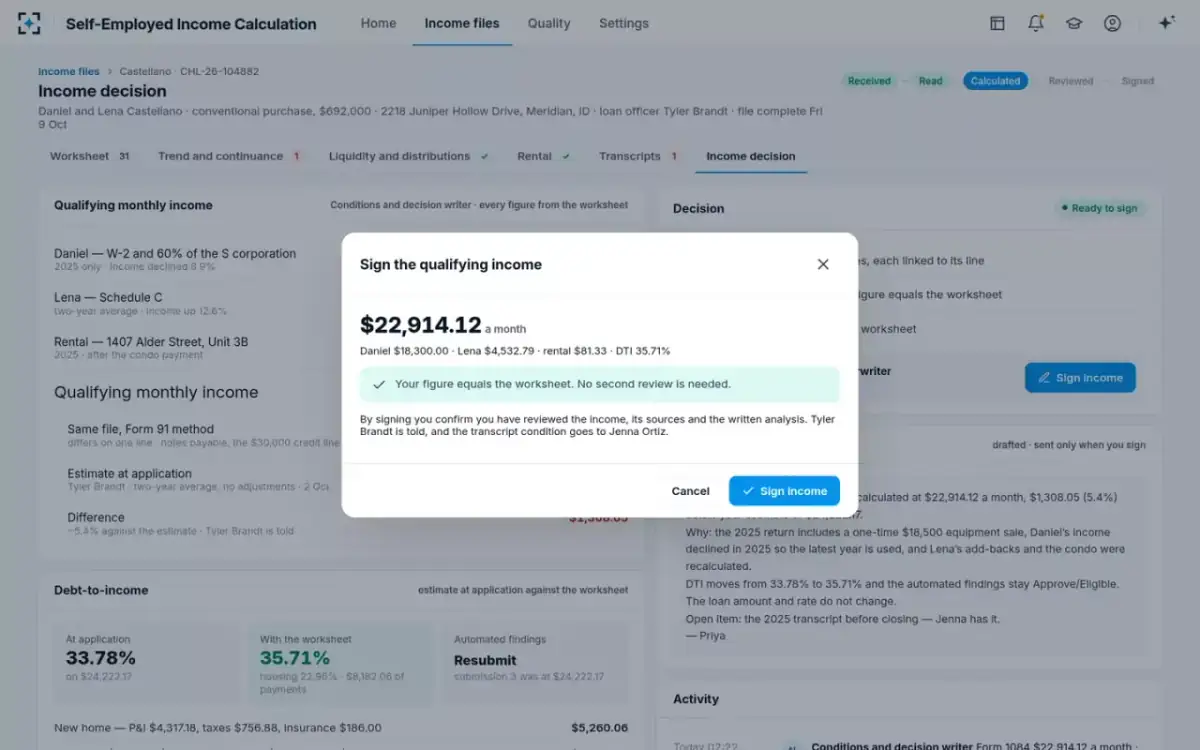
The sample file shows how easily a figure crosses. Daniel and Lena Castellano, fictional borrowers in the solution's sample file, were quoted at application on a quick two-year average with no adjustments: $24,222.17 a month. The worksheet, with a one-time equipment gain taken out, Daniel's declining year used alone and Lena's add-backs applied, came to $22,914.12, $1,308.05 lower. If a calculator given the same returns had produced the worksheet's figure, an underwriter who kept the loan officer's number would have been 5.4% over the line and outside the relief, on a loan whose DTI moved from 33.78% to 35.71% when corrected.
The check before the signature: is the underwriter's figure the worksheet's?
What if my income figure is higher than the calculator?
Then that income source has no relief, and the lender stands behind the higher figure on its own analysis. Nothing in the Guide forbids it; a lender may have a reason, such as its own liquidity analysis, which the calculator lets a user choose on the K-1 screen (Income Calculator user guide). But the written analysis must then carry the argument, and Fannie's general rule applies: if the lender cannot establish the stability of income from the available documents, the income must be removed and the loan resubmitted.
The more common case is not a reasoned departure but an unnoticed one: an estimate keyed at application that nobody re-checks against the calculation. Research on the years before 2008 found that income on mortgage applications stopped tracking IRS-reported income in the non-agency market from 2002 to 2005 (Mian and Sufi, NBER). The relief line is a cheap guard against a much smaller version of the same drift: a figure that moved for no written reason.
The calculator does not ask why your figure is higher. It simply stops covering it.
What the relief does not cover
It covers the arithmetic, not the inputs and not the judgement. The Guide's own wording keeps the lender "responsible for the accuracy of the information submitted", and the calculator's user guide reminds lenders that checking each figure was transcribed correctly from the returns is theirs (user guide). A transposed K-1 figure, a missing Schedule C or a return that does not match its IRS transcript is the lender's problem with or without relief.
What Income Calculator relief covers, and what stays with the lender
| Item | Covered by the relief | Stays with the lender |
|---|---|---|
| The arithmetic of the income calculation | Yes, per income source, at or below its figure | |
| Figures keyed from the returns | Accuracy and completeness of every input | |
| Returns matching IRS transcripts | Verification and any discrepancy explained | |
| Age of the tax returns used | The Guide’s document-age rules | |
| A declining trend | The calculation | Documenting that the income has stabilized |
| Income used above the calculator’s figure | All of it, on that income source | |
| FHA, VA and Freddie Mac loans | All of it: the relief is Fannie Mae’s |
It does not cover other programs. FHA has no equivalent: HUD's quality reviews of fiscal year 2022 loans put borrower income at 22.17% of material findings, the largest area, and the lender owns all of it (HUD, FHA Quality Assurance Update, 2023). How FHA's own method differs is set out in FHA self-employed income decline against Fannie Mae's trend test.
Two other routes to relief: approved vendor tools and DU validation
The calculator is not the only way Fannie Mae gives relief on self-employed income, and the other two have stricter terms. For income calculated by a Fannie Mae-approved vendor tool, Fannie "will not enforce representations and warranties on … the accuracy of the calculation of the amount of self-employment income by the tool", provided "the information submitted to the tool must be accurate and complete", "the lender must not perform any manual overrides of the output results of the tool", "the amount of self-employment income entered in DU must match the amount of income calculated by the tool", and the loan carries the special feature code Fannie names (A2-2-04). The no-override condition is the one to weigh: an underwriter who disagrees with the tool's figure keeps the judgement and loses the relief.
The third route is Desktop Underwriter's validation service. When DU validates income from a verification report, Fannie will not enforce representations and warranties on "the accuracy of the lender's income calculations related to the validated income", per borrower and per income source, if the DU messages say so and the loan closes by the date DU gives. For a sole proprietor, Schedule C income validated this way can even remove the need for the tax returns (B3-3.1-02). In every route the same caveat applies: relief does not survive contradictory information in the file that the lender should have investigated.
Do I still need a written analysis with the Income Calculator?
Not a separate one for the figure the calculator produced; the findings report is the written analysis, provided a copy is kept in the loan file (B3-3.5-01). You do still need your own reasoning wherever the calculator asks for it, most often a declining trend, where its message requires the file to show the income has stabilized before it is used, and wherever you depart from its figure. And you need your own analysis for every file it does not take.
The relief, in three conditions that are easy to miss
Per source
relief is granted income source by income source, not for the whole file
Before delivery
the DU casefile must be linked in the calculator, or the relief is not available
$0
of income above the calculator’s figure is covered, on that source
Using the line as a control
Treat the calculator's figure, where you have one, as a tripwire rather than a target. A sensible policy has three parts: compare the underwriter's figure with the calculator's for every income source; send any figure above it to a second reviewer with a written reason; and record which loans kept relief and which did not, so the credit policy team can see the drift. The sample lender in Botminds' Self-Employed Income Calculation runs the same kind of comparison against its own worksheet: a figure more than 5% from it, or an overridden finding, goes to the underwriting manager before it counts.
The two comparisons work together. The worksheet shows why the income is what it is, line by line; the calculator, through an approved provider, gives relief when the figures agree. How to connect them is covered in what to put around the Income Calculator API, and the choice between methods in tax return analysis software against a spreadsheet.
Questions people ask
Is the Fannie Mae Income Calculator free?
Yes. The web interface is free to use and needs no login; it collects no names, Social Security numbers or business identifiers, so evaluations are found again by their ID and a challenge question taken from the return.
Does the Income Calculator give relief if I use a lower income?
Yes. The condition is that the income used is not more than the calculator's figure, so a lower, more conservative figure keeps the relief for that income source, provided the other conditions are met.
Does Freddie Mac have an income calculator?
Freddie Mac has its own tools and its own Form 91 worksheet, and its relief terms are set in its Seller/Servicer Guide. Fannie Mae's relief applies only to loans delivered to Fannie Mae; this page does not cover Freddie's terms.
Can I change the inputs after locking the evaluation?
No. "Lock Data" permanently prevents further edits to an evaluation, and "Hide Data" permanently makes it unsearchable. A correction after locking means a new evaluation, so lock only once the inputs have been checked against the returns.
Does the calculator check my figures against the IRS?
No. It calculates from what it is given. Matching the returns to IRS transcripts, and explaining any difference, stays with the lender under Fannie Mae's transcript rules.