Automated income calculation is software that turns a self-employed borrower's tax returns into a qualifying monthly income: it reads the 1040, the business returns and the K-1s, applies the agency cash-flow method with its add-backs and subtractions, compares the years, tests whether the business can support what it paid out, and checks the returns against IRS transcripts. Done by hand this is the slowest part of underwriting a business owner, because every figure has to be found on a page before it can be judged. Botminds' Self-Employed Income Calculation does it with six agents that cite the page and line of every figure and stop short of the decision. Below, one fictional sample file runs through it from end to end: 42 pages, 19 worksheet lines, 91 seconds. At each step we name the Selling Guide or HUD rule the step answers to, and what the agent is not allowed to do.
Six agents, one income file: where the 91 seconds go
- Classify and extract 42 pages22 s
- Waits for extracted lines
- Return against transcript9 s
- Waits for extracted lines
- Form 1084 and Form 91 columns26 s
- Waits for the worksheet
- K-1 against distributions, ratios15 s
- Waits for the worksheet
- Year over year, P&L, draft analysis14 s
- Waits for every finding
- Income by source, DTI, conditions8 s
What is automated income calculation?
It is any tool that produces the self-employed income figure and the written analysis behind it without a person keying every number. Fannie Mae allows exactly that: the lender may use Form 1084, "another type of cash flow analysis, or an automated tool such as Fannie Mae-approved vendor tools or the Income Calculator, that apply the same principles as Form 1084" (Selling Guide B3-3.5-01). The phrase "the same principles" is the standard every automated method is held to.
The tools differ in where the numbers come from. Fannie's own Income Calculator calculates from figures someone enters or imports from a data file, not from the return PDFs, and it takes them as they appear on the return, leaving the judgement on what recurs to the lender (Income Calculator user guide). Extraction tools read the PDFs and fill a calculator. Agents go further: they read, apply the program's adjustments with a reason for each, run the tests and write the conditions. Which of those you need is the subject of tax return analysis software against a spreadsheet and the Income Calculator.
How does automated income calculation work for tax returns? Six steps, each tied to a rule
It works as a chain in which each step answers one requirement in the agency guides, and the last link is a person. The sample file is Daniel and Lena Castellano's, a $692,000 conventional purchase on fictional borrowers. Daniel owns 60% of Castellano Landscape Group, an S corporation, and draws a W-2 from it; Lena runs a photography business on Schedule C; they rent out a condo. The loan officer's quick estimate at application was $24,222.17 a month.
Self-Employed Income Calculation, step by step, and what each step may never do
Agent
Return readerClassifies every page (1040 and schedules, 1120-S, K-1s, W-2s, P&L, leases) and extracts each line used for income with its tax year, page and line.
Never: Never infers a figure that is not on the page.
Agent
Transcript matcherCompares each return with its IRS transcript line by line, reads e-file acknowledgements and requests a transcript again when the IRS has no record.
Never: Never accepts a year without a transcript or proof of filing.
Agent
Cash-flow calculatorBuilds Form 1084 with a Form 91 column for conventional loans, or the FHA and VA method, and applies the ownership share.
Never: Never applies an adjustment the program’s guide does not list.
Agent
Trend and continuance analystCompares receipts, expenses and taxable income by year, reads the year-to-date P&L and drafts the written analysis.
Never: Never averages a declining year under the lender’s setting; never owns the conclusion.
Agent
Liquidity and distributions checkerTests K-1 income against distributions, computes the current or quick ratio and separates renewing credit lines from notes that fall due.
Never: Never counts K-1 income that was neither distributed nor supported by liquidity.
Agent
Conditions and decision writerSums income by source, recomputes DTI, prepares the resubmission to automated underwriting and writes conditions and a note to the loan officer.
Never: Never signs, and never changes income after the underwriter signs.
A person decides
UnderwriterReads the reasons, edits and keeps the written analysis, decides any override and signs the qualifying income.
Step 1: can software read Schedule C and K-1? Yes, if it cites the line
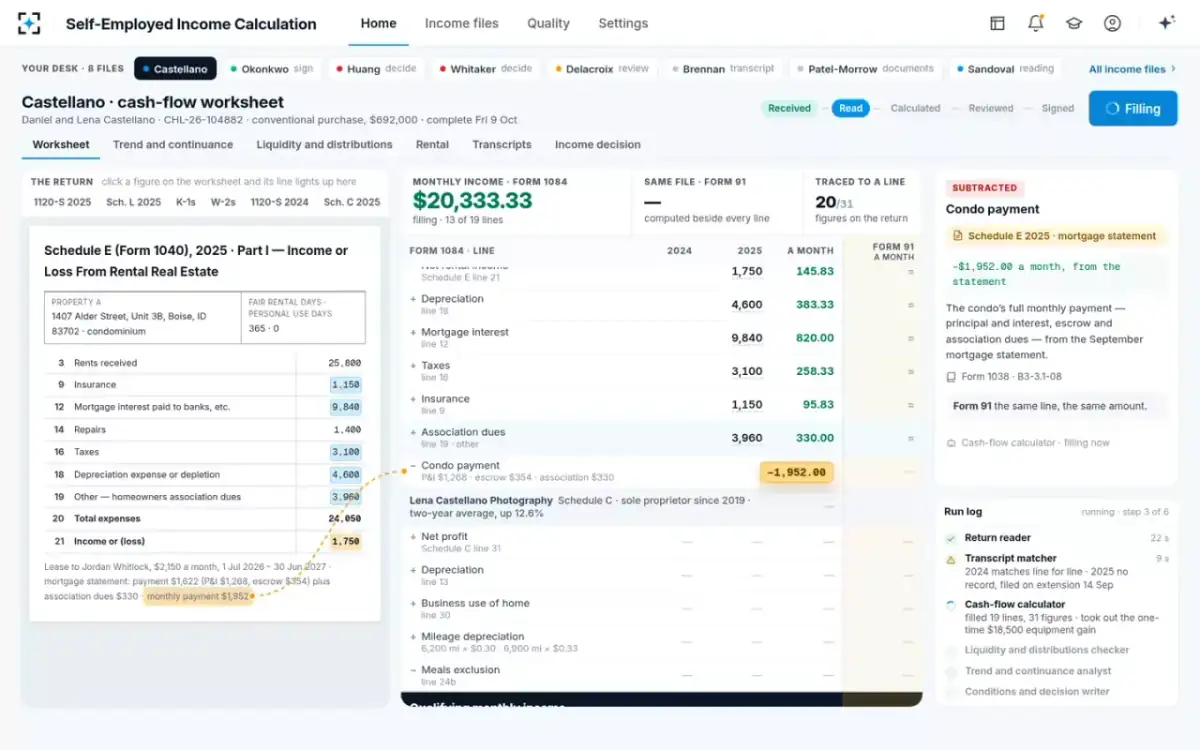
Reading is the easy part to demonstrate and the hard part to trust. The return reader took 22 seconds to sort 42 pages: two years of the S corporation's 1120-S with Schedule L and statements, the K-1s, the W-2s, Lena's Schedule C, the condo's Schedule E and the transcripts. What makes the output usable is not the extraction but the citation. Every figure carries its document, year, page and line, and a line the agent cannot read is marked for a person rather than guessed. On this file all 31 figures that reached the worksheet were linked back to a return line.
Each figure lands from its line on the return
Step 2: matching the return to the IRS transcript
The transcript matcher compares the borrower's copy of each return with what the IRS holds. The ability-to-repay rule names an IRS tax-return transcript as a reliable third-party record for verifying income (12 CFR 1026.43(c)(4)), and Fannie requires that a transcript received before closing be used to verify the income documents the borrower gave (B3-3.1-02). On the sample file, 2024 matched on six of six lines in nine seconds. For 2025 the IRS answered "no record of return filed": the return had been e-filed on extension and accepted on 14 September, and the acknowledgement was in the file. The agent did not pass the year. It raised a condition for the processor, the 2025 transcript before closing, and requested it again. What a mismatch or a "no record" answer means, and how lenders handle each, is covered in 4506-C IVES transcripts, return against IRS.
Step 3: the cash-flow worksheet, line by line
The cash-flow calculator fills the agency worksheet and keeps the reason for every adjustment beside it. For Lena's Schedule C it added back depreciation, business use of home and the depreciation portion of her standard mileage, and took out the meals exclusion, the treatments Fannie lists for a sole proprietorship (B3-3.6-03; Form 1084 instructions). Her depreciation, $5,600 and $6,100 on line 13 of the two years' Schedule C, became $487.50 a month in the two-year average.
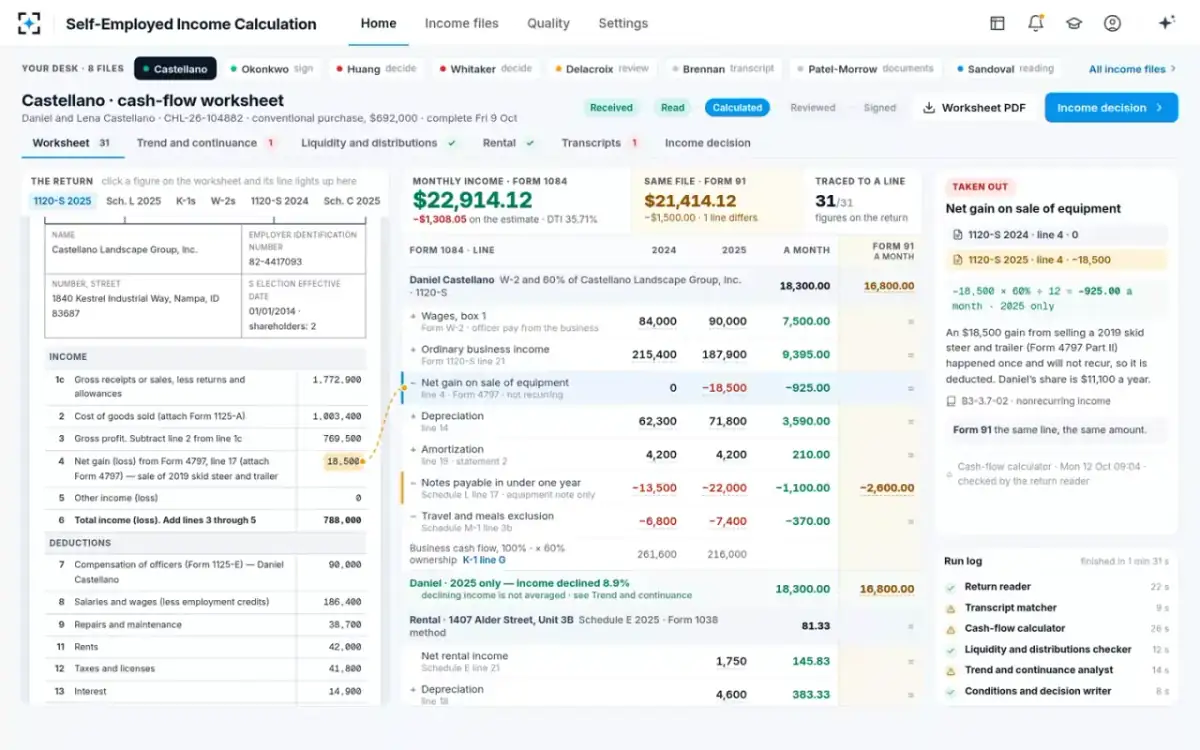
Daniel's line is where a person typing figures most often slips. His company's 2025 return carries an $18,500 gain from selling a 2019 skid steer and trailer (line 4 and Form 4797). It happened once, so the calculator subtracted his 60% share, $925 a month, citing Fannie's instruction to subtract "other reported income that is not consistent and recurring" (B3-3.7-02). Schedule L showed $52,000 payable within a year; the calculator split it using the company's own statement into a $30,000 revolving line that renews every April and a $22,000 equipment note, and subtracted only the note. The same file worked the Form 91 way, under the lender's stricter setting for credit lines, gave $1,500 a month less. All 19 lines are shown in a second column so the underwriter sees the one line where the methods part.
Why a line is there: the rule, the source lines and the arithmetic
Steps 4 and 5: trend, continuance and K-1 liquidity
These two agents run side by side because both need the finished worksheet. The trend analyst found Daniel's income down 8.9%, from $240,960 in 2024 to $219,600 in 2025, and the company's ordinary income down 12.8% on 4.0% lower receipts. The 2026 profit and loss statement through September annualizes 12.6% above 2025. Fannie asks the lender to measure "year-to-year trends for gross income, expenses, and taxable income" and to retain a written analysis (B3-3.5-01). Under the sample lender's setting, a declining year is used alone, so the analyst used $18,300.00 a month rather than the $19,190.00 average and drafted the analysis for the underwriter to edit. That choice is a lender policy; how FHA and Fannie differ on it is set out in FHA's decline rule against Fannie's trend test.
The liquidity checker compared Daniel's K-1 income with his distributions: $112,740 allocated against $96,000 paid out in 2025, 85%. Because the distributions did not cover the income, it computed the current ratio from Schedule L, $412,600 of current assets over $298,300 of current liabilities, 1.38, above the lender's 1.00 threshold, so the K-1 income counts. The full test, with the quick ratio for inventory businesses, is worked through in how to calculate K-1 income for a mortgage.
Step 6: conditions, the decision, and who signs the income worksheet
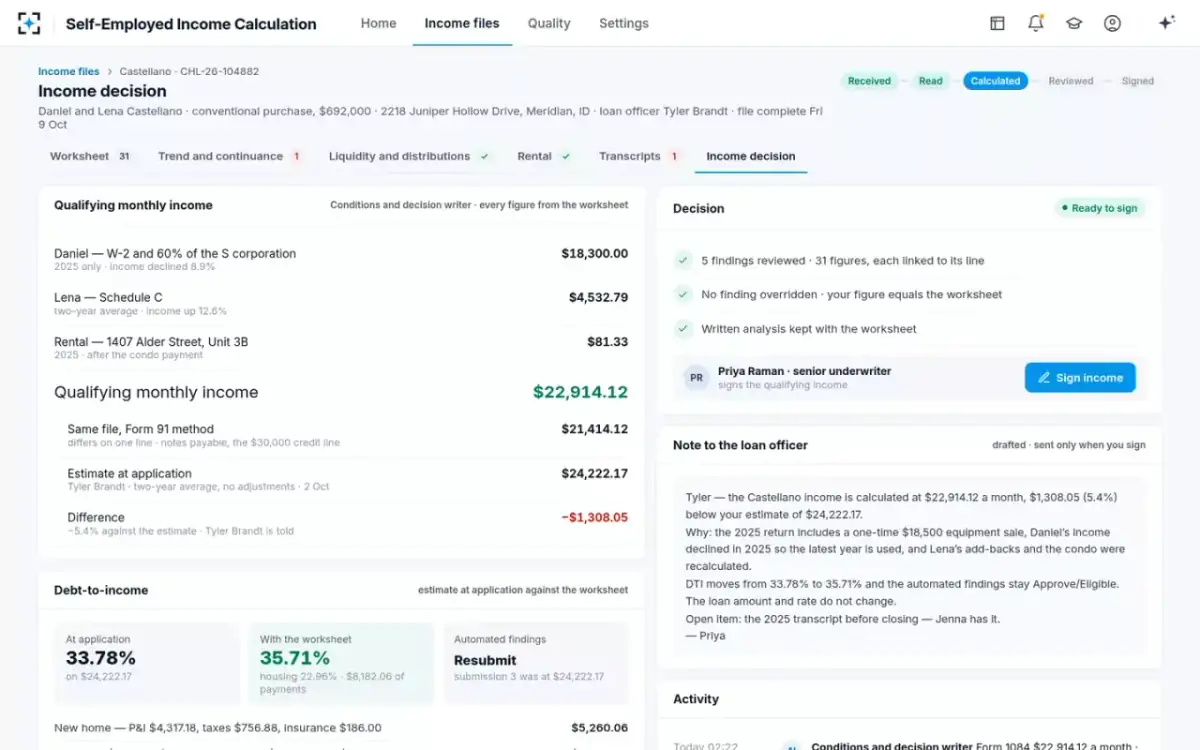
The last agent assembles; the underwriter signs. It summed $18,300.00 from Daniel, $4,532.79 from Lena and $81.33 from the condo: $22,914.12 a month, $1,308.05 below the estimate. DTI moved from 33.78% to 35.71%. It prepared the resubmission to automated underwriting at the new figure, listed one open condition and drafted a plain note to the loan officer. None of it is sent until the underwriter signs, and the agent cannot change the income afterwards. If the underwriter's own figure had differed from the worksheet by more than 5%, or she had overridden a finding, the lender's settings would have sent it to the underwriting manager for a second review.
The decision screen the underwriter signs from
Is automated income calculation accurate?
It is as accurate as you can prove it is, so ask for proof in three forms. First, traceability: what share of the worksheet's figures link to a line on a return (31 of 31 here). Second, findings: what the tool changed against the figure a person would have used, and why. Third, a back-test on files your own team has already underwritten and quality control has already reviewed.
The stakes are documented. In FHA's reviews of fiscal year 2022 loans, borrower income was the single largest area of material findings, 22.17% of the total, and HUD's examples include self-employment income not averaged over two years and self-employment losses not subtracted (HUD, FHA Quality Assurance Update, 2023). And the decision on whether to rely on a tool sits with the lender: Fannie Mae's April 2026 Lender Letter requires sellers that use AI in origination to keep policies on its use and to govern vendors' AI "no less protective" than their own (LL-2026-04).
What the sample lender's quality screen counts once the agents run
214
worksheets signed in a month by five underwriters
154
findings the worksheets made, by type: one-time income 41, declining income 33, notes payable 27
0
income defects in quality control on 61 closed loans sampled since July
4 of 58 in the first quarter, before
How long does it take to calculate self-employed income?
By hand, long enough that it shapes the pipeline; with agents, minutes, of which the agents use about a minute and a half. On the sample lender's quality screen, the median from a complete file to a signed worksheet was 68 minutes by hand and 11 with the agents, and the design target is 10. Those are fictional sample figures. The independent evidence on speed comes from research on origination as a whole: technology-based lenders process mortgages about 20% faster, around ten days, without higher default rates (Fuster, Plosser, Schnabl and Vickery, NBER).
What to look for when you buy automated income calculation
Look for the trace, the limits and the signature. A tool that gives a number without the line it came from moves the re-keying into review. A tool whose adjustments are not tied to the program's listed rules cannot be defended to an investor. And a tool that signs, or lets income change after signature, takes away the control the guides depend on.
Eight questions to put to any automated income calculation
- Does every figure link to its page and line?
Ask to click a worksheet figure and see the line light up on the return.
- Does every adjustment name its rule?
Depreciation, one-time gains, notes payable: the guide section and the arithmetic, not a code.
- Which programs does it apply?
Fannie, Freddie, FHA and VA treat decline, notes payable and S corporation income differently.
- What does it do with a declining year?
It should flag it, apply your written policy and draft an analysis, not decide silently.
- Does it test K-1 income against distributions and liquidity?
Allocated income is not cash. The test should be shown, with the ratio and its inputs.
- How does it treat transcripts?
A year with no transcript and no proof of filing should become a named condition.
- Who signs, and when is a second review required?
The signature should be a person’s, and overrides should go to a second reviewer.
- Will it run on our own closed files?
A back-test against files your quality control has already reviewed is the only proof that counts.
Where it does not fit matters too. Botminds' Self-Employed Income Calculation works from tax returns and the agency methods; it prepares the resubmission to automated underwriting but does not replace it, and it does not claim Fannie Mae approved-vendor status, so on its own it does not bring the representation and warranty relief Fannie gives for income calculated by its Income Calculator or by an approved vendor tool. When that relief applies, and when a higher figure loses it, is set out in the Income Calculator relief line.
Each step of the trace and the rule it answers to
| Step | Rule it answers to | Source |
|---|---|---|
| Read and cite every line | Income relied on must be verified with reasonably reliable third-party records | 12 CFR 1026.43(c)(4) |
| Return against transcript | A transcript received before closing must be used to verify the income documents | Selling Guide B3-3.1-02 |
| Cash-flow worksheet | Form 1084 or any cash-flow analysis applying the same principles | Selling Guide B3-3.5-01 |
| Trend and continuance | Year-to-year trends in gross income, expenses and taxable income; a written analysis | Selling Guide B3-3.5-01 |
| K-1 liquidity | Distributions consistent with the income, or adequate business liquidity | Selling Guide B3-3.7-02 |
| FHA files | Lesser of the two-year and one-year averages; manual underwriting after a decline above 20% | HUD Handbook 4000.1 |
| Signature | The lender’s written evaluation of the income | Selling Guide B3-3.5-01 |
Questions people ask
What is the difference between automated income calculation and automated underwriting?
Automated underwriting, such as Desktop Underwriter, recommends a decision from the figures it is given, including income. Automated income calculation produces the income figure itself from the tax returns. On the sample file the calculation lowered income by 5.4%, so the loan was resubmitted to automated underwriting at the new figure.
Can automated income calculation handle more than one business?
It should evaluate each business and each borrower separately, then sum. Fannie's Income Calculator, for example, needs a separate evaluation for every borrower and business combination and for each rental property. The sample file combines an S corporation, a Schedule C and a rental into one income by source.
Does automated income calculation work for FHA loans?
Only if it applies FHA's own method, which differs from Fannie's. HUD requires the lesser of the two-year and one-year averages of gross self-employment income and a manual downgrade when business income falls more than 20% over the analysis period. Botminds' solution switches to the HUD Handbook 4000.1 method for FHA files.
Who signs the income worksheet?
A named underwriter. In the solution the signature states that the underwriter reviewed the income, its sources and the written analysis, and the agents cannot change the income afterwards. Fannie requires the written analysis, or the Income Calculator findings report, to be kept in the loan file.
What happens when the software cannot read a page?
It should say so. The return reader marks an unreadable line for a person and never infers a figure that is not on the page. The line waits for a person to read it from the document, which is the right outcome: a guessed figure on a tax return is exactly the kind of error quality control finds months later.