A secure message scam is a fake email or text that imitates a bank's "you have a new secure message" notice, or a message that pretends to come from the bank, built to get the customer to sign in on a look-alike page, read out a one-time code, give a card number, or move money "to keep it safe". A real secure message is read inside the bank's own app or website after the customer signs in the usual way; it does not need the customer to follow a link in an email, and a bank answering a signed-in customer has no reason to ask for a password or a code. Customers cannot easily tell the difference by looking, which is why the bank's own replies matter: if no genuine reply ever asks for a code, every message that does ask stands out. Botminds' Secure Message Triage reads every message in a bank's secure inbox, including the ones customers send to ask "is this you?", and routes each scam report the day it arrives.
Impersonation is the most reported scam, and email is how it most often starts
$2.95B
reported lost to imposter scams in 2024, the second-largest loss category
$470M
reported lost to text scams in 2024, more than five times the 2020 figure
#1
contact method in fraud reports for the second year running: email
Is a secure message from my bank a scam? How to tell
Read it where it lives. A genuine secure message sits in the message center of your bank's app or website; you get to it by opening the app or typing the bank's address yourself and signing in. If an email or text says you have a secure message, that may be true, but you never need its link to read it. The FTC's advice for any unexpected message that claims to be from a company: "If you think it might be legit, contact the company using a phone number or website you know is real. Don't use the information in the text message" (FTC, April 2025).
Then read what it asks. A message that wants a one-time code, a password, a PIN or a full card number, or that urges you to move money to a "safe" account, is the scam's tell, whatever the logo and the address look like. A real reply from a bank that knows who you are because you signed in can answer you without any of those.
A real secure message and a fake, line by line
A secure message from the bank: Inside the bank's app or website, after you sign in the way you always do.
A secure message scam: In an email or text with a link to "view your secure message", leading to a look-alike sign-in page.
A secure message from the bank: By the last four digits, if at all; it already knows which accounts are yours.
A secure message scam: Asks you to "confirm" your card number, account number or date of birth.
A secure message from the bank: At most, details about a transaction you raised: dates, amounts, what happened.
A secure message scam: A one-time code just sent to your phone, your password or your PIN.
A secure message from the bank: Never asks you to move money to protect it.
A secure message scam: Says your money is at risk and must go to a "safe" account now.
A secure message from the bank: Gives dates the bank is bound by: when it will report, when a credit will post.
A secure message scam: Gives you minutes: "reply now or your account will be closed".
A secure message from the bank: Points you to the number on your card or the bank's website.
A secure message scam: Gives its own number, or asks you to stay on the line.
How do scammers imitate bank messages?
They copy the bank's alarm, not its branding. Fake fraud alerts were among the top five text scams the FTC identified in 2024: "Many people reported texts about so-called suspicious activity or a big purchase they didn't make. These texts often look like they're from a bank or Amazon. They might give a number to call. Or they might say to reply YES or NO to verify a large transaction" (FTC, Top text scams of 2024). The person who calls back reaches a "fraud department" that is the scammer.
The same playbook runs by email and by phone. For the second year running, email was the most common way people told the FTC they had been contacted by scammers, and imposter scams were the most reported category, with $2.95 billion reported lost in 2024 (FTC, March 2025). The FTC's 2025 spotlight on older adults describes the opening lie in the costliest cases: "Someone is using your accounts. This lie might start with someone pretending to be your bank, flagging so-called suspicious activity" (FTC, August 2025).
Reports from older adults who lost $10,000 or more to business or government imposters
What will a bank never ask you in a message?
Nothing a well-run bank needs, and the FTC's list is short: do not move money because a message or caller tells you to, and do not hand over the keys to your accounts. Its 2025 advice to older adults puts the first rule without exceptions: "Never transfer or send money to anyone, no matter who they say they are, in response to an unexpected call or message. Even if they say it's to 'protect it'" (FTC, August 2025).
Behind the second rule is how banks protect accounts. The FFIEC's authentication guidance warns that even multi-factor sign-in can be defeated when someone in the middle captures the one-time code sent to a customer (FFIEC, 2021; the guidance as a whole is read in FFIEC authentication guidance). A one-time code is a key to a sign-in or a payment; anyone who asks you to read it out is asking for the key. A bank answering a secure message already knows who you are, because you signed in to send it.
Will a bank ask for a code in a secure message?
It should not, and a bank can make that a rule for its own replies. A code sent to your phone is there to prove that you, not someone else, are signing in or approving a payment right now; a reply in the message center comes after that proof, inside the session it protected. A message that arrives by email or text and asks for the code that just landed on your phone is the scam described above.
For the bank, the reply rule is cheap and powerful. If no approved reply template ever asks for a password, a code, a PIN or a full card number, customers can learn one simple test, and the bank's staff never have to judge in the moment whether this request is the exception. It also makes the bank's customer education true in every case, including the part the FFIEC suggests on when the bank itself will add checks, such as a call from the bank or an extra step before a password reset.
Is a transfer covered if I was tricked by a fake bank?
Often, yes, if the scammer used what you gave them to take money from your account. CFPB staff guidance treats that as an unauthorized transfer under Regulation E, with the error-resolution and liability protections that come with it. The bureau's first example is the fake bank itself: a caller posing as the customer's bank who talks the customer into reading out a sign-in, a texted code or a card number, then uses it to move money out (CFPB EFT FAQs, unauthorized EFTs, question 5). The same reasoning, applied to person-to-person payments, is in is Zelle covered by Reg E.
Two points from the same FAQs matter after a scam. A consumer who is fraudulently induced to share access information "has not furnished an access device", so the exception for people the consumer handed a card to does not apply. And carelessness on the customer's part does not let the bank charge more than Regulation E's own liability limits (CFPB EFT FAQs; the denial reasons that do and do not hold up are in Reg E denial reasons). A payment you sent yourself to a scammer, persuaded that it was keeping your money safe, raises a different question; the P2P Fraud Claims series takes it up for person-to-person payments in what a qualifying imposter scam is.
What should I do if I replied to a fake bank message?
Tell your bank at once, through a number or app you know is real, and say exactly what you shared. Speed matters in Regulation E's liability rules: if you report a lost or stolen access device within two business days of learning of it, your liability for unauthorized transfers is capped at $50, or less if less was taken before you told the bank, and transfers that appear on a statement should be reported within 60 days of the statement to avoid liability for later ones (12 CFR 1005.6(b)). Writing through the bank's secure message center counts: written notice is considered given when the consumer "delivers it for transmission to the institution by any other usual means" (1005.6(b)(5)(iii)).
After answering a fake bank message
- Contact the bank through a channel you trust
The number on your card, the app, or the address you type yourself; never the number in the message.
- Say what you shared
A password, a code, a card number, a PIN: each needs a different fix.
- Change the password and turn on the bank's strongest sign-in option
And change it anywhere else you used the same one.
- Ask for the card to be blocked and reissued
If the card number, PIN or a code linked to the card went out.
- Report every transfer you did not make, in writing, with dates and amounts
A secure message is written notice; it starts the bank's error-resolution clock on the day it arrives.
- Report the scam
To the FTC at ReportFraud.ftc.gov; forward scam texts to 7726 (SPAM), as the FTC advises.
How do banks protect secure messaging?
By putting the channel behind the sign-in, by training staff against social engineering, and by telling customers what the bank will and will not do. The FFIEC's guidance singles out the human channel, where social engineers have repeatedly talked call center and IT help desk staff into resetting passwords and other credentials (FFIEC, Authentication and Access to Financial Institution Services and Systems, 2021, Section 8). A secure inbox is a help desk in writing, and a request to change a phone number or reset a sign-in that arrives there deserves the same verification as one on the phone.
The same guidance gives examples of what a customer awareness program may include, and the first is the subject of this page: "An explanation of how customers can determine the legitimacy of communications from the financial institution, particularly communications that seek information that could be used to access the customer's account." Others are "a listing of financial institution contacts that customers may use to report suspicious account activity" and an explanation of the customer's rights "including protections under Regulation E" (FFIEC, 2021, Section 10). A bank's secure message replies are the most-read form of that education, because customers read them when something has already gone wrong.
Why a bank's own replies should never ask for a code
Because customers learn what the bank sounds like from its replies, and a scam only has to sound like that. If the bank's genuine replies sometimes ask a customer to "confirm" a card number or a code, the customer has no way to tell the bank from an imitation; if they never do, the request itself is the warning. The rule protects the bank's staff too: a representative who never asks for a code cannot be talked into "just this once" by someone who has stolen a customer's session or phone.
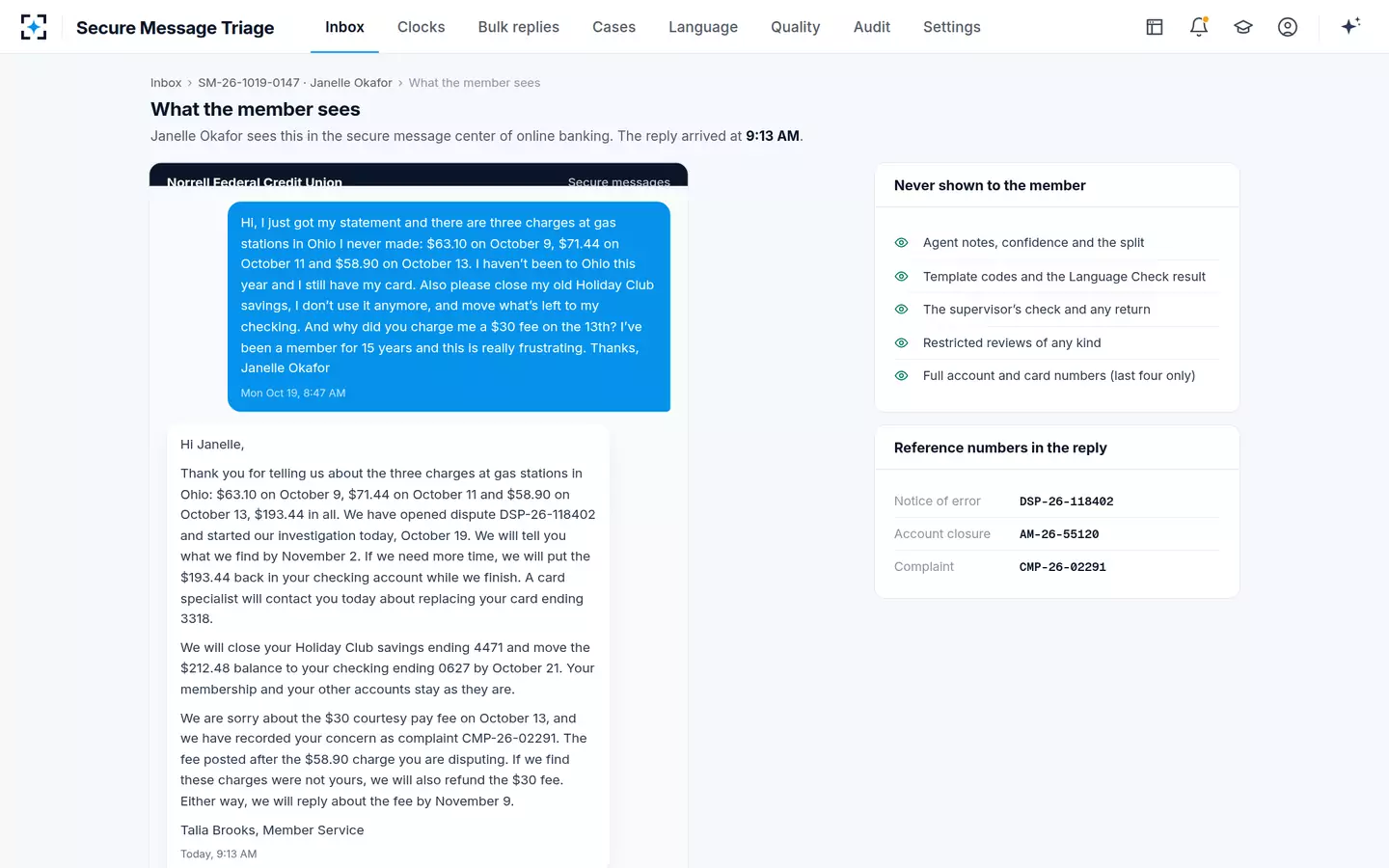
The rule belongs in the approved language, not in each representative's memory. In Secure Message Triage the Reply agent drafts only from approved templates, account and card numbers are masked to their last four digits on every screen and attachment, and the reply the customer sees never carries agent notes, template codes, review details or full account numbers.
What the customer sees: plain answers, last four digits only
When a customer reports a scam by secure message
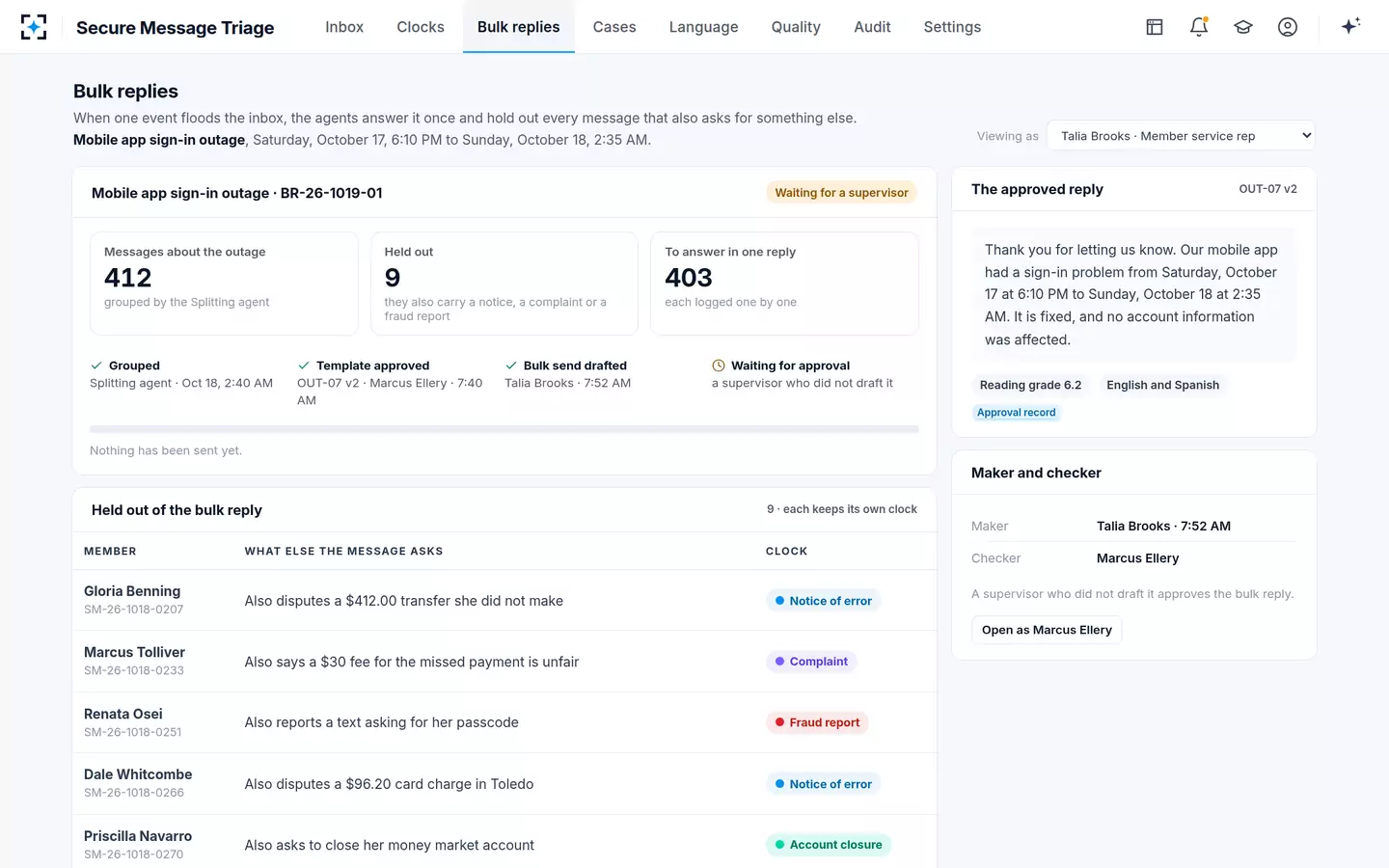
Treat it as a request with a deadline. "Is this you? I got a text saying my account was locked" is a fraud report for the fraud team today; "I gave them the code and now $412 is gone" is also a notice of error, with Regulation E's 10 business days running from the day the message arrived. In one sample weekend, a sign-in outage at the fictional Norrell Federal Credit Union brought 412 messages; nine also asked for something else, among them a member reporting a text that asked for her passcode, and each of the nine was held out of the bulk reply with its own clock.
Scam and fraud reports held out of a bulk reply, each on its own clock
The fraud work itself, account takeover and scam payments, belongs to the bank's fraud teams; what triage owes them is speed and the date. What makes a message a notice of error covers the dating, and what a secure message is covers the channel these scams imitate. For warnings at the moment of payment, see the APP Fraud Detection guide to bank scam warnings.
Questions people ask
Why do banks send "you have a secure message" emails at all?
Because the message itself stays inside online banking, and customers would not otherwise know it is there. The email or text should only tell you a message is waiting; read it by signing in the way you always do, not through the link.
Is a "secure email" from a company I don't bank with a scam?
It may be. Some businesses send encrypted email that you open through a web page, and scammers copy those notices too. If you did not expect it, contact the sender through a number or website you already know, as the FTC advises, rather than through the message.
Does my bank have to refund me if I gave a scammer my code?
If the scammer used it to take money from your account, CFPB staff guidance treats the transfer as unauthorized under Regulation E, and your liability is limited by how quickly you report it (12 CFR 1005.6). Report in writing, with dates and amounts, as soon as you can.
How do I report a fake bank message?
Tell your bank through a channel you trust, report it to the FTC at ReportFraud.ftc.gov, and forward scam texts to 7726 (SPAM) so your carrier can block similar ones. The last two steps are the FTC's own advice in its 2025 text-scam spotlight.
Is it safe to reply to a real secure message?
Yes, once you have signed in yourself and are reading it inside the bank's app or website. Even there, keep to what the bank needs: dates, amounts and what happened. Leave out passwords, codes, PINs and full card numbers; the bank can already see which accounts are yours.