An RFP tracking template in Excel can run an asset manager's institutional search pipeline well, provided each row is a search rather than an RFP, every signal carries its date and source, and every pursue-or-pass decision carries a reason. Most trackers fail on the first rule: they start a row when the RFP arrives, so the spreadsheet records the searches the firm already knew about and nothing earlier. This guide sets out the columns a tracker needs, then runs one fictional search through three approaches: a spreadsheet kept by hand, a monthly list of issued RFPs, and the agents of Botminds' RFP Tracking, which read pension board minutes overnight and write a pursuit to the CRM only after a person approves it. The difference that matters is not the tool's features but the day each one first sees the search.
The search is the solution's sample: Ridgeline County ERS, a fictional $18.4 billion county plan, votes 7–2 on 16 September 2026 to terminate its emerging-markets debt manager and issue an RFP in the first quarter of 2027. Quillfield Capital, the fictional manager, wants to know in time.
One search, three ways of tracking it
First sees the Ridgeline search
SpreadsheetWhen someone types it in, usually from an alert or the RFP
Monthly alert listOn the RFP's release, or a consultant's announcement
Agents reading the minutesThe night after the approved minutes are posted
Plans it can cover
SpreadsheetAs many as the team reads by hand
Monthly alert listWhatever the service lists
Agents reading the minutesEvery plan on the watch list, nightly
Source behind each row
SpreadsheetA note, if anyone wrote one
Monthly alert listThe listing itself
Agents reading the minutesThe page, with a stored copy and a second agent's re-read
Languages
SpreadsheetThose the team reads
Monthly alert listWhatever markets the service covers
Agents reading the minutesOriginal language beside a checked English version
Contact rules
SpreadsheetA column someone remembers to fill
Monthly alert listNot covered
Agents reading the minutesChecked before every planned contact; compliance decides
History and audit
SpreadsheetWhatever the last save kept
Monthly alert listNot applicable
Agents reading the minutesAppend-only trail of every read, decision and write
Cost to start
SpreadsheetNothing but hours
Monthly alert listA subscription
Agents reading the minutesSetup with a back-test on last year's searches
What should an RFP tracking template in Excel hold?
An RFP tracking template should hold one row per manager search, opened at the first signal and closed at the award or the decision to pass. That is the difference between a tracker and a log of RFPs received. A search row can sit for months with no RFP attached, gathering dated evidence: the watch-list placement, the consultant's asset-class review, the vote to terminate, the posted minutes, the procurement notice. When the RFP lands, it joins a row that already holds a size, a strategy, a contact plan and a decision.
Three rules keep such a sheet usable. Date every signal by when it was posted, not when the meeting happened, so lead time can be measured honestly. Link every signal to the page it came from, so anyone downstream can check it. And record every decision, including every pass, with a reason drawn from a fixed list, so the sheet can later answer which searches the firm could not enter and why.
The RFP tracker columns that matter, field by field
Seventeen columns cover a search from first signal to outcome. Fewer and the sheet cannot measure lead time or explain a pass; many more and nobody fills them in. The groups below are what a reviewer will ask for.
RFP tracker columns: what each holds and why it is there
| Column | What it holds | Why it matters |
|---|---|---|
| Search ID | One ID per search, kept when the RFP arrives | Stops two rows for the same search |
| Plan sponsor, type and state | Name, state or local, the state whose laws apply | Open-meetings and procurement rules differ by state |
| Consultant | General or search consultant, if any | Who will shape the RFP and the shortlist |
| Asset class and vehicle | As the board wrote it, then as the firm reads it | Ambiguity here is where wrong matches start |
| Signal type | Watch list, review, new target, pacing line, termination, RFP authorised | Strength of the evidence |
| Meeting date and posted date | Both, separately | Lead time counts from the posted date |
| Source and page | Link to the document and the page number | Anyone can check the row |
| Size and its arithmetic | E.g. 4% target × $18.4bn fund = $736M | A size without working cannot be checked |
| Probability and drivers | A percentage and the reasons for and against | Lets calibration be tested later |
| Expected RFP window | Earliest, most likely, latest | Plans the consultant meeting and response team |
| Strategy matched and fit | Strategy, and why not the alternatives | Catches the wrong strategy before finals |
| Contact status | Quiet period start, contribution check result, clearance by whom | A missed quiet period can disqualify the bid |
| Owner and RFP coordinator | Named people | Who acts when the RFP lands |
| Decision, reason code, approver | Pursue or pass, a code from a fixed list, who approved | The pipeline can be defended, and passes become product gaps |
| RFP release and due dates | From the procurement notice | Response planning and lead-time measurement |
| Finals and outcome | Finals date, won, lost or cancelled | Win rate on the right denominator |
| Last checked | Date and person | Shows which rows have gone stale |
Filled in, a good row reads like a short case file. Here is the sample search as a tracker row on the morning the pursuit was approved, with every value taken from what the solution showed on its fictional data.
One search as a tracker row: Ridgeline County ERS, the morning of approval
| Column | Value on 21 October 2026 |
|---|---|
| Search ID | PS-2611 |
| Plan sponsor, type and state | Ridgeline County Employees' Retirement System; county plan, US |
| Consultant | Calloway Partners, general consultant |
| Asset class and vehicle | Emerging markets debt, active; separate account |
| Signal type | Vote to terminate, with "staff and consultant to issue an RFP in Q1 2027"; first signal a watch-list placement in March |
| Meeting date and posted date | Voted 16 September; minutes approved 7 October, posted 19 October |
| Source and page | Approved minutes, page 14 of 22, item 7.B |
| Size and its arithmetic | 4% target × $18.4bn fund ≈ $736M |
| Probability and drivers | 70%. For: 7–2 vote; 9 of the plan's last 11 terminations went to a public RFP within 150 days. Against: passive option open; 2 of 11 went to an existing manager; no date in the motion |
| Expected RFP window | 15 January to 31 March 2027, most likely 10 February |
| Strategy matched and fit | Emerging Markets Debt Blend, fit 92 (Local Currency 71, Corporate 58) |
| Contact status | No quiet period yet under the plan's rules; contribution look-back checked; consultant meeting request held for compliance |
| Owner and RFP coordinator | Institutional sales director; RFP coordinator, materials due 15 December |
| Decision, reason code, approver | Pursue; PURSUE-FIT; head of consultant relations, 8:56 a.m. |
| RFP release and due dates | Not yet released; watch set on the plan's portal |
| Finals and outcome | Open |
| Last checked | 21 October, by the checker who approved it |
The contact-status column deserves its own discipline. A public plan's quiet-period rules can start before the RFP is released, and the SEC's pay-to-play rule looks back two years at contributions by the people who will call, so the column needs a date and a name, not a tick. When an RFP blackout period starts and who may be contacted is worked through separately.
When does each approach first see the search?
On the Ridgeline search, the three approaches first see it at very different points: the agents the night after the approved minutes are posted, the alert list when the RFP is released, and the spreadsheet whenever a person adds it, which in practice means from one of the other two.
The Ridgeline search from vote to expected RFP: who sees it, and when
- Vote to minutes read34 d
- Seen, checked, pursued113 d
- A plan of this size is outside the 40147 d
- Not listed until the RFP is released147 d
The middle lane is the one most teams live in. A team with time to read forty boards reads the forty largest, which is sensible: the twelve systems with $100 billion or more held about 38% of all public pension assets in 2025, by our count from the Census Bureau's unit file. But an $18.4 billion county plan sits around 81st, and there are about 113 systems with $10 billion or more. The searches below the reading line are found when their RFPs are listed, and by then the consultant's shortlist may already be forming.
What an RFP tracking spreadsheet does well
A spreadsheet is cheap, flexible and owned by the team. It costs nothing to start, it bends to any firm's process, and a well-kept one is a perfectly good tracker for a firm that covers a few dozen plans in one language, with one or two people who read the packets on a calendar. It is also the right place to begin, because the columns above force the discipline that any later tool will need: a row per search, dated sources and reasons for every pass.
A spreadsheet's other strength is that it holds what no public document does: what the consultant said over coffee, which trustee asked about fees, why the firm passed on a search three years ago. Any replacement has to keep that history, which is the subject of the last section.
Where the RFP tracking spreadsheet breaks
The spreadsheet breaks on four things, and none of them is the software. The first is scale. The Census Bureau counted 311 state-administered funds and 4,061 local systems in 2025 (Annual Survey of Public Pensions 2025), and a board packet can run to hundreds of pages. The second is language: many plans outside the US post board decisions only in their own language, and a team reads the ones it can.
The third is dates. A sheet that is updated weekly records when a person noticed a signal, not when it was posted, and the lead time it reports is the team's reading lag plus the plan's. The fourth is evidence. When a CIO, an auditor or an examiner asks why a search was pursued, a cell that says "per minutes" is not an answer, and the SEC's books-and-records rule already expects an adviser to keep written communications relating to advice and the agreements it enters into (17 CFR 275.204-2). A pipeline that cannot be traced is hard to defend in any of those rooms.
An RFP tracking spreadsheet and RFP Tracking's agents, row by row
Spreadsheet kept by hand: The team, as time allows, largest plans first.
RFP Tracking's agents: The Reader agent, every watched plan's documents overnight; 6,842 documents in October on the sample.
Spreadsheet kept by hand: A note or a link, if anyone added one.
RFP Tracking's agents: The page, a hashed stored copy and a second agent's independent re-read.
Spreadsheet kept by hand: Not applicable.
RFP Tracking's agents: Below 85% confidence on the sample settings, the analyst decides before anything proceeds.
Spreadsheet kept by hand: A column, filled or not.
RFP Tracking's agents: Every planned contact checked against quiet periods and contribution pre-clearance; held for compliance when in doubt.
Spreadsheet kept by hand: Whoever edits the cell.
RFP Tracking's agents: A maker proposes, a different checker approves with a reason code; two approvers at the top tier.
Spreadsheet kept by hand: Copied across by hand, sometimes.
RFP Tracking's agents: Written only after approval, with the approval as its reference.
What monthly RFP alert lists add
Lists of issued investment management RFPs are a net, not a forecast. They catch searches with no public board trail, searches at plans nobody watches and RFPs that appear without warning, and that is worth paying for. What they cannot do is report a search before its RFP, except when a consultant announces it first, so their lead time is close to zero by design. In the sample firm's year, three of nine missed searches were consultant-run searches for plans with no public minutes: the kind a list may catch and a reader of minutes cannot.
A sensible stack for many teams is a tracker fed by both: agents or people reading minutes for the months before the RFP, a list of issued RFPs to catch what reading missed. A back-test on last year's searches shows what each source would have contributed; how to run one is set out in its own guide.
What agents reading the minutes change
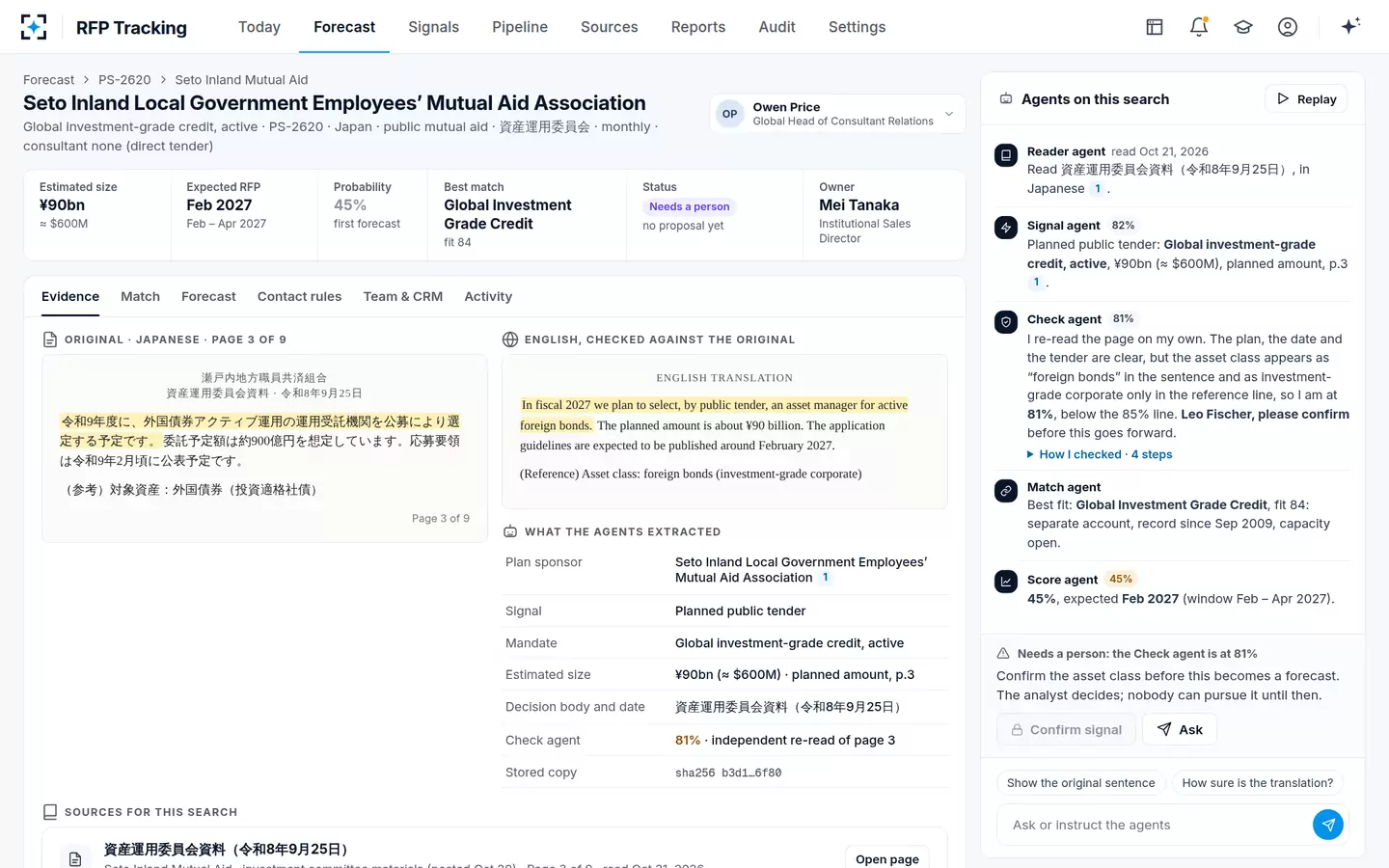
Agents change the left-hand side of the timeline. They read every watched plan's agendas, packets, minutes, meeting video transcripts and procurement notices, in the original language, find the sentences that start a search and extract the body, date, vote, asset class and size with their page. A second agent re-reads the source before any forecast exists. Each search then gets a strategy match on eight criteria, a probability with its drivers and a contact check, and a person decides.
A Japanese tender plan, read in the original and sent to a person at 81%
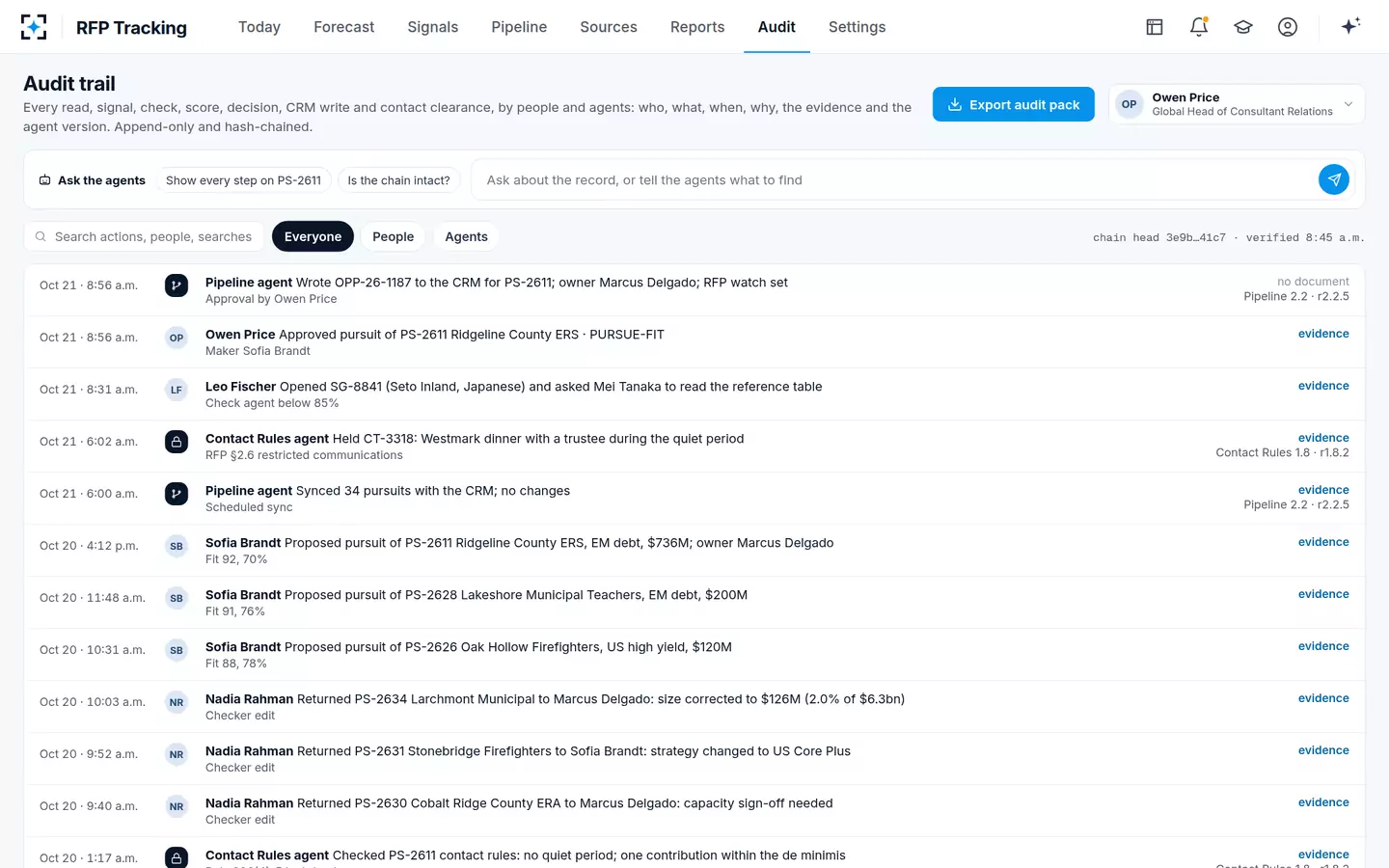
The history a spreadsheet kept by accident, the agents keep by design. Every read, signal, check, score, decision, CRM write and contact clearance goes onto an append-only trail with who, what, when, why, the evidence and the agent version.
The audit trail: every step on a search, by people and agents
When to replace an RFP tracking spreadsheet
Replace the spreadsheet when the reading, not the sheet, is the constraint. Four signs mark the point, and a team that sees two of them is usually past it.
Four signs a team has outgrown its RFP tracking spreadsheet
- Searches arrive as RFPs more often than as signals
Count last year's relevant RFPs that had no row before their release.
- The watch list stops at the plans the team has time to read
If it is the largest forty or so, the searches at smaller plans arrive as RFPs.
- Board documents in languages nobody on the team reads
European and Asian plans that publish decisions in their own language.
- Nobody can say why a search was pursued or passed
Reasons missing, edits untraced, the CRM disagreeing with the sheet.
Moving from the spreadsheet without losing history
A tracker's history is the test set for whatever replaces it. Export the last twelve months of rows, mark which searches became RFPs and which the firm won, lost or passed, and use them to back-test the new approach: did it see those searches, how early, and with what probabilities? The rows that held private knowledge, such as a consultant's comment, stay with the people who own those relationships; the public evidence moves to the new tool, page by page.
Keep the CRM as the system of record throughout. In RFP Tracking, an approved pursuit is written to the CRM with the approval as its reference, and nothing is written before that. Why the CRM should hold only approved pursuits explains the integration. To see the forecast, the checks and the approvals on one screen, start from RFP Tracking.
Questions people ask
Is there a free RFP tracking template for Excel?
Any spreadsheet can serve if it holds the seventeen columns above: one row per search, posted dates, a source and page for every signal, a size with its arithmetic, a probability, contact status and a reason-coded decision. The columns matter more than the template.
What is the difference between an RFP tracker and an RFP log?
A log records RFPs received and responses sent. A tracker follows searches from the first board signal, months before any RFP, to the award or the decision to pass. Only a tracker can measure lead time or show which searches the shelf could not enter.
Should an RFP tracker live in Excel or the CRM?
The CRM should hold approved pursuits; the evidence behind them, signals, pages and probabilities, needs a place built for documents and dates. Many teams start with a sheet beside the CRM. The rule that keeps both honest is that nothing enters the CRM until someone approves the pursuit.
How many plans can one person track by hand?
That depends on how often the boards meet and how long their packets run, and no study publishes a figure. Measure it: count the documents your watched plans posted last quarter and the hours spent reading them. In the solution's sample, the watched plans posted 6,842 documents in October alone.
Can RFP alerts replace a tracker?
No. Alerts report searches at or near the RFP, so they cannot provide lead time, contact planning or reasons for passing. They are a useful net beside a tracker for searches with no public board trail.