Slide library software stores a firm's approved slides in one searchable place so people build presentations from vetted content instead of old files: versions, owners, expiry dates, permissions and usually a way to insert slides straight into PowerPoint. At an asset manager the library is the reason a finals deck starts from approved language and current disclosures. What it cannot govern is the numbers. A performance slide approved in the library in April is a correct template with April's figures in it, and those figures are out of date by July whatever the library says. Botminds' Pitch Book Creation is built around that gap. Its Assembly agent builds each deck only from your approved library, its Refresh and Check agents source and re-read every figure from the systems of record, and the library, the performance system and the CRM stay exactly where they are.
Keep the library, add the source: where Pitch Book Creation sits between your systems
Agent
Assembly agentBuilds the deck from the approved slide library only, in the order of the prospect’s questions, and proposes an approved slide for any unanswered question.
Never: uses an expired or restricted slide, or writes new performance content.
Agent
Refresh agentFills each figure on each slide from its system of record and stamps the slide with the as-of date and source.
Never: uses preliminary or unapproved data.
Agent
Check agentRe-reads every figure from the source on its own and compares values, totals and labels.
Never: changes a slide.
A person decides
Deck makerApproves refreshed figures and fixes; tailors the deck.
A person decides
Marketing complianceApproves the release of this version for this prospect.
Agent
Release agentLocks and watermarks the approved version, posts it to the CRM and files it with its evidence in the records archive.
Never: releases anything compliance has not approved.
What is slide library software?
Slide library software is a managed store of approved presentation slides with the controls a shared drive lacks. The core features are much the same across products: search by topic or keyword, insertion into a deck without copying a file, versioning so an edit replaces the old slide everywhere it is fetched from, an owner and an expiry date per slide, and permissions that restrict who may use or change what. Many firms built theirs on SharePoint; others use a dedicated add-in for PowerPoint.
For a marketing team the library solves real problems: off-brand slides, superseded disclosures, a bio for a portfolio manager who left last year. For compliance it solves another, because a slide approved once in the library can be reused without being reviewed from scratch each time. That reuse is exactly why the library matters to the Marketing Rule, and why it is not the whole answer.
Can a deck builder use only approved slides?
Yes, if the builder is restricted to the library and the library knows which slides are approved for which use. That means each slide carries its status (approved, expired, restricted to an audience or a region), and the tool that assembles the deck refuses anything else. In the solution this is a hard rule: the Assembly agent builds only from approved library slides and never uses an expired or restricted one, and anything it cannot answer from the library it proposes from the library rather than writing.
On the sample finals deck the Assembly agent built 25 slides from library version 2026.10, skipped one slide that had expired, and proposed an approved carbon intensity slide for a consultant question nothing else answered. That proposal went to the portfolio manager, not into the deck, because a new claim needs its content owner. The rule worth copying into any library's policy is the one the agent follows: assembly may choose and order approved slides; it may not create performance content.
Why an approved slide is not an approved number
A slide library approves a slide as content on a date; the figures on it are a separate fact with a separate owner. When a slide holds live data, composite returns, top holdings, sector weights, a peer ranking, the library's approval covers the template, the labels and the disclosures. Whether the numbers are this quarter's approved figures is a question for the performance system, portfolio accounting and the data vendor.
The SEC has said plainly that reused pieces stay inside the rule. In the Marketing Rule's adopting release, the Commission explained that an adviser that keeps performance inserts or tables in a database and uses them in otherwise customized communications must treat those inserts as advertisements subject to the rule (86 FR 13024, 2021). A performance slide in a library is exactly such an insert. Each time it is reused, it carries its figures into a new advertisement, so each reuse needs current figures and net returns shown with gross for the same period, under Rule 206(4)-1(d).
For EU funds the consistency test runs to the fund's legal documents as well. ESMA's guidelines on marketing communications say that where figures on past or expected performance appear, they should be consistent with those used in the fund's legal and regulatory documents, computed by the same method (ESMA34-45-1272, 2021). A library slide filled from a different source than the prospectus breaks that test even when every number on it is correct.
Keep the library: what stays the system of record
Nothing about adding agents requires moving the library. The approved slides, their owners and their expiry dates stay where they are; the agents read them. The same is true of every source of figures. The useful way to plan the integration is one row per system: what the agents read from it, and what, if anything, they write back.
Seven systems stay the systems of record; the agents read them and write back only the released deck
Slide library
Record ofSystem of record for approved slides and disclosures
ReadApproved slides, versions, expiry dates, restrictions
Written backNothing
Performance measurement system
Record ofSystem of record for composite returns
ReadApproved returns, GIPS reports, approval status and time
Written backNothing
Portfolio accounting
Record ofSystem of record for holdings and weights
ReadHoldings reconciled with the custodian, as of each month-end
Written backNothing
Attribution system
Record ofSector and stock attribution
ReadAttribution for the same period as performance
Written backNothing
Index, peer and ESG data vendors
Record ofThird-party data licensed for marketing
ReadIndex returns, peer rankings with date and period, carbon data
Written backNothing
CRM
Record ofOpportunities and deck requests
ReadThe request, the prospect, the deadline
Written backThe released deck, posted after compliance approves
Records archive
Record ofBooks and records
ReadRetention rules and legal holds
Written backThe locked released version with its evidence file, write-once
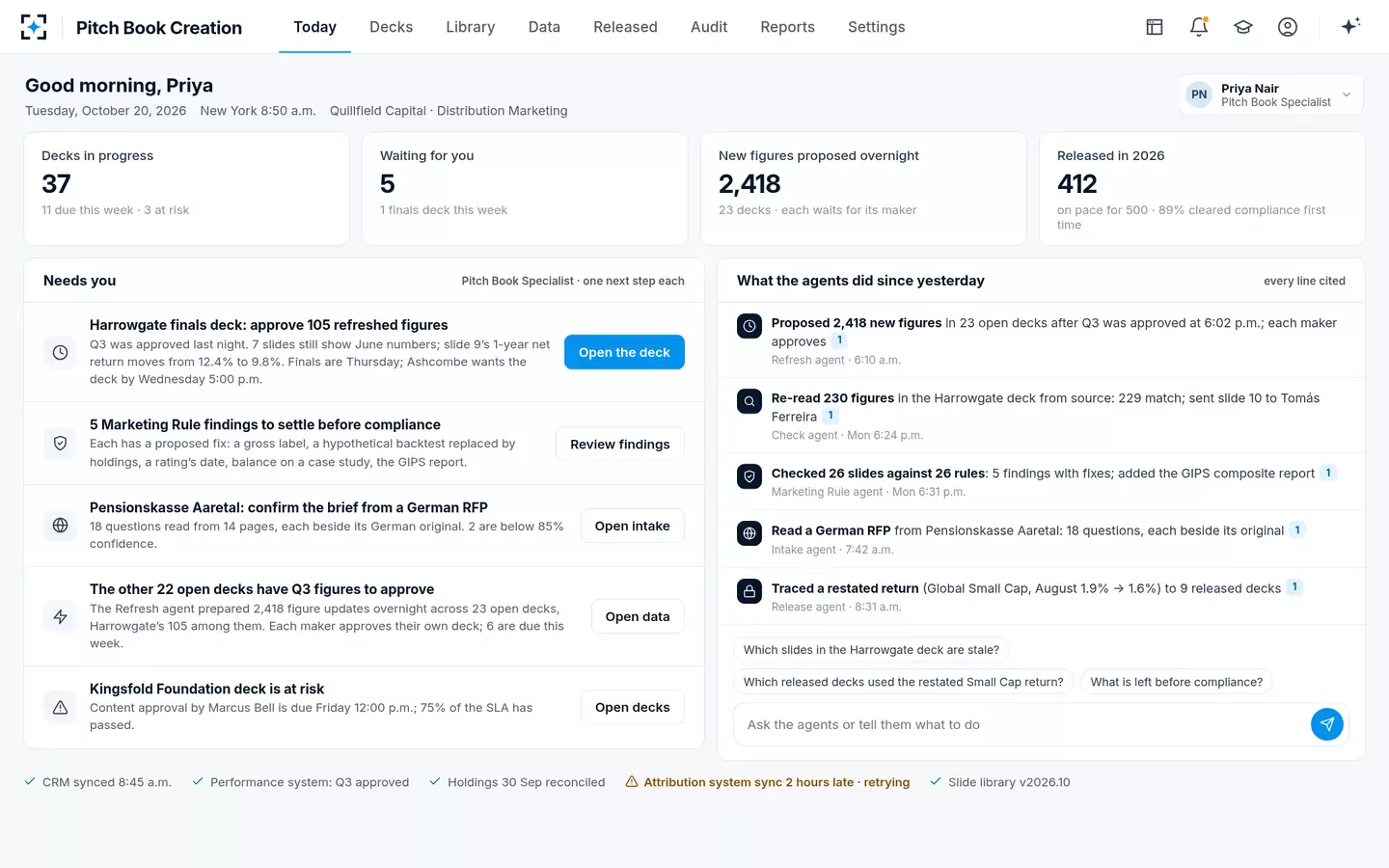
Two settings decide most of the behaviour. The first is freshness per data type: in the sample firm, performance figures must come from the latest approved quarter, holdings must be 35 days old or less (changed from 45 by the administrator and approved by marketing compliance), and ratings need their date, period, provider and any payment. The second is the library version the agents build from: in the sample it is version 2026.10, named in the agents' run and on the specialist's home screen, so anyone can see which approved content a deck was built from.
The specialist's day: the library version and every source's status at the foot of the screen
Add the source: a data stamp on every slide
The addition is small to describe and large in effect: every slide in every deck carries a stamp saying what its numbers are and where they came from. In the solution the stamp shows the as-of date and source of the slide's figures; it is red when they are older than the approved quarter and grey for approved text with no figures. Click any number and its source record opens.
That stamp is what lets a library-based process scale. A specialist can see which of 26 slides need attention without reading them; a reviewer can see that the performance page came from the approved composite and the holdings page from portfolio accounting, each at its own date; an examiner can be shown the record behind any figure years later. The SEC's April 2024 risk alert found advisers who could not produce documentation supporting the performance claims in their advertisements (SEC Division of Examinations). A stamp per slide, kept with the released version, is that documentation by construction.
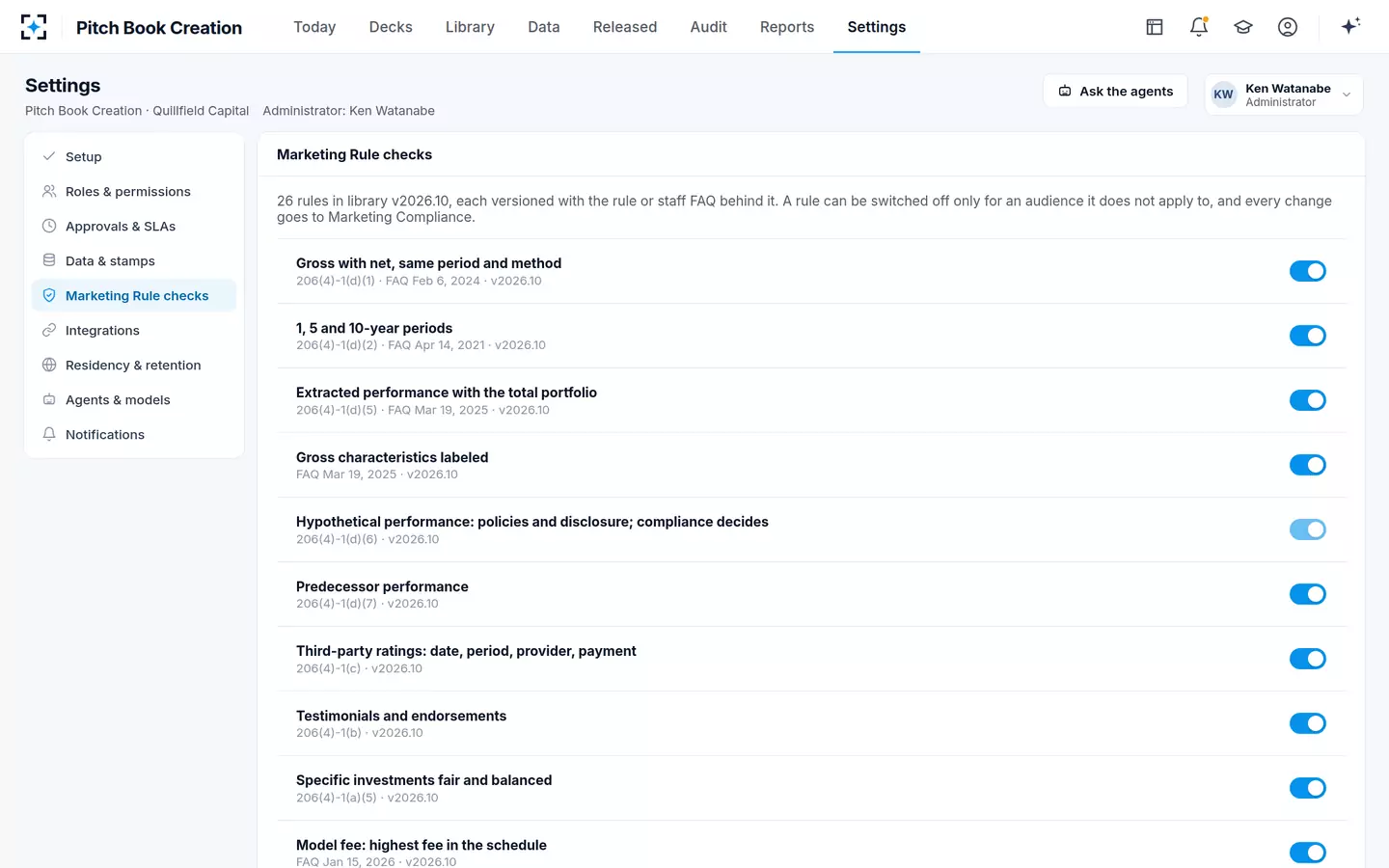
Freshness and checks are settings, each citing the rule or staff FAQ behind it
The released deck, not the library, is what you must keep
Books and records attach to what was used, not to what was available. An adviser must keep a copy of each advertisement it disseminates, directly or indirectly, and the records needed to demonstrate the calculation of any performance in it, for five years from the end of the fiscal year in which it was last disseminated (Rule 204-2(a)(11), (a)(16) and (e)(3)(i)). The library holds the approved slide; only the released deck shows which figures, which disclosures and which tailoring a prospect actually received.
So the archive step is the one to get right. In the solution the Release agent locks the approved version, watermarks it for the prospect ("Prepared for Harrowgate University Endowment" in the sample), posts it to the CRM opportunity and files it in the records archive with its evidence: the PDF, the data stamps, snapshots of the sources and the checks and approvals. The sample deck released on 20 October 2026 is kept until 31 December 2031. A change after release starts a new version and new approvals, while the released one stays as it was.
Going live is a mapping exercise, not a migration
Because nothing moves, a rollout is mostly a matter of telling the agents what each slide is and where each figure on it comes from. The checklist below is the order the sample firm worked in; most of it is information marketing operations and IT already hold.
Mapping a slide library to its sources, in seven steps
- Inventory the library
Every slide with its owner, approval date, expiry and any audience or region restriction. Retire what has no owner.
- Mark the slides that hold data
Separate approved text from slides with live figures; only the second kind needs sources mapped.
- Map each figure to its system
Composite and period from the performance system, holdings from portfolio accounting, rankings from the vendor, team data from HR.
- Set freshness per data type
Latest approved quarter for performance, a day limit for holdings, a date and period for every rating.
- Write down who signs what
Maker, content owner, content approver, release approver. The maker never approves the release.
- Connect the CRM and the archive
Requests in, released decks out, retention and legal holds applied by the archive.
- Rebuild recent approved decks
Have the agents rebuild a set of decks compliance already approved, and compare them figure by figure before go-live.
The last step usually produces the most useful surprises: a performance slide fed from a workbook rather than the performance system, a disclosure that was updated in the library but not in a heavily used older deck, a ranking whose date nobody recorded. Each is a finding about the current process, and each is cheaper to find before a consultant does. The cost side of that decision is set out in presentation automation tools compared on cost.
Slide library tools and agents: what each should own
The cleanest division gives the library everything about approved content and the agents everything about the figures and the deck's journey. Overlap is where problems start: a library that tries to refresh data, or an assembly tool that lets users edit approved slides in place.
The library owns approved content; the agents own figures, checks and the deck's journey
Slide library software: Owns them: versions, owners, expiry, restrictions.
Pitch Book Creation's agents: Read them, and build every deck from them.
Slide library software: Holds whatever figures were on the slide when it was approved.
Pitch Book Creation's agents: Fill each from its system of record, stamp the date and source, re-read it independently.
Slide library software: Lets a person search and insert slides.
Pitch Book Creation's agents: Assemble in the prospect’s question order and map each question to its slide.
Slide library software: Rely on the slide’s original approval.
Pitch Book Creation's agents: Check every slide in this deck for this audience, and propose a fix for each finding.
Slide library software: Usually outside the tool.
Pitch Book Creation's agents: Lock, watermark, post to the CRM and file with the evidence after compliance approves.
Slide library software: Updates the slide for future decks.
Pitch Book Creation's agents: Traces a restated figure to every released deck that carries it and drafts corrections for compliance.
Firms looking for a SharePoint slide library replacement are often trying to solve the left column and the right one at once. The left column is a library problem and any good library product solves it. The right column is a data and evidence problem, and it is the one that decides whether a released deck can be defended. To see the agents work from your own library, start from Pitch Book Creation; an annotated pitch book shows which slides in a typical deck hold figures that need a source.
Questions people ask
What is a slide library in PowerPoint?
It is a shared store of approved slides that users can search and insert into a presentation, usually through an add-in or a SharePoint site, so decks start from current, on-brand content. A good library tracks each slide's owner, version, expiry and restrictions. It governs the slide's content, not whether the figures on it are current.
Is there a SharePoint slide library replacement for asset managers?
Several slide library products integrate with PowerPoint and SharePoint and cover search, versions, expiry and permissions. For an asset manager the test is what happens to slides with figures: whether each figure is filled from its system of record, stamped with its date and re-checked, and whether the released deck is kept with its evidence. A library and an agent layer can be combined rather than replaced.
How do you keep a slide library up to date?
Give every slide an owner and an expiry date, separate text slides from data slides, and refresh data slides from their sources rather than editing them by hand. Review owners quarterly and retire orphaned slides. Above all, do not rely on a data slide's library approval for its figures; stamp each figure with its as-of date.
Do library slides need compliance approval every time they are used?
The SEC Marketing Rule leaves the review method to each adviser's policies, and many approve library slides once and review each deck for its tailoring and figures. Reused performance inserts remain advertisements subject to the rule, so their figures must be current and paired correctly every time. FINRA members must have a principal approve each retail communication before use.
Who should own the slide library at an asset manager?
Usually marketing operations or the head of institutional marketing owns the library, with each slide owned by its content owner: a portfolio manager or product specialist for strategy slides, compliance for disclosures, legal for firm descriptions. Changes to approved slides should go through marketing compliance, as they do in the sample firm's settings.
How long must old pitch book versions be kept?
Each released advertisement must be kept for five years from the end of the fiscal year in which it was last disseminated, the first two in an appropriate office, under SEC Rule 204-2(e)(3)(i), together with the records that demonstrate any performance it shows. Library versions are worth keeping too, because they show which approved content a deck was built from.