PowerPoint automation from Excel means letting slides take their numbers from a workbook instead of retyping them. There are three common ways: charts and tables linked to a workbook that update when the file changes, a macro or script that writes values from a sheet into named places on the slides, and template tools that generate a whole deck from a data export. For an asset manager's pitch book all three solve the typing, and none answers the question compliance and the consultant will ask: was this the approved figure, for this composite, over this period, on this fee basis? Botminds' Pitch Book Creation treats the refresh as half the job. Its Refresh agent proposes each figure from the performance, holdings and attribution systems with its as-of date, and its Check agent re-reads every figure from the source on its own, without seeing the first agent's work, before the deck's maker approves anything.
A link moves a number; a second read asks whether it was the right one
Excel linked to PowerPoint: Whatever is in the linked cell when the link updates, including a working copy.
Refresh agent, then an independent Check agent: The system of record: composite returns from performance measurement, holdings from portfolio accounting, attribution from the attribution system.
Excel linked to PowerPoint: The link cannot tell. A preliminary quarter updates exactly like a final one.
Refresh agent, then an independent Check agent: Only figures marked approved are proposed; preliminary data is blocked by setting.
Excel linked to PowerPoint: Depends on the analyst choosing the right range and the right column.
Refresh agent, then an independent Check agent: Each figure carries its period and basis; net is checked against gross for the same period.
Excel linked to PowerPoint: When someone opens the file and accepts the update, if the link has not broken.
Refresh agent, then an independent Check agent: When the quarter is approved, as a proposal on every open deck that shows the old quarter.
Excel linked to PowerPoint: The person who built it, or nobody.
Refresh agent, then an independent Check agent: A second agent with separate read-only access re-reads every figure, then the maker approves.
Excel linked to PowerPoint: A deck. The workbook may have changed since.
Refresh agent, then an independent Check agent: A data stamp per slide, the source behind every figure and the approvals, kept with the released version.
How do you automate PowerPoint slides from Excel?
The usual starting point is links. A chart or range pasted from Excel as a link keeps a pointer to the workbook, and PowerPoint can refresh it from the file, usually after asking whether to update links when the presentation opens. A chart built inside PowerPoint keeps its own embedded copy of the data, which never changes unless someone edits it. The difference matters on the day a number moves: a linked chart follows the workbook, an embedded one stays as it was, and the two look identical on the slide.
The second step is a script. A macro or a short program reads values from named cells and writes them into named shapes or table cells on each slide, which removes the fragile file pointers and lets one workbook feed many decks. The third is a document-generation tool that builds slides from a template and a data feed, typically a nightly export from the performance system. Each step removes more typing and more chances to transpose a digit.
Each also moves the question rather than answering it. The script is only as good as the export it reads, and the export only as good as the moment it was taken. An asset manager's deck draws on several systems with different approval clocks: performance measurement approves the quarter on one evening, holdings reconcile with the custodian on another, peer rankings arrive from a vendor when they arrive. A refresh that runs before all of them are final publishes a mixture.
What happens to a linked chart when the source workbook changes?
It takes the new value, and nothing on the slide says so. That is the strength of a link and its risk. If the workbook was overwritten with a preliminary quarter, the chart now shows a preliminary quarter. If someone inserted a row, a range-based link may now point at the neighbouring composite. If the file moved or was renamed, the link breaks and the chart keeps showing its last values, which is how a June figure reaches an October meeting looking perfectly current.
None of these failures is visible in the deck. A reviewer reading slide 9 sees a clean table of returns. Whether those returns are this quarter's approved composite figures, net of the right fee, is a fact about the workbook and its history, not about the slide. That is why "the chart is linked" is not an answer to the examiner's question about where a figure came from, and why the books and records rule asks for the records that demonstrate the calculation of any advertised performance, not for the slide (Rule 204-2(a)(16)).
What a refresh cannot know: approved, the right composite, the right period, the right fee
A pitch book's performance page has to satisfy rules that no spreadsheet link checks. Under the SEC Marketing Rule, gross performance may appear only alongside net performance shown with at least equal prominence, in a format that eases comparison, and calculated over the same period with the same type of return and method (Rule 206(4)-1(d)(1)). Outside private funds, performance must also be shown for one-, five- and ten-year periods ending no earlier than the latest calendar year-end, under paragraph (d)(2). A refresh that updates gross returns from one tab and net returns from another can break the first rule without changing a single formula.
The fee basis is the next trap. Net returns can be calculated with actual fees or with a model fee, and the staff's January 2026 FAQ warns that showing net returns after actual fees can mislead when the audience will pay more than past clients did (SEC Marketing Compliance FAQ). In the sample deck, net returns are after the highest fee in the separate-account schedule, 0.70%: the one-year composite return was 10.5% gross and 9.8% net to 30 September 2026. A link copies 9.8; it cannot tell you which fee produced it.
The professional standard says the same thing from the other side. CFA Institute's Standard III(D) asks members to make reasonable efforts to ensure performance information is fair, accurate and complete, and its guidance includes "maintaining the data and records used to calculate the performance being presented" among the compliance practices (CFA Institute, Standard III(D), updated April 2024). Data and records are exactly what a refreshed slide leaves behind, unless the refresh keeps them.
One slide, refreshed and traced: the composite returns page
Take the sample deck's slide 9, composite returns net and gross, as the third quarter's figures arrive. Fifteen figures move from 30 June to 30 September 2026. The one that matters is the one-year net return, which falls from 12.4% to 9.8%, while the index shows 8.1%. A specialist who sees a three-point drop in a finals deck will want to know why before a trustee asks.
Slide 9 before and after, with every refreshed figure traced to its source
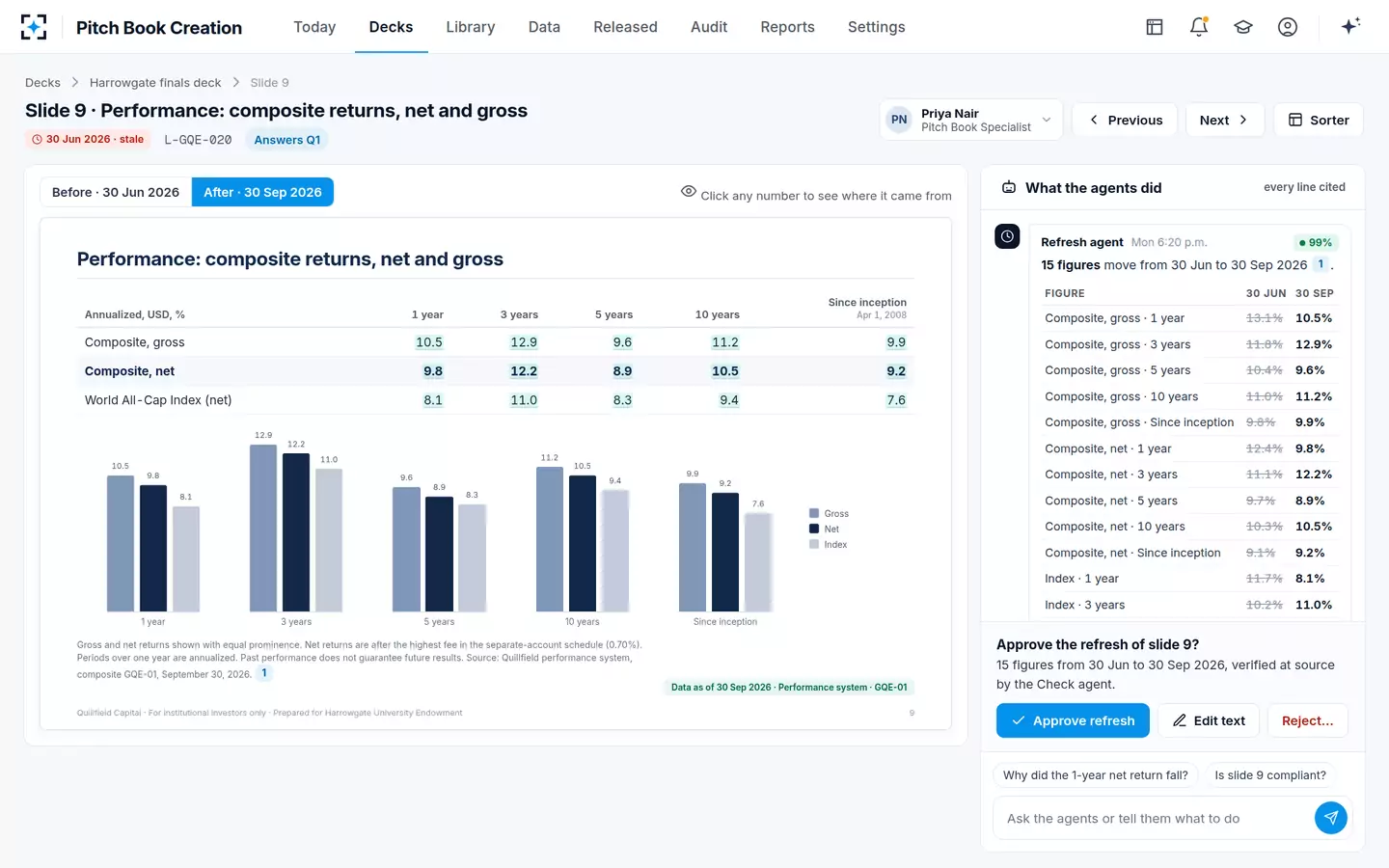
Asked why, the Refresh agent answers from the composite's own history: the one-year window moved forward a quarter, so the strong third quarter of 2025 dropped out; the composite returned 10.5% gross and 9.8% net in the twelve months to 30 September, against 13.1% and 12.4% to 30 June, and is still ahead of the index. That is the explanation a portfolio manager would give, sourced, before anyone has to ask the portfolio manager. If the specialist thinks a number is wrong, rejecting it keeps the slide's June figures and its red stamp, and the agent re-reads the source and answers her reason before proposing again.
Refresh, then re-read: why the second read has to be independent
A check that reads the refreshed slide and agrees with it has checked nothing; it needs its own route to the source. The Check agent in the solution re-reads every figure from the system of record with separate read-only access, without seeing the Refresh agent's output, and compares values, totals and labels. Its tolerance in the sample firm's settings is 0.0 percentage points: any difference goes to the figure's owner with both values and both sources.
Independence matters more when software writes the numbers. The US Treasury's 2024 report on AI in financial services warns that generative models can produce confident but wrong output (US Treasury, December 2024). Grounding a model in source documents reduces that risk without removing it: in a peer-reviewed test of legal research tools built on retrieval, each still produced hallucinated answers between 17% and 33% of the time (Magesh et al., Journal of Empirical Legal Studies, 2025). And help from AI is uneven even for skilled professionals: in a field experiment with 758 consultants, AI assistance raised output on tasks inside its competence but lowered accuracy on a task outside it (Dell'Acqua et al., Harvard Business School working paper, 2023). A second reader that cannot see the first is the cheapest defence against all three.
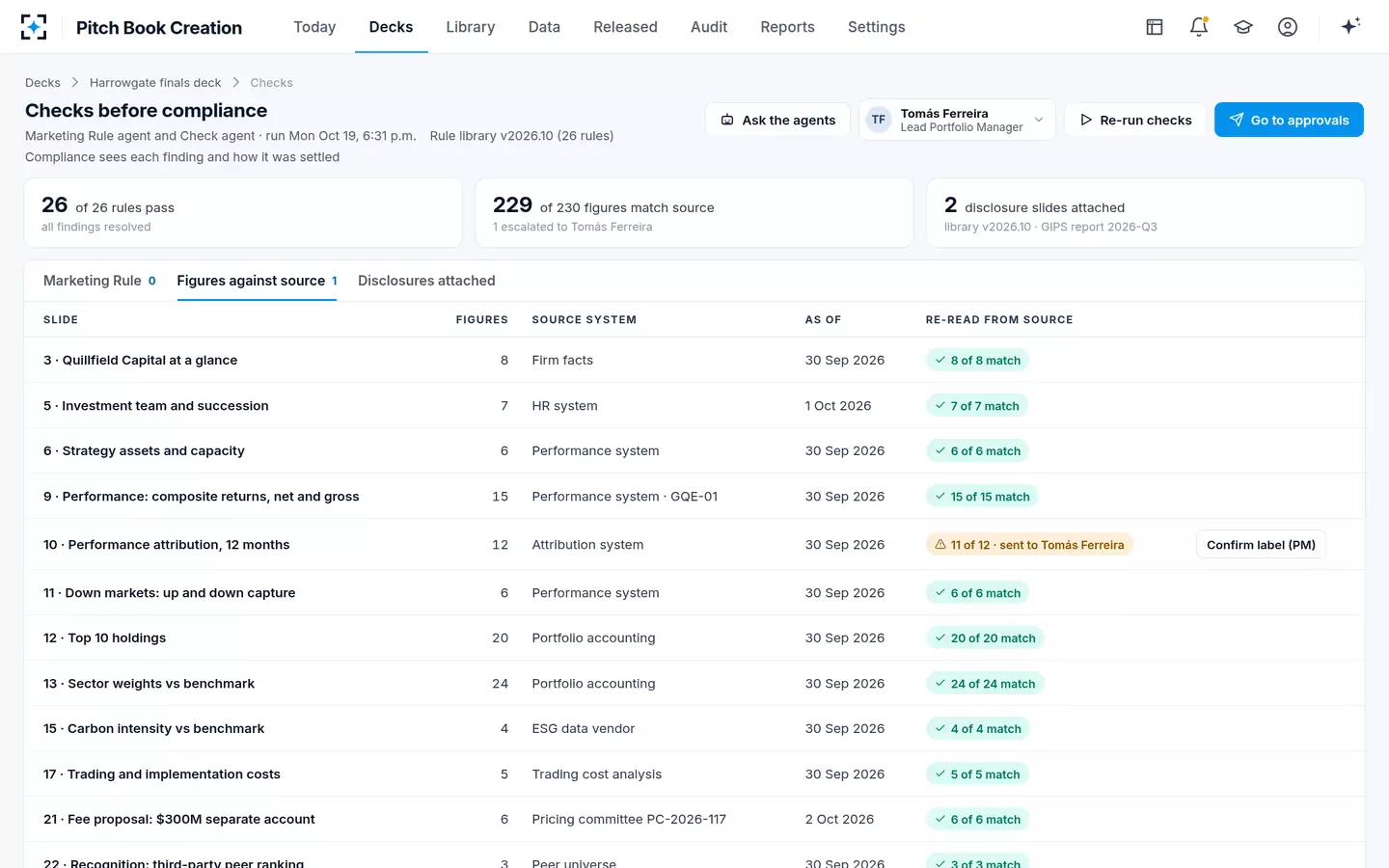
230 figures in one finals deck, re-read from source: one did not tie
The one that did not tie is the instructive case. On slide 10 the holdings-based attribution total was +2.2% and the composite's gross excess return +2.4%. Both were correct; they measure different things, since holdings-based attribution leaves out trading and cash. A link would have shown both numbers on different slides without comment. The Check agent did not pick one; it sent both values and both sources to the portfolio manager, who confirmed the label, attribution before fees with +0.2% from trading and cash, so the deck says what each number is.
Figures against source: every slide, its system and its as-of date
How the refresh and the re-read divide the work
The useful split is not human versus machine but proposer versus checker versus approver, with a person in the last seat. The Flow below is how the sample firm runs it on every open deck once a quarter is approved.
Pitch Book Creation's refresh: propose, re-read, approve
A person decides
Performance measurementApproves the quarter’s composite returns in the performance system.
Agent
Refresh agentFinds every open deck that shows the old quarter and proposes each new figure with a before-and-after view and an as-of stamp per slide.
Never: uses preliminary or unapproved data.
Agent
Check agentRe-reads every figure from its source with its own read-only access and compares value, total and label.
Never: changes a slide or sees the Refresh agent’s output.
A person decides
Portfolio managerDecides any difference, with both values and both sources in front of him.
A person decides
Deck makerApproves the refreshed slides with a reason code, or rejects a figure with a reason the agent must answer.
The design choice that matters is that the agents propose and the maker approves. When the sample specialist typed "Approve the refresh", the Refresh agent replied that it can prepare and explain but cannot approve, and put the decision in front of her with two buttons. Her approval of 105 figures on seven slides went on the audit trail with her name, the time and the reason code "Figures verified at source".
What to look for in PowerPoint automation tools for a regulated deck
Judge a tool by what it can prove about each number, not by how fast it fills a template. Ask each vendor to refresh one of your own released decks with the following quarter's figures, and to answer these questions on the result.
Ten questions for any PowerPoint automation tool before it touches a pitch book
- Where does each figure come from?
The system of record and the exact item, not a workbook someone exported.
- Can it tell approved from preliminary?
A preliminary quarter should be blocked, not merely flagged.
- Does every slide show its as-of date?
A stamp per slide, visible to the maker, that turns red when it is older than the approved quarter.
- Is every gross figure labelled and paired with net?
Net for the same period for returns. For characteristics such as capture ratios, the staff FAQ accepts gross figures only when labelled as gross and shown with the total portfolio’s gross and net returns.
- Who checks the refresh, and how independently?
A second read from the source, not a re-read of the slide.
- What happens on a difference?
It should go to the figure’s owner with both values, not be averaged or overwritten.
- Who approves?
The deck’s maker, by name and reason. A tool that approves its own work has removed a control.
- Does it keep your template and library?
Re-platforming a slide library is a project of its own, and agents should not need one.
- What does it keep afterwards?
The sources and approvals behind the released version, for five years from its last use.
- Can it trace a restated figure?
To every released deck that carries it, so corrections can be drafted for compliance.
Three of those questions are about the slide library rather than the refresh, and they decide how long a rollout takes. Keeping the approved library and adding a source behind every figure covers them, and the cost of each approach to a finals deck sets out how to price them.
Where Excel links are enough, and where they are not
Links are enough when one person owns one deck fed from one validated workbook. An internal monthly review deck, a board summary built by the person who built the workbook, a factsheet with a single data owner: in each, the maker and the data owner are close enough that the link's blindness is covered by people who know where the numbers came from.
They stop being enough when the deck goes outside the firm, draws on several systems with different approval clocks, or exists in many tailored versions at once. A finals deck is all three. The SEC's adopting release makes the point about templates directly: performance inserts or tables kept in a database and reused across otherwise customized communications are themselves advertisements subject to the rule (86 FR 13024). Every tailored deck that reuses a linked performance table inherits whatever that table contains.
That is also where Pitch Book Creation does not fit. A firm whose decks are a handful of standard pitches refreshed quarterly by one person may be well served by links and a careful checklist. The solution earns its place where dozens of decks are open at once, each tailored, each due to a consultant, and each one a regulated advertisement once it leaves the building. To see the refresh and the re-read on a deck of your own, start from Pitch Book Creation.
Questions people ask
Can PowerPoint update automatically from Excel?
Yes, if the chart or table was pasted as a link: PowerPoint can refresh it from the workbook, usually when the presentation opens and the user accepts the update. A chart built inside PowerPoint keeps an embedded copy of its data and does not update. Moving or renaming the workbook breaks the link, and the chart keeps showing its last values.
How do I automatically update graphs in PowerPoint from Excel?
Paste the chart as a link rather than as a picture or an embedded object, keep the workbook in a fixed location, and update links before each use. For many decks, a script that writes named cells into named shapes is sturdier than file links. Either way, record which file and which version fed the deck, because the slide will not show it.
Why do linked charts in PowerPoint stop updating?
The usual causes are a moved or renamed workbook, a changed sheet or range name, a link set to manual update, or a security setting that blocks updates when the file opens. In each case the chart keeps its last values and looks current. In a pitch book that is the most common route by which last quarter's figures reach a meeting.
Does an automated chart still need compliance review?
Yes. Automation changes how the number got onto the slide, not what the slide must show: net with gross for the same period, the required time periods and fair and balanced presentation under SEC Rule 206(4)-1. What automation can change is what compliance has to read, if every figure arrives with its source and its re-read result.
What are PowerPoint automation examples in asset management?
The common ones are quarterly refreshes of performance, holdings and attribution slides across open decks; client review decks generated from each account's data; factsheet-style one-pagers; and RFP appendices rebuilt from the same approved figures. In the sample week of the solution, one quarter's approval produced 2,418 proposed figure updates across 23 open decks.
Is it safe to let an AI tool write figures into a pitch book?
Only if something independent checks each figure against its source before a person approves it. Even retrieval-based AI tools produced hallucinated answers between 17% and 33% of the time in a peer-reviewed 2025 test of legal research tools. Pitch Book Creation separates the agent that proposes a figure from the one that re-reads it, and neither can approve.