An insurance quote comparison spreadsheet puts each carrier's quote in a column and each term of cover in a row, so a broker can see premium, limits, retentions, exclusions and conditions side by side and recommend one. Built by hand, it means retyping values from five quote layouts. The sheet's weakness is not arithmetic. It is that a cell holds a number and loses the words around it: “$5,000,000” for one carrier may mean each claim, and for another one aggregate shared with every other part of the policy. Botminds' Insurance Quote Comparison builds the same grid from the quotes and their forms, stores each value with its basis and its page, and marks the cells that read the same but are not. This guide is about the measure that matters for any comparison, hand-built or not: whether each cell matches the form that defines it.
The worked examples use the solution's sample renewal: a fictional brokerage comparing five fictional carriers' cyber quotes for a fictional client, Meridale Health Billing Services. Every passage quoted from a carrier is from that sample.
Three spreadsheet cells that were right, and the forms that made them wrong
What the spreadsheet cell says: $5,000,000, the same as the other four carriers
What the carrier’s form says: One aggregate is the most the policy pays for all loss under every insuring agreement combined, ransomware, business income and breach response included (page 14).
What the spreadsheet cell says: $5,000,000, full limit, read from the schedule
What the carrier’s form says: “Solely with respect to Insuring Agreement E (Cyber Extortion), Loss in excess of $1,000,000 is subject to Coinsurance of 20%, which shall be borne by the Insured and shall remain uninsured.” (endorsement NG-CY 114, page 37)
What the spreadsheet cell says: $100,000, lower than the incumbent’s $150,000 at renewal
What the carrier’s form says: The retention applies to each insuring agreement, so one ransomware event that triggers three agreements costs three retentions. (page 19)
How do you build an insurance quote comparison spreadsheet?
Build it as a set of rows you decide before the quotes arrive, one column per carrier, and three things in every cell: the value, its basis, and the page it came from. Rows come from the line of business and from the client's own requirements; columns come from the market; cells come from the documents. If any of the three is missing, the sheet is a summary, not a comparison.
The order of work matters. First write the client's requirements as rows, with the clause that imposes each one: a customer contract's insurance clause, a lender's covenant, a board memo, the expiring policy. Then add the rows every quote for that line must answer. Then read each quote into its column, declarations and schedule first, then every form on the forms list. Last, compare across each row and mark the cells whose wording differs. A sheet built in the opposite order, quotes first and requirements later, tends to compare what the carriers chose to show.
What columns and rows should an insurance comparison include?
One column per carrier, plus one for the client's requirement and, at renewal, one for the expiring policy. The rows differ by line; the sample brokerage's standard for cyber has 25 of them in five sections, and the same skeleton works as a template for most commercial lines with the limits section rewritten.
A cyber quote comparison template: 25 rows in five sections, and what each cell must record
| Section | Rows | What the cell must record |
|---|---|---|
| Cost and paper (5) | Annual premium; taxes and fees; total cost; paper and financial strength; quote valid until | Admitted or non-admitted, because a surplus lines quote adds tax; the date the offer lapses. |
| Limits (11) | Policy aggregate; network security and privacy liability; regulatory defense and penalties; PCI fines and assessments; media liability; cyber extortion and ransomware; business interruption; waiting period; dependent business interruption; breach response costs; social engineering fraud | Amount and basis: each claim, aggregate, sublimit, separate or shared aggregate, inside or outside the limit. |
| Retentions and claim expenses (3) | Retention; ransomware retention; claim expenses | Per claim, per event or per insuring agreement; whether defense costs erode the limit. |
| Cover terms and exclusions (5) | Retroactive date; war and state-backed cyber operations; tracking technologies; unencrypted devices; contractual liability | The form number and page that adds or removes the cover. |
| Conditions (1) | Subjectivities | Each condition, its timing (before binding or after) and the document that meets it. |
The third column is the one most templates leave out. A template that downloads with “Limit” and “Deductible” rows invites one number per cell, and the basis is exactly what a single number cannot hold. Even the FCA's guidance on assessing suitability, written for protection policies, lists what a recommendation must weigh as the policy's “level of cover and cost, and relevant exclusions, excesses, limitations and conditions” (FCA Handbook, ICOBS 5.3.2G); a sheet that records only cover and cost has two of the six.
What is the difference between per claim and aggregate limits?
A per claim limit is the most the policy pays for any one claim; an aggregate limit is the most it pays for everything in the policy period. Most liability limits have both. What the spreadsheet cell rarely shows is what else draws on the aggregate. In the sample case, one carrier's liability aggregate is separate from first-party loss; another's single aggregate is shared by everything, ransomware and business interruption included.
One bad year under two limits that both read $5,000,000
| Separate liability aggregate (Larkspur) | One shared aggregate (Bramwell) | |
|---|---|---|
| Limit as the sheet shows it | $5,000,000 | $5,000,000 |
| March: ransomware event, $3,000,000 of first-party loss | Paid from the first-party aggregate | Paid from the one aggregate: $2,900,000 after the $100,000 retention |
| Left for a privacy claim later in the year | $5,000,000 each claim, untouched | $2,100,000 |
| September: a customer’s privacy claim of $4,000,000 | Paid in full after the retention | $2,100,000 paid; the client carries $1,900,000, the retention included |
This is the difference the like-for-like checker in the solution looks for first. Nothing in either quote is hidden; both say what they mean on one page. The sheet hid it, by giving each a single number in the same row.
How do you compare deductibles and retentions?
Compare what the client pays on a realistic loss, not the figure in the retention row. A retention that applies to each insuring agreement can be charged several times on one event; coinsurance in an endorsement adds a share of the loss above a threshold; a sublimit caps a cover beneath the headline limit. The client's board in the sample case wrote its requirement the right way, as “A retention of no more than $150,000 for any one event, however many parts of the policy respond.”
One $3,000,000 ransomware event, five different bills for the client
Read with the retention row alone, Calloway's $100,000 looked like the best on offer and Larkspur's $150,000 like the worst. Applied to one event, Larkspur's is one of the two lowest bills and Calloway's is double it. A spreadsheet that wants to show this needs a row for the retention basis and a scenario row underneath, worked for each carrier.
How do you show exclusions in a comparison?
Give each exclusion that matters to this client its own row, and record the form that adds it, not just yes or no. Exclusions rarely appear on the declarations; they arrive as endorsements on a forms list, named by number. In the sample case the renewal quote from the incumbent added LSC 2291, an exclusion for tracking technologies, which mattered because the client's payment portal uses analytics tags. It showed up only by comparing the renewal's forms list with the expiring policy's.
The cyber market makes this harder than most lines. The GAO's review of the market found that carriers define common cyber terms in different ways, as the cyber insurance coverage comparison shows row by row, and NAIC staff told the GAO that without consistent definitions “it will not be clear which perils are covered and which are excluded” (GAO-21-477, May 2021). Two quotes can each exclude “war” and mean different things. A comparison that records the form number and page lets anyone who checks it read the definition; one that records “excluded: yes” does not.
What are common mistakes in insurance comparisons?
Almost all of them are the same mistake: a value copied without the words that qualify it. The list below is drawn from the sample case, where each one was present in at least one quote.
Eight mistakes that make a complete insurance comparison wrong
- Recording a limit without its basis
Each claim, aggregate, sublimit, separate or shared: the basis is half the value.
- Reading the schedule and not the forms
Coinsurance, sublimits and new exclusions arrive as endorsements named only by number.
- Comparing retention amounts, not retention bills
Per insuring agreement retentions stack on one event.
- Ranking on premium instead of total cost
A non-admitted quote adds surplus lines tax and fees; the sample sheet adds 5% to two quotes.
- Leaving out the retroactive date
A quote with no prior acts cover can fail a continuity requirement while matching on every limit.
- Putting “inside” and “outside the limit” in one row
Breach costs paid in addition to the limit and costs that erode it are different promises.
- Ignoring the quote’s validity date
An offer that lapses before the client meets is not an option.
- Keeping no page reference
A cell that cannot be traced to its page cannot be checked by anyone else, including after a claim.
How to test a quote comparison against its sources, not its totals
Test the cells, not the sums. A comparison whose totals reconcile can still be wrong in every way that matters, because the errors that hurt are bases and forms, not addition. The test is mechanical: take a sample of cells, open the page each one cites, and score the value and the basis separately. Then open every form on one carrier's schedule and check that each form that changes a term appears in a row.
Five cells traced to their pages: the value can match while the cell is wrong
Bramwell · privacy liability
In the sheet$5,000,000
Cited pagep.14, BIC-CYB 200 §III.A
Basis on the pagePolicy aggregate, shared with all insuring agreements
VerdictValue right, basis missing
Northgate · cyber extortion
In the sheet$5,000,000
Cited pagep.6 schedule; p.37 NG-CY 114
Basis on the pageFull limit on the schedule; 20% coinsurance above $1,000,000 in an endorsement
VerdictValue right, form missed
Calloway · retention
In the sheet$100,000
Cited pagep.19
Basis on the pageEach insuring agreement, so several can apply to one event
VerdictValue right, basis missing
Larkspur · retention
In the sheet$150,000
Cited pagep.3
Basis on the pageEach claim, up from $100,000 expiring
VerdictMatches
Ashcombe · retroactive date
In the sheet1 Nov 2026
Cited pagep.3
Basis on the pageInception: no prior acts cover
VerdictMatches, and fails the requirement
Run on a renewal the brokerage has already bound, the same test gives a measure worth having: the share of cells whose value and basis both match the bound policy, and the number of form-level changes the comparison caught. It is also the right way to judge any tool that claims to build the sheet for you, which is how a two-week pilot on past renewals is scored.
Is there a template for comparing commercial insurance quotes?
Yes, and the 25-row table above is one for cyber; employee benefits quotes need different rows altogether, which Group Benefits Quote Comparison covers. A template fixes the rows, not the reading. Its value is that it forces the same questions of every quote. Its limit is that every cell still has to be read from the right page of the right document, with the forms opened. The GAO's finding that cyber terms are not consistently defined means no template can standardize the answers.
The comparison Insurance Quote Comparison builds: value, basis and page in every cell
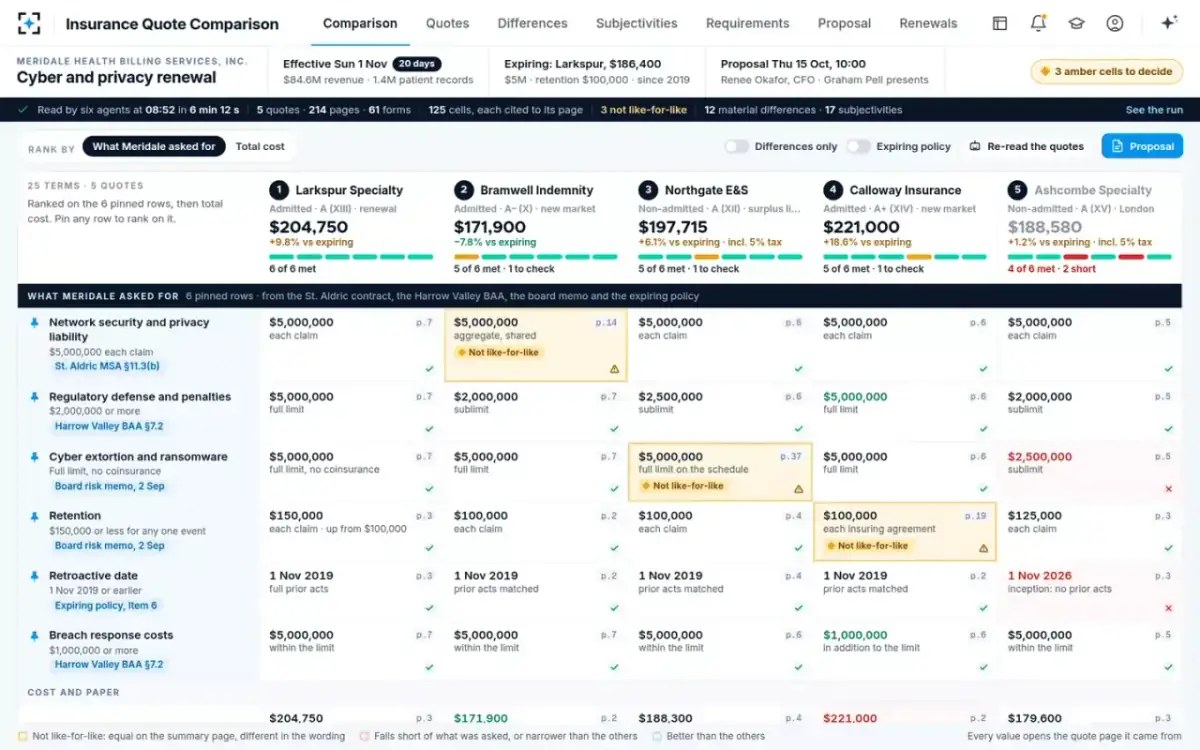
What the solution changes is who does the reading and how it is checked. The readers fill the sheet from the documents; a separate checker compares the wording behind equal values; the account executive decides each amber cell; and the material differences are listed for the proposal with the wording quoted. The proposal standard, including which rows each line compares, belongs to the brokerage's placement and E&O lead.
Twelve material differences across five quotes, ranked by what they could cost
Material differences, each with the wording, not a summary of it
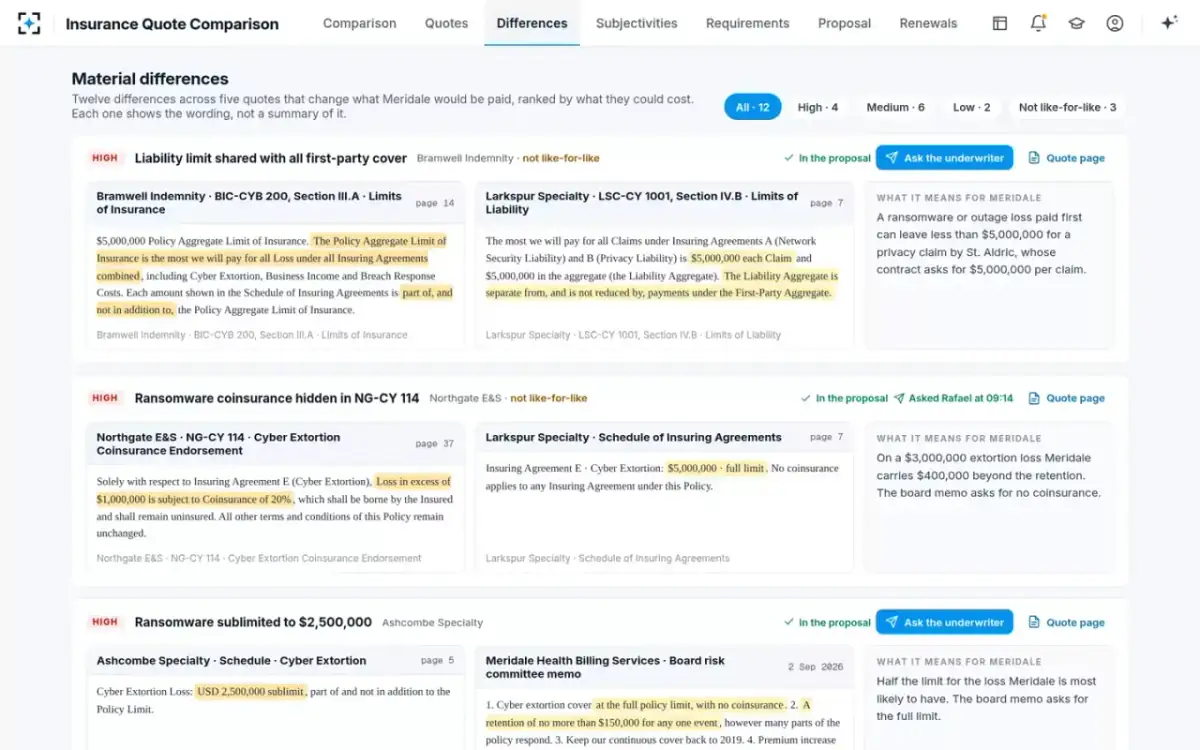
A spreadsheet is still how many clients like to read the result, and the solution's output can be read that way. The difference is underneath: each cell can be traced to its page, and the cells that only look equal have been decided by a person. The cost of getting that wrong is set out in what a broker owes the client. To see the comparison built on the sample renewal, start from Insurance Quote Comparison.
Questions people ask
Should a comparison show the expiring policy as a column?
At renewal, yes: it is the client's baseline, and new exclusions and narrower terms only show against it. In the sample case the incumbent's renewal changed 6 of 22 terms, including a higher retention, a longer business interruption waiting period and a new tracking technologies exclusion.
How should taxes and fees appear?
As separate rows, with total cost below them, because ranking on premium alone favours non-admitted quotes whose tax is added on top. In the sample sheet two non-admitted quotes carry a 5% surplus lines tax, which moved one of them from $179,600 of premium to $188,580 in total.
What does “not stated” mean in a comparison?
That the quote does not address the term on any page the reader found. It should never be filled with a typical value or with another carrier's figure; it is a question for the underwriter. Insurance Quote Comparison writes “not stated” for exactly that reason.
How many carriers should one sheet compare?
As many as returned a quote the client could actually buy. A declination or an indication that cannot be bound belongs in the market summary, not the comparison, because a column implies an offer. The sample case compares five bindable quotes.
Can the client edit the comparison?
The client should see it, not edit it. The comparison is the brokerage's reading of the carriers' documents; the client's role is to confirm the requirements in the rows and to choose among the options. Keeping the client's decision separate from the brokerage's reading is what makes the file useful later.