Document redaction software for a clinical study report has to do four things a general-purpose tool rarely does all of: excise the text rather than cover it, read the parts of the document that are not text — scanned pages, headers, footnotes, signatures and file metadata — keep one identifier hidden the same way in every place it appears across a multi-document package, and produce the exact set of files each authority asks for, marked and coloured to its rules. The reason it is hard is scale and shape: a Phase 3 package runs to thousands of pages across a study report, its Appendix 16.1 and its Appendix 16.2 listings, and a single identifier left readable anywhere in it undoes the anonymisation of the whole. Botminds' Clinical Trial Disclosure & Redaction is built for the package rather than the page: it proposes every redaction with the authority's rule, links every occurrence of every identifier across all the documents, and shows the places where one has been handled differently.
The sponsor, study, medicine, sites and people in the examples below are invented sample data used to demonstrate the solution. The regulatory requirements are the authorities' own, linked where they appear.
What a tool is actually asked to cope with, in one sample package
2,140
pages across three documents: the study report body, Appendix 16.1 and the Appendix 16.2 listings
312
of them scanned, with no text layer at all, including signature pages
1,946
distinct identifiers, each linked to every place it appears in the package
14
of them hidden in one place and readable in another, found overnight
What document redaction software has to do for a clinical package
Start from what the authority will take delivery of, because that is the specification. EMA sets out the technical requirements for the redaction proposal version of the clinical reports and says plainly what they are for: "These are the minimum requirements that the redaction tool used should fulfil" (EMA Policy 0070 external guidance, v1.5, §2.3.3.1.7). Two versions of every document are owed, and they are opposites of each other. The proposal version has to show the reviewer what you intend to hide: "The text proposed for redaction should be clearly identified as such (i.e. marked) and the text itself should be legible (read-through). Each proposed redaction of CCI and PPD should be labelled in the read-through documents using 'CCI' or 'PPD'." The final version has to hide it for good.
That alone rules out a workflow built on a single pass of black boxes. A tool that can only produce a flattened, redacted file cannot produce the read-through proposal; a tool that can only annotate cannot produce the final. What a disclosure team needs is one set of decisions that renders two ways — and, at the end, four deliverables: the redacted documents, the proposal version with its labelled annotations, the justification table for the confidential redactions, and the anonymisation report.
Can redacted text be recovered from a published PDF?
Sometimes, yes, and in more ways than most buyers assume. The crude failure is familiar: a black rectangle drawn over text that is still in the file, so the words come back with a copy and paste or a text extractor. EMA closes that one explicitly in its requirements for the final version: "The un-redacted text only must be text-searchable. Redacted text and the blackened redaction box (that covers the redacted text) should neither be searchable nor subject to further editing" (§2.4.5). EMA's CTIS guidance says the same thing from the other direction, asking that a tool ensure the information "is irreversibly blacked out by applying a permanent and unremovable overlay and, at the same time, making the redacted text unreadable and unsearchable in the document" (EMA, Protection of personal data and CCI while using CTIS, v2.2, §3.3.1).
The subtler failure survives true excision, and it is the finding every buyer of redaction software should know about. Researchers at the University of Illinois Urbana-Champaign showed that the positions of the characters still in the file leak information about the characters removed from it: "In particular, subpixel-sized horizontal shifts in redacted and non-redacted characters can be recovered and used to effectively deredact first and last names. Unfortunately these findings affect redactions where the text underneath the black box is removed from the PDF" (Bland, Iyer and Levchenko, 'Story Beyond the Eye: Glyph Positions Break PDF Text Redaction', Proceedings on Privacy Enhancing Technologies, 2023).
"We examine 11 popular PDF redaction tools, including Adobe Acrobat, and find that they leak information about redacted text."
Bland, Iyer and Levchenko, 'Story Beyond the Eye: Glyph Positions Break PDF Text Redaction'
The study went on to de-redact hundreds of real-world redactions, including ones in inspector-general investigation reports and freedom-of-information responses, and the authors released open-source code to fix trivial redactions and reduce what non-excising redactions leak. For a disclosure team the practical reading is not that redaction is hopeless; it is that "we draw a box and flatten the file" is not a complete answer to how a tool works, and that the question "what is left in the file where the text used to be" deserves a real reply rather than a reassurance.
Black boxes leak more than the words under them
Even a perfectly excised page can carry the identifier somewhere else in the same file. Three places are worth naming because tools treat them inconsistently. The first is file metadata: EMA's CTIS guidance asks that "Personal data of the author of a document, included as part of the metadata of a file, should equally be removed prior to uploading the document" (CTIS guidance, v2.2, §3.3.1). The author field of a protocol amendment names a person as surely as the signature block does.
The second is signatures, which the same guidance disposes of in one line: "Signatures should never be disclosed in the document version 'for publication.'" EMA's Policy 0070 guidance extends that to everything written by hand: "Handwritten text present in the clinical reports in the form of medical notes, annotations or even handwritten signatures and associated dates may lead to the identification of an individual and should be redacted" (§3.6). A handwritten date beside an investigator's signature is an identifier, and no text-layer search will ever find it.
The third is the parts of a page that are not the body: running headers that repeat a site or a subject on every page of a listing, footnotes that explain a row, and the table cells a page-at-a-time search reads in the wrong order. Health Canada's list of directly-identifying variables is a useful reminder of how wide the net is — names, initials, signatures, job titles and positions, addresses, fax numbers, email addresses, health plan beneficiary numbers, batch and serial numbers, telephone numbers (Health Canada, Public Release of Clinical Information). Batch and serial numbers are the ones tools miss, because they look like data rather than like a person.
Scanned pages, headers, footnotes and file metadata
A third of the awkwardness in a real package comes from pages that were never text. In the invented sample package, 312 of 2,140 pages are scans: signed investigator pages, consent documentation, annotated case report form pages. A tool that works from the PDF text layer sees nothing on any of them, and — this is the part that bites — reports nothing, which reads exactly like a clean page.
Ask specifically what happens to such a page. Does the tool read the image and propose redactions on it, or does it hand the page to a person with a note that it could not be read? Both answers are defensible; silence is not. In the sample package two of the fourteen identifiers handled inconsistently were on scanned signature pages, and two more were in page headers — four of fourteen in the places a text search does not reach.
Where the fourteen inconsistencies hid, in one sample package
14 identifiers hidden in one place and readable in another
- Broken across a line · 29%
- Split across table cells · 21%
- Written another way · 21%
- On scanned signature pages · 14%
- In page headers · 14%
The first two bars are the ones that embarrass a careful team, because the identifier was found and hidden elsewhere on the same page. An ID that breaks across a line in a narrow footnote column becomes two strings, neither of which matches what the tool was told to look for; an ID split across table cells becomes two numbers in two boxes. A search is doing exactly what it was asked. The question for a vendor is what else the tool does besides search.
Does it keep one identifier hidden the same way everywhere?
This is the test a clinical package applies that almost nothing else does, and it is worth putting at the top of an evaluation rather than the bottom. One subject number can appear in the study report body, in a narrative, in a table in section 14, in Appendix 16.1 and dozens of times in the Appendix 16.2 listings. Hiding it is not one decision repeated; it is one decision that has to land identically in every place, including the places written differently.
One redaction, and every other place the same subject appears
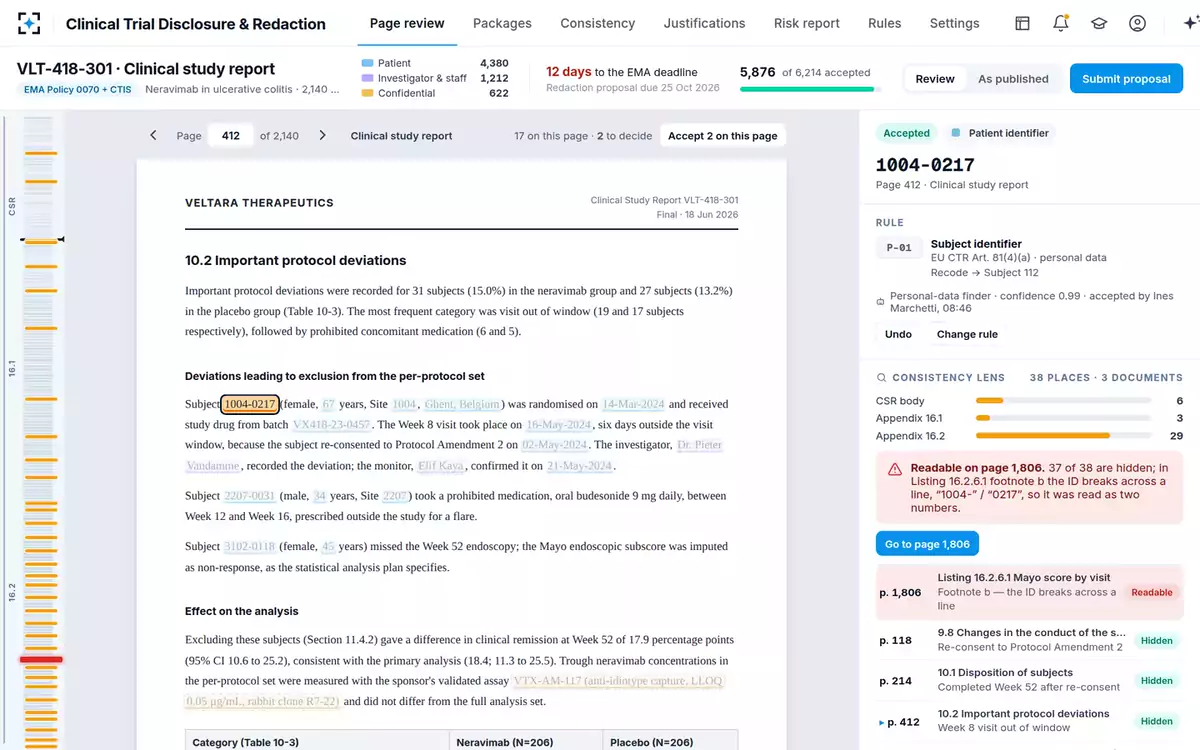
In the sample package the consistency check linked 1,946 identifiers to every place they appeared and found fourteen handled differently. One of them was a subject number readable in a listing footnote on page 1,806 because it had broken across a line — hidden in the other 37 places it appeared. Nothing about the page it was on looked wrong; the problem was only visible by comparison. That comparison is also precisely what EMA's review of the anonymisation report tests, so a tool that cannot make it leaves the claim in the anonymisation report resting on a manual re-read nobody has time for.
A page-at-a-time tool and a package-at-a-time tool, on the same study report
General-purpose PDF redaction: The open document, and a search across it for strings you supply.
Built for a disclosure package: Every document in the package at once, and every form the same identifier takes in them.
General-purpose PDF redaction: Usually nothing, unless the file has been put through text recognition first — and silence looks like a clean page.
Built for a disclosure package: Read as images, with what could not be read handed to a person rather than passed over.
General-purpose PDF redaction: Two separate decisions, as consistent as the person making them.
Built for a disclosure package: One decision, applied the same way everywhere, with any place it is still readable flagged.
General-purpose PDF redaction: In a reviewer’s notes, if anywhere.
Built for a disclosure package: On the redaction: the authority’s rule and reference, the method, and who accepted it.
General-purpose PDF redaction: Review time that scales with pages, and a residual risk that scales with them too.
Built for a disclosure package: Set-up: rules per authority, a recoding scheme, and the discipline of accepting proposals rather than making them.
Recoding, banding and offsetting are not redaction
A buyer who equates "redaction software" with "black boxes" will under-specify the job. EMA treats masking as only the simplest of several techniques: "The simplest method of anonymisation is the masking of values for variables which allow direct or indirect identification of an individual from the data. This technique is sometimes called redaction," and, pointedly, "Redacting entire sections of the report where redaction of pre-specified variables is possible is not considered appropriate, and is, therefore, not recommended by EMA" (§3.5.3.2). Beyond masking, the guidance describes randomisation and generalisation — the families that include shifting dates and banding ages.
In practice an anonymised study report needs four operations, not one: redact (a study nurse's name, a signature), recode (a subject number, to a code used identically in every document and every package for the study), offset (a visit date, to a study day), and band or pool (an age, a site). Only the first is a black box. The other three change the published value to another value, which means the tool has to be deterministic and its settings auditable — the same input giving the same output every time, or the listings stop reconciling with the body. That is a software requirement, and it is the one most often discovered after purchase.
Labels, colours and the files each authority wants back
The deliverables are specified down to the colour, and getting them wrong costs a round of correspondence rather than a rejection — but it costs it at the point in the procedure when nobody has days to spare.
What the published and proposed files must look like
| Requirement | What is expected | Where it comes from |
|---|---|---|
| Proposal version | Redactions marked but legible — read-through — and each one labelled "CCI" or "PPD". | EMA Policy 0070 external guidance, §2.3.3.1.7 |
| Commercially confidential redactions, published version | Black background with red overlay text. | EMA Policy 0070 external guidance, §2.3.3.1.7 |
| Protected personal data, published version | Blue background — pantone 291 C, RGB 115, 203, 235 — with black overlay text. | EMA Policy 0070 external guidance, §2.3.3.1.7 |
| Visibility | "Redactions must be clearly visible (typically using a black rectangle)." | EMA Policy 0070 external guidance, §§2.3.3.1.7 and 2.4.5 |
| Labels in the final file | Agreed labels "should be visible and irremovable together with the final redacted text"; files must not be password protected, because EMA watermarks every page. | EMA Policy 0070 external guidance, §2.4.5 |
| Searchability | Only the un-redacted text is text-searchable; the redacted text and the box over it are neither searchable nor editable. | EMA Policy 0070 external guidance, §2.4.5 |
| Colour fidelity | If the original report had colour text or figures, the final redacted version should be in colour too. | EMA Policy 0070 external guidance, §2.4.5 |
One thing not to confuse: the colours a tool uses on screen while a team is reviewing are not these colours. In the solution the review page shows proposed redactions in three colours by kind, which is a working aid for the person accepting them; the published file still has to carry EMA's black-and-red and blue-and-black. Ask a vendor to show you the published artefact, not the editing screen. The justification table that accompanies the confidential redactions is a separate deliverable again, and what EMA actually accepts as commercially confidential decides what goes in it.
What a general-purpose PDF tool does well
It is worth being straight about this, because a buying guide that finds no use for the incumbent is not credible. For the page in front of you, a mature PDF redaction tool is excellent: fast marking, reliable excision when it is configured to excise, familiar to everyone, and already validated in most quality systems. EMA itself treats the choice as the sponsor's and underwrites it for smaller companies: "The choice of the redaction tool is a decision to be taken by each applicant/MAH, EMA will make available to Micro, Small and Medium sized Enterprises (SMEs) a license for a redaction tool for a period of 12 months. SMEs are advised to contact the SME office five months prior to the CHMP opinion to apply for the redaction tool licence" (§2.3.3.1.7). A sponsor with one product and one package a year should take that offer seriously before buying anything.
What changes the calculation is volume and shape, not sophistication. At a few dozen pages, a person holds the whole document in their head and consistency takes care of itself. At 2,140 pages across three documents, with 1,946 identifiers and 312 pages that are pictures, the limiting factor stops being how fast you can mark a page and becomes whether anyone can tell you what is on the pages you did not open. The sourcing question that follows — do it inside, buy the service, or buy the tool — is a decision of its own.
Nine questions to put to a vendor
Each of these has an answer that should end the conversation, which is what makes them useful in a first meeting rather than a procurement document.
Nine questions, and the answer that disqualifies a tool
- When you redact, is the text removed from the file, or covered?
Disqualifying: "the box is on top, nobody can read it." Ask to extract text from a redacted sample and search it.
- What is left in the file where the removed characters were?
Disqualifying: a blank look. Published research de-redacts names from character positions alone, in tools that do excise.
- What happens to a scanned page with no text layer?
Disqualifying: it is skipped silently. Acceptable: it is read as an image, or handed to a person as unread.
- Does it propose redactions in headers, footnotes and table cells, and find an ID broken across a line?
Disqualifying: "our search finds whatever you type." That is the failure mode, stated as a feature.
- Can it show me every other place this identifier appears, across every document in the package?
Disqualifying: one document at a time. This is the test the authority’s consistency review applies.
- Does it remove document metadata and handle signatures?
Disqualifying: metadata is out of scope. The author field and a handwritten signature both name people.
- Can it recode, offset and band — deterministically — as well as black out?
Disqualifying: redaction only. Then subject codes, study days and age bands are somebody’s spreadsheet.
- Can it produce both versions: read-through proposal with CCI and PPD labels, and the final file in the required colours?
Disqualifying: one output. Two versions of every document are owed, and they are opposites.
- What leaves the building, and does the un-redacted original ever?
Disqualifying: no clear answer. Decide this before a vendor’s architecture decides it for you.
Where the rules and the recoding live
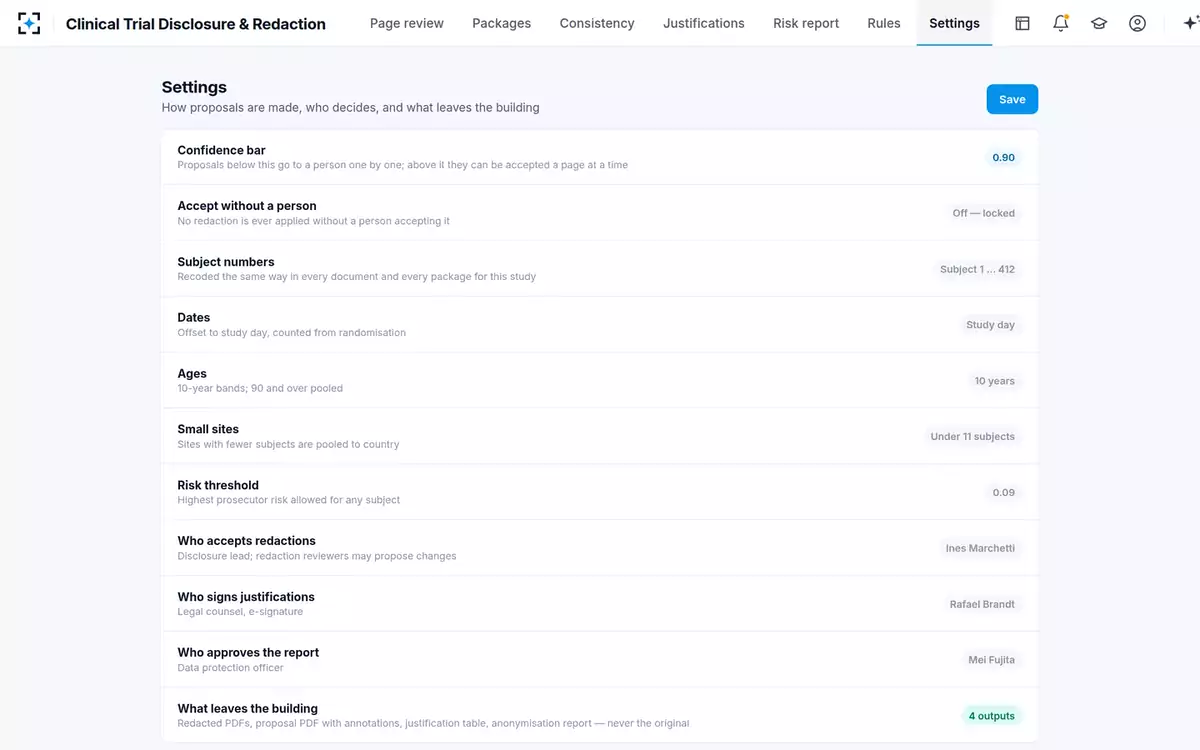
A tool is only ever half the answer here. The other half is that someone has to accept every proposal, and that the reason for each redaction has to survive being read by a regulator months later. To see redactions proposed with their rule, linked across a package, start from Clinical Trial Disclosure & Redaction.
Questions people ask
Can redaction software remove text from a PDF permanently?
Good tools excise the characters rather than cover them, and that is what EMA requires of the final version: only the un-redacted text may be text-searchable, and neither the redacted text nor the box over it may be searchable or editable. Test it rather than take it on trust — extract the text from a redacted sample and search it for what should be gone.
Can you redact a scanned PDF?
Yes, but only with a tool that reads the image. A scanned page has no text layer, so a text search finds nothing and reports nothing, which is indistinguishable from a page with nothing to hide. In a clinical package the scans are disproportionately dangerous because they include signature pages and handwritten annotations, which EMA says should be redacted precisely because they can identify a person.
Does redaction remove document metadata?
Not automatically. EMA's CTIS guidance asks for personal data of a document's author, held in the file's metadata, to be removed before the document is uploaded and published. Treat metadata as a separate step with its own check, and ask a vendor to demonstrate it on a real file rather than describe it.
How do you check a redaction before publishing?
Three checks catch most of it: extract the text of the published file and search it for identifiers that should be gone; open every page that was a scan and look at it; and compare each identifier against every other place it appears in the package, which is where the inconsistencies live. The third is the one that cannot be done by eye at a few thousand pages.
Is a general-purpose PDF tool enough for a clinical study report?
For a small package, often yes — and EMA will license a redaction tool to a micro, small or medium-sized enterprise for twelve months, which makes it the sensible starting point for a sponsor with one procedure. What a general-purpose tool does not do is tell you about the pages you did not open: consistency across documents, scanned pages, and the recoding and banding that an anonymised report needs beyond black boxes.
What colours and labels does EMA expect in the published file?
Commercially confidential redactions are expected as black background with red overlay text, and protected personal data as a blue background — pantone 291 C, RGB 115, 203, 235 — with black overlay text; redactions must be clearly visible, typically a black rectangle, and agreed labels must stay visible and irremovable with the final text. Temporary redactions applied to avoid unblinding an ongoing study are marked BLD in white on black instead.