Census data cleaning, for a group life or disability quote, is the work of turning the employee census a broker sends into a file the carrier can rate: finding the table, mapping the columns, and correcting the values that would break the price. Most of it is done as validity checking, making sure each cell has the right form. That is necessary and not enough, because a census can be perfectly valid and still describe the wrong people, ages or pay. Botminds' Group Census & RFP Intake Automation separates the two tests: agents check every cell for validity and accuracy, compare the file with the RFP letter and a second source, and suggest each fix with its reason, and a person accepts or keeps it.
The distinction is old in statistics. The federal statistical agencies' data quality framework defines accuracy as measuring "the closeness of an estimate, including direct and modeled estimates, to its true value" (Federal Committee on Statistical Methodology, A Framework for Data Quality, 2020). A date of 01/01/1900 is a valid date. It is not close to anyone's true birth date.
Valid is not accurate: eight cells from one census
Passes a format check: A real date in the right column, in the right format.
What an accuracy check finds: A placeholder: the employee would be 127 on a 1 January 2027 effective date, and lands in the oldest age band, which on a life table is the most expensive.
Passes a format check: Parses as a date once a spreadsheet picks a century.
What an accuracy check finds: The century is a guess: 1968 makes the employee 58; 2068 makes the row impossible. Only a second source settles it.
Passes a format check: A positive number in the salary column.
What an accuracy check finds: An hourly rate. At 40 scheduled hours, $27.00 × 40 × 52 = $56,160 a year.
Passes a format check: A positive number.
What an accuracy check finds: A placeholder, often for an officer whose pay is kept off the export.
Passes a format check: A valid relationship code and a valid date.
What an accuracy check finds: A dependent on an employee row: counted as a life, with someone else’s age and sex.
Passes a format check: Every row is complete.
What an accuracy check finds: A duplicate, or a dependent filed under the employee’s ID. Either inflates lives and volume until it is resolved.
Passes a format check: A non-blank text label.
What an accuracy check finds: One of the employer’s own department codes: it must be mapped to a class the letter defines before a plan design can attach.
Passes a format check: Five-digit ZIPs, all valid, all matching their state.
What an accuracy check finds: The letter names a third plant in Ohio. A whole location is missing, and no cell shows it.
What is census data cleaning for group insurance?
It is the step between the broker's file and the rating file. Brokers build censuses from an employer's payroll or HR system, and those exports are made for paying people, not for pricing insurance: a merged title across the top rows, birth years cut to two digits, hourly rates in the salary column, spouses and children listed under the employee, departments spelled four ways, placeholders where a value was missing. Cleaning produces a census in the carrier's rating layout, with each person's age at the effective date, earnings on an annual basis, class, hours, location and status.
The statistical framework above names the problem precisely. Using a payroll export to price insurance is what it calls secondary use of nonstatistical data, and it warns that coverage error "applies to secondary use of nonstatistical data when the universe from which the data were originally collected does not match the target population of the intended data product." A payroll universe and an eligible-employee universe are rarely the same.
What are common errors in an employee census?
Birth dates, pay basis and class labels lead, in the solution's fictional sample season of 214 RFPs. That season is sample data, not a measured industry rate: no public body publishes census error rates. But the order matches what the public record shows carriers asking about, and the mix is a reasonable place to start a test plan.
What the fixes were, across a sample season of 214 censuses
How do you validate census data for insurance?
Run two sets of tests on every field. Validity tests ask whether the value could be right: is it present, of the right type, in a plausible range, consistent with the row's other fields. Accuracy tests ask whether it is right, and they always need something outside the cell: a second source, the RFP letter, the arithmetic of the pay basis, or the broker. Most hand cleaning runs the first set and stops.
Validity and accuracy tests, field by field
| Field | Validity test (the cell alone) | Accuracy test (needs a second source) |
|---|---|---|
| Date of birth | A date; age 16 to 85 at the effective date; no two-digit years | Matches the current carrier’s billing roster when two of three keys agree |
| Sex | Present | Asked of the broker when blank: never inferred from a name |
| Annual earnings | A number at or above a floor ($10,000 in the sample settings) | Pay basis confirmed: hourly × scheduled hours × 52, monthly × 12, or the roster’s billed salary |
| Scheduled hours | A number of weekly hours | Against the letter’s eligibility wording; marginal cases confirmed with the broker |
| Class | Not blank | Mapped to a class the letter defines; unmapped labels become questions |
| Relationship | A known code | Employees only on the census; dependents moved to their own list |
| Employee ID | Unique | Two rows for one person merged only after a person reviews them |
| ZIP, state, location | Five digits; state matches ZIP | Every location in the letter present on the file |
| Lives | A count | Equal to the letter’s count, or the gap explained |
What is a placeholder birth date, and why does it matter?
A placeholder birth date is a value typed to fill a required field when the real date was missing: 01/01/1900, 01/01/1901, the first of January of some year, or the hire date copied into the wrong column. It passes every format check. It matters because age drives price more than any other census field in group life and disability, and pricing works in age bands. The EEOC's rule lets plans adjust benefits by cost "on the basis of age brackets of up to 5 years" (29 CFR 1625.10), and the IRS values group-term life cover "on the basis of 5-year age brackets" (26 CFR 1.79-3, Table I).
The IRS table gives a public sense of the stakes. It is not any carrier's rate, but it is an official age-graded price of group-term life cover: $0.10 a month per $1,000 at ages 40 to 44 and $2.06 at 70 and above. On a $50,000 flat benefit, a 42-year-old wrongly placed at 127 moves from $5.00 a month to $103.00 on that table, a twentyfold error on one row. Two-digit years do the opposite kind of damage: a birth year of 68 read into the wrong century makes the row impossible, and one read into the right century by luck hides that it was ever a guess.
The fix is a second source, not a rule. In the solution's sample case, the birth-date column carried 63 problems. Fifty dates came from the current carrier's billing roster, matched on two of three keys; thirteen two-digit years were expanded by rule; and the underwriter accepted the whole column with each source in view. How those ages then feed an age-banded or composite rate is worked in age banded rates vs composite rates.
One cell, its suggested fix, the reason and the rule
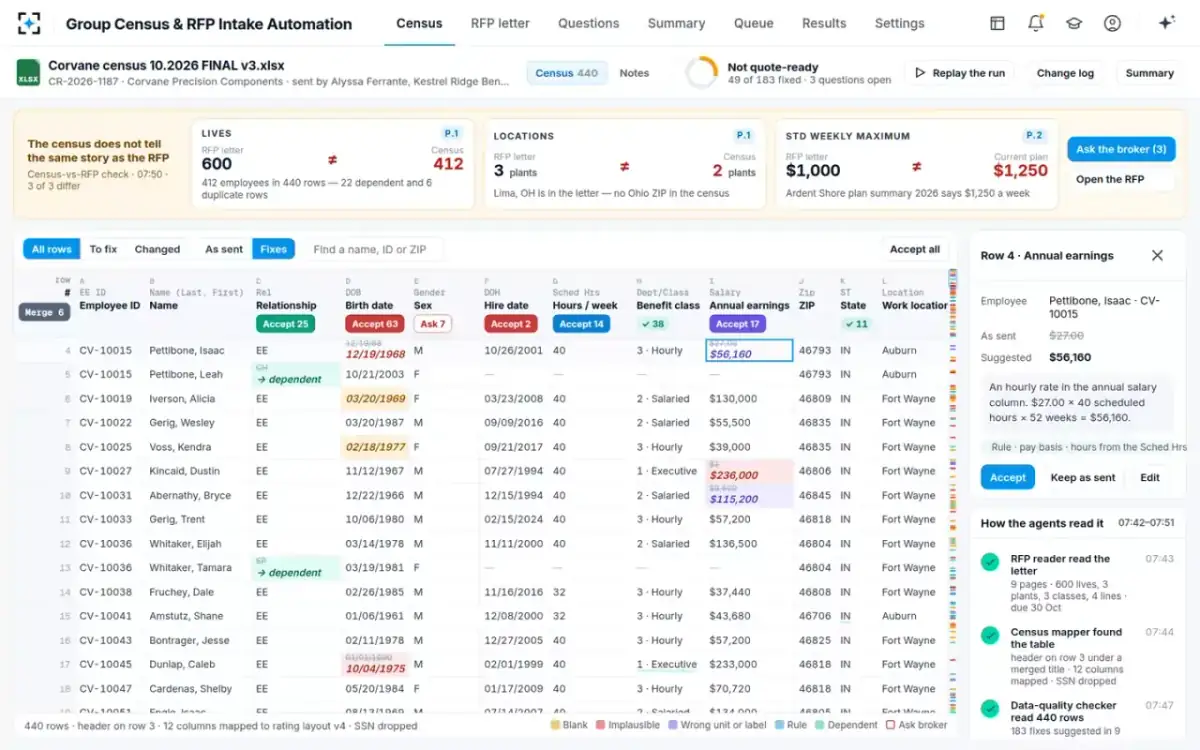
Pay basis: the hourly rate in the salary column
Earnings errors are the second largest group, and the most expensive for disability lines, because benefits and premium are both set from earnings. Payroll systems hold pay as an hourly rate, a monthly amount or an annual salary, and an export that flattens them into one column produces a salary column with three units in it. The accuracy test is arithmetic plus the hours column: a value of $27.00 with 40 scheduled hours is an hourly rate; a value of $4,680 for a salaried employee is probably monthly. Each conversion should show its working so a person can accept it.
The sample case shows the scale. Seventeen salary cells changed: eight hourly rates annualised at scheduled hours times 52, four monthly amounts multiplied by 12, and five $1 placeholders replaced with the salary billed on the current carrier's roster. The $27.00 row alone moves that employee's covered monthly earnings for long-term disability from $2.25 to $4,680. What that does to a long-term disability premium is priced, error by error, in how long term disability rates are calculated.
How do you find duplicate employees in a census?
Match rows on several keys at once, and treat a match as a question until a person confirms it. Two rows with the same employee ID and different names are often an employee and a dependent; two rows with the same name and birth date and different IDs are often a rehire; two identical rows are usually an export that ran twice. The statistical framework calls the risk linkage error, and it cuts both ways: "false matches or missed matches."
In the sample census, 440 rows held 412 employees: 22 rows were dependents on employee rows and 6 were duplicates. Counted as lives, those 28 extra rows overstate the group by almost 7%, and each dependent carries someone else's age and sex into the employee mix. The solution moves dependents to their own list and proposes merges, which the underwriter accepts as a group, each reversible.
A whole column of fixes, accepted at once
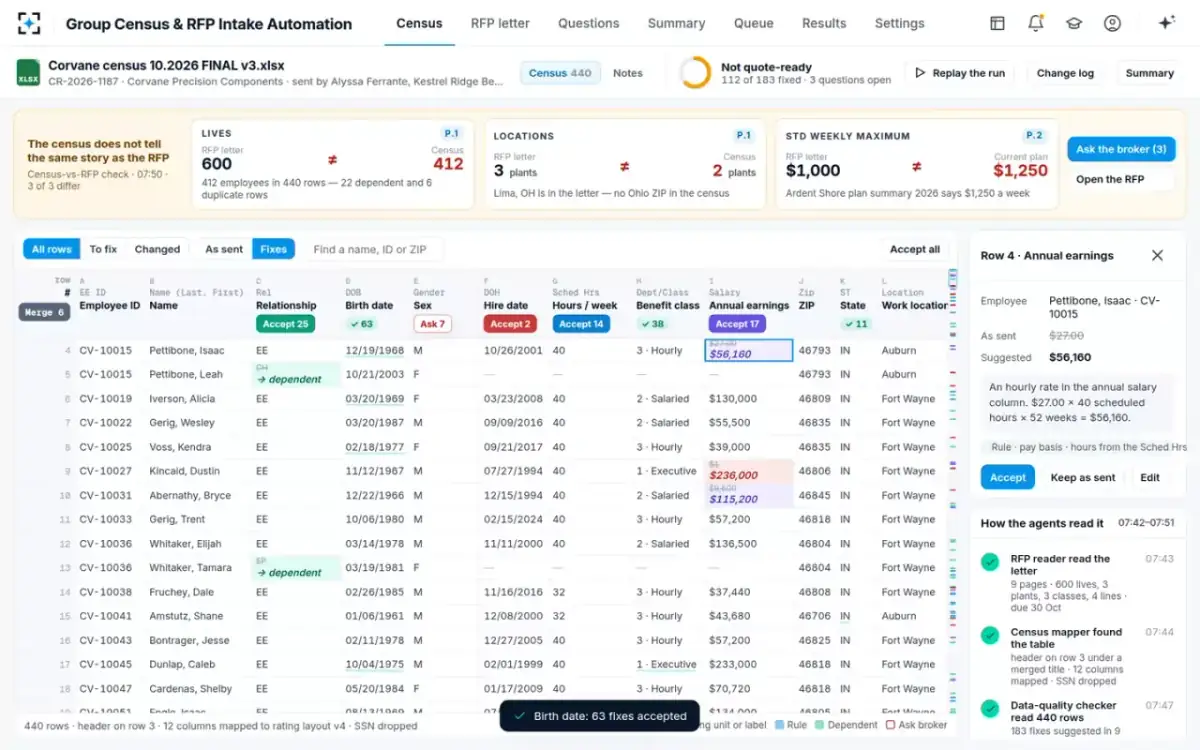
A census can be accurate row by row and still describe the wrong group
The hardest error has no cell. If the broker's export left out a plant, every row on the file can be correct and the case still be priced on the wrong age, sex and salary mix. The statistical name is coverage error; the practical test is to compare the file with the letter: the count of lives, the list of locations and the list of classes.
Public procurements show how often the gap is found only by a bidder reading closely. Bidders on Providence's 2024 life RFP noticed that "The census does not show any class 5 lives (superintendents)" although a certificate for that class was provided (City of Providence). On Indiana's 2019 RFP, 5,718 employees had no entry under the census's plan column, and only a question established that they "are not currently enrolled in group life insurance" (Indiana RFP 19-112). In Clark County's 2023 RFP, a bidder found retirees on a census for a plan that does not cover them (Clark County RFP 868). In the solution's sample case, 188 employees at a plant in Lima, Ohio were missing: almost a third of a 600-life group, found by the reconciler because the letter named three plants and the file had ZIPs for two.
A cell can be checked against a rule. A census can only be checked against the letter that describes the group it is supposed to list.
Can a carrier change a broker census?
A carrier should never overwrite it. The census is the broker's representation of the employer's workforce, and the quote rests on it; a carrier that corrects values silently can no longer show what it was given, which matters when the case is audited, lost or disputed at renewal. Cleaning also introduces error of its own: the statistical framework lists "data entry, coding, editing, imputation" among the sources of processing error.
The safe pattern is suggestion, not overwrite. Every fix in the solution is a suggestion with its reason and source until a person accepts it, a cell or a column at a time, or keeps the value as sent. The file can always be shown as sent beside the fixes, and the change log records field, row, from, to, source, who and when. Values that are rating factors with no trusted second source, such as sex or a coverage amount, are never suggested at all; they go to the broker as questions, one message per case, as described in the RFP intake process, task by task.
Twelve tests for census data cleaning
The checklist below is the minimum a census should pass before rating sees it, whoever or whatever does the work. The first six are validity tests; the last six need a second source.
Twelve census data cleaning tests before a group quote
- Header row found and every column mapped
No column dropped silently; an unmapped column is a question.
- Identifiers the quote does not need removed
SSNs and similar columns dropped on arrival, not carried into rating.
- Dates are dates, with four-digit years
Two-digit years flagged, not guessed into a century.
- Ages plausible at the effective date
Outside 16 to 85, or exactly on 1 January of an old year, is a placeholder until shown otherwise.
- Earnings above a floor and on one basis
Hourly and monthly amounts converted with the working shown.
- One row per employee
Dependents moved to their own list; duplicates proposed for merge, not merged blind.
- Blank birth dates and placeholder salaries matched to a trusted source
The current carrier’s billing roster, only when two of three keys agree.
- Every class label mapped to a class in the letter
Broker codes explained, not interpreted.
- Eligibility applied as the letter words it
Hours and status checked; marginal cases confirmed with the broker.
- Lives on the file equal lives in the letter
Or the gap explained in writing.
- Every location in the letter on the file
A missing plant is invisible row by row.
- Blank sex and missing designs asked, never filled
Rating factors without a source go to the broker.
Questions people ask
How do you clean employee census data in Excel?
By hand: unmerge the title rows, set the header, convert dates to four-digit years, put earnings on one annual basis using the hours column, move dependents to their own sheet, sort by ID to find duplicates, and map class labels to the letter's classes. Keep the broker's original sheet untouched and log every change beside it, or you lose the ability to show what was sent.
What happens if the census is wrong?
The rate is computed on the wrong age mix, salary volume or lives, and stays wrong for the rate guarantee. A missing location priced later usually comes in at a different rate, and an error found after sale can mean a re-rate or a dispute. In the sample letter the guarantees were three years on life and two on disability.
How long does census cleaning take?
No public body measures it. Botminds' estimate, from carrier sales-support practice, is two to three days of sales-support time for a mid-market census by hand, before any wait for the broker. Time your own cases from arrival to a signed quote-ready census to get a baseline.
Should census cleaning fill in a missing sex or birth date?
A missing birth date can be filled from a trusted second source, such as the current carrier's billing roster when the employee matches on two of three keys, and a person should accept it. Sex should never be inferred: it is a rating factor, and the only reliable source is the employer.
Are dependents listed on an employee census?
For group life and disability quoting, the census should list employees; dependents belong on a separate list if dependent life is quoted. Dependents on employee rows inflate the count of lives and mix spouses' and children's ages into the employee age distribution, which is why they are among the most common fixes.
What is a census scrub?
Another name for census data cleaning: checking and correcting a broker's census before rating. A scrub that only tests format catches malformed cells; one that tests accuracy also catches placeholders, wrong pay bases, duplicates and missing locations, which need the letter or a second source.