FDIC Part 328 is the FDIC’s rule on its official signs and on advertising membership (subpart A), and on misrepresenting deposit insurance (subpart B). On a bank’s screens it comes down to 12 CFR 328.5 as amended in January 2026, which requires the FDIC official digital sign on the homepage, login page and first account-opening page of each bank website and app, non-deposit signage on pages primarily about non-deposit products, and a one-time notice before a signed-in customer leaves for a third party’s non-deposit product, with compliance by April 1, 2027. Checking that is not hard on one screen; it is hard on a thousand, across channels, device sizes, logged-in states and partner apps that change every month. Botminds’ FDIC Signage Compliance splits the work between eight agents that capture, mark, check and draft, and the people who decide. This guide follows a screen through that chain and sets out, agent by agent, what each may never do.
FDIC Signage Compliance’s agents, by their settings
8agents
each with one job: capture, layout, rules, grouping, drafting, follow-up, branch photos, evidence
0.90
confidence below which an agent proposes nothing and hands the screen to a person
4sizes
device sizes captured: two phones, one web, one ATM
a bank setting
12hours
to recapture a screen after a fix is reported, same size and test account
a bank setting
What does FDIC Part 328 require on a bank’s screens?
Three duties on a bank’s own digital deposit-taking channels, plus subpart B wherever a partner’s screen mentions insurance. The official digital sign, clearly, continuously and conspicuously, on three pages per channel. Non-deposit signage (not insured by the FDIC, not deposits, may lose value) on pages primarily dedicated to non-deposit products. And a one-time per session notice for logged-in customers leaving for a third party’s non-deposit platform, closed by the customer or after at least three seconds (12 CFR 328.5(c)–(d)). The FDIC’s Q&A, updated in May 2026 with FIL-22-2026, answers the practical questions (FDIC). A full plain-words walk through each rule is in FDIC digital signage requirements.
Each duty breaks into checks a machine can run and judgments it cannot. Is there a sign on this login page: a check. Is it beside the username field or the bank’s name: a measurement. Is the investing page primarily dedicated to non-deposit products, and is the disclosure conspicuous against the rest of the page: judgments the FDIC itself frames relative to the page. The design of the agents follows that split.
Where must the FDIC digital sign appear, and how is that checked?
On the initial page or homepage, the login page and the page where the consumer first starts a deposit account opening, of every website and app that takes deposits. The check starts with an inventory of those pages per channel, because the rule multiplies by channels: a public website, online banking and two apps are four homepages and four login pages. Then each page is captured as a customer reaches it, logged out for the homepage and login, signed in with a test account where the account-opening flow starts after login.
Captures happen at the device’s own size, because a sign that sits beside the bank’s name on a 1280-pixel browser can wrap below the fold on a 390-pixel phone. The Layout agent finds the sign, the bank’s name or logo and the login fields on each capture, draws the overlay and measures placement; the rule’s own examples (near the top beside the bank’s name; beside the username and password fields) become measurable criteria, while the standard itself stays a judgment against the page.
One screen through FDIC Signage Compliance: agents draft, people decide
Agent
Capture agentVisits the page or screen on schedule and after every reported fix, at the device’s size, logged in with a test account where needed, and walks exit journeys like a customer.
Never: Uses a customer’s login or bypasses a bot check.
Agent
Layout agentFinds the sign, the bank’s name, insurance wording, non-deposit products and exit links; draws the overlay; measures placement.
Never: Decides compliance; it reports what it sees with a confidence.
Agent
Rules agentChecks the capture against Part 328 and the program agreement, citing the passage behind each check.
Never: Proposes anything below 0.90 confidence, or closes a finding.
Agent
Grouping agentGroups failing screens by the template, component or build that causes them.
Never: Merges screens with different owners.
Agent
Drafting agentWrites the internal ticket or partner request, every sentence cited, with the bank’s due date for that kind of finding.
Never: Sends anything.
A person decides
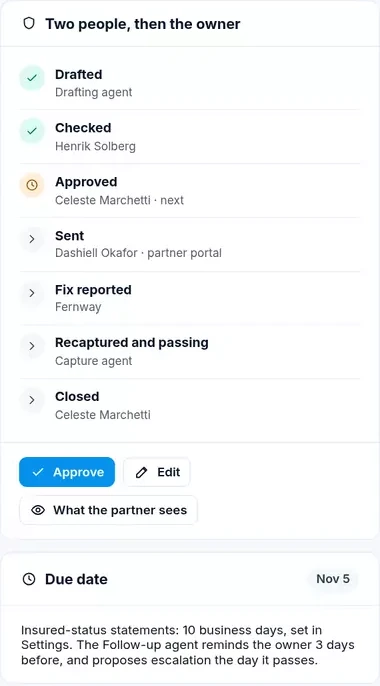
ReviewerChecks every finding with its capture, overlay and passage; returns it with a reason code or passes it on.
A person decides
Compliance OfficerApproves the finding and its request, never one she checked or edited herself; later approves closure against both captures.
A person decides
Owner or program managerFixes the page, or sends the approved request to the partner; reports the fix, which triggers a recapture.
Can the FDIC digital sign be dismissed? Checking continuity
No, not on the three pages that need it, and the FDIC says so for logged-in customers too; but the sign need not stick to the screen as the customer scrolls (Q&A II.A.4). For a sound check that means two captures, not one: the page as it first loads, and the page after any banner, cookie notice or onboarding overlay is closed, to confirm the sign is not inside something the customer can dismiss. Scrolling is not tested, because the rule does not require the sign to follow it.
Continuity also means the sign is there on every version. An app that shows the sign on iOS and not on Android has two different login pages for the rule, and a sample bank’s open findings include exactly that: an Android login screen without the digital sign. One finding per build, not one per customer complaint, is what the Grouping agent is for.
What color must the FDIC digital sign be, when the rule names no shade?
Navy blue or black, with “FDIC” in bold and the longer line in smaller italic, in Source Sans Pro Web or a similar font, and white where the background would make navy or black illegible (12 CFR 328.5(b)). The 2026 rule dropped the hexadecimal codes and font sizes of the 2023 design, so there is no exact color to match against.
That changes what an automated check should report. It can confirm the words exactly, see whether the text is dark or white against its background and compare the type with the sign’s design. It should not declare a particular navy non-compliant, because the rule no longer defines one. Where a sign is light grey on white, or the words are altered, the check fails on the text of the rule; where the shade is merely unusual, the agent flags it for a person.
These changes are intended to give IDIs sufficient flexibility to exercise reasonable judgment in order to accommodate technical limitations (e.g., space constraints, font availability, and color options for “navy blue”).
FDIC, final rule of January 29, 2026
Can the FDIC digital sign wrap on mobile?
Yes. The rule permits wrapping for space, and the Q&A adds that the sign can be scaled or stacked to fit a screen, with no change to the words beyond the permitted colors (Q&A II.A.6). The agent therefore checks the words and their order, not the line breaks, and captures each page at every configured phone size so a wrap that pushes the sign off the first view is visible.
Does the app store listing need the FDIC sign? What the agents skip
No. The FDIC’s Q&A excludes the app store listing, post-login dashboards, social media ads and, generally, downloadable documents such as terms and conditions; pages where customers transact with deposits were removed from the rule in 2026 (Q&A II.A.8–13, II.E.1). The inventory marks those as out of scope for the digital sign, so no agent raises a finding for its absence there.
Out of scope for one rule is not out of scope for all. A post-login dashboard that shows a brokerage balance beside a deposit balance is still checked for statements about insurance, and a social ad promoting deposits still needs the advertising statement. Each capture is checked against every rule that reaches it, and against none that does not.
What each agent may never do, and why the limit exists
| Agent | Never | Why |
|---|---|---|
| Capture | Use a customer’s login; bypass a bot check; store personal data unmasked | Evidence must be lawful to collect and safe to keep; an unreachable screen goes to a person |
| Layout | Decide compliance | Seeing a sign is not the same as judging it conspicuous |
| Rules | Propose anything below its confidence threshold; close a finding | Ambiguous pages need a person; closure needs evidence and an approver |
| Grouping | Merge screens with different owners | One finding must have one person able to fix it |
| Drafting | Send; keep approved wording that has since changed | Partners hear only what two people approved |
| Follow-up | Escalate on its own | Escalation is a relationship decision for the program manager |
| Branch Sign | Accept a photo older than the attestation window | Old photos prove the past, not the lobby today |
| Evidence | Present a draft or an unapproved finding as final | An examiner pack must show only what people decided |
Walking the one-time notice as a signed-in customer
The one-time notice can only be tested by doing what the rule describes: signing in, clicking a link to a third party’s non-deposit platform and seeing what appears before the customer leaves. The Capture agent walks that journey with a test account. A thorough test records whether a notice appears, what it says, and whether it closes on a click, after at least three seconds, or both, then follows a second, different third-party link in the same session, because the FDIC says each different destination needs its own notice (Q&A II.B.3). Affiliates count as third parties.
The test also needs to know what it must not flag. Customers who are not logged in are outside the requirement, and so are links that keep the customer inside the bank’s channel. The FDIC said the notice applies only when a customer leaves the bank’s digital deposit-taking channel, so the test has to record who owns the destination before deciding which check applies.
What every capture records, so a person can re-check it
- Where
Channel, page or screen, and its place in the inventory.
- Which version
App version, web release or ATM screen build.
- Which size
The device size it was captured at.
- Which state
Logged out, or logged in as which test account; never a customer’s.
- When
Date and time, and the rule version in force that day.
- What was seen
The overlay: sign, bank name, insurance wording, non-deposit products, exit links.
- What was checked
Each check, its passage, its result and its confidence.
- Integrity
A hash, and personal data masked before storing.
Four decisions no signage agent may make
Four kinds of decision stay with people. Whether an ambiguous page is in scope, such as a page that is partly about investments. Whether a finding stands, and what the request says. Whether a partner is escalated, and whether a cure notice goes out under the program agreement. And whether a finding is closed. The agents prepare each of these, with the capture and passage attached; none can make them.
Model risk guidance points the same way, though it is not binding. The agencies’ revised guidance of April 2026 describes itself as setting no enforceable standards and generally does not apply to models at banks with total assets of $30 billion or less without significant model risk (FIL-15-2026). A bank under that line still needs its own controls over an automated check, which is why every agent check carries its passage and confidence, and a person checks every finding before anything leaves the bank.
Agents prepare, people decide: the split in FDIC Signage Compliance
What the agents do: Keep the inventory from publish logs, releases, builds and partner portals.
What people decide: Settle whether an ambiguous page is in scope.
What the agents do: Capture every place, at the right size and state, with a hash.
What people decide: Follow up screens the agents could not reach.
What the agents do: Mark the overlay and check against the cited passage, with a confidence.
What people decide: Confirm or return every finding, with a reason code.
What the agents do: Group failures by template and draft the ticket or request.
What people decide: Approve the request; the owner fixes, the program manager sends.
What the agents do: Recapture the same place after a reported fix.
What people decide: Approve closure against both captures, or reopen it.
From finding to closure: a sample morning
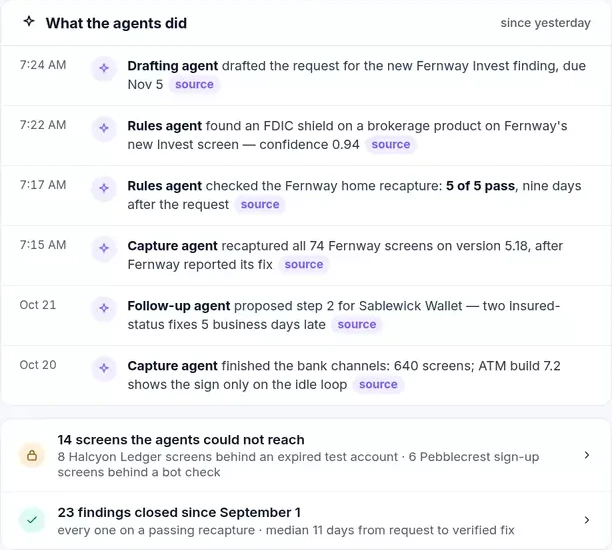
Take a fictional community bank, Tessaly Community Bank, as it runs through Botminds’ FDIC Signage Compliance on October 22, 2026. Overnight, after a partner reported a fix, the Capture agent recaptured all 74 screens of the partner’s new app version. On the same pass the Rules agent found a new screen with an FDIC shield beside a brokerage product, confidence 0.94, and the Drafting agent prepared a request, due by the bank’s own timeline. None of it has reached the partner: the reviewer checks it first, the Compliance Officer approves it, and the program manager sends it.
What the agents did overnight, each with its source
Every request passes two people before the owner sees it
The same chain works for ATMs, where the Capture agent records both the idle loop and the welcome screen of each build, because § 328.4 counts only the second (12 CFR 328.4(b)), and for partner screens, where the checks come from subpart B rather than § 328.5 (12 CFR 328.102). How to measure whether the whole chain checks the right places and judges them right is in the FDIC signage audit.
Questions people ask
How do you check every screen for the FDIC digital sign?
Start from an inventory of each channel’s homepage, login page and first account-opening page, built from release and publish records rather than memory. Capture each at the device’s own size on the version customers see, check it against § 328.5 with the passage cited, and recapture after every change or reported fix.
Can an AI agent decide that a page complies with FDIC Part 328?
In FDIC Signage Compliance, no agent decides. Agents capture, mark and check, each check citing its passage and a confidence; a reviewer confirms every finding and the Compliance Officer approves findings and closures. Below the bank’s confidence threshold an agent proposes nothing at all.
Do the agents log in as customers?
No. They use test accounts the bank or partner provides and never a customer’s login. Screens they cannot reach, for example behind an expired test account or a bot check, are listed for a person rather than guessed at.
Does the FDIC digital sign need to follow scrolling?
No. The FDIC’s Q&A says the sign must remain visible on the three required pages, and cannot be dismissed there, but need not follow the user while scrolling. Checks therefore test the page as loaded and after overlays close, not after scrolling.
What happens when a partner reports a fix?
The report schedules a recapture of the same screen, at the same size and with the same test account, on the new version, within the time the bank has set. Only a passing recapture lets the reviewer propose closure, and only the Compliance Officer approves it.