PDF forensics tools examine the file behind the page: its saved revisions, embedded fonts, text objects and layers, metadata and image compression. Their purpose is to find the traces an edit leaves that the eye cannot see. For an insurer the use is narrow and practical. Invoices, medical bills and repair estimates arrive as PDFs, and one changed figure can move thousands of dollars. General tools such as structure parsers, metadata viewers and the utilities used in security contests show raw structure to a specialist. A claims operation needs the same reading done on every document, measured, and explained to an adjuster in a sentence. Document Fraud Detection is Botminds' solution for testing claim documents before they are paid. Its file-forensics agent is the PDF forensics step, and this guide takes it apart: what it reads, what it can prove, where it fails, and how to test any tool that claims to do the same.
The worked example is sample data on fictional companies: a $9,812.60 mitigation invoice from Clearwater Dry-Out & Restoration LLC on a homeowners claim at a fictional carrier. On the page it is a clean, ordinary invoice. In the file it is two documents stacked on top of each other.
Anatomy of one altered invoice: the page you see, and the two revisions in the file
On screen
INVOICE 20931
Nine lines$4,812.60
Tax$0.00
Total$9,812.60
One page, 212 KB. Nothing looks wrong at normal size.
In the file
Revision 1
Sep 22, 2026 · 18:04 · Online invoicing app, PDF export
- Page, header, nine lines, subtotal $4,812.60, tax $0.00
- Fonts: Inter Regular (412 glyphs), Inter SemiBold (96 glyphs)
- Cross-reference table and trailer, ending in an end-of-file marker
Revision 2, saved later
Oct 11, 2026 · 21:47 · Desktop PDF editor, opened and saved again
- One new text object: "$9,812.60" on a second layer
- One new font: Arial Bold, 9 glyphs, used for the total only
- Region around the total re-encoded at a different quality
- Saved into the same file: the page as first made is still there to read
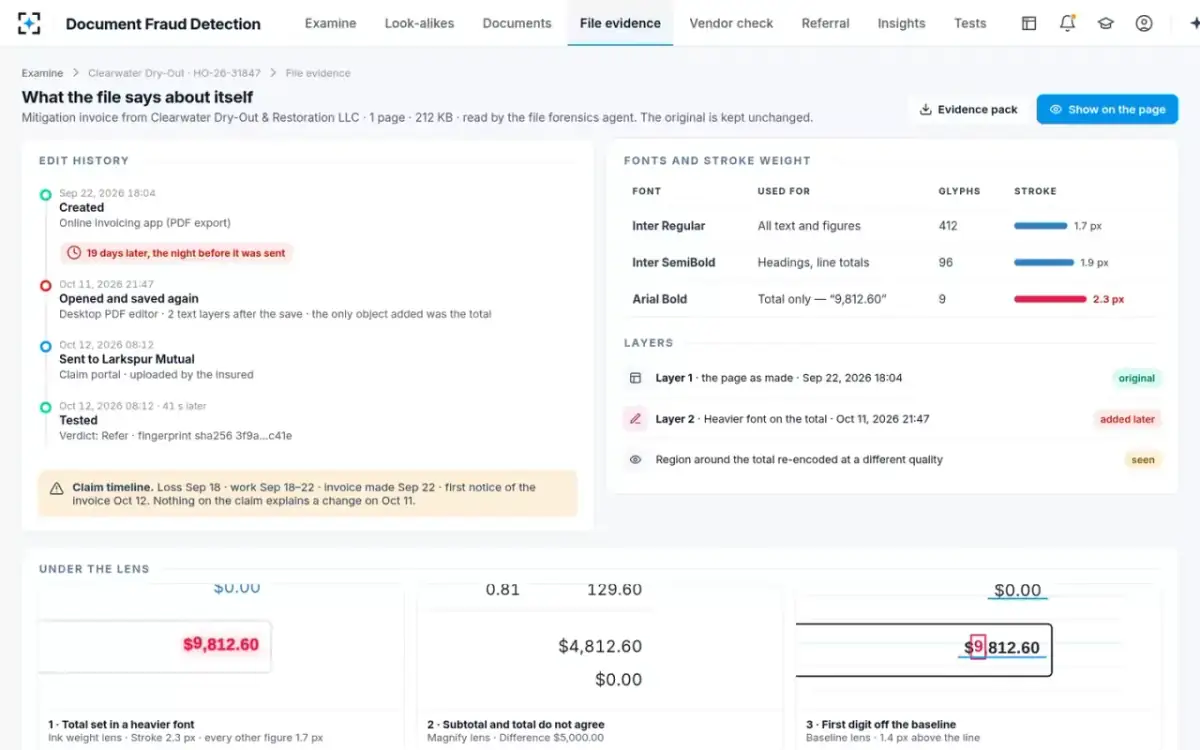
Claim timeline: loss Sep 18, work Sep 18 to 22, invoice made Sep 22, uploaded Oct 12 at 08:12. Nothing on the claim explains a change on Oct 11.
How do you detect if a PDF has been tampered with? Read the file, not the page
You detect tampering in a PDF by reading its internal structure, because the format keeps more than it shows. A PDF has four parts: a header, a body of numbered objects (text, fonts, images, metadata), a cross-reference table that says where each object sits, and a trailer that ends in an end-of-file marker (Adhatarao and Lauradoux). When software saves a change quickly, it does not rewrite the file. The Library of Congress, describing the format, notes that a version override "was introduced to facilitate the incremental updating of a PDF by simply adding to the end of the file" (Library of Congress).
That design is what makes forensics possible. An incremental save appends new objects, a new cross-reference section and a new end-of-file marker, and leaves the original objects in place. A tool that walks the revisions can show the page as it was first made and list exactly what was added later. On the Clearwater file, the second revision added one text object, the total, in a font used nowhere else on the page.
Not every edit leaves revisions. Many editors rewrite the whole file on save, and a document that was printed to a new PDF, scanned or photographed starts its file history again. Then the evidence moves from structure to the content itself: which fonts render which characters, how heavy each stroke is, whether a digit sits on the line of its neighbours, and whether one region of an image was compressed differently from the rest.
What does PDF metadata show, and does it prove tampering?
PDF metadata shows what the file says about itself: the creating application, the producer that wrote the PDF, creation and modification dates, and sometimes an author. It is a useful lead and weak proof. Researchers at Université Grenoble Alpes and Inria put it plainly: "metadata are not a reliable source of information: they can be easily modified using tools like exiftool or using sanitization tools like Adobe Acrobat" (arXiv 2103.02702).
The same team showed what a better test looks like. Every PDF producer writes the format in its own coding style, so the structure itself betrays which software made the file even when the metadata has been removed or rewritten. From 900 files made with 11 producers on three operating systems they wrote 192 rules, then tested them on 508,836 PDFs from preprint servers. Some producers were identified with 100% accuracy; overall, 74% of files were attributed correctly. For a claims document the practical use is a contradiction test: a file whose metadata names an invoicing app, but whose structure was written by a desktop editor, has been through more hands than its metadata admits.
So metadata never stands alone in the solution. The Clearwater edit history is supported by the second revision, the new font and the re-encoded region, and the agent reports it as evidence with measurements, not as a conclusion.
What the file says about itself, laid against the claim timeline
Inside the Document Fraud Detection file-forensics agent: five measurements
The agent reads each claim document over the threshold and returns five kinds of measurement, each tied to a place on the page. Each is cheap to compute and hard to fake all at once, which is the point: an editor who matches the font may forget the stroke weight, and one who matches both may not know the file kept the first revision.
What the file-forensics agent measures, and what it never does
Agent
Fonts and stroke weightLists every font and the glyphs it renders, and measures stroke weight. Clearwater: the total alone in Arial Bold at 2.3 px; every other figure Inter at 1.7 px.
Agent
Text layersSeparates text drawn at different times. Clearwater: a second layer holding only the total.
Agent
Edit historyReads revisions and dates and lays them against the claim timeline. Clearwater: saved again 19 days after it was made, ten hours before upload.
Agent
Digit alignmentChecks each digit against the baseline of its neighbours. Clearwater: the leading 9 sits 1.4 px high.
Agent
Re-encoded regionsFinds image areas compressed at a different quality from the rest, the trace a pasted patch leaves.
Never: calls a document fraudulent; it reports measurements
A person decides
AdjusterReads the measurements under the lens and decides: pay, hold, ask the vendor or refer.
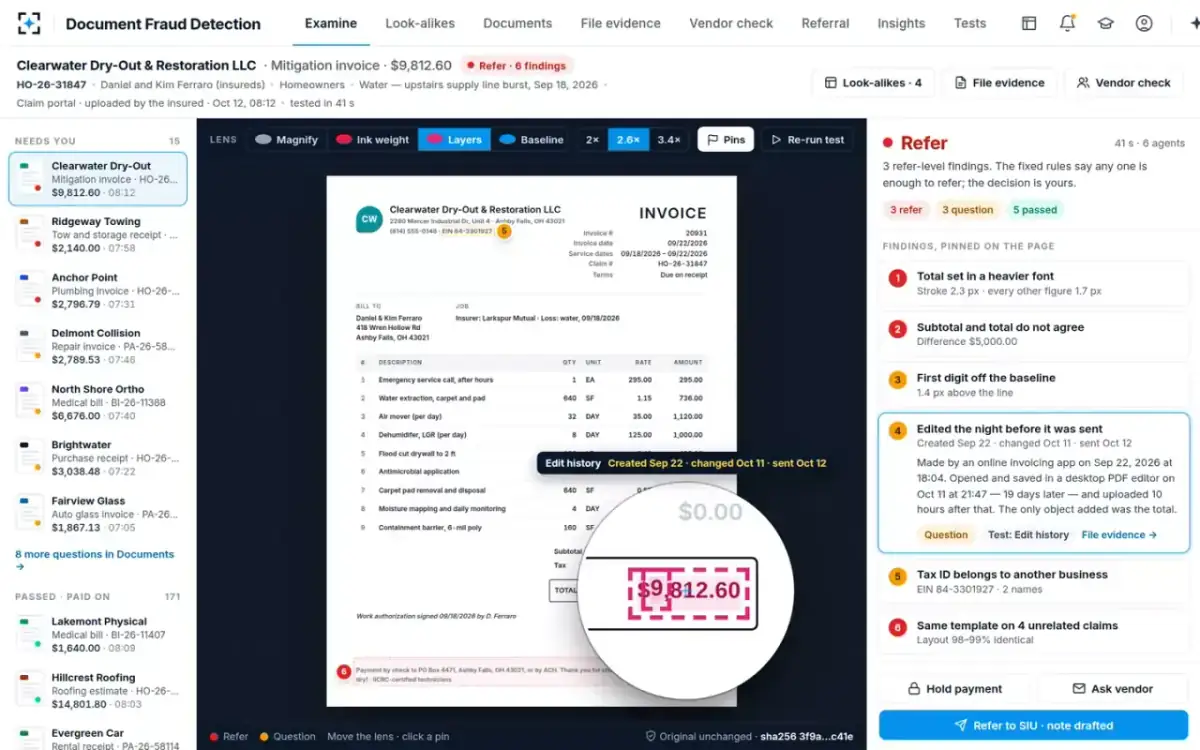
The measurements are only useful if a person can check them. In the solution each one is a numbered pin, and the adjuster can switch the lens to Ink weight, Layers or Baseline and see the evidence on the page itself. The layers view outlines the text added in the later revision; the edit history sits beside it.
The Layers lens: the later text outlined on the page
What a PDF forensics tool can prove, and what it cannot
A PDF forensics tool can prove that a file changed and describe the change. It cannot say who made it, why, or whether the change was dishonest. Vendors re-issue invoices, add claim numbers and fix typos, and all of those leave the same traces as a fraud. That is why the edit-history test in the sample raises a question rather than a refer on its own.
There is a harder limit too. NIST's review of the science behind digital investigations warns that deliberate changes made to mislead an examiner can be hard to detect, and that finding them "relies on the skill of the examiner" (NIST IR 8354; what that means for a single file is in how to check if a PDF has been altered). A forger who rewrites the file from scratch, or prints the edited page to a fresh PDF, leaves little structure to read. Photographs and scans add another problem: the authors of the DocTamper study found that "image compression can cover up some of tampering clues" (Qu et al., CVPR 2023).
What the file can tell an adjuster, and what it cannot
The file can show: That an object was added in a later revision, and when the revision was saved.
The file cannot show: Who saved it. The date is the computer’s clock, which the editor controls.
The file can show: That one figure is in a font, weight or size no other figure uses.
The file cannot show: Why. A vendor’s template may use a bold total on purpose.
The file can show: Which software wrote the structure, even when metadata is stripped.
The file cannot show: Whether that software was used honestly.
The file can show: That one region was compressed differently from the rest.
The file cannot show: What was there before, once the patch has replaced it.
The file can show: Very little: a reprinted or rewritten PDF starts its history again.
The file cannot show: Anything about earlier versions, which is why sums, vendor and look-alike checks matter.
Can AI detect edited documents? Pixel detectors, and why they are paired with checks
AI detectors can flag edited regions in document images, but their accuracy falls sharply on edits unlike the ones they were trained on. A 2026 benchmark of AI-inpainted receipts and forms, a preprint not yet peer reviewed, found a leading general forgery detector at an AUC of 0.751, a document-specific detector at 0.563, and a GPT-4o judge at 0.509, where 0.5 is a coin toss. The full numbers are set out in can AI make fake receipts.
The design answer is not a better pixel detector alone. It is to pair the file's evidence with checks the forger cannot fake from the image: the arithmetic, the vendor register, the claim's own dates and the same template on other claims. On the Clearwater invoice the arithmetic finding needs no forensics at all; the nine lines add to $4,812.60 and the total says $9,812.60. Across the sample carrier's 30 days, the tests that do not read the file raised more than a third of all findings.
Findings by test over 30 days: the file tests lead, the content checks carry the rest
A PDF is also an attack surface: open it like one
A tool that opens thousands of claim PDFs from the public is a target in its own right. Malicious PDFs are an established attack route; the Inria authors note that "malicious PDF files are commonly used by attackers" (arXiv 2103.02702). A Télécom Paris team that built a forensic pipeline tested on real medical work-stoppage certificates put a security screen in front of the forensics. Their first stage validates that the file conforms to the format and flags embedded malicious payloads before any forensic module runs (arXiv 2609.38252).
The same team set a rule worth copying into any purchase: the inspection must neither change the original nor hide its own steps. In their words, every analysis function is wrapped so that the procedure "neither mutates the original sample nor obscures diagnostic steps". In the solution, document intake keeps the original as it arrived with a SHA-256 fingerprint, and every finding carries that fingerprint, so any later copy can be shown to match. How the fingerprint and the findings travel into claim systems is covered in the document fraud detection API guide.
How accurate is PDF tampering detection? Test the tool the way NIST tests forensic tools
Accuracy depends on the edit, the file and the producer, so a single figure from a brochure says little. The right question is how the tool performs on edits like yours, in files like yours. NIST runs a Computer Forensics Tool Testing program for exactly this reason, because "A capability is required to ensure that forensic software tools consistently produce accurate and objective test results" (NIST CFTT). Its method is to write down what a tool should do, build test sets, and check each claim against them. A buyer can do a small version of the same.
Eight tests to run on any PDF forensics tool before trusting it on claims
- An incremental save that changes one figure
It should find the revision, name the added object and place it on the page.
- The same change saved as a full rewrite
It should fall back to fonts, stroke weight and alignment, and say that the history is gone.
- The edited page printed to a fresh PDF
It should report little from structure and lean on the content checks. A tool that still claims certainty is guessing.
- Metadata stripped, or rewritten to name an innocent producer
Structure should contradict the metadata.
- A scanned paper invoice and a phone photo of a receipt
It should test compression and alignment without inventing file history.
- Honest re-issued invoices from your own vendors
Count how many it flags. Those are the questions your adjusters will have to clear.
- A booby-trapped PDF from your security team
It should refuse or quarantine it, not open it.
- Fingerprint before and after
The original’s hash must be identical after the tool has run.
Seeded tests like these are the subject of document tampering detection datasets, and why your own claims beat them. The short version: plant each kind of edit in your own past invoices and bills, run the tool, and count what comes back by edit type, because a tool that is excellent at incremental saves may be blind to reprinted files.
Free PDF forensics tools online, or a tool that works on every claim?
Free online PDF forensics tools are fine for learning the format and dangerous for claims. Uploading an insured's invoice or medical bill to an unknown website hands personal and claim data to a third party with no contract and no audit. The Télécom Paris authors make the same point about the market, describing the existing options as basic metadata checks, structural analysis of incremental updates, or "opaque commercial platforms that require uploading sensitive files to third-party infrastructure" (arXiv 2609.38252).
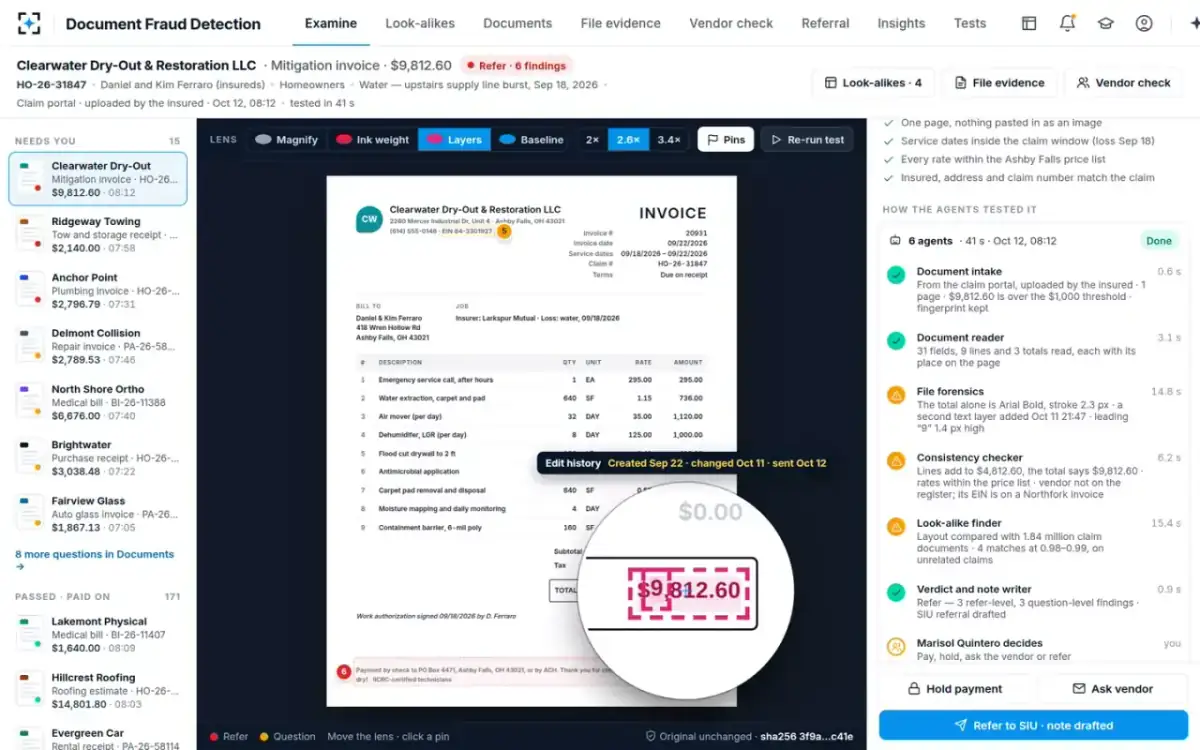
A claims-grade tool differs in four ways. It runs inside the carrier's own controls. It runs on every document over a threshold, not on the ones someone thought to upload. It reports measurements with a place on the page, so an adjuster can see the evidence. And it hands its findings to the rest of the process: the arithmetic, the vendor check, the look-alike search and a person's decision. In the sample, the six agents together took 41 seconds on the Clearwater invoice, of which file forensics took 14.8.
File forensics as one of six steps in Document Fraud Detection
Questions people ask
Can software tell if a PDF was edited?
Often, when the edit was saved into the same file: an incremental save leaves the earlier revision readable, and a typed-over figure usually brings its own font or stroke weight. It is much harder when the file was rewritten from scratch, printed to a new PDF or scanned, which is why file evidence is paired with checks on the content.
What are signs a PDF was altered?
More than one revision, with a save date that does not fit the story; one figure in a font, weight or size used nowhere else; a digit off the baseline of its neighbours; an image region compressed differently; and metadata that contradicts the file's structure. Each is a reason to ask, not proof.
Does PDF metadata prove tampering?
No. Metadata can be edited or stripped with common tools, as Inria researchers note, so it is a lead rather than proof. It becomes evidence when it agrees with the structure, such as a second revision and a new font, or when the structure contradicts it.
What is PDF tampering detection?
It is the testing of a PDF for signs that its content was changed after it was produced, by reading the file's revisions, fonts, layers, metadata and images. In claims it is one of several checks, alongside arithmetic, vendor verification and comparison with past documents.
Are there free PDF forensics tools?
Yes: open-source parsers and metadata viewers show a PDF's objects, revisions and metadata to someone who knows the format. They suit an investigator examining one file. They are not built to test every claim document, explain findings to an adjuster or keep the original fingerprinted, and online versions send the document to a third party.
How long does PDF forensic analysis take?
For one invoice in the sample, the file-forensics agent took 14.8 seconds of a 41-second run that also checked the sums, the vendor and 1.84 million past claim documents. A specialist's manual examination is usually kept for files already under investigation.