To check if a PDF has been altered, look in five places: the end of the file, where every quick save leaves a marker; the document properties, which record the software and dates; the fonts, where a typed-over figure usually brings its own; the objects under and over the page, where covered text and added layers sit; and the sums and sources, which no file can clean. The first four can expose an edit in minutes with tools most adjusters already have. None of them alone proves fraud, and a careful forger can defeat each, which is why the fifth matters most. Claims teams meet this question on invoices, medical bills, estimates and receipts every day, usually with no time to ask it. Document Fraud Detection is Botminds' solution for testing those claim documents before payment: it reads all five places on every document over a set amount and pins each finding on the page for the adjuster.
Five places one altered invoice gave itself away
Emergency service call, after hours295.00
Water extraction, carpet and pad736.00
Air movers, 32 days1,120.00
LGR dehumidifier, 8 days1,000.00
five more lines1,661.60
Subtotal 54,812.60
Tax0.00
Total34 $9,812.60
Saved Sep 22 · saved again Oct 11, 21:47 1
- 1The savesMade on Sep 22, saved again on Oct 11 at 21:47; the page as first made is still in the file.
- 2The propertiesCreated by an online invoicing app; modified in a desktop PDF editor 19 days later.
- 3The fontsInter for every figure but one. The total alone is Arial Bold, at a heavier stroke.
- 4The layersA second text layer holds one object: the total.
- 5The sumsNine lines add to $4,812.60. The total reads $9,812.60.
Can you see the edit history of a PDF? Count the saves at the end of the file
Often, yes. Most quick edits are saved incrementally: the editor adds the changed objects, a new cross-reference section and a new end-of-file marker to the end of the file, and leaves the original bytes in place. Every PDF ends with the marker %%EOF, preceded by a pointer to the cross-reference table that tells a reader where each object is. A file with two or more of those markers has been saved more than once, and each earlier version can usually be recovered.
The check by hand is quick. Open the PDF in a plain text editor rather than a PDF viewer, search for %%EOF, and count. One marker means one save, or a file that was rewritten from scratch. Two or more means later revisions exist. On the sample invoice the file holds two states: the page as the invoicing app made it on 22 September, and a save on 11 October at 21:47 that added a single object, the total. A second save is not proof of anything. Vendors re-save invoices to add a claim number or fix an address. It is a reason to ask what changed and when, and to compare the date with the claim.
Does PDF metadata show who edited it? Rarely a person, often the software and the dates
PDF metadata usually shows which program created the file, which program wrote the PDF, and when it was created and last modified. It rarely names a person reliably, and it can be edited by anyone with a free tool. It also lives in two places. The Library of Congress explains that the older document information dictionary has held entries such as title and author since PDF 1.1, alongside the newer XMP metadata framework, and that in PDF 2.0 "entries in the document information dictionary other than the CreationDate and ModDate entries are deprecated" (Library of Congress).
That double record is useful to an examiner. The same description notes that "Experience with the PDF/A standards has highlighted the challenges associated with avoiding conflicting metadata entries in the two structures." Software that edits one record and not the other leaves them disagreeing. To check, open the document properties in any PDF viewer and read the creator, producer and the two dates; a forensic viewer or command-line tool will show the XMP record as well. A creation date after the work it bills, or a modification date the night before upload, is a question to ask. A producer that does not match the vendor's usual software is another.
What the file says about itself, against what the claim says
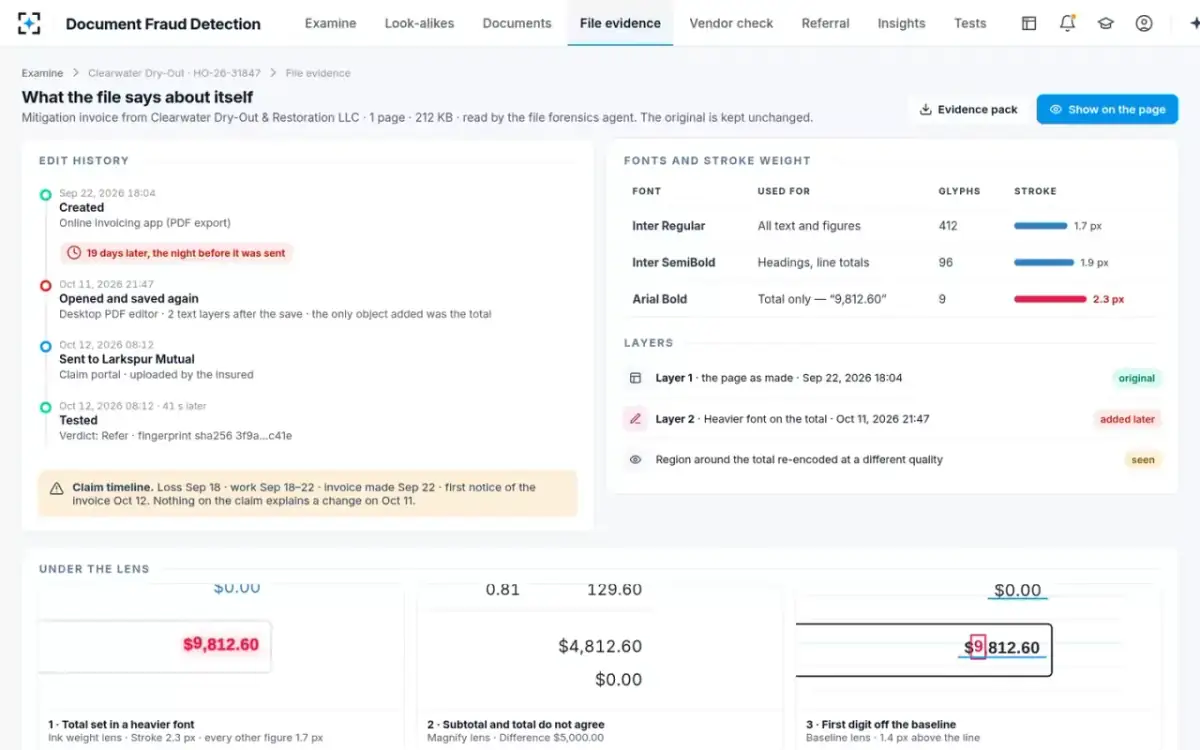
The fonts: one figure in a typeface nothing else uses
A typed-over number usually arrives in a different font, weight or size, because the person editing it had to type it in a font their editor offered. PDFs make this visible. The Library of Congress notes that PDF documents with Unicode text "do not store the text as characters - but as references to the glyphs (letter shapes) in the fonts used" (Library of Congress), so every run of text is tied to a named font in the file. The font list in a viewer's document properties shows every font the document uses.
The check: open the fonts list and ask whether each font has a reason to be there. An invoicing app usually embeds one or two families. A third family used only for a total, a date or an hours cell is the classic sign of an edit. Then look closer at the figure itself at high zoom: is its stroke heavier than its neighbours, does it sit on the same baseline, is the spacing the same? On the sample invoice the total alone is Arial Bold among 412 glyphs of Inter Regular, with a stroke of 2.3 px against 1.7 px, and its leading 9 sits 1.4 px above the line. None of that is visible at normal size.
What sits under the page: covered text and stacked objects
Many edits do not remove the original; they cover it. A white box over the old figure with a new figure on top, or a new text layer above the page, looks clean on screen and leaves the original in the file. Researchers who studied 39,664 PDFs published by security agencies found how much files hold beneath their surface. Of the few agencies that cleaned some of their files, they still found sensitive information in 65% of the cleaned files, because cleaning "requires to remove all the hidden sensitive information from the file and not just to remove the data at the surface" (Adhatarao and Lauradoux). If trained staff leave material under the surface, an editor patching an invoice usually does too.
The checks: select all the text on the page, or drag across the edited figure, and see whether two values are selected; copy the page's text into a plain editor and look for numbers you cannot see on screen; open the layers panel if the viewer has one; and try to move the suspect figure. On the sample invoice, the second text layer holds exactly one object, the total, added in the later save.
Where to look for each of the four file traces
| Hiding place | Where to look | What an edit looks like |
|---|---|---|
| Saves | The file opened in a plain text editor | More than one %%EOF marker |
| Metadata | Document properties; XMP in a forensic tool | Dates that do not fit the claim; a producer that is not the vendor’s software; two records that disagree |
| Fonts | The fonts list; the figure at high zoom | One figure in a font, weight or size nothing else uses; off the baseline |
| Objects and layers | Select all; copy text out; layers panel | Two values selected where one shows; a figure on its own layer |
The sums and the sources: the hiding place no file can clean
The fifth check is the one that does not depend on the file at all: does the document agree with itself and with the world? Lines must add to the subtotal, the subtotal plus tax to the total. Dates must fall inside the claim: work after the loss, invoice after the work. The vendor must exist where it says it does, under the tax ID it prints. The items and units must match what was approved. A forger who rebuilt the file from scratch, printed it to a fresh PDF or photographed it has removed the file traces. They have not made $4,812.60 add up to $9,812.60.
On the sample invoice, the sources were as revealing as the sums. The vendor was not on the carrier's register and had no state contractor registration under its name. Its tax ID was printed on another business's invoice already paid on a different claim. Its street address was a mailbox store. The insureds and work dates did match the claim, and a fair check records that too. Whether a vendor's document is one of a family reused under several names is a question for a search across claims.
What each of the five checks can show, and how it can be defeated
What it shows: That the file was saved again, and when.
How a careful forger defeats it: Rewrite the whole file, or print the edited page to a new PDF.
What it shows: Which software made and changed it, and the dates.
How a careful forger defeats it: Edit or strip the metadata with a free tool.
What it shows: A figure typed in a font, weight or size nothing else uses.
How a careful forger defeats it: Match the font exactly, or regenerate the figure with an image model.
What it shows: Covered text, or a figure sitting on its own layer.
How a careful forger defeats it: Flatten the page, or rebuild it from scratch.
What it shows: Totals that do not add up; vendors, dates and amounts that do not fit the claim.
How a careful forger defeats it: Only by changing every related figure and record consistently, including ones outside the document.
Can a PDF be edited without leaving a trace?
In the file, yes; in the facts, rarely. A PDF rewritten from scratch, printed to a new file or scanned starts with a clean history: one save, fresh metadata, possibly a single font. NIST's review of digital forensics is frank about the limit: "If someone has taken steps to change information in digital evidence to mislead an examiner, it may be difficult to detect the changes." (NIST IR 8354). That is why a clean file should never close the question when the amounts, dates or vendor do not fit.
Photos and scans carry their own record. The same NIST review notes that "computers store much more data than what is typically presented to the user", including "time and location data on photos". The Exif standard behind most of that camera data was designed, in the Library of Congress's description, "mainly intended for recording technical details associated with digital photography" (Library of Congress). It can be read in any photo viewer's details pane, and it can be stripped or edited as easily as PDF metadata, so treat it the same way: a lead, not proof. How AI image models change this picture is covered in can AI make fake receipts.
How do you know if a bank statement PDF is edited?
The same five places apply, and the fifth is strongest: a bank statement has to agree with the bank. Opening and closing balances must reconcile with every transaction listed, dates must run in order, and the bank's own copy, obtained through the account holder or the bank, settles the question. In a claim, a bank statement usually supports a payment the claimant says they made; the card or bank record of that payment is often easier to obtain than the statement.
Lending teams face the same problem with pay stubs and statements, where the employer or bank is the source to check against. A banking-side guide to that work is how to identify fake pay stubs.
Is it illegal to edit a PDF invoice?
Editing a PDF is not a crime; presenting an altered one to support an insurance claim, knowing it is false, is. New York's definition of a fraudulent insurance act covers anyone who knowingly, with intent to defraud, presents or prepares "any written statement as part of, or in support of," a claim for payment under an insurance policy that contains materially false information (N.Y. Penal Law § 176.05). Other states' statutes read much the same. Vendors who correct an invoice and say so, or re-issue it with a new number, are doing ordinary business. The question is always what changed, whether it was disclosed, and whether it moved money.
That is also why the checker should write down facts, not conclusions. "Saved again on 11 October at 21:47; the total is in a font no other figure uses; the lines add to $4,812.60" is something the vendor can explain or not. "This invoice is fake" is an accusation the adjuster is not in a position to make. How findings like these move from the adjuster to the SIU is set out in the document fraud investigation process.
A check by hand on one PDF, in order
- Keep the original
Save the file exactly as received before opening it in anything that might re-save it. Note its hash if you can.
- Count the end-of-file markers
Open in a plain text editor and search for %%EOF.
- Read the properties
Creator, producer, created and modified dates, against the claim timeline.
- Open the fonts list
Is every font used for a reason? Zoom in on totals, dates and hours.
- Select and copy all the text
Look for two values where one shows, and numbers you cannot see.
- Redo the arithmetic
Lines, subtotal, tax, total; units times rates.
- Fit it to the claim
Dates, address, insured, items and approved amounts.
- Check the vendor
Register, state registration, tax ID, address and phone, from sources the vendor did not give you.
- Write down facts with locations
What, where on the page, and what matched as well as what did not.
Doing all five on every document with Document Fraud Detection
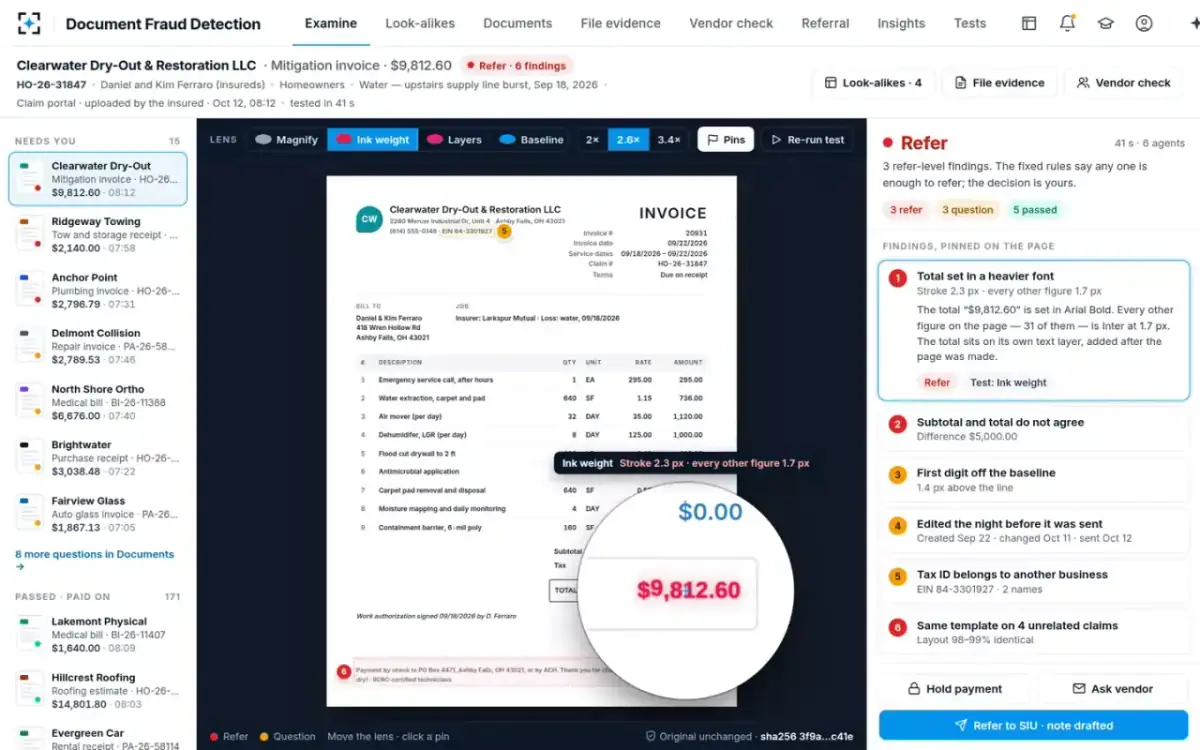
The hand check works on one document someone already doubts. The problem in claims is the document nobody doubts, and there are hundreds a morning. In the sample, Document Fraud Detection tested 186 claim documents between 06:00 and 08:12 on a Monday, each before anyone could pay on it, and the six agents took 41 seconds on the invoice in this guide. Its file forensics reads the saves, metadata, fonts and layers; the consistency checker redoes the sums and checks the claim, the price list and the registers; the look-alike finder searches past claim documents for the same layout. Each finding becomes a numbered pin, and the adjuster decides whether to pay, hold, ask the vendor or refer.
All five places, read and pinned by Document Fraud Detection
Questions people ask
What is PDF incremental save?
It is a way of saving changes by adding them to the end of the file instead of rewriting it. The original objects stay in place, and a new cross-reference section and end-of-file marker are appended, which is why an earlier version of an incrementally saved PDF can often be recovered.
How can I check when a PDF was last edited?
Open the document properties in a PDF viewer and read the modification date, then confirm it by counting end-of-file markers in a text editor. Remember that the date comes from the editing computer's clock and can be changed, so it is evidence to weigh, not proof.
Can you tell who edited a PDF?
Usually not with confidence. Metadata may carry an author name taken from the editing software's settings, but anyone can change it. The software and dates are more useful, and who made a change is a question for an investigation, not the file.
Is there a free way to check if a PDF has been altered?
Yes: a plain text editor, a PDF viewer's properties and fonts panels, and copying the page's text out are all free. Avoid uploading claim documents to free online checkers, which hand personal data to a third party.
Does printing a PDF to a new PDF remove the evidence?
It removes most file evidence: earlier saves, layers and often the original fonts. It does not change the content, so the arithmetic, the dates and the vendor checks still apply, and a fresh file sent the night before upload is itself worth a question.