Literature review software is sold as one category and is really four: reference managers that organise what you have found, screening tools that help a team sift thousands of titles, bibliographic databases that find the papers in the first place, and question-answering search that returns a written, sourced answer instead of a list. Choosing badly is easy because the four overlap at the edges and the demonstrations look alike, and because much of a literature week is spent on work none of them covers. Botminds’ Scientific Literature Search is the fourth kind, with one addition the other three rarely attempt: it indexes a company’s own research reports and signed lab-notebook entries alongside the published literature and patents, and answers from all of them at once, with every statement opening at the passage it came from.
The screens on this page come from the solution running on its sample library; the programmes, studies, people, journals and sources named in them are fictional. The research figures come from peer-reviewed methodology studies and from the National Library of Medicine’s own index, linked where they appear.
The scale the software is up against
1,882,304
items in the National Library of Medicine’s index carrying a 2025 publication date, measured on 27 October 2026
75/day
trials published per day, with 11 systematic reviews of trials per day, as measured in 2010
67.3wks
mean time from registration to publication for a systematic review (IQR 42)
What does literature review software do?
Depending on which of the four you bought, it does one of these four things. It stores references and formats citations. It splits a pile of titles and abstracts between two screeners and records their decisions. It searches an index of the published literature and returns records. Or it answers a question in sentences, with sources attached to each one.
None of the four reads the papers for you in the sense that matters — turning what a study measured into a line you can compare with another study — except, partly, the fourth. And none of the first three can see anything your own company wrote, because their corpus is the published record. That is the gap worth being deliberate about before you spend anything.
The four kinds, and what each is really for
Four kinds of literature review software
| Kind | What it does well | What it never does | Who buys it |
|---|---|---|---|
| Reference manager | Stores what you found, deduplicates a library, formats citations, shares a folder with a team, attaches the PDF. | Finds nothing. Reads nothing. It is downstream of every decision that matters. | Everyone, usually already, and often two different ones in the same group. |
| Screening tool | Splits thousands of titles and abstracts between reviewers, records include and exclude decisions with reasons, produces the counts a formal review must report, orders the queue by predicted relevance. | Does not search, and does not extract anything from a full text. Its value starts once the search is done. | Evidence synthesis and health-economics teams running formal reviews. |
| Bibliographic database | Finds published records at scale, with controlled vocabulary, field-level syntax and a search that can be written down and re-run. | Returns records, not answers, and indexes only what a publisher deposited — never your reports, rarely your patents in useful form. | Libraries, information specialists, and anyone whose search has to be reported. |
| Question-answering search | Takes a question in plain words and returns a written answer with sources, pulling n, model system and effect into comparable rows. | Does not replace a screening tool in a formal review, and cannot produce a flow count of records at each step. | Scientists and translational teams who need an answer this morning, not a reading list. |
The common buying mistake follows from the table. A group feels slow, looks at the market, and buys a second product in a category it already owns — a better reference manager, a faster database — when the time is going somewhere neither category touches.
Where the time actually goes
Our estimate of how one scientist’s literature week divides, and how the solution changes it, is below. It is an estimate and it is ours, offered as a shape to test against your own week rather than as a measurement.
An estimated literature week, by hand and with Scientific Literature Search
Read down the first column and the point of the four-kind table becomes concrete. A reference manager touches none of these five lines. A bibliographic database touches the first. A screening tool touches a part of the first and nothing else. The three middle lines — finding our own work, building the comparison, checking it against our data — are where the hours are, and they are the lines that are usually left to a person because no category of product claims them.
How do you choose literature review software?
Start from the work, not the category. Write down the last five literature questions your group actually asked, and for each one note who asked, how long it took, what the answer was used for, and which step took the longest. Then read the four-kind table against that list. In many research groups the answer is that the finding was never the bottleneck.
Three decision rules do most of the work after that. First, buy for the step that is slow, not for the step that is visible. Second, prefer a tool whose output can be checked by the person who did not produce it — an answer whose every statement opens at its source can be reviewed in minutes, a summary cannot. Third, test with your own questions on your own corpus: a demonstration on a vendor’s prepared library tells you about the library.
A list of hits, and a sourced answer: what each leaves for a person
A list of hits: 340 records, ranked, with abstracts.
A sourced answer: A short answer and numbered claims, each a block of rows.
A list of hits: Reading abstracts to decide what to open.
A sourced answer: Reading the claims and opening the three rows that matter.
A list of hits: Open each paper, find n and the model system, retype them into a table.
A sourced answer: n, model system, effect and stance are already on each row.
A list of hits: A separate search, if anyone remembers to do it.
A sourced answer: In the same answer, labelled, and readable only by the programme that owns them.
A list of hits: A folder of PDFs and a table someone built by hand.
A sourced answer: A kept answer with its claims, rows and passages, and the questions the team asked this week.
A list of hits: Re-run the search and hope the ranking has not moved.
A sourced answer: The kept answer, with anything published since checked against it overnight.
The question to ask about your own reports
Ask every vendor: can this search what our company wrote? Then ask the follow-up that separates the honest answers from the demonstrations — not “can we upload documents”, which everything can, but “can an answer draw on an internal report and a published paper in the same claim, and can the reader tell which is which?”
The reason to press is that internal reports are often the decisive evidence and usually the hardest to find. A translational interim report describes the exact model system the next study will use. A pharmacology study report has the dose and the schedule. A signed notebook entry has the observation before anyone summarised it. None of that is in any published index, and a tool that cannot reach it leaves the slowest line of the week untouched — a point the results that never became papers guide takes further, including the conference abstracts and registry results that are public and still unread.
Repeatability: the feature nobody demonstrates
Ask whether the same question gets the same answer next week, and what happens when it does not. The methodology literature treats this as a defining property of a search system rather than a refinement: a search counts as reproducible when the same query brings back the same results. The same study’s verdict on the market was blunt — of the 28 systems it tested, only half, and only a few open-access databases among them, could be recommended for evidence synthesis without substantial caveats (Gusenbauer & Haddaway, 2020).
For question-answering tools the bar is harder, because the answer is generated. A reasonable standard: the sources retrieved for a given question should be stable unless the corpus changed, and when the answer does change, the tool should be able to say what was added or removed. If a vendor cannot describe what makes an answer change, nobody in your group will be able to defend one six months after it was given — and reporting standards expect the strategy to be recoverable, with PRISMA-S asking that searches be “copied and pasted exactly as run”.
Access: who may see which internal source
The moment internal reports enter the index, the product stops being a search tool and becomes something closer to a reading permission system. A partnered programme, a blinded study, a report written under a separate wall: each is readable by some colleagues and not others, and a search result that quotes a line has already disclosed it.
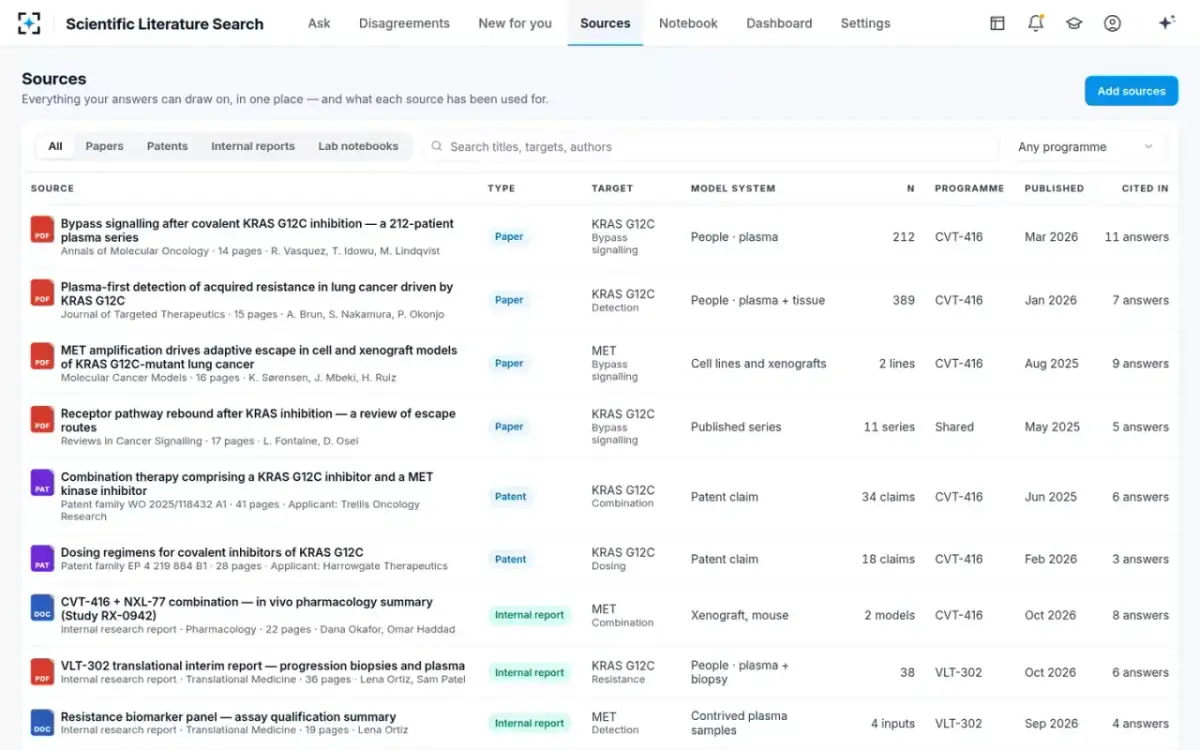
There are two ways to build this and only one of them survives contact. Deciding at query time means every question is an access question, and the failure is silent. Deciding at index time means the programme that owns a source is written onto it when it enters the index, and every answer, every list and every overnight watch respects it by construction. The solution takes the second route: papers and patents are open to everyone in research, internal reports and notebooks answer only to the programme that owns them, and a watch never surfaces a source its watcher may not open.
Inside Scientific Literature Search: every source with its owner and who may read it
What the free tools do well, and where they stop
A good deal of this work can be done for nothing, and a buyer should know exactly how far free goes before paying for anything.
The major bibliographic indexes are free to search, and the largest of them is also the best documented: field tags, controlled vocabulary and a query you can write down and re-run. Free reference managers handle storage, deduplication and citation formatting perfectly well for a group. Several screening tools have free tiers that are adequate for a review with a few thousand records. Between them, the finding, the storing and the sifting are covered at no cost.
Three things stop. Free tools do not read full texts into comparable rows, so building the table stays manual. They cannot see your internal reports, because those are not in anyone’s index. And they do not re-check what you concluded when something new is published, which is the quiet cost of a literature review: it is correct on the day it is written. Those three are the honest justification for spending money, and if a paid tool does not change at least one of them, it is replacing something you already have for free.
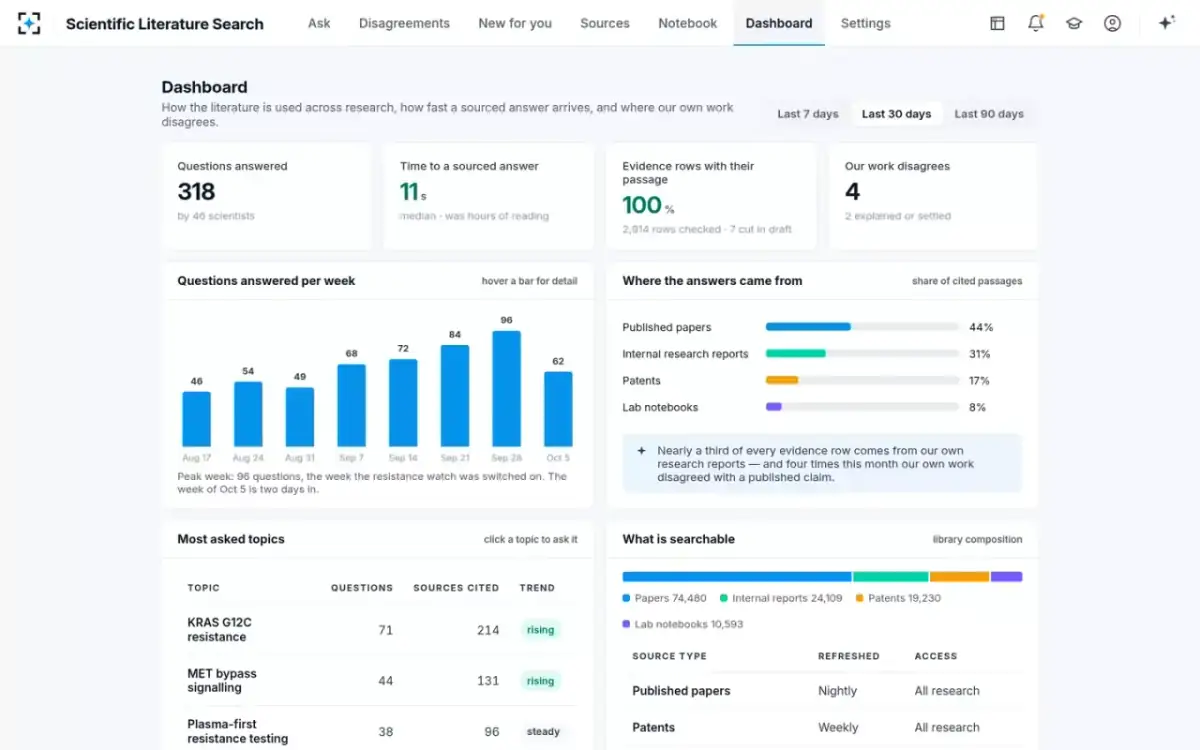
What the week looks like when the middle lines are automated
A one-week evaluation you can run yourself
Five days, one person, no benchmark data required. This is a procurement week; the accuracy tests belong inside day two, and what to test before you trust one sets those out in detail.
A one-week evaluation, day by day
- Monday — inventory what you already own
List every tool the group pays for and put each in one of the four kinds. Note which of the five week-lines each one touches. Look for two products in the same kind, and for lines with nothing against them.
- Tuesday — five real questions
Take the last five literature questions the group actually asked and run them. Judge the answers on whether a colleague who did not run them could check them, source by source, in ten minutes.
- Wednesday — the internal question
Ask one question whose real answer is in your own reports. If the tool cannot reach them, you have learned the size of the gap. If it can, check whether the reader can tell an internal row from a published one.
- Thursday — the access test
Have someone outside a programme ask a question whose answer is in that programme’s report. Nothing from it should appear, in the answer, in a list, or in the next morning’s watch.
- Friday — price it against what it replaces
Compare the cost with the week-lines it actually removes, not with the seat price of the tool it resembles. If it only replaces a reference manager, buy a reference manager.
One last caution, aimed at the budget holder. Formal evidence synthesis is a distinct discipline with its own reporting obligations, and a question-answering tool does not satisfy them — the counts, the exclusion reasons and the strategies as run are a screening tool’s job, set out in systematic review software and what the standard makes you publish. To try the fourth kind on your own library, start from Scientific Literature Search.
Questions people ask
What is the best literature review software?
There is no single best, because four different products share the phrase. The useful question is which of the four you are short of: a reference manager to organise, a screening tool to sift, a bibliographic database to find, or question-answering search to read and compare. Write down where your group’s hours actually go, then buy for the slow step rather than the visible one.
Is there free literature review software?
Yes, for three of the four jobs. The major bibliographic indexes are free to search, several reference managers are free for a group, and several screening tools have workable free tiers. What free tools do not do is read full texts into comparable rows, reach your company’s own reports, or re-check a conclusion when something new is published. If a paid tool does not change one of those three, it is duplicating something you have.
Do you need software for a literature review?
For a narrative review, a database and a reference manager are enough. For a formal systematic review you effectively need a screening tool, because the standard requires counts at each step and recorded exclusion reasons that are impractical to keep by hand. For the recurring working question — what is known about this target, today — the limiting factor is usually reading and comparison rather than software of any kind.
Can literature review software search internal documents?
Many cannot: their corpus is the published record. The ones that can should be judged on two things — whether an internal report and a published paper can support the same claim with the reader able to tell them apart, and whether access is decided when the source is indexed rather than when the question is asked. The second is what stops a search result disclosing a programme’s report to someone outside it.
How do you choose literature review software?
Take your last five real questions, note which step took longest for each, and map those steps onto the four kinds. Then test the shortlist on those same five questions with your own corpus, check whether a colleague can verify an answer without re-doing it, and ask what makes an answer change between one week and the next. Price it against the hours it removes, not against the tool it resembles.
What should literature review software cost?
The honest answer is that per-seat prices are not comparable across the four kinds, so compare against the work instead. A systematic review takes a mean of 67.3 weeks from registration to publication and a mean of five authors, and funded reviews in that study ran longer and involved more people — 6.8 against 4.8. Against numbers like those, the question is not the seat price but how many of a group’s literature hours a tool genuinely removes.