Policy and procedure management on SharePoint works well for the library itself: documents in one place, access by role, a version history and search. What no document library does, on SharePoint or anywhere else, is link each sentence to the rule it implements, find the documents a rule change makes wrong, hold a checked version until the rule's effective date, or prove that the staff who use it have read it. Those are compliance tasks, and they can be added around the library without moving a single file. Botminds' Policy & Procedure Management is an agentic solution that reads the library where it is, drafts the redlines a rule change needs for each owner, checks them against the rule and publishes the approved versions back into the library, the intranet and the learning management system at the same minute on the effective date.
The examples below come from the solution running on a fictional sample credit union whose procedures live in a document library and on intranet pages, as most institutions' do.
One rule change, four places the same text had to change at once
17
documents in the library quoting the old Regulation CC amounts
11
intranet pages carrying the same procedures to staff
1
learning course holding three teller job aids
612
staff asked to read the new versions before July 1, 2025
Can SharePoint be used for policy management?
Yes, as the library: the place procedures are stored, found and read. A bank or credit union that already keeps its policies and procedures in a document library or on an intranet has no compliance reason to move them. The work that goes wrong is not storage. It is everything that has to happen to the right documents, in the right order, when a rule changes, and that work can sit around the library rather than inside it.
The library stays where it is; five steps are added around it
Agent
Watch the rule feedsThe Federal Register, NCUA letters, CFPB rules and board minutes, read every morning; each change logged with its date and the numbers it sets.
Never: closes a change as not applicable
A person decides
Compliance confirms it appliesOr closes it as not applicable with a reason that stays on the record.
Agent
Read the library in placeEvery document that cites the rule, quotes a number it sets or depends on one that does; each redline drafted in the owner's words.
Never: edits a document
A person decides
Owner approves, Compliance checksThe owner approves each redline; every number in the approved version is compared with the rule before Compliance signs.
Agent
Publish on the date, track who read itApproved versions go into the library, the intranet and the learning system at 12:00 AM on the effective date; the old ones stay as history.
Never: marks anyone as having read
What does SharePoint not do for policy management?
A library knows files, not rules. Its search finds the words you type; it does not know that $5,525 in a teller quick card is a Regulation CC amount, or that a call script which never mentions the regulation quotes one. Its version history records when a file was saved, not the date the text applied. And a view of a page is not a person's acknowledgment of a version. The gaps below are the same on any document platform.
A library alone, and the same library with the checks added
The library alone: Someone reads it, searches for the citation and emails a list of files to owners
With Policy & Procedure Management: Every document that cites the rule, quotes a number it sets or depends on one is listed, closest first, with the sentence that is now wrong
The library alone: Not found by a citation search
With Policy & Procedure Management: Found by the amount; look-alikes such as an ATM limit the institution sets are left out with a reason
The library alone: In whichever copy of the file they open; Compliance reviews some edits by eye
With Policy & Procedure Management: Only the changed sentences, beside the rule passage; every number in the approved version compared with the rule
The library alone: On the day the edit is finished, which is rarely the effective date
With Policy & Procedure Management: At 12:00 AM on the effective date, in the library, on the intranet and in the learning system at the same minute
The library alone: A "please read" email; nobody knows who read it
With Policy & Procedure Management: Each person asked to acknowledge the versions their role uses, with reminders and a due date before the rule takes effect
The library alone: The history is rebuilt from file dates and email
With Policy & Procedure Management: Any date picked; the text in force, its approval and its check
How do you link policies to regulations?
At the level of the sentence and the number, not the document. A metadata column that says "Regulation CC" on a procedure's cover page helps a search for the citation and nothing else: it cannot say which sentence carries which amount, which section of the rule it comes from, or that a quick card derived from the procedure carries the same amount without the column. A useful link records the rule section, the amount and the period it applies, and every document that quotes it.
The supervisory texts explain why the link has to reach staff, not just the library. The OCC's examination procedures ask whether "procedures are communicated to appropriate personnel and made readily available for reference" (OCC, Corporate and Risk Governance). The FDIC asks for more on change: when a regulation changes, necessary modifications "should be made expeditiously to minimize compliance risk, and applicable personnel in all affected operating units should be advised of the changes" (FDIC Consumer Compliance Examination Manual, II-3.1). "All affected operating units" is the phrase a citation column cannot satisfy, because the units affected are the ones whose documents quote the number.
What each document in the library should carry, beyond its file
| Field | Why it matters | Example from the sample |
|---|---|---|
| Owner, by name | Routes every rule change and review to a person | Deposit operations manager |
| Rule links, to the section | Lets a change find the document even when the text never names the rule | 12 CFR 229.10(c)(1)(vii) and 229.12(d) |
| Policy it implements | Ties the procedure to the board-level decision above it | The funds availability policy |
| Roles that use it | Decides who must acknowledge a new version | Tellers, member service representatives, deposit operations |
| Review cycle and next review | Keeps the document reviewed when no rule changes | Every 12 months; next review August 12, 2025 |
| In force from, and to | Answers what the text said on any date | Version 7 in force until June 30, 2025 |
| Approval and check | Shows two people signed, each once | Owner approval; Compliance check |
How do you publish a procedure on its effective date?
By separating approval from publication and scheduling the second for the start of the effective date. An owner who approves a redline on May 20 for a rule that takes effect on July 1 has finished their part; the version then waits, approved and checked, while the old one stays in force. Publishing on approval puts staff on the new rule six weeks early; publishing whenever the intranet is updated puts different pages on different rules for days.
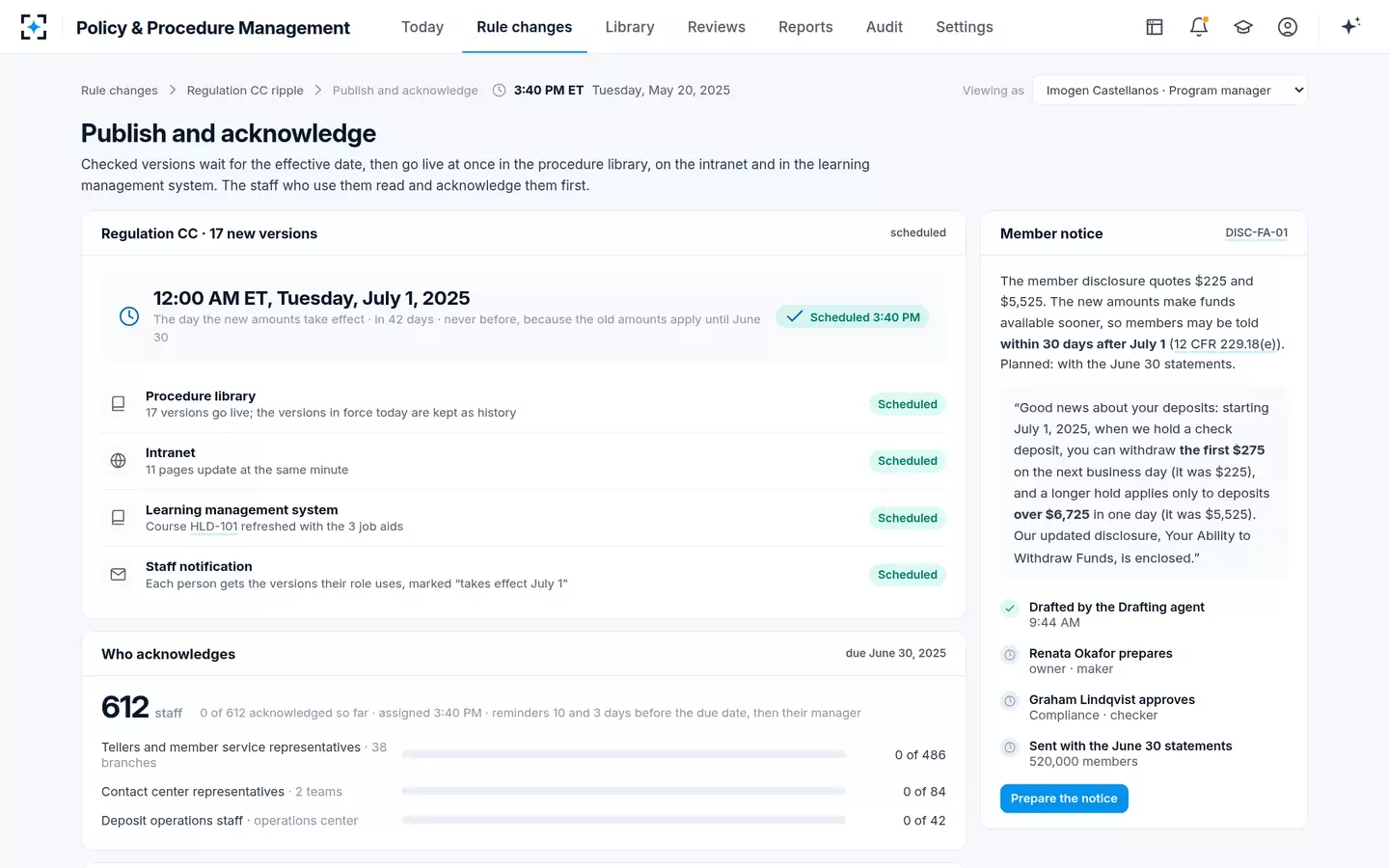
In the sample, the 17 approved versions were scheduled for 12:00 AM Eastern on July 1, 2025, in the procedure library, on 11 intranet pages and in the learning course with the three teller job aids, at the same minute. Staff could read them beforehand, marked "takes effect July 1". The member notice ran on its own clock: Regulation CC lets a change that makes funds available sooner be disclosed up to 30 days after it takes effect, and asks for 30 days' notice before any other change (12 CFR 229.18(e)).
One schedule for the library, the intranet and the learning system
How do you track who read a policy in SharePoint?
Not from page views. A view shows that a page was opened; it does not tie a named person to a version, a due date or the change that mattered. An acknowledgment that an examiner can rely on records who acknowledged which version, when, and that it was before the version took effect, and it never records anyone as having read something they did not acknowledge.
In the sample, the 612 staff who use the 17 new versions were asked to acknowledge them by June 30: 486 tellers and member service representatives, 84 contact center representatives and 42 deposit operations staff, with reminders 10 and 3 days before the due date and then their manager. On the earlier acceptable use policy, 259 of 2,300 staff had still not acknowledged it ten days before it was due, which is the number a library cannot produce at all. What a read-and-acknowledge record has to prove goes further into the record itself.
Do we need to migrate our policy library?
No. The solution reads the procedures, job aids, forms and board policies where they are, publishes new versions back into the same library and keeps the old ones as history. It connects to the intranet pages that carry procedures to staff, to the learning management system for courses and acknowledgments, to the HR directory for people, roles and departures, read nightly, and to the regulatory feeds and the board's minutes.
What a connection does need is a decision about the library's own discipline: one current version per document, a named owner on each, and a way to tell which roles use it. Where those are missing, supplying them is the first piece of work, and it is work the institution needs whichever tool it chooses. Settings such as review cycles, approvers and restricted documents are proposed by an administrator and approved by the Compliance Officer before they take effect.
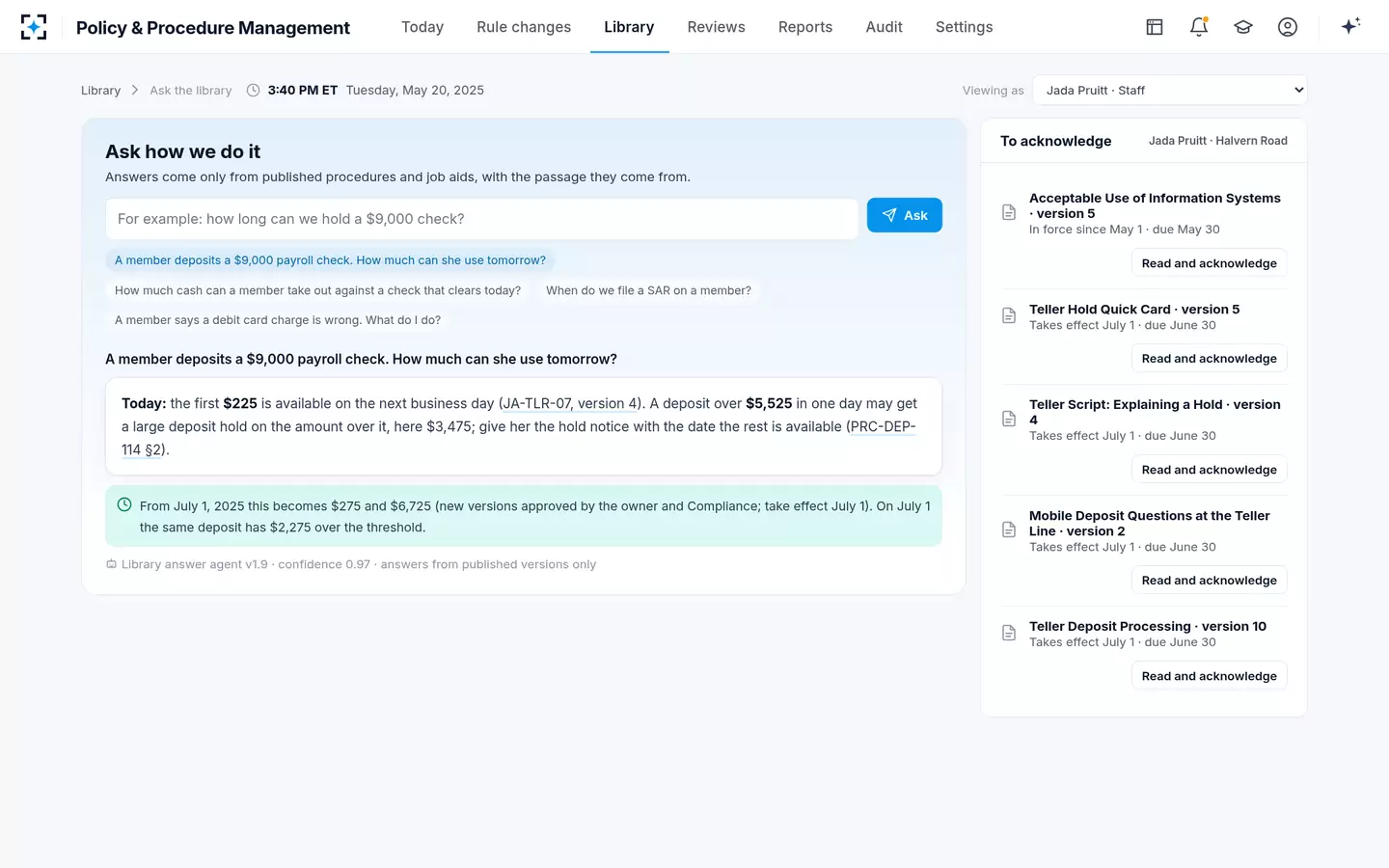
Staff ask the library and get the answer in force, with its source
Is SharePoint enough for a bank exam?
It can be, if the library's discipline answers the examiner's questions; the platform is not what examiners test. They ask what a procedure said on a date and who approved it, whether every affected unit was told of a change, whether the board approved the policies a rule requires, and whether the institution can show it found every document a rule change touched. A library that keeps versions as files can answer the first only by reconstruction and the last not at all.
Five questions the library has to answer at the exam
- What did this procedure say on a given date?
Needs in-force dates on every version, not file save dates.
- Who approved it, and who checked it?
Two different people, each with a time, on every version.
- Which documents did this rule change touch, and how do you know?
A list made by searching the citation, the numbers and the links, with the reason for each exclusion.
- Were the staff who use it told before it took effect?
Named acknowledgments of that version, dated before the effective date.
- Did the board approve the policies a rule assigns to it?
The approval in the minutes, linked to the version approved.
How to test the checks on your own library before you buy
Replay a rule change you have already handled, on a copy of your own library, and compare the result with what you did by hand. The Regulation CC change of July 1, 2025 suits almost any bank or credit union: every institution that takes check deposits had to bring its hold procedures, quick cards, scripts and disclosure up to the new amounts, and its own files show which documents it changed and when. Differences in either direction are the finding.
A replay on your own library: six tests and what a pass looks like
| Test | How to run it | A pass |
|---|---|---|
| Reach | Connect read access to the library and the intranet; ask for the list of documents the tool can and cannot read | Every document readable, or each one it cannot read named with the reason |
| The ripple | Replay the 2025 Regulation CC change against the library as it stood in May 2025 | Every document you changed, plus any you missed, each with its sentence; look-alikes left out with a reason |
| The check | Type one wrong amount into an approved test version | Set aside before sign-off, with the rule section |
| The schedule | Schedule a test version for a set minute | Library, intranet page and learning course change at that minute, and not before |
| The acknowledgment | Ask a small test group to acknowledge the test version | Name, version and time for each; reminders to those who do not; nobody marked as read |
| The history | Pick a date before the test and ask what the document said | The text in force that day, with its approval and check |
The second row is where libraries differ most. A citation search of the sample credit union's library found 7 of the 17 documents the Regulation CC change touched; the amounts found 7 more, and links to dependent documents the last 3. If your own replay finds documents your team missed in 2025, those documents may still quote the old amounts today, and the replay has paid for itself as an internal review whatever you decide to buy. A seeded test with ten planted errors takes the same idea further.
Where Policy & Procedure Management fits, and what stays with the library
The library keeps storage, permissions, search and the reading experience staff already know. The solution adds what a library cannot hold: the link from each rule to every sentence that implements it, the ripple when a rule changes, the owner's redline beside the rule, the number-by-number check before Compliance signs, publication on the effective date across every place staff read, the acknowledgment record and the history as of any date. Restricted documents, such as BSA procedures, stay visible only to the team allowed to see them, and the library answer never quotes them to anyone else.
The fit is weakest where a library has no owners and no single current version of each document; the solution can propose owners from the HR directory, but people have to decide which file is current and who answers for it. It is strongest where many documents quote regulated numbers and many owners must act on the same date. Twelve questions to put to any policy and procedure management software helps compare it with replacing the library outright, and Policy & Procedure Management can be run on a sample of your own library against a rule change you have already handled.
Questions people ask
How do you manage policies and procedures in SharePoint?
Keep one library with one current version of each document, a named owner, the roles that use it, a review date and the rule sections it implements. Treat approval and publication as separate steps, and record acknowledgments against a version rather than a page. The gaps a library leaves, finding what a rule change touches and checking the edits, need a process or a tool around it.
Should job aids live in the same library as procedures?
Yes, or at least be linked to it. Job aids are where regulated numbers are most often quoted without the rule's name: in the sample, the teller hold quick card and a teller script were among seven documents a citation search would have missed. A job aid outside the library is a job aid no rule change reaches.
Can the intranet and the library show different versions?
They often do when each is updated by hand on the day someone gets to it. In the sample the same procedures appeared on 11 intranet pages, and the new versions were scheduled to change in the library and on every page at the same minute, 12:00 AM on the effective date.
Does a policy library need a separate document management system?
Not for policies and procedures. A general document library with disciplined owners, versions and access control is enough storage. What it lacks is rule awareness, which is a different capability from document management and can be added without replacing the library.
Who should administer the policy library?
A policy program manager or equivalent, who sends changes to owners, schedules publication and keeps the library's structure, but approves no content. In the sample, settings changes are proposed by an administrator and take effect only when the Compliance Officer approves them.