User access review software runs the periodic certification of access: it lists who can reach which systems and with which rights, asks a manager or system owner to confirm or revoke each one, and keeps the evidence for auditors. Banks buy it for their employees' access to bank systems, and it does that job. In treasury management the access that most often outlives its reason belongs to someone else entirely: a business client's user, such as a controller who resigned and still holds approval rights in the client's online banking. Those users sit in the digital banking administration system, belong to the client, and are invisible to an employee review. Botminds' Treasury Management Client Services does not run review campaigns. It shows each business client's administrators, users and entitlements in one place, and verifies and makes the removals and transfers a review produces, with two names on each change.
The examples come from a fictional credit union running the solution on sample data. The control language is from NIST and the FFIEC, linked where quoted.
Two access reviews a bank runs, or should: its employees', and its business clients' users
Employee access review: Bank staff, contractors and service accounts
Client user and entitlement review: Each business client's online banking users and administrators
Employee access review: HR records: joiners, movers, leavers
Client user and entitlement review: The client's own authorized-user list and agreement; the bank has no HR feed for the client
Employee access review: The employee's manager or the system owner
Client user and entitlement review: The client's administrators, ideally two, confirming their list
Employee access review: IT or identity administration
Client user and entitlement review: The client's administrator, or the bank on a verified request
Employee access review: User access review software
Client user and entitlement review: Not the employee tool, which has no HR feed or certifier for these users
Employee access review: An ex-employee with system access
Client user and entitlement review: An ex-employee of the client who can still approve or release payments
What is a user access review?
A user access review is a periodic check that each account on a system still belongs to someone who needs it, with only the rights they need. The widely used federal control catalogue states both halves. Account management includes the requirement to "Review accounts for compliance with account management requirements [Assignment: organization-defined frequency]," and the least-privilege control adds a review of privileges "to validate the need for such privileges," and to "Reassign or remove privileges, if necessary, to correctly reflect organizational mission and business needs" (NIST SP 800-53 Rev. 5, AC-2 and AC-6(7)).
The FFIEC's 2021 authentication guidance frames the same idea for financial institutions: "User access is limited to those information systems and resources related to the user's job function or role" (FFIEC, Authentication and Access, 2021). A review is how a bank shows that limit still holds months after access was granted.
User access review tools: built for your employees, not your clients' users
User access review tools are built around an employer's knowledge of its own people. They pull joiners, movers and leavers from HR, connect to the bank's applications, and route certifications to managers who know what their staff do. Every one of those inputs is missing for a business client's users. The bank does not know when a client's controller resigns, has no manager to ask, and does not decide who at the client should have release rights.
That is why client entitlements rarely appear in an access review at all. They are not bank staff, so the employee campaign skips them; they live in the digital banking platform, which may not be connected to the review tool; and the only person who knows whether each user should still exist works at the client. NIST's account control points at the missing link: "Align account management processes with personnel termination and transfer processes" (NIST SP 800-53 Rev. 5, AC-2). For client users, the termination process belongs to someone else.
What happens when a client's controller leaves?
Often, nothing happens in online banking. The client updates its payroll and email, perhaps tells its bank's branch to change the signers, and the departed controller's online banking user keeps its approval rights until someone notices. If that person's credentials are later compromised, or the person is disgruntled, the client's dual control has a second approver who no longer works there.
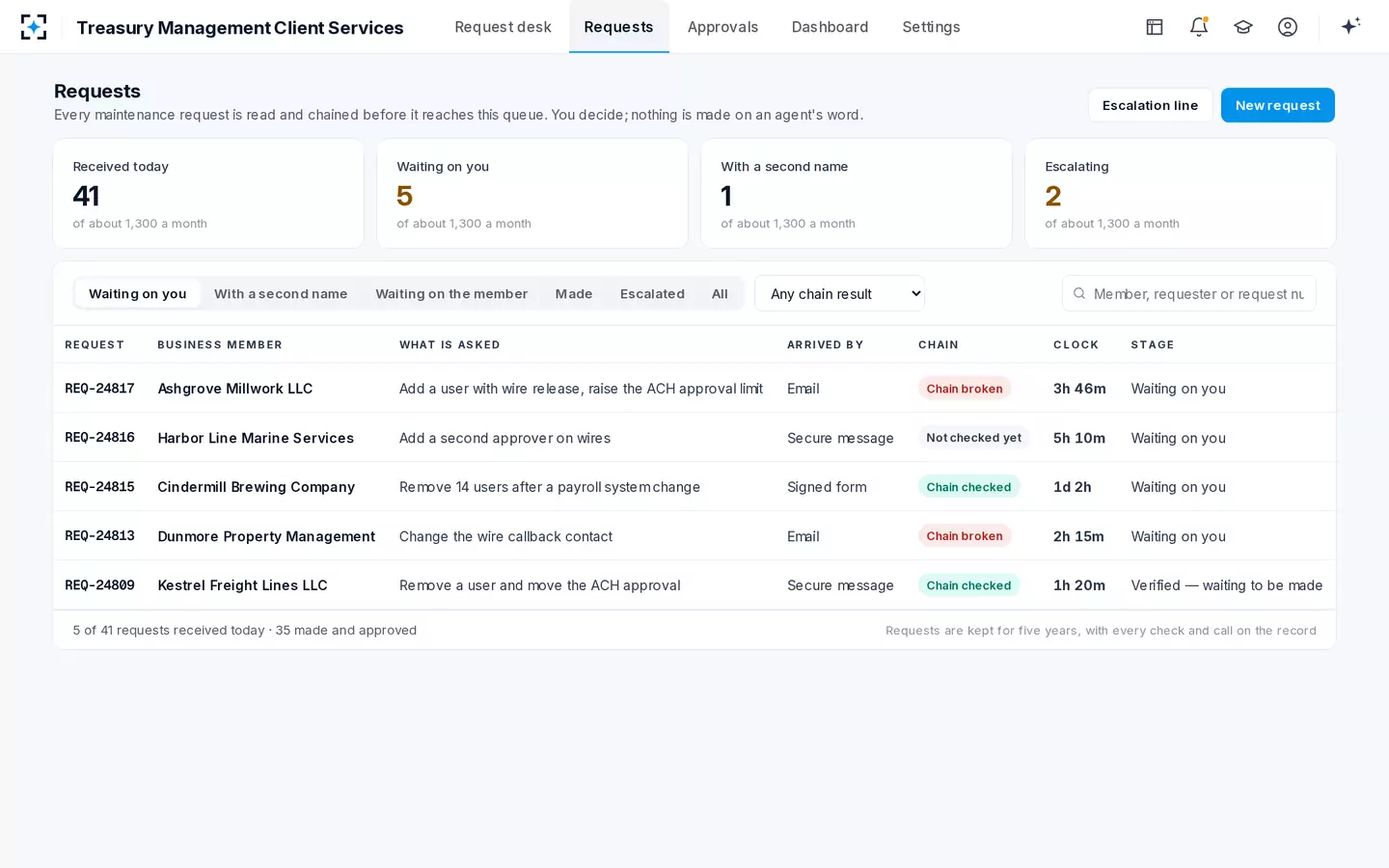
The sample credit union's queue shows the right outcome when a client remembers: a freight client asked to remove its leaving controller and move his ACH approval to the finance director. The drafted change ended his access that day, moved the second-approver role, kept the approval limit for that role at $250,000 and left the daily exposure unchanged. Another client on the same queue asked to remove 14 users after a payroll system change. Both requests went through the same five checks as any addition, because a forged removal can be used to take out the second approver who would have stopped a fraud.
One client's administrators, contacts and users, with what each user may do
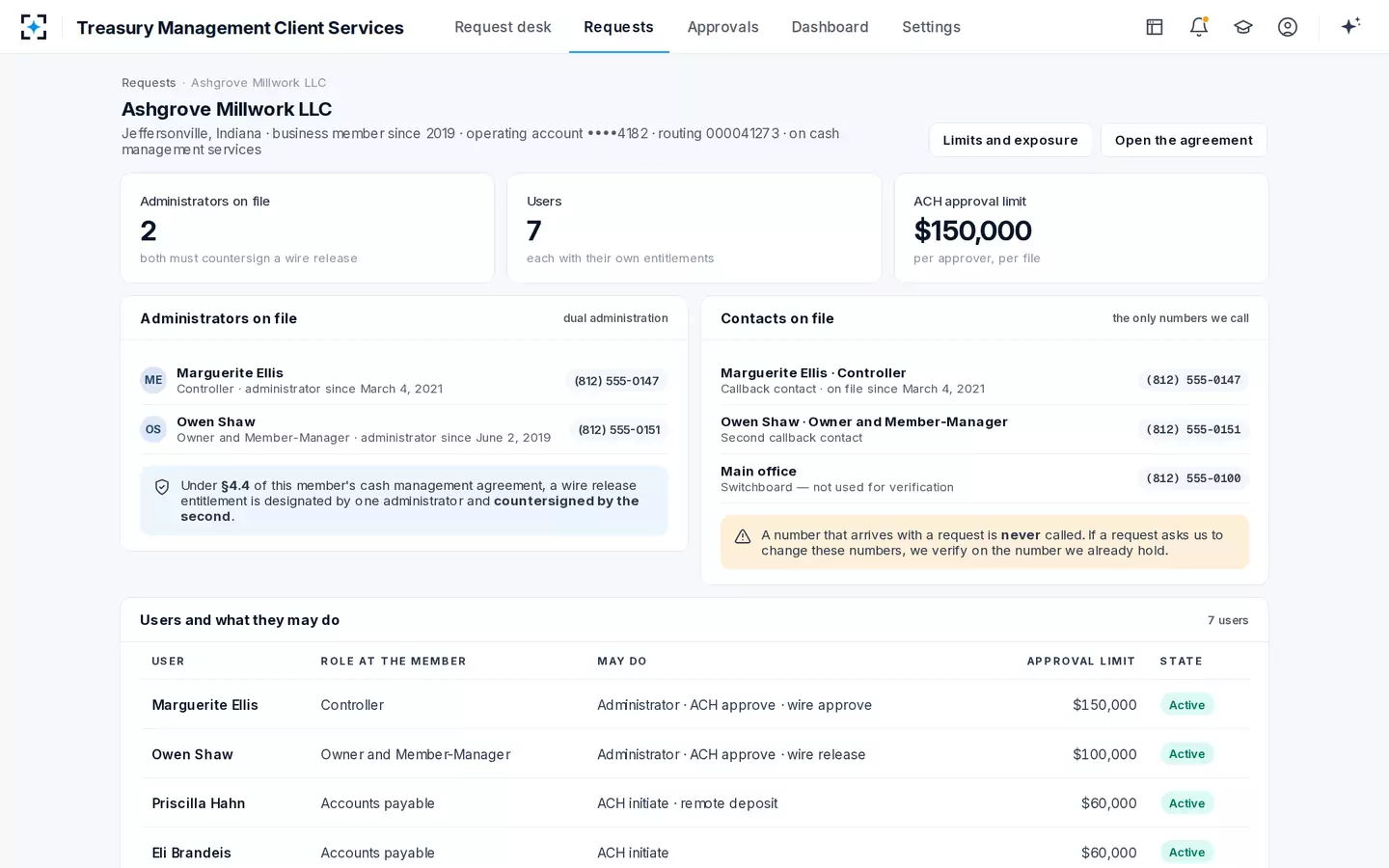
How often should business banking users be reviewed?
No regulation sets one interval for a business client's online banking users; NIST leaves the frequency to the organization, and banks set their own. A sound approach combines a regular cycle, commonly annual and aligned with another touchpoint such as the client's annual originator review, with event triggers that do not wait for the cycle.
The events matter more than the calendar: a change of controller or treasurer, an administrator leaving, a merger or restructuring at the client, a new payroll or accounting system, and inactivity. The FFIEC lists the last one as a control in its own right: "Policies and system controls are in place to de-provision or suspend access credentials after a certain period of account inactivity" (FFIEC, 2021). A user who has not logged in for a year is either unneeded or about to be used by someone else.
An illustrative annual review of one client's users: most of the time is the client's
- Send1 day
- Client checks its list10 days
- Returned2 days
- Verified2 days
- Filed1 day
How to perform a user access review of client entitlements
A client entitlement review is a reconciliation between two lists, the users the bank's system holds and the people the client says should have access, followed by verified changes to close the gap. The steps below are a workable process for a treasury desk; the tooling matters less than doing every step and keeping the evidence.
Reviewing one business client's users, step by step
- Export the client's users with every entitlement and limit
Including administrators, last login and the date each user was created.
- Send it to the client's administrators through an allowed channel
The secure message center or the administrators' addresses on file; never to whoever last emailed.
- Ask both administrators to confirm or mark each user
Keep, remove, or change rights; a single administrator confirming their own access proves little.
- Flag users the client cannot identify, and dormant ones
Unknown and inactive users are the review's real findings.
- Treat each removal and change as a maintenance request
Verified by callback where the rules require it, made by one person, approved by a second.
- Check approval chains after removals
Removing a second approver can leave a client without dual control; tell the client before it does.
- File the client's confirmation with the changes it produced
The review's evidence is the confirmed list plus the changes, not a "completed" status.
What a client entitlement review usually finds
A review of a client's users finds four kinds of stale access, and only the first is about people who left. Each one weakens a control the client thinks it has, which is why the findings deserve the same verification as any other change.
The first is the departed user: an ex-controller, an ex-bookkeeper, a temporary hire whose login was never removed. The second is the dormant user who is still employed but has not logged in for months; nobody will notice if that login is used by someone else. The third is the user whose rights have grown past their job: an accounts payable clerk who was given approve rights for a holiday and kept them, which quietly gives one person both halves of the client's dual control. The fourth is the administrator problem: a client with one administrator left, or an administrator whose contact details on file are out of date, so the bank's callbacks would go to a number nobody answers.
Each finding resolves into a maintenance request: remove a user, reduce a right, appoint a second administrator, update a contact. The third and fourth are the ones to slow down on. Reducing a right can break a payment run the client depends on, so the client should confirm the new approval chain first; updating a contact is itself a change to the verification channel, verified on the number already held, as out of band verification explains.
What a user access review audit looks for
An auditor reviewing access reviews looks for completeness, timeliness and follow-through: that every account was in scope, that the review happened when policy said, and that every "remove" actually led to a removal. The last test is where reviews most often fail, because the review and the change happen in different places.
What an auditor will ask of a client entitlement review, and the evidence that answers it
| The auditor asks | Evidence that answers it |
|---|---|
| Were all business clients' users in scope? | The population: every client on cash management, with its user count on the review date |
| Did the client, not the bank, confirm who should have access? | The administrators' confirmations, received through an allowed channel |
| Was each removal made, and when? | The change for each user marked remove, with its date and both names |
| Were removals verified like additions? | The callback and the reason code on each removal |
| Were dormant and unknown users handled? | The list of each, with the decision taken |
| Is notification of departures timely between reviews? | Event-driven removals in the period, and how long each took |
That last row is NIST's expectation translated to clients. The control asks organizations to notify account managers within a set period "when users are terminated or transferred" (NIST SP 800-53 Rev. 5, AC-2(h)). A bank cannot impose that on a client, but its agreement can ask the client to tell it, and its desk can make acting on that notice fast and safe.
"System administrators are informed in a timely manner of changes (e.g., alteration, removal, or suspension) to user status."
FFIEC, Authentication and Access to Financial Institution Services and Systems, 2021
Where Treasury Management Client Services fits, and where it does not
The solution fits the half of a client review that changes something. It shows each client's administrators with the dates they were appointed, its contacts on file and every user with entitlements and approval limit. When a client returns its confirmed list, each removal or transfer becomes a request the agents check (who asked, the channel, the authority, the callback where required, the limits) and that a specialist makes and a second approves. Every step lands on a trail that exports per request.
It does not fit the rest. It does not certify bank employees' access to bank systems; that is what user access review software is for, and a bank should keep its employee tool. It does not run review campaigns, send lists to clients on a schedule or chase their confirmations; those belong in the bank's own process or a dedicated tool. And it does not see changes a client's own administrators make inside online banking unless the bank routes them to the desk. Saying so plainly is part of the evaluation: where client services software sits among a bank's treasury systems sets out the full map.
Removals arrive as requests like any other, each with its chain result
Questions to ask before buying user access review software
Ask any vendor, including one selling employee access reviews, the questions that expose the client-user gap. Can it read users and entitlements from the digital banking administration system, or only from systems the bank's staff log into? Can a certifier be outside the bank, such as a client administrator, and how is that person authenticated? Does a "remove" decision produce a change, or only a ticket? Is the removal verified and approved by a second person? Can one client's review be exported with its evidence?
Employee review products may answer the first and second questions badly, which is not a flaw in them; they were built for a different population. The honest outcome may be two tools: an access review product for employees, and a verified change process for clients' users, with the client's confirmation as its input. What each entitlement grants and why the administrator is the user to watch cover the rights a client review is really checking. To see removals verified on a sample queue, start from Treasury Management Client Services.
Questions people ask
What is the user access review process?
List every account and its rights, ask the person who knows whether each is still needed to confirm or revoke it, make the revocations, and keep the evidence. For bank employees the confirmer is a manager; for a business client's users it is the client's administrators.
What are user access review tools?
Software that automates employee access certifications: it connects to applications, pulls HR events, routes reviews to managers and records decisions. They are built for an organization's own workforce and rarely reach a business client's online banking users.
What does "entitlements" mean in a banking access review?
The specific rights a user holds: which services, accounts and functions, such as initiate, approve or release, up to what limit. A review that checks only whether a user exists, not what they are entitled to do, misses most of the risk.
Who is responsible for removing a business client's departed users?
The client is responsible for telling the bank, or for removing the user itself if its administrators can. The bank is responsible for making a requested removal promptly and safely, verifying it like any other change so that a forged removal cannot strip out a needed approver.
Should dormant client users be removed automatically?
Suspending them after a set period of inactivity is a control the FFIEC lists. Removing them outright is better done with the client's confirmation, because a seasonal user may be needed again.